00197496-01_UM_SiClusterMultiline_DE_EN.pdf - 第150页
How to Configure a Multi Line Job Calculating the Line Production Time 4.8.1 Dialog Box: Settings 150 SIPLACE SiCluster Multiline SIPLACE SiCluster Multiline
How to Configure a Multi Line Job
4.8.1 Dialog Box: Settings Calculating the Line Production Time
SIPLACE SiCluster Multiline SIPLACE SiCluster Multiline 149
4.11
4.11 Calculating the Line Production Time
Calculating the Line Production Time
As a prerequisite for the optimization, you need to prescribe the available production time for the line. If
you do not know exactly how much time you need to produce the jobs, you can calculate an estimate
with SiCluster Multiline.
The production time is the total time available for production, in which all recipes for this job should be
produced. If a valid allocation of recipes to line is not possible within the prescribed timeframe and pa-
rameters, SiCluster Multiline will terminate with the corresponding error message.
If you know this time for your production, you can enter this value manually. For example, you can enter
the amount of time you have to produce all the recipes in this job (this could be based on the shift sched-
ule).
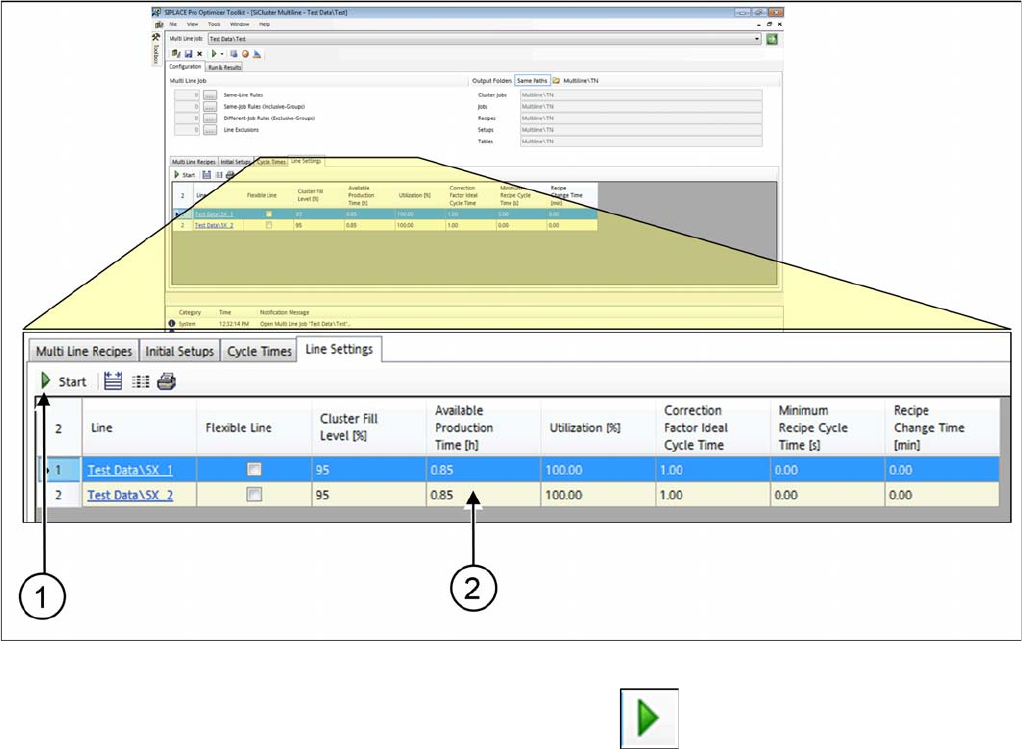
► Go to Configuration and select the Line Settings tab.
Tab: line settings: determining production time of line
► Start calculation of the line production time with Start .
⇨ The result is entered in the Available Production Times (2) column.
⇨ Any values entered manually will be overwritten.
How to Configure a Multi Line Job
Calculating the Line Production Time 4.8.1 Dialog Box: Settings
150 SIPLACE SiCluster Multiline SIPLACE SiCluster Multiline

How to Perform Multiline Clustering
Defining the Optimization Strategy
SIPLACE SiCluster Multiline SIPLACE SiCluster Multiline 151
5
5 How to Perform Multiline Clustering
How to Perform Multiline Clustering
► Perform the following steps, which are described in this chapter using an example, to perform Mul-
tiline Clustering.
▪ Optimization parameters
– Defining the Optimization Strategy
▪ Run & Results tab
– Creating Cluster Jobs
– Performing Clustering Within Lines
– Changing the Optimization Strategy (Optional)
– Optimizing Cluster Jobs in Multi Job Optimization
– Results of Cluster Job Optimization
5.1
5.1 Defining the Optimization Strategy
Defining the Optimization Strategy
Define the optimization strategy with the help of the optimization parameters, before performing Multiline
Clustering. These settings will then be automatically transferred to the cluster jobs for the lines, which
are then generated as the Multiline Clustering results.
► Go to the SiCluster Multiline toolbar and select the icon.
⇨ The Optimization Parameters dialog box will open.
⇨ Select Cluster Parameters and define the required settings. See also "7.2 Optimization Parameters:
Cluster Parameters" [ ➙ 173].