7OM-1625-004_w.pdf - 第97页
7OM-1603 2-28 Chapter 2 : 3. Product Change Menu 3.2.3 "PU Pos Ofst T ch" Window [2] [1] [3] [4] [5] [6] [8] [7] "PU Pos Ofst Tch" window F7B27 [1] Feeder No. T ray Set Display The Feeder No. where th…

7OM-1603
Chapter 2 : 3. Product Change Menu
2-27
[6] [Move & Adjust] Button
When this button is pressed, the recognition window appears and the manual
alignment operation is enabled.
[7] [OK], [CANCEL] Button
Using these buttons, the set parameters are reected on the machine
operation or cancelled.
[8] [Storage] Button
When this button is pressed, the tray drawn out in [3] is stored.
[9] Feeder (B) Offset
Displayed are the current values that indicate the pickup position. After a
teaching operation is performed, the results appear in the text boxes entitled
"Adj".
Before
:
Values before Teaching Operation
After
: Results of Teaching Operation
1102-003
7OM-1603
2-28
Chapter 2 : 3. Product Change Menu
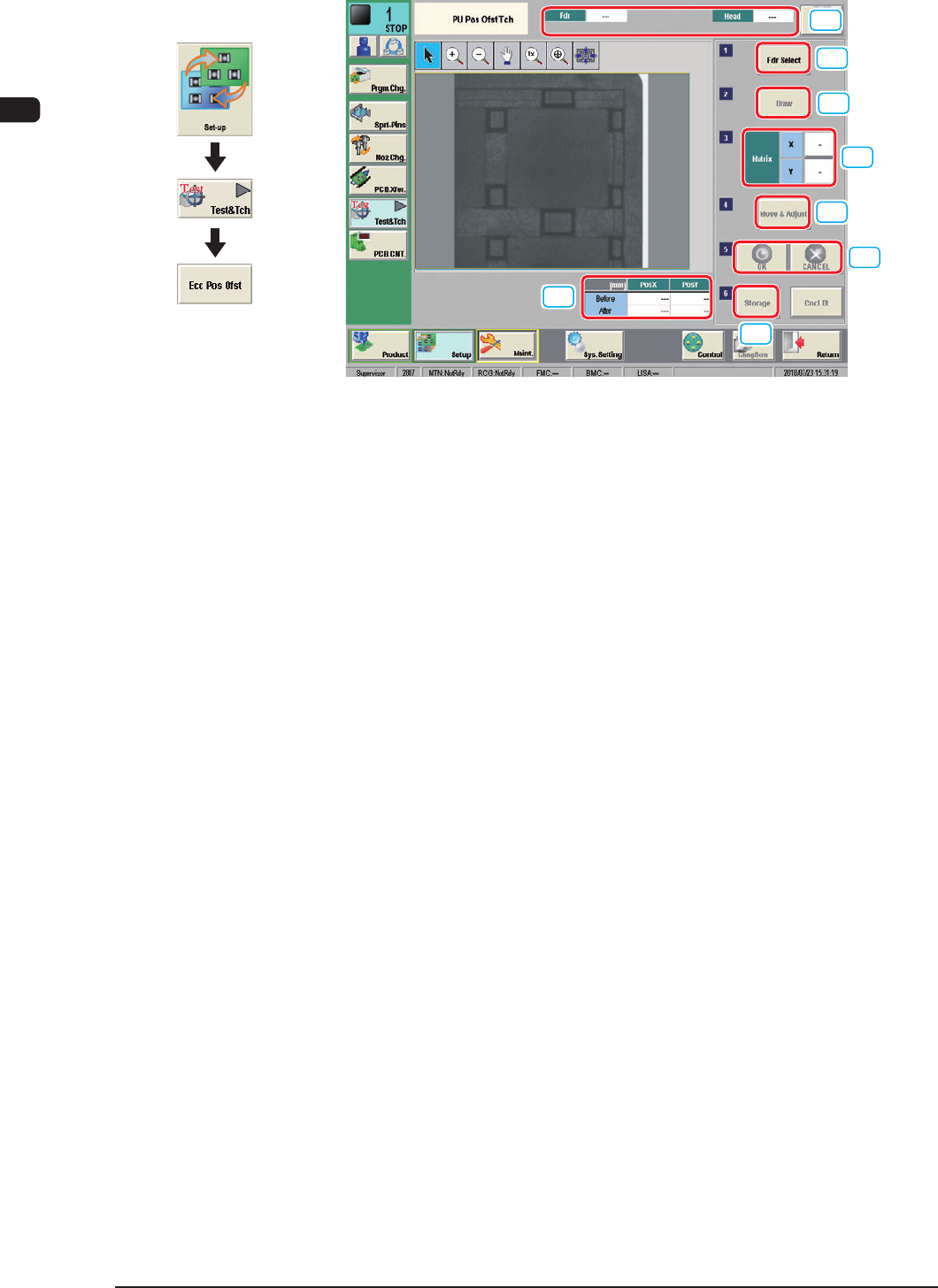
3.2.3 "PU Pos Ofst Tch" Window
[2]
[1]
[3]
[4]
[5]
[6]
[8]
[7]
"PU Pos Ofst Tch" window F7B27
[1] Feeder No. Tray Set Display
The Feeder No. where the components are picked up, magazine, setup, block
and head are displayed in this pane.
[2] [Fdr Select] Button
When this button is pressed, the feeder to be taught is selected.
[3] [Draw] Button
When the multi-layer tray feeder has been selected in [2], using this button,
the tray is drawn out from the elevator unit.
[4] Matrix
The matrix to be taught is set in this group box.
[5] [Move &
Adjust] Button
When this button is pressed, the recognition window appears and the manual
alignment operation is enabled.
[6] [OK], [CANCEL] Button
Using these buttons, the set parameters are reected on the machine
operation or cancelled.
[7] [Storage] Button
The tray drawn out in [3] is stored.
[8] Feeder (B) Of
fset
Displayed are the current values that indicate the pickup position. After a
teaching operation is performed, the results appear in the text boxes entitled
"Adj".
Before
: Values before Teaching Operation
After
:
Results of Teaching Operation
1102-004
Graphic
Development

7OM-1603
1007-002 3-A
Chapter 3
Maintenance Menu
This chapter describes various adjustments and offset change, as well
as the maintenance menu and system setting menu for the operator who
performs the system adjustment.
1. Maintenance Menu
2. Menus for System Setting