00196376-0102_UM S-Feeder_EN.pdf - 第28页
Tape Feeder Modules Operating Tape Feeders - General Inserting the Tape 28 User Manual SIPLACE S-Feeder 2.1.3 Inserting the Tape Insertion of the tape differs between the various feeder types. F o r a d e s c r i p t i o…
Tape Feeder Modules
Operating Controls - Function Operating Tape Feeders - General
User Manual SIPLACE S-Feeder 27
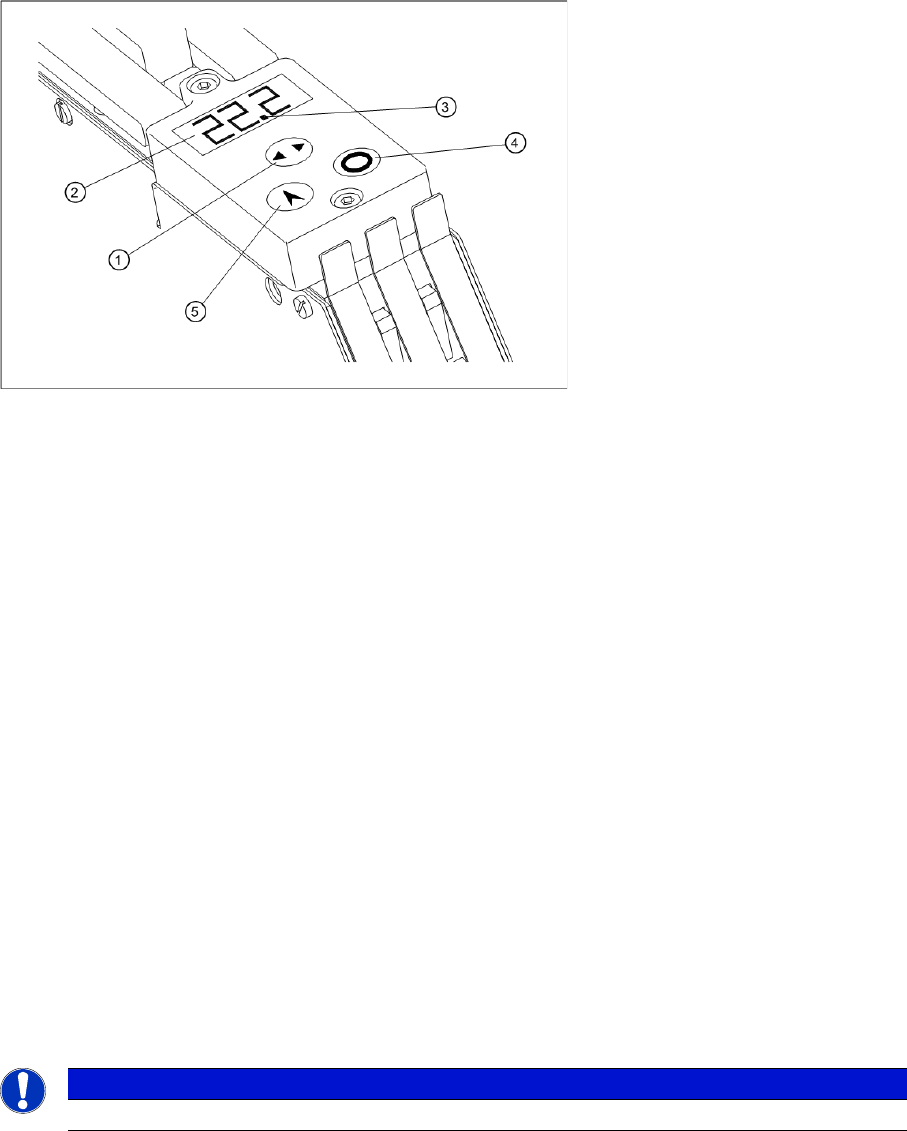
2.1.2.2 Controls for Feeders with Three Tracks
This operating control is used for 3x8 mm feeders (
3x8 mm S
,
3x8 mm SL
,
3x8 mm S for 0201/
0402 components
and
3x8 mm S for 01005 components
).
Operating controls for feeders with three tracks
2.1.2.3 Manual Tape Transport
►When using feeders with 3 tracks (
3x8 mm S
), first press the "Select" button to select the track to be
used.
►Briefly press the "Index" button and then release immediately.
The tape will be moved by the set step size.
2.1.2.4 Manual Operation of Foil Removal
►When using feeders with 3 tracks (
3x8 mm S
), first press the "Select" button to select the track to be
used.
►Press the "Foil" button.
The foil removal motor will run until the foil rocker is no longer in the light barrier.
Legend:
1 "Select" button for selecting the track to be used
2 Display
Continuously shows the set step size for each track
3 Marks the selected track
4 "Foil" button for foil removal
5 "Index" button for manual tape transport
NOTICE
Manual operation of the foil removal only functions if the foil rocker is not tensioned.
Tape Feeder Modules
Operating Tape Feeders - General Inserting the Tape
28 User Manual SIPLACE S-Feeder
2.1.3 Inserting the Tape
Insertion of the tape differs between the various feeder types. For a description of how to insert the tape,
refer to the relevant section for the specific feeder type.
2.1.4 Positioning the Tape to the Pickup Position
You will need to set the position of the tapes to be used in relation to the pickup position. This setting will
vary according to the size of the components to be handled. To move the tape material to the correct
pickup position, perform the following steps.
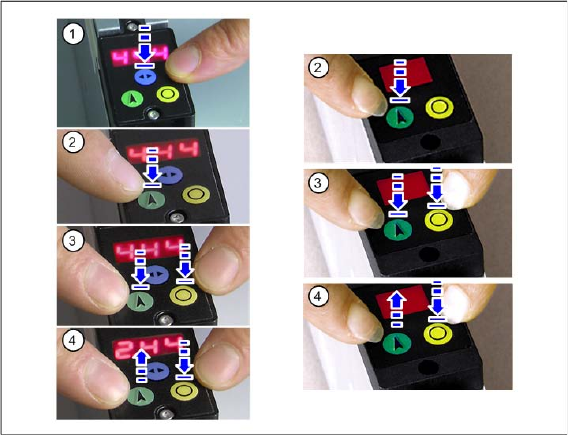
►(1)
When using 3x8 mm S feeder modules only
Press the blue "Select" button to select the track to be set.
The selected track will be marked in the control display will a dot.
►(2) Press the "Index" button and hold.
The component cover above the pickup position will be pulled back.
►(3) Press the yellow "Foil" button within the next 2 seconds and hold.
►(4) Hold the yellow "Foil" button pressed and release the green "Index" button.
The component cover will close and the tape with be moved 2 mm forwards.
If you still hold the "Foil" button pressed, while again pressing the "Index" button, the tape will be moved
another 2 mm forwards.
►Keep the yellow "Foil" button pressed and, at the same time, briefly press the green "Index" button
repeatedly until the tape material is in the correct position.
Tape Feeder Modules
Positioning the Tape to the Pickup Position Operating Tape Feeders - General
User Manual SIPLACE S-Feeder 29
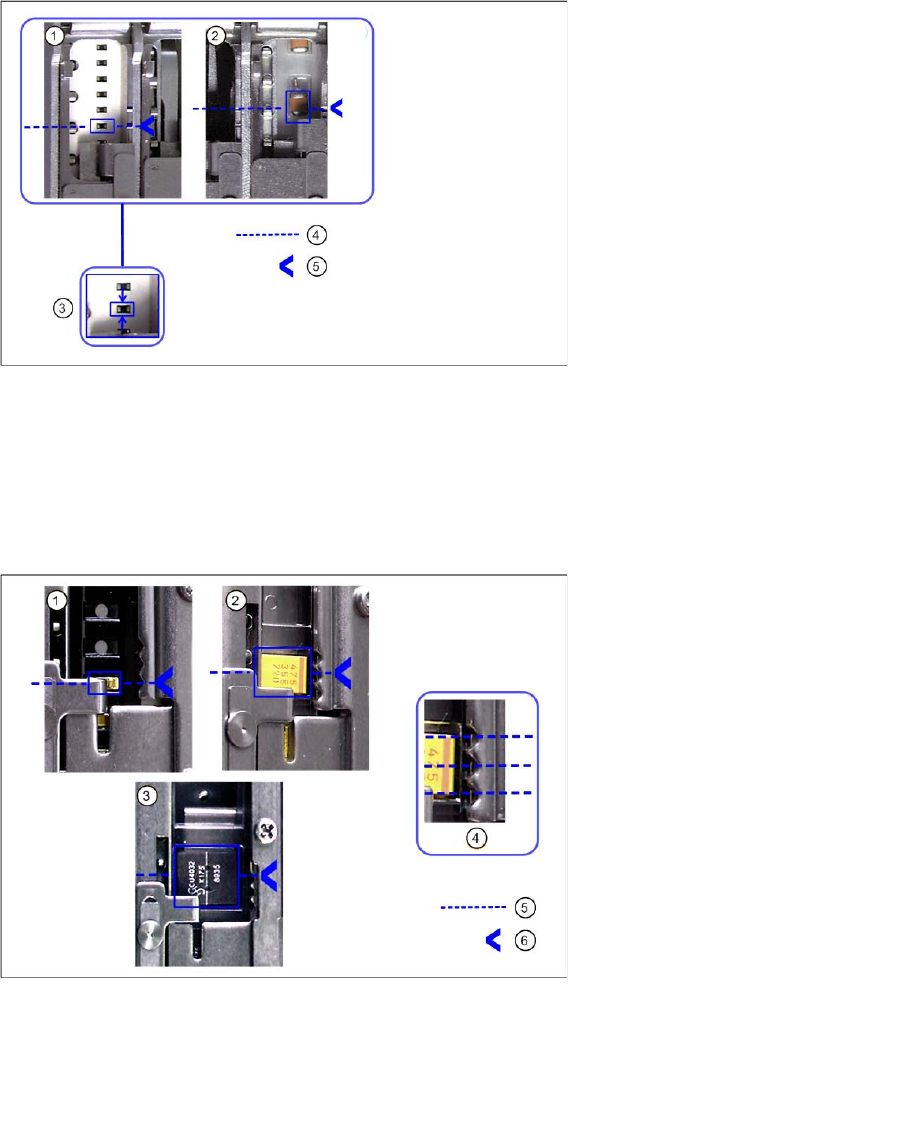
2.1.4.1 Correct Tape Position
Tape positions for 3x8 mm S
Tape position for 12/16 mm S feeders
1 Tape position for components <3mm 4 Component center
2 Tape position for components > 3mm 5 Centering position
3 Example of tape position for components
<3mm
1 Tape position for components 1-3 mm 5 Component center
2 Tape position for components 3.1-7 mm 6 Centering position
3 Example of tape position for components 7.1-16 mm
4 Example of tape position for components 3.1-7 mm