00196376-0102_UM S-Feeder_EN.pdf - 第36页
Tape Feeder Modules Details for 3x8 mm S Feeders Inserting the Spacer (0402 Tape Support) 36 User Manual SIPLACE S-Feeder 2.2 Details for 3x8 mm S Feeders The following description applies to all S feeders with 8 mm tap …
Tape Feeder Modules
Splicing the Foil Operating Tape Feeders - General
User Manual SIPLACE S-Feeder 35
2.1.8 Splicing the Foil
►Cut the tape edge and the cover tape on the old tape so that they are level with one another.
►Leave 5 to 10 mm of the new tape overlapping the cut tape edge.
►Place the overhang of the new foil over the end of the old foil.
►Fix the adhesive strip over the center of the foil edge on the new tape.
For more information about foil splicing, refer to the "Tape Splicing Tool" section of the "Job Guide -
Feeders".
For detailed information about the tape splicing tool, refer to the documentation supplied with this tool.
2.1.9 Maintenance
►Each time you change the tape, clean the area around the transport wheel and the pickup window.
Loose components could be deposited and jammed here during operation.
►From time to time, operate the transport wheel without a tape. Use these service runs to remove any
components which have been caught between the transportation pins.
For 3x8 mm S feeders only
The transport wheel moves components into the feeder.
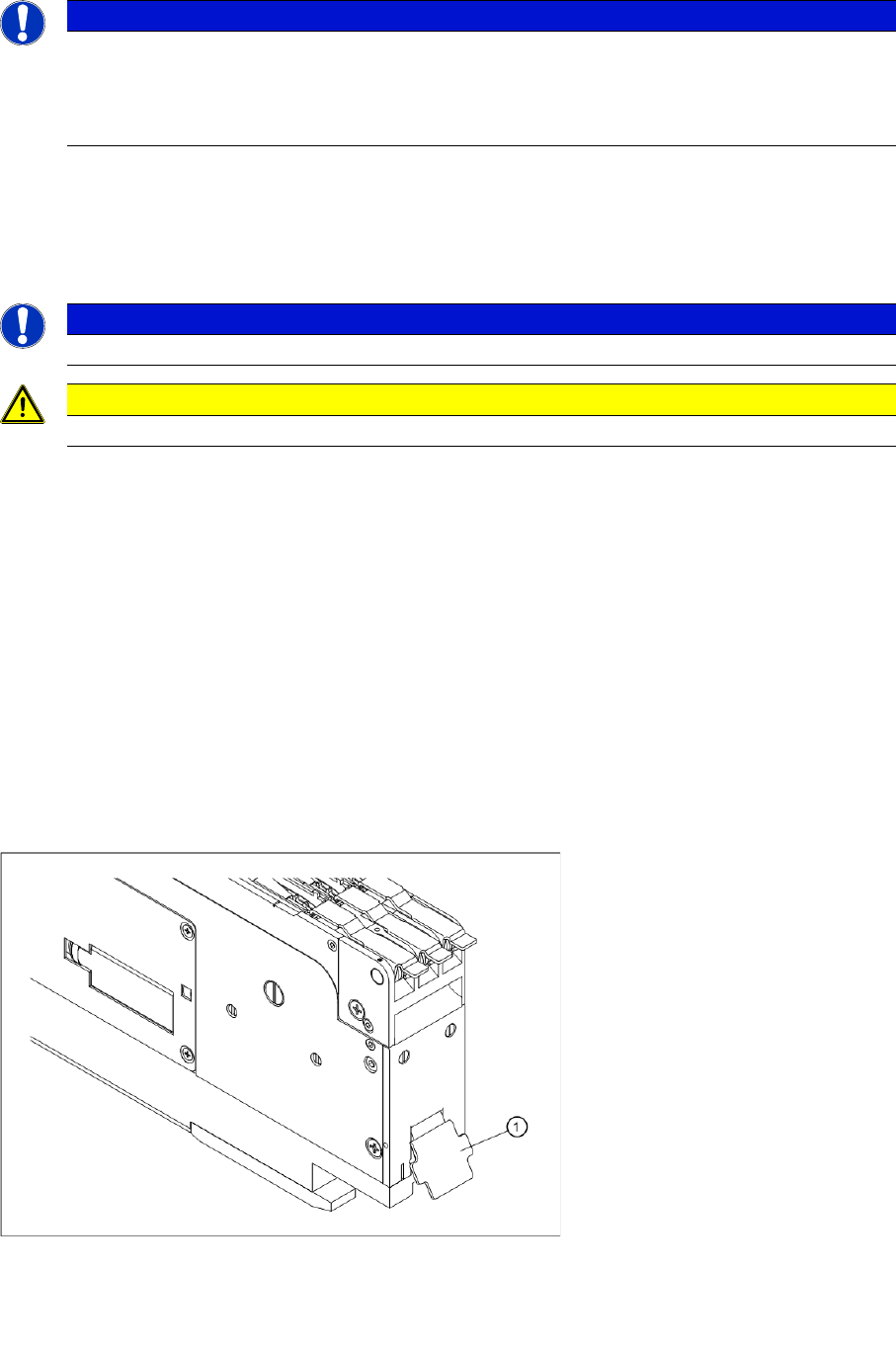
►Open the component reject flap (1) and shake out the components which have collected there.
Component reject flap
NOTICE
To splice the foil, use the adhesive strips from the tape splicing tool package Item
No.: 02102988-xx.
When processing the foil splice points, make sure that they are overlapped and follow the
procedure below.
NOTICE
Make sure that there is no adhesive foil protruding over the side of the splice point.
CAUTION
Make sure that adhesive strips from defective splice points are not fed into the foil container.
Legend:
1 Component reject flap
Tape Feeder Modules
Details for 3x8 mm S Feeders Inserting the Spacer (0402 Tape Support)
36 User Manual SIPLACE S-Feeder
2.2 Details for 3x8 mm S Feeders
The following description applies to all S feeders with 8 mm tapes operating on three parallel tracks
(3x8 mm S, 3x8 mm S for 0201/0402 components, 3x8 mm S for 01005 components and 3x8 mm SL).
2.2.1 Inserting the Spacer (0402 Tape Support)
Spacers are used for processing paper tapes with size 0402 components, to stabilize the tape under the
pickup position. Inserting the spacer significantly increases the pickup reliability.
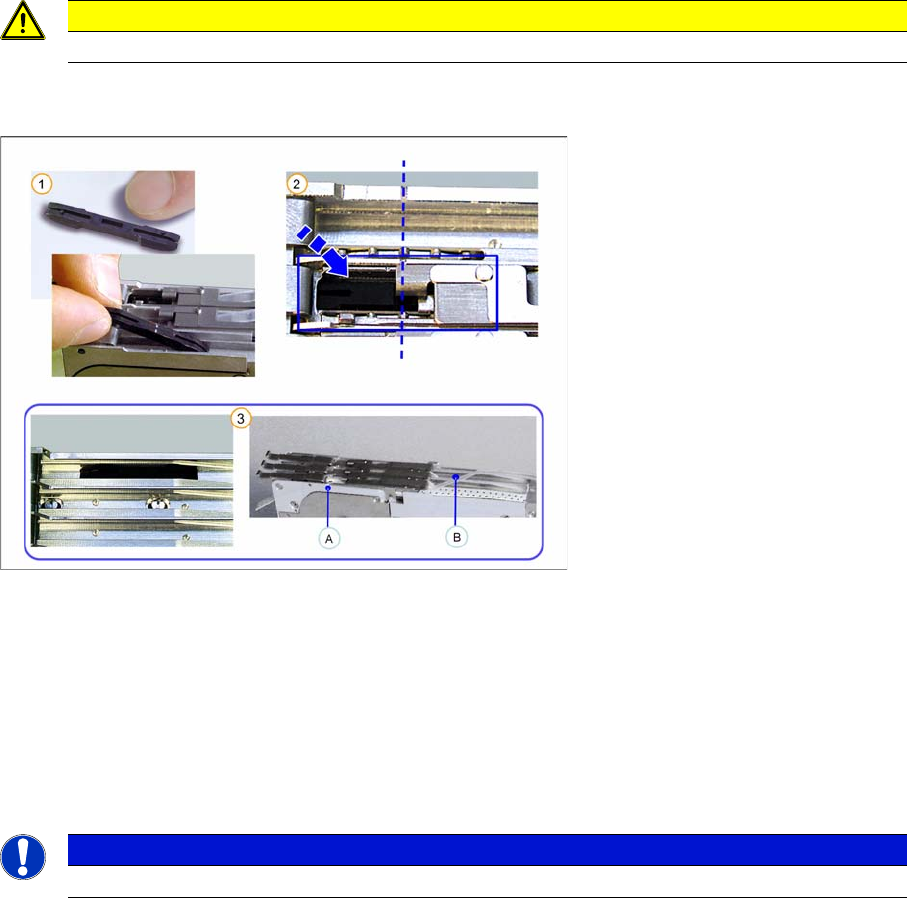
►(1) Open the pickup window and place the spacer into the feeder, with the latching pins facing down-
wards at the pickup position.
►(2) Make sure that the latching pins on the underside of the spacer engage properly in the holes pro-
vided for this purpose at the pickup position.
►(3) If you do not need the spacer, remove this from the pickup position (A) and place it in the park
position (B) for safekeeping.
The latching pins on the underside of the space must engage into the holes provided in the park
position (B).
CAUTION
This tape support may not be used with blister tapes.
NOTICE
When inserting a new tape, make sure that the spacer is positioned correctly.
Tape Feeder Modules
Inserting the Tape Details for 3x8 mm S Feeders
User Manual SIPLACE S-Feeder 37
2.2.2 Inserting the Tape
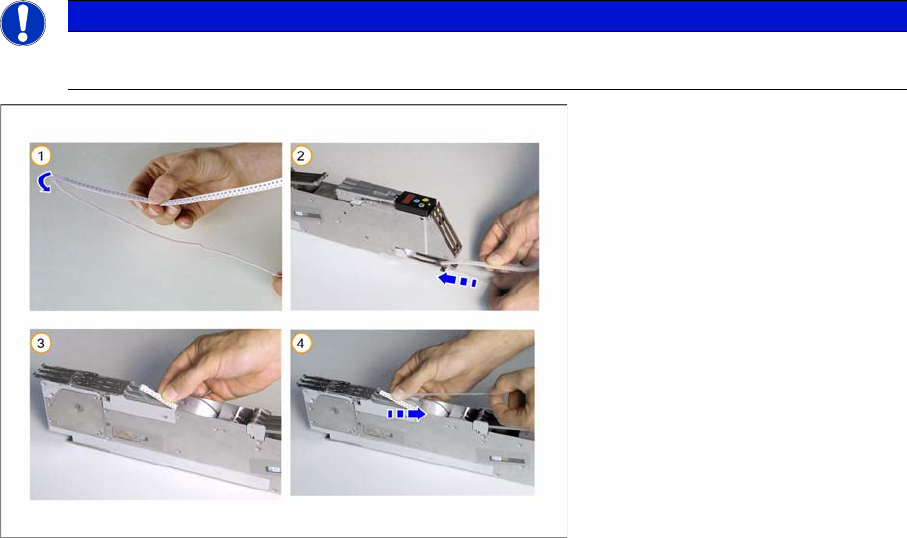
►(1)
Only for tapes with foil overhang at the beginning of the tape
:
Wrap the foil overhang (for threading in) around the beginning of the tape material, tension the foil
along the underside of the tape and hold in place.
►(2) Thread the tape from behind into the feeder track.
►(3) Insert the tape into the feeder until you can grip the tape at the top of the feeder.
Only for tapes with no overhang at the beginning of the tape
:
Free up approx. 2-3 cm of the foil.
►(4) Pull back the foil on the top of the tape.
NOTICE
Before you insert the tape, remove any loose components from the feeder. Pay particular
attention to the area under the pickup window and the transport wheel.