Samsung(三星)-KLM8G1GEAC-B001.pdf - 第14页
- 13 - IF THERE IS ANY OTHER OPERATION TO IMPLEMENT IN ADDITION TO SPECIFICATION IN THE DATASHEET OR JEDEC STANDARD, PLEASE CONTACT EACH BRANCH OFFICE OR HEADQUARTERS OF SAMSUNG ELECTRONICS. datasheet e·MMC Rev. 1.0 KLMx…
- 12 -
IF THERE IS ANY OTHER OPERATION TO IMPLEMENT IN ADDITION TO SPECIFICATION
IN THE DATASHEET OR JEDEC STANDARD, PLEASE CONTACT EACH BRANCH OFFICE OR
HEADQUARTERS OF SAMSUNG ELECTRONICS.
datasheet
e·MMC
Rev. 1.0
KLMxGxGEAC-B001
SAMSUNG CONFIDENTIAL
4.3 Discard
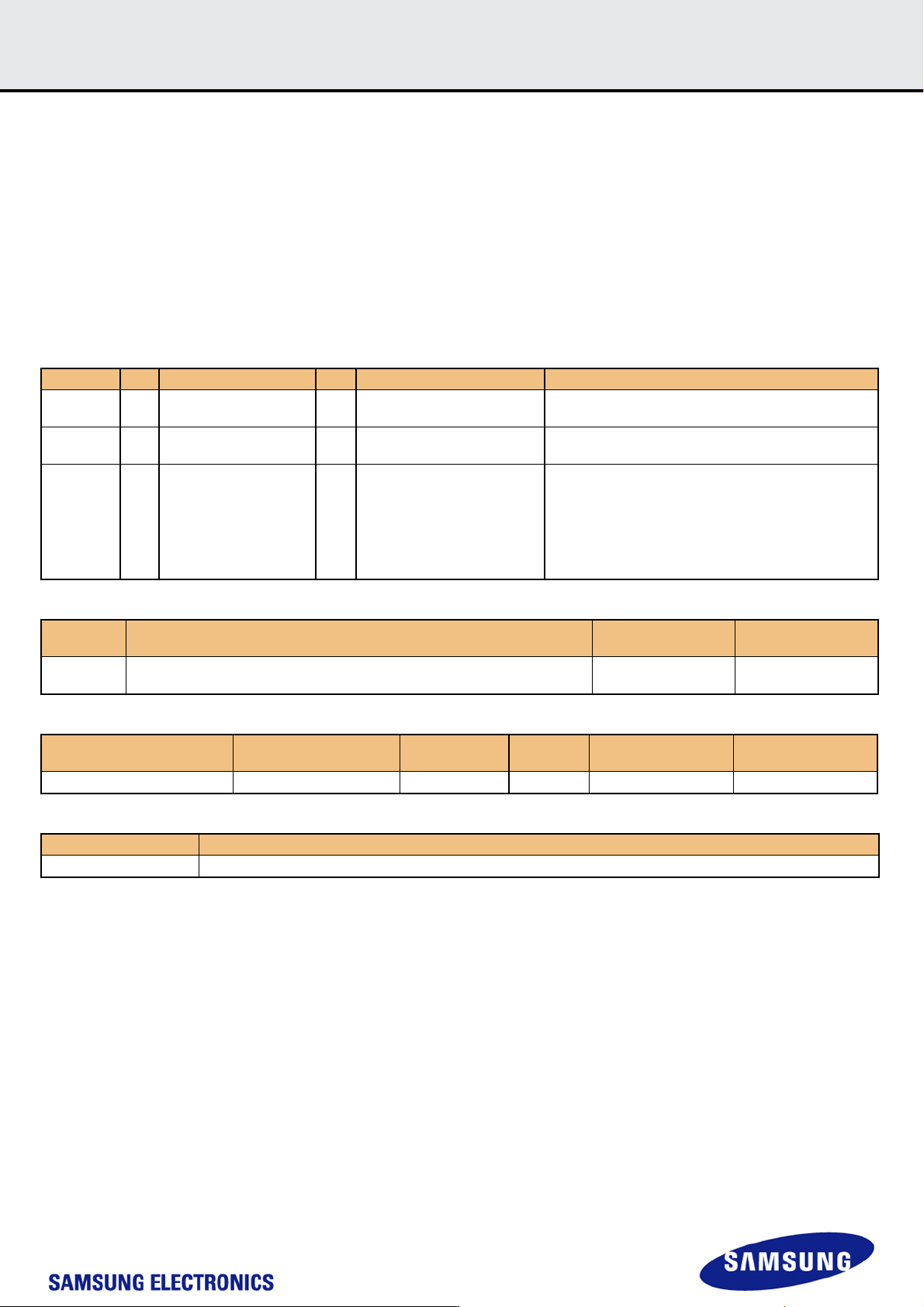
Discard allows the device to know data which is no longer required. So, the device can erase the data during background operation when it’s necessary.
Discard is similar operation to TRIM. For the TRIM function that is not aligned to optimal trim size, redundant programs are needed. Difference between
TRIM and Discard is that the contents of write block where the discard command is issued shall be ‘don’t care.’ After discard operation, the original data
may be remained partially or fully depending on device. The device will decide the data of discarded address range for performance.
[Discard command sequence]
In case of a discard operation, both CMD35 and CMD36 is used to identify the addresses of write blocks rather than erase groups.
1) Define the start address of the range using the ERASE_GROUP_START (CMD35)
2) Define the last address of the range using the ERASE_GROUP_END (CMD36)
3) Start the erase process by issuing ERASE (CMD38) command with argument bit0 and bit1 set to ‘1’ and the remainder of the arguments set to ‘0’.
[Table 10] Command description related to Discard
[Table 11] Erase Command valid arguments
[Table 12] EXT_CSD value for Discard
[Table 13] Definition of EXT_CSD value for Discard
CMD INDEX Type Argument Resp Abbreviation Command Descrlptlon
CMD35 ac [31:0] data address1,2 R1 ERASE_GROUP_START
Sets the address of the 1st erase group within a range to
be selected for erase
CMD36 ac [31:0] data address1,2 R1 ERASE_GROUP_END
Sets the address of the last Erase group within a continu-
ous range to be selected for erase
CMD38 ac
[31] obsolete set to 0
[30:16] set to 0
[15] obsolete set to 0
[14:2] set to 0
[1] Trimmed data definition
[0] Identify Write block for
Erase
R1b ERASE
Erase all previously selected write blocks according to
argument bits. To maintain backward compatibility, the
device must not report an error if bits 31 and 15 are set.
The device behavior when these are set is undefined .
Arguments Command Description
SEC_GB_CL_EN
(EXT_CSD[231] bit 4)
SEC_ER_EN
(EXT_CSD[231] bit 0)
0x00000003
Discard : the write blocks identified by CMD35 & 36.
The controller can perform partial or full the actual erase at a convenient time.
n/a n/a
Name Field
Size
(Bytes)
Cell
Type
CSD-Sllce Value
TRIM Multiplier TRIM_MULT 1 R [232] 0x02
Field Definition
TRIM_MULT This register is used to calculate the Discard function timeout. Discard Timeout = 300ms x TRIM_MULT
- 13 -
IF THERE IS ANY OTHER OPERATION TO IMPLEMENT IN ADDITION TO SPECIFICATION
IN THE DATASHEET OR JEDEC STANDARD, PLEASE CONTACT EACH BRANCH OFFICE OR
HEADQUARTERS OF SAMSUNG ELECTRONICS.
datasheet
e·MMC
Rev. 1.0
KLMxGxGEAC-B001
SAMSUNG CONFIDENTIAL
4.4 Sanitize
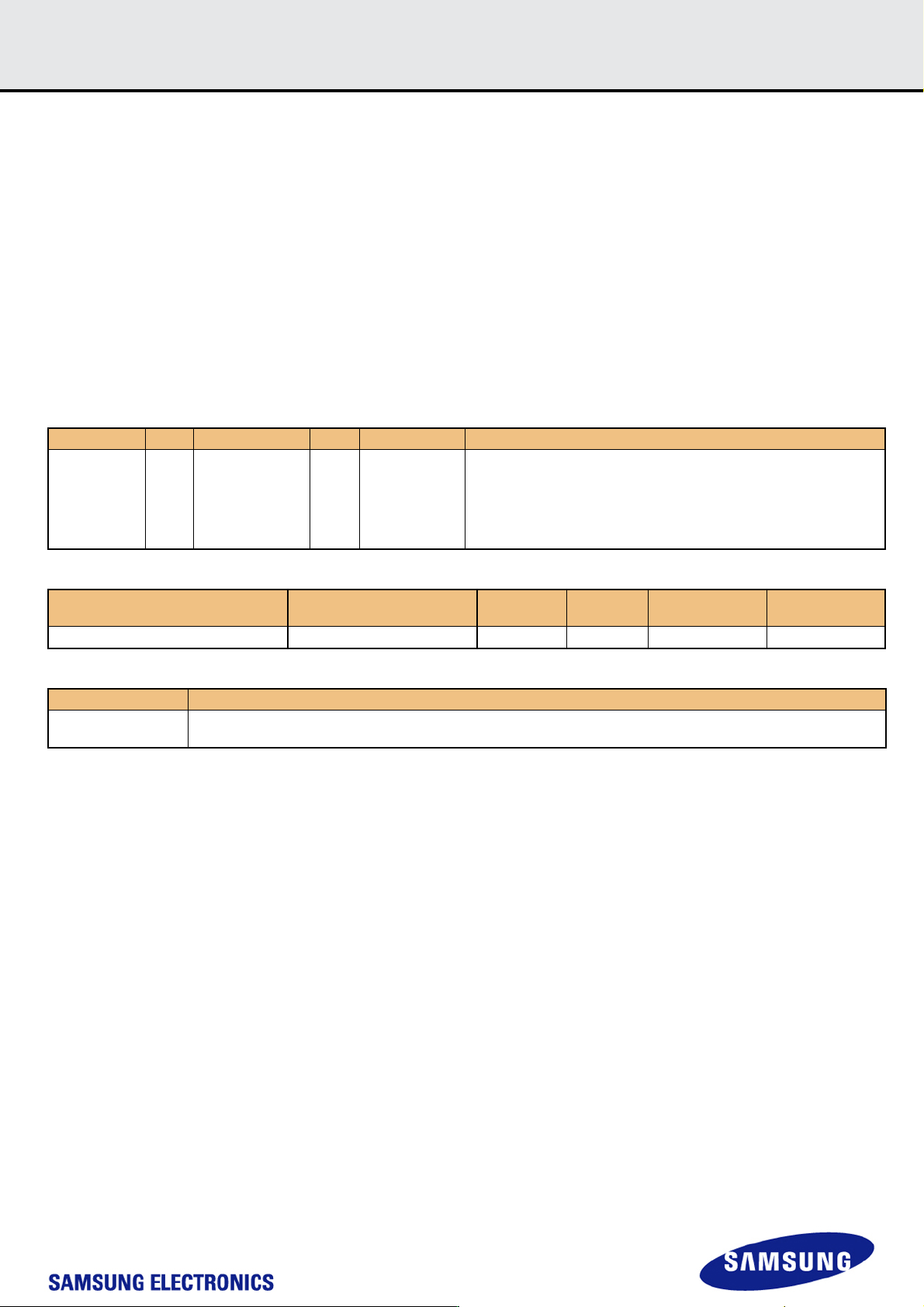
Sanitize is a feature which is used to remove data from the device. Once Sanitize operation is executed, the device physically removes the data from the
unmapped user address space. There is no timeout related to the sanitize operation. While the device is performing the sanitize operation, the busy line
is asserted. Until one of the following events occurs, the device will continue the sanitize operation with busy line asserted.
After the sanitize operation is completed, no data should exist in the unmapped address range of the device.
1) Sanitize operation is finished
2) HPI (High Priority Interrupt) is used to abort Sanitize
3) Power failure
4) H/W reset
If the sanitize operation is interrupted by HPI, Power failure and H/W reset, the state of the unmapped address range can not be guaranteed. In order to
restart the sanitize operation, host must re-initiate by writing to the SANITIZE_START [165].
[Sanitize command sequence]
Sanitize operation is initiated by writing a value to the EXT_CSD register SANITIZE_START [165] by using switch command (CMD6)
[Table 14] Command description related to Sanitize
[Table 15] EXT_CSD value for Sanitize
[Table 16] Definition of EXT_CSD value for Sanitize
CMD INDEX Type Argument Resp Abbreviation Command Description
CMD6 ac
[31:26] Set to 0
[25:24] Access
[23:16] Index
[15:8] Value
[7:3] Set to 0
[2:0] CMD set
R1b SWITCH
Switches the mode of operation of the selected Device or modifies the
EXT_CSD registers.
Name Field
Size
(Bytes)
Cell
Type
CSD-Slice Value
Start Sanitize operation SANITIZE_START 1 W/E_P [165] 0x00
Field Definition
SANITIZE_START
Writing any value to this field shall manually start a Sanitize operation. Device shall busy till no more background operations
are needed.
- 14 -
IF THERE IS ANY OTHER OPERATION TO IMPLEMENT IN ADDITION TO SPECIFICATION
IN THE DATASHEET OR JEDEC STANDARD, PLEASE CONTACT EACH BRANCH OFFICE OR
HEADQUARTERS OF SAMSUNG ELECTRONICS.
datasheet
e·MMC
Rev. 1.0
KLMxGxGEAC-B001
SAMSUNG CONFIDENTIAL
4.5 Power Off Notification
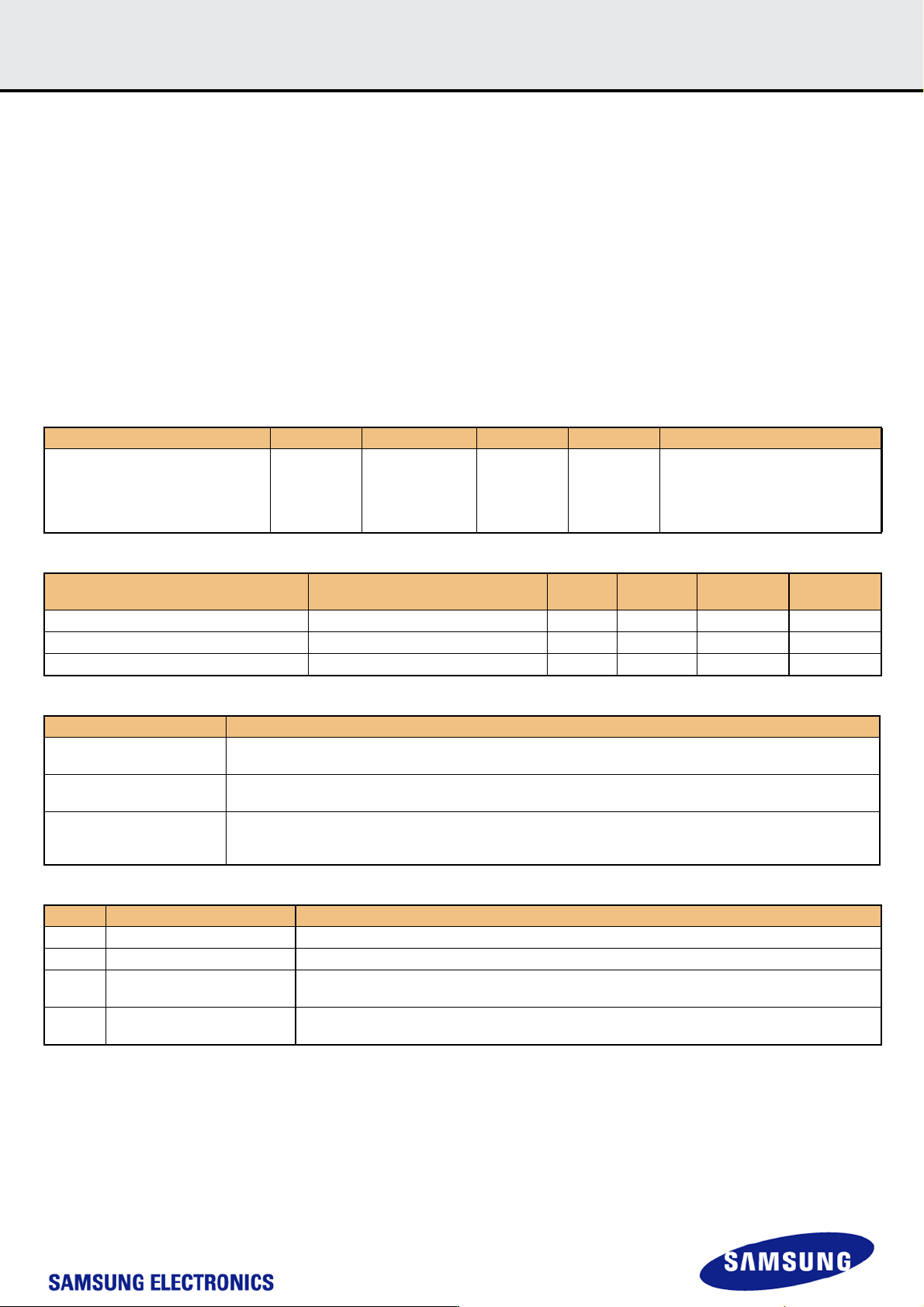
Device has no idea when host powers off. Power Off Notification allows the host to notify the device before the host powers off. This enables the device to
better prepare itself for being powered off. This feature can be used by the host to write meta data in advance that can reduce initialization time in the next
power up sequence.
[Power Off Notification sequence]
If the power off notification is supported by host, the host shall first set
POWER_OFF_NOTIFICATION byte in EXT_CSD [34] to POWERED_ON (0x01)
Before powering the device down, the host will change the value to either
POWER_OFF_SHORT (0x02) or POWER_OFF_LONG (0x03)
[Power Off Notification Mode]
The difference between two types of Power Off modes is that how quickly host wants to turn power off.
1) Power Off Long (0x03) : The device should respond to POWER_OFF_LONG_TIME timeout if more time for power off is acceptable.
2) Power Off Short (0x02) : The device should respond to POWER_OFF_SHORT under the Generic CMD6 timeout.
[Table 17] Command description related to Power Off Notification
[Table 18] EXT_CSD value for Power Off Notification
[Table 19] Definition of EXT_CSD value for Power Off Notification
[Table 20] Valid POWER_OFF_NOTIFICATION values
CMD INDEX Type Argument Resp Abbreviation Command Description
CMD6 ac
[25:24] Access
[23:16] Index
[15:8] Value
[7:3] Set to 0
[2:0] CMD set
R1b SWITCH
Switches the mode of operation of the
selected Device or modifies the
EXT_CSD registers.
Name Field
Size
(Bytes)
Cell
Type
CSD-Slice Value
Generic CMD6 timeout GENERIC_CMD6_TIME 1 R [248] 0x0A
Power off notification(long) timeout POWER_OFF_LONG_TIME 1 R [247] 0x3C
Power Off Notification POWER_OFF_NOTIFICATION 1 R/W/E_P [34] 0x00
Field Definition
GENERIC_CMD6_TIME
(Power off short)
The default max. timeout for a SWITCH command (CMD6)
Generic CMD6 timeout = 10ms x GENERIC_CMD6_TIME
POWER_OFF_LONG_TIME
Max. timeout for the SWITCH command (CMD6) when notifying the device that the power is about to be turned off.
Power off long timeout = 10ms x POWER_OFF_LONG_TIME
POWER_OFF_NOTIFICATION
This field allows host to notify the device when the host powers off.
Any other values which don’t exist in the [Table 3] are invalid. If the host sets invalid values, the device will result in
SWITCH_ERROR.
Value Name Description
0x00 NO_POWER_NOTIFICATION Power off notification is not supported by host, device shall not assume any notification.
0x01 POWERED_ON Host shall notify before powering off the device, and keep power supplies alive and active until then.
0x02 POWER_OFF_SHORT
Host is going to power off the device. The device
shall respond within GENERIC_CMD6_TIME.
0x03 POWER_OFF_LONG.
Host is going to power off the device. The device
shall respond within POWER_OFF_LONG_TIME