Samsung(三星)-KLM8G1GEAC-B001.pdf - 第15页
- 14 - IF THERE IS ANY OTHER OPERATION TO IMPLEMENT IN ADDITION TO SPECIFICATION IN THE DATASHEET OR JEDEC STANDARD, PLEASE CONTACT EACH BRANCH OFFICE OR HEADQUARTERS OF SAMSUNG ELECTRONICS. datasheet e·MMC Rev. 1.0 KLMx…
- 13 -
IF THERE IS ANY OTHER OPERATION TO IMPLEMENT IN ADDITION TO SPECIFICATION
IN THE DATASHEET OR JEDEC STANDARD, PLEASE CONTACT EACH BRANCH OFFICE OR
HEADQUARTERS OF SAMSUNG ELECTRONICS.
datasheet
e·MMC
Rev. 1.0
KLMxGxGEAC-B001
SAMSUNG CONFIDENTIAL
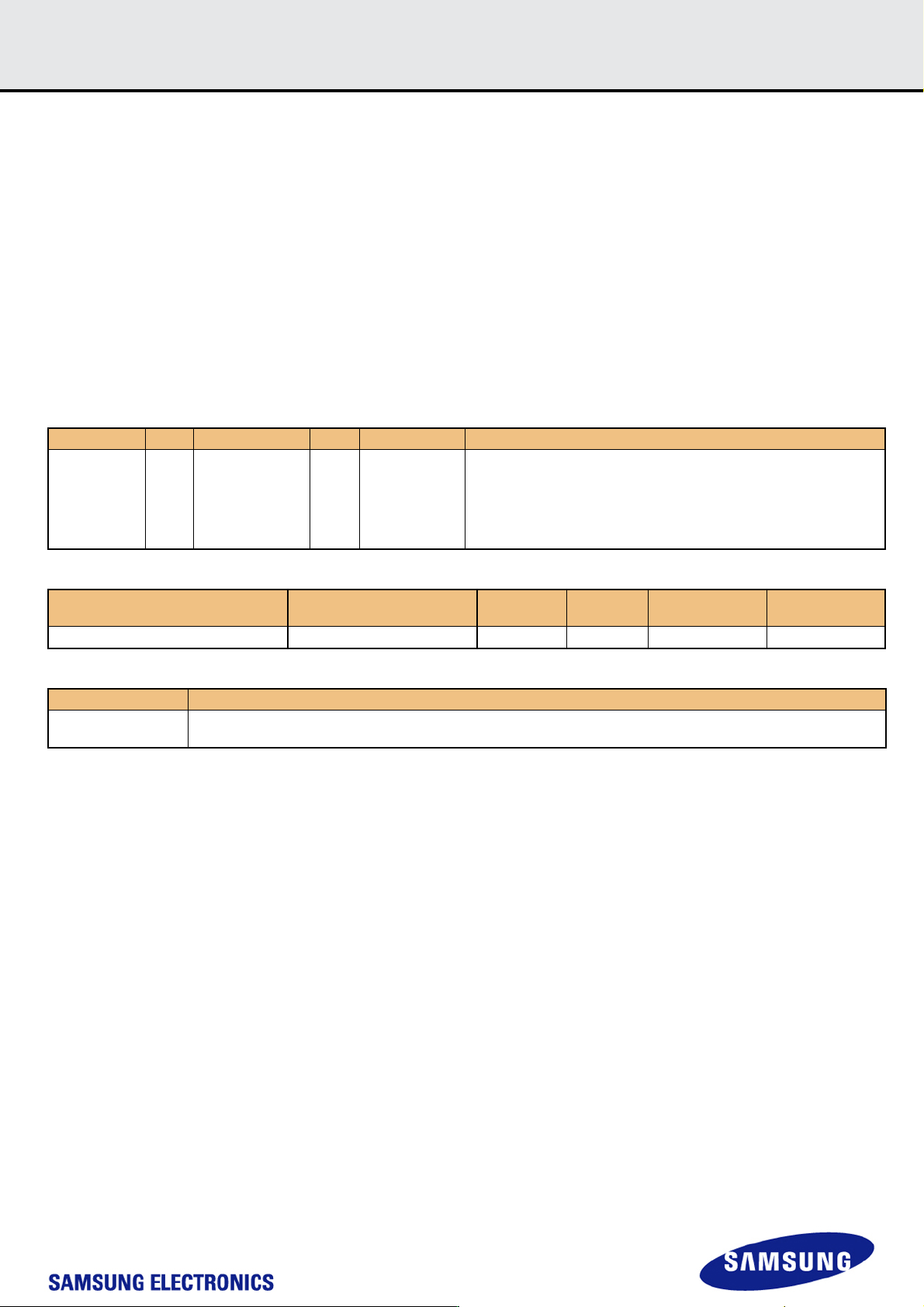
4.4 Sanitize
Sanitize is a feature which is used to remove data from the device. Once Sanitize operation is executed, the device physically removes the data from the
unmapped user address space. There is no timeout related to the sanitize operation. While the device is performing the sanitize operation, the busy line
is asserted. Until one of the following events occurs, the device will continue the sanitize operation with busy line asserted.
After the sanitize operation is completed, no data should exist in the unmapped address range of the device.
1) Sanitize operation is finished
2) HPI (High Priority Interrupt) is used to abort Sanitize
3) Power failure
4) H/W reset
If the sanitize operation is interrupted by HPI, Power failure and H/W reset, the state of the unmapped address range can not be guaranteed. In order to
restart the sanitize operation, host must re-initiate by writing to the SANITIZE_START [165].
[Sanitize command sequence]
Sanitize operation is initiated by writing a value to the EXT_CSD register SANITIZE_START [165] by using switch command (CMD6)
[Table 14] Command description related to Sanitize
[Table 15] EXT_CSD value for Sanitize
[Table 16] Definition of EXT_CSD value for Sanitize
CMD INDEX Type Argument Resp Abbreviation Command Description
CMD6 ac
[31:26] Set to 0
[25:24] Access
[23:16] Index
[15:8] Value
[7:3] Set to 0
[2:0] CMD set
R1b SWITCH
Switches the mode of operation of the selected Device or modifies the
EXT_CSD registers.
Name Field
Size
(Bytes)
Cell
Type
CSD-Slice Value
Start Sanitize operation SANITIZE_START 1 W/E_P [165] 0x00
Field Definition
SANITIZE_START
Writing any value to this field shall manually start a Sanitize operation. Device shall busy till no more background operations
are needed.
- 14 -
IF THERE IS ANY OTHER OPERATION TO IMPLEMENT IN ADDITION TO SPECIFICATION
IN THE DATASHEET OR JEDEC STANDARD, PLEASE CONTACT EACH BRANCH OFFICE OR
HEADQUARTERS OF SAMSUNG ELECTRONICS.
datasheet
e·MMC
Rev. 1.0
KLMxGxGEAC-B001
SAMSUNG CONFIDENTIAL
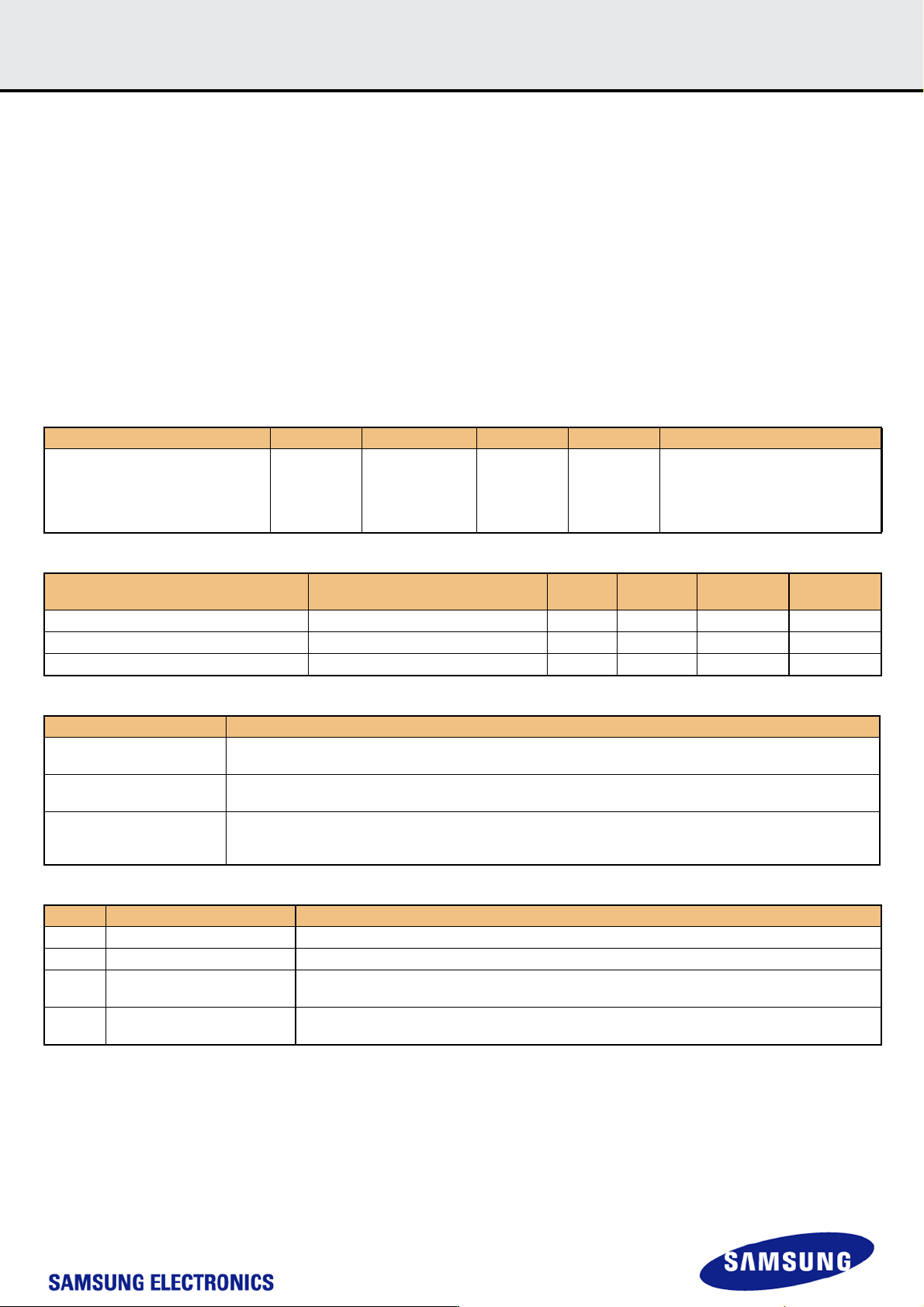
4.5 Power Off Notification
Device has no idea when host powers off. Power Off Notification allows the host to notify the device before the host powers off. This enables the device to
better prepare itself for being powered off. This feature can be used by the host to write meta data in advance that can reduce initialization time in the next
power up sequence.
[Power Off Notification sequence]
If the power off notification is supported by host, the host shall first set
POWER_OFF_NOTIFICATION byte in EXT_CSD [34] to POWERED_ON (0x01)
Before powering the device down, the host will change the value to either
POWER_OFF_SHORT (0x02) or POWER_OFF_LONG (0x03)
[Power Off Notification Mode]
The difference between two types of Power Off modes is that how quickly host wants to turn power off.
1) Power Off Long (0x03) : The device should respond to POWER_OFF_LONG_TIME timeout if more time for power off is acceptable.
2) Power Off Short (0x02) : The device should respond to POWER_OFF_SHORT under the Generic CMD6 timeout.
[Table 17] Command description related to Power Off Notification
[Table 18] EXT_CSD value for Power Off Notification
[Table 19] Definition of EXT_CSD value for Power Off Notification
[Table 20] Valid POWER_OFF_NOTIFICATION values
CMD INDEX Type Argument Resp Abbreviation Command Description
CMD6 ac
[25:24] Access
[23:16] Index
[15:8] Value
[7:3] Set to 0
[2:0] CMD set
R1b SWITCH
Switches the mode of operation of the
selected Device or modifies the
EXT_CSD registers.
Name Field
Size
(Bytes)
Cell
Type
CSD-Slice Value
Generic CMD6 timeout GENERIC_CMD6_TIME 1 R [248] 0x0A
Power off notification(long) timeout POWER_OFF_LONG_TIME 1 R [247] 0x3C
Power Off Notification POWER_OFF_NOTIFICATION 1 R/W/E_P [34] 0x00
Field Definition
GENERIC_CMD6_TIME
(Power off short)
The default max. timeout for a SWITCH command (CMD6)
Generic CMD6 timeout = 10ms x GENERIC_CMD6_TIME
POWER_OFF_LONG_TIME
Max. timeout for the SWITCH command (CMD6) when notifying the device that the power is about to be turned off.
Power off long timeout = 10ms x POWER_OFF_LONG_TIME
POWER_OFF_NOTIFICATION
This field allows host to notify the device when the host powers off.
Any other values which don’t exist in the [Table 3] are invalid. If the host sets invalid values, the device will result in
SWITCH_ERROR.
Value Name Description
0x00 NO_POWER_NOTIFICATION Power off notification is not supported by host, device shall not assume any notification.
0x01 POWERED_ON Host shall notify before powering off the device, and keep power supplies alive and active until then.
0x02 POWER_OFF_SHORT
Host is going to power off the device. The device
shall respond within GENERIC_CMD6_TIME.
0x03 POWER_OFF_LONG.
Host is going to power off the device. The device
shall respond within POWER_OFF_LONG_TIME
- 15 -
IF THERE IS ANY OTHER OPERATION TO IMPLEMENT IN ADDITION TO SPECIFICATION
IN THE DATASHEET OR JEDEC STANDARD, PLEASE CONTACT EACH BRANCH OFFICE OR
HEADQUARTERS OF SAMSUNG ELECTRONICS.
datasheet
e·MMC
Rev. 1.0
KLMxGxGEAC-B001
SAMSUNG CONFIDENTIAL
5.0 Technical Notes
5.1 S/W Agorithm
5.1.1 Partition Management
The device initially consists of two Boot Partitions and RPMB Partition and User Data Area.
The User Data Area can be divided into four General Purpose Area Partitions and User Data Area partition. Each of the General Purpose Area partitions
and a section of User Data Area partition can be configured as enhanced partition.
5.1.1.1 Boot Area Partition and RPMB Area Partition
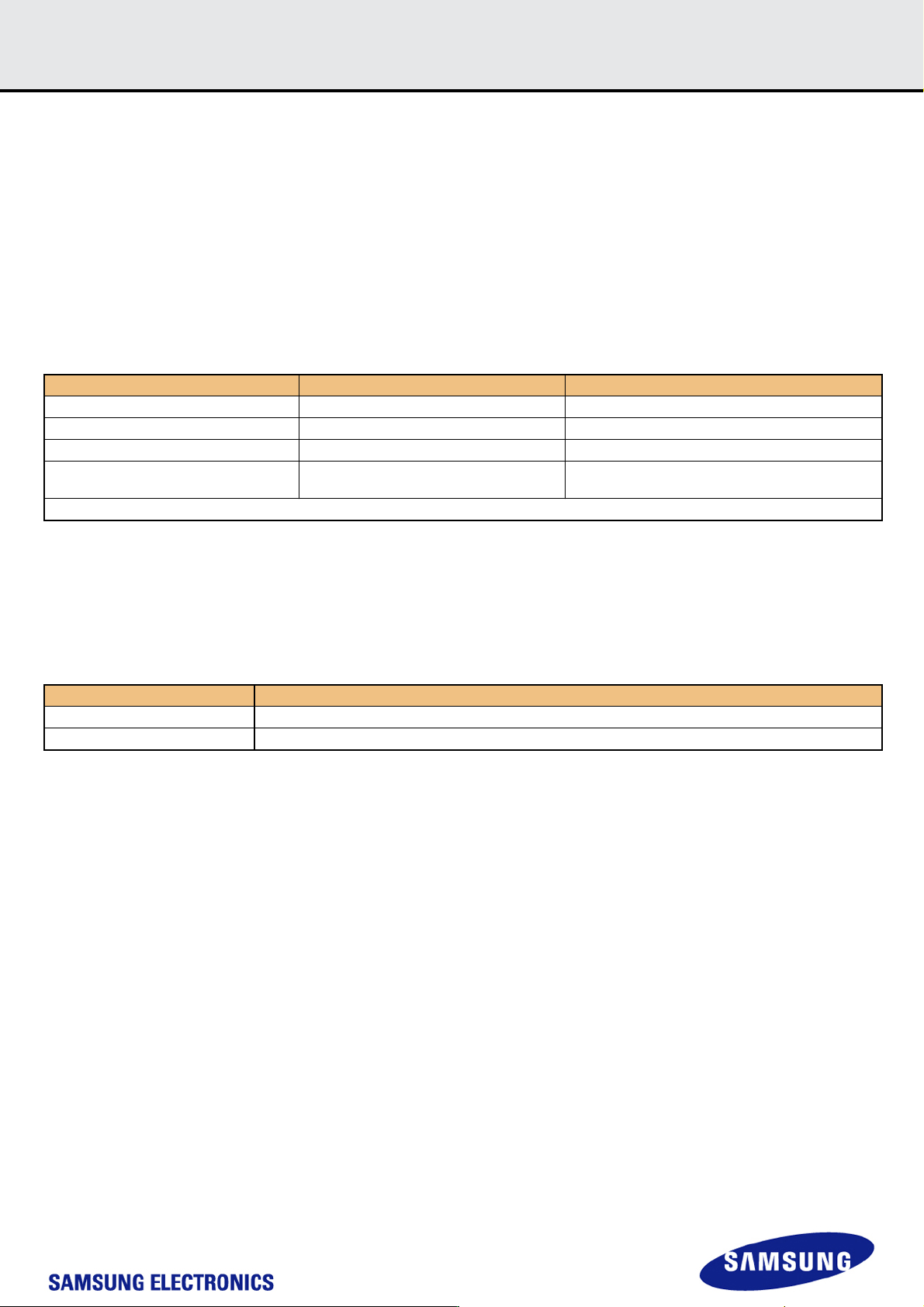
Boot Partition size & RPMB Partition Size are set by the following command sequence :
[Table 21] Setting sequence of Boot Area Partition size and RPMB Area Partition size
Boot partition size is calculated as ( 128KB * BOOT_SIZE_MULTI )
The size of Boot Area Partition 1 and 2 can not be set independently. It is set as same value.
RPMB partition size is calculated as ( 128KB * RPMB_SIZE_MULTI ).
In RPMB partition, CMD 0, 6, 8, 12, 13, 15, 18, 23, 25 are admitted.
Access Size of RPMB partition is defined as the below:
[Table 22] REL_WR_SEC_C value for write operation on RPMB partition
Any undefined set of parameters or sequence of commands results in failure access.
If the failure is in data programming case, the data is not programmed. And if the failure occurs in data read case, the read data is ‘0x00’.
5.1.1.2 Enhanced Partition (Area)
SAMSUNG e·MMC adopts Enhanced User Data Area as SLC Mode. Therefore when master adopts some portion as enhanced user data area in User
Data Area, that area occupies double size of original set up size. ( ex> if master set 1MB for enhanced mode, total 2MB user data area is needed to gen-
erate 1MB enhanced area)
Max Enhanced User Data Area size is defined as (MAX_ENH_SIZE_MULT x HC_WP_GRP_SIZE x HC_ERASE_GRP_SIZE x 512kBytes)
Function Command Description
Partition Size Change Mode CMD62(0xEFAC62EC) Enter the Partition Size Change Mode
Partition Size Set Mode CMD62(0x00CBAEA7) Partition Size setting mode
Set Boot Partition Size CMD62(BOOT_SIZE_MULTI) Boot Partition Size value
Set RPMB Partition Size CMD62(RPMB_SIZE_MULTI)
RPMB Partition Size value
F/W Re-Partition is executed in this step.
Power Cycle
REL_WR_SEC_C Description
REL_WR_SEC_C = 1 Access sizes 256B and 512B supported to RPMB partition
REL_WR_SEC_C > 1 Access sizes up to REL_WR_SEC_C * 512B supported to RPMB partition with 256B granularity