Samsung(三星)-KLM8G1GEAC-B001.pdf - 第17页
- 16 - IF THERE IS ANY OTHER OPERATION TO IMPLEMENT IN ADDITION TO SPECIFICATION IN THE DATASHEET OR JEDEC STANDARD, PLEASE CONTACT EACH BRANCH OFFICE OR HEADQUARTERS OF SAMSUNG ELECTRONICS. datasheet e·MMC Rev. 1.0 KLMx…
- 15 -
IF THERE IS ANY OTHER OPERATION TO IMPLEMENT IN ADDITION TO SPECIFICATION
IN THE DATASHEET OR JEDEC STANDARD, PLEASE CONTACT EACH BRANCH OFFICE OR
HEADQUARTERS OF SAMSUNG ELECTRONICS.
datasheet
e·MMC
Rev. 1.0
KLMxGxGEAC-B001
SAMSUNG CONFIDENTIAL
5.0 Technical Notes
5.1 S/W Agorithm
5.1.1 Partition Management
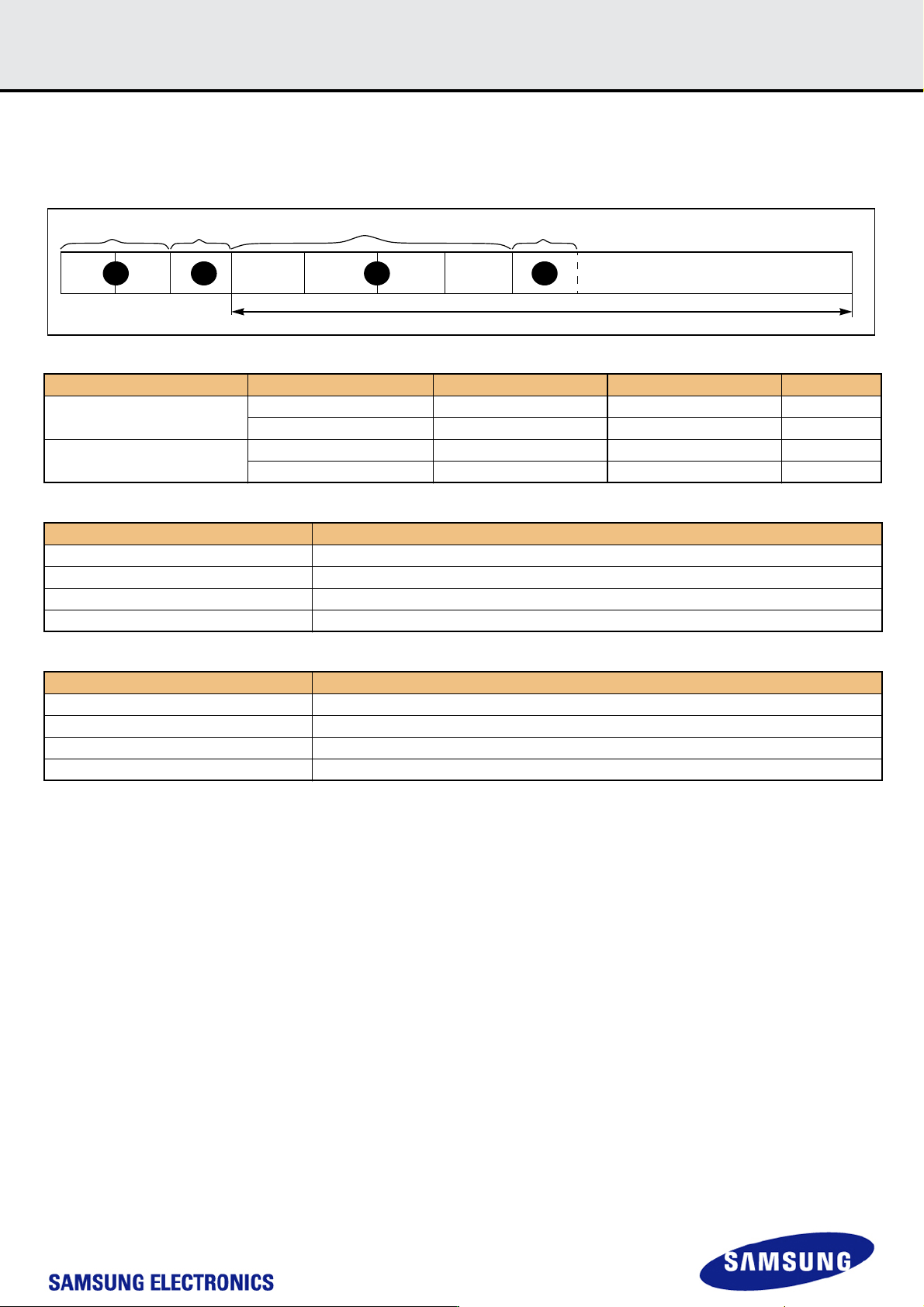
The device initially consists of two Boot Partitions and RPMB Partition and User Data Area.
The User Data Area can be divided into four General Purpose Area Partitions and User Data Area partition. Each of the General Purpose Area partitions
and a section of User Data Area partition can be configured as enhanced partition.
5.1.1.1 Boot Area Partition and RPMB Area Partition
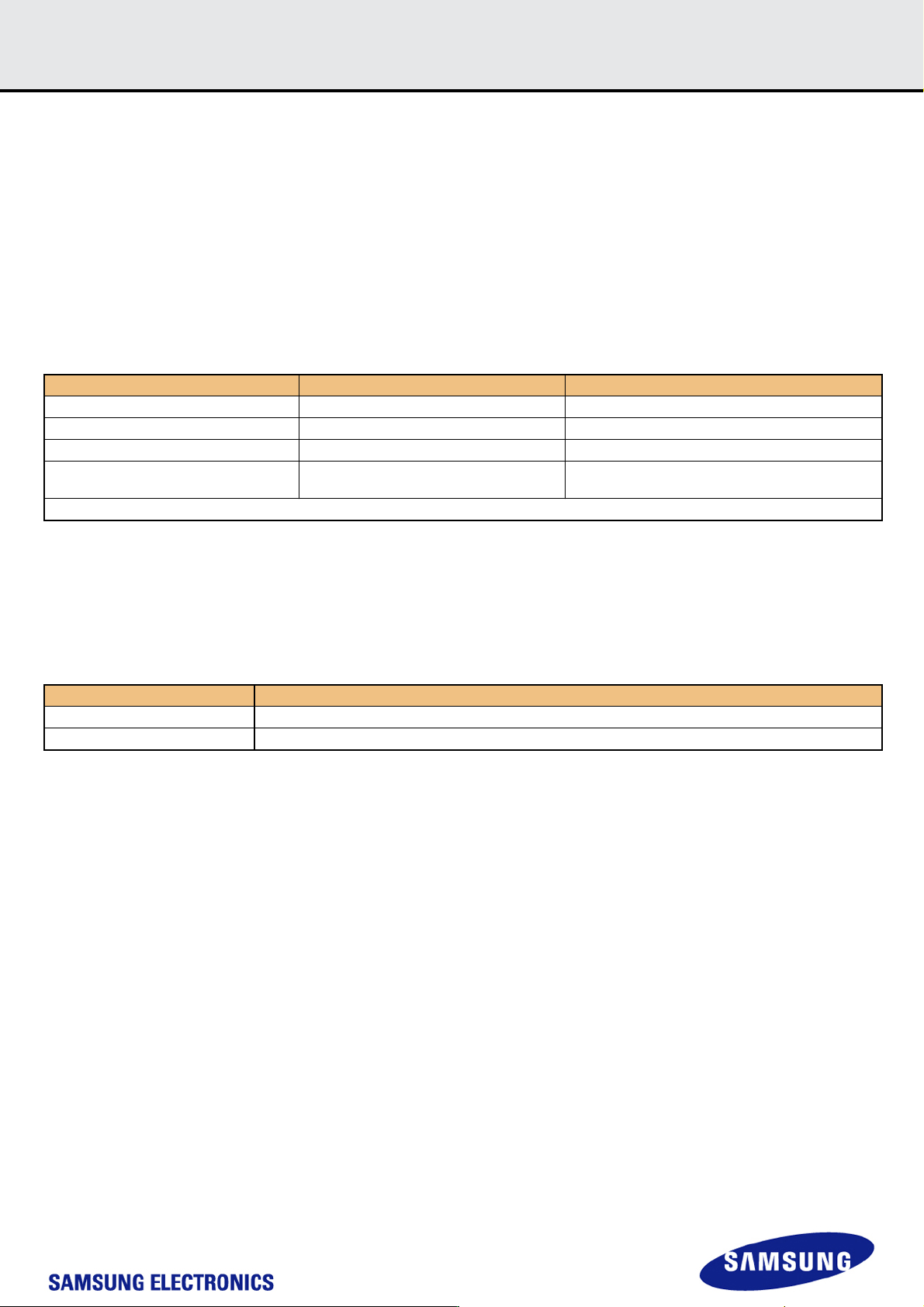
Boot Partition size & RPMB Partition Size are set by the following command sequence :
[Table 21] Setting sequence of Boot Area Partition size and RPMB Area Partition size
Boot partition size is calculated as ( 128KB * BOOT_SIZE_MULTI )
The size of Boot Area Partition 1 and 2 can not be set independently. It is set as same value.
RPMB partition size is calculated as ( 128KB * RPMB_SIZE_MULTI ).
In RPMB partition, CMD 0, 6, 8, 12, 13, 15, 18, 23, 25 are admitted.
Access Size of RPMB partition is defined as the below:
[Table 22] REL_WR_SEC_C value for write operation on RPMB partition
Any undefined set of parameters or sequence of commands results in failure access.
If the failure is in data programming case, the data is not programmed. And if the failure occurs in data read case, the read data is ‘0x00’.
5.1.1.2 Enhanced Partition (Area)
SAMSUNG e·MMC adopts Enhanced User Data Area as SLC Mode. Therefore when master adopts some portion as enhanced user data area in User
Data Area, that area occupies double size of original set up size. ( ex> if master set 1MB for enhanced mode, total 2MB user data area is needed to gen-
erate 1MB enhanced area)
Max Enhanced User Data Area size is defined as (MAX_ENH_SIZE_MULT x HC_WP_GRP_SIZE x HC_ERASE_GRP_SIZE x 512kBytes)
Function Command Description
Partition Size Change Mode CMD62(0xEFAC62EC) Enter the Partition Size Change Mode
Partition Size Set Mode CMD62(0x00CBAEA7) Partition Size setting mode
Set Boot Partition Size CMD62(BOOT_SIZE_MULTI) Boot Partition Size value
Set RPMB Partition Size CMD62(RPMB_SIZE_MULTI)
RPMB Partition Size value
F/W Re-Partition is executed in this step.
Power Cycle
REL_WR_SEC_C Description
REL_WR_SEC_C = 1 Access sizes 256B and 512B supported to RPMB partition
REL_WR_SEC_C > 1 Access sizes up to REL_WR_SEC_C * 512B supported to RPMB partition with 256B granularity
- 16 -
IF THERE IS ANY OTHER OPERATION TO IMPLEMENT IN ADDITION TO SPECIFICATION
IN THE DATASHEET OR JEDEC STANDARD, PLEASE CONTACT EACH BRANCH OFFICE OR
HEADQUARTERS OF SAMSUNG ELECTRONICS.
datasheet
e·MMC
Rev. 1.0
KLMxGxGEAC-B001
SAMSUNG CONFIDENTIAL
5.1.2 Boot operation
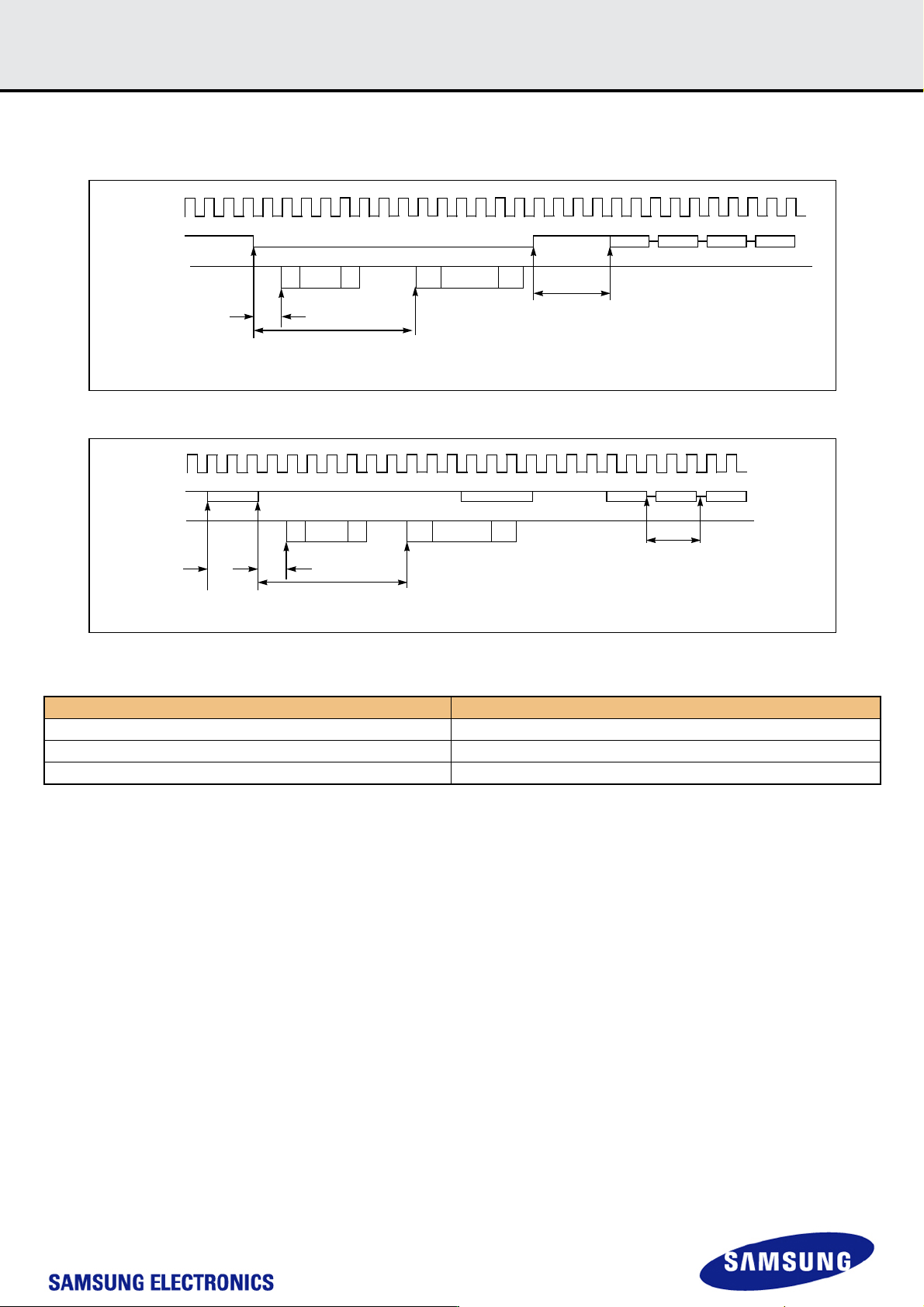
Device supports not only boot mode but also alternative boot mode. Device supports high speed timing and dual data rate during boot.
Figure 5. MultiMediaCard state diagram (boot mode)
Figure 6. MultiMediaCard state diagram (alternative boot mode)
[Table 23] Boot ack, boot data and initialization Time
NOTE:
1) This initialization time includes partition setting, Please refer to INI_TIMEOUT_AP in 6.4 Extended CSD Register.
Normal initialization time (without partition setting) is completed within 1sec
Timing Factor Value
(1) Boot ACK Time < 50 ms
(2) Boot Data Time < 60 ms
(3) Initialization Time
1)
< 3 secs
SE
SE
010
512bytes
+CRC
CLK
CMD
DAT[0]
CMD1 RESP CMD2 RESP
Boot terminated
MIn 8 cloks + 48 clocks = 56 clocks required from
CMD signal high to next MMC command.
(1)
(2)
*(1) Boot ACK Time (2) Boot Data Time (3) CMD1 Time
SE
SE
010
512bytes
+CRC
CLK
CMD
DAT[0]
CMD1
RESP CMD2
CMD0
1
CMD0 Reset
Min74
Clocks
required
after
power is
stable to
start boot
command
*(1) Boot ACK Time (2) Boot Data Time (3) CMD1 Time
*CMD0 with argument 0xFFFFFFFA
(1)
(2)
Boot terminated
CMD1
(3)
- 17 -
IF THERE IS ANY OTHER OPERATION TO IMPLEMENT IN ADDITION TO SPECIFICATION
IN THE DATASHEET OR JEDEC STANDARD, PLEASE CONTACT EACH BRANCH OFFICE OR
HEADQUARTERS OF SAMSUNG ELECTRONICS.
datasheet
e·MMC
Rev. 1.0
KLMxGxGEAC-B001
SAMSUNG CONFIDENTIAL
5.1.3 User Density
Total User Density depends on device type.
For example, 32MB in the SLC Mode requires 64MB in MLC.
This results in decreasing of user density.
[Table 24] Capacity according to partition
[Table 25] Maximum Enhanced Partition Size
[Table 26] User Density Size
Capacities Value Boot partition 1 Boot partition 2 RPMB
8GB
Default. 4,096KB 4,096KB 512KB
Max. 4,096KB 4,096KB 4,096KB
16GB,32GB,64GB
Default. 4,096KB 4,096KB 4,096KB
Max. 4,096KB 4,096KB 4,096KB
Device Max. Enhanced Partition Size
8 GB 3,909,091,328 Bytes
16 GB 7,809,794,048 Bytes
32 GB 15,627,976,704 Bytes
64 GB 31,264,342,016 Bytes
Device User Density Size
8 GB 7,818,182,656 Bytes
16 GB 15,634,268,160 Bytes
32 GB 31,268,536,320 Bytes
64 GB 62,537,072,640 Bytes
4321
User Density
Enhanced User Data Area
4 General Purpose Partitions (GPP)
RPMB
Boot Partition #1