00197283-02_IM_LED_Pairing_V2_1_EN.pdf - 第19页
LED Pair ing / Ins tallatio n Manua l 05/2014 Edit ion 19 6.1.1 Missing OIB connec tion If the SIPL ACE L ED Pair ing Con troller r ecogni zes that a requ ired ser vice cann ot be f ound, th e follo wing dialog is dis pl…
LED Pairing / Installation Manual 05/2014 Edition
18
6 Configuring SIPLACE LED Pairing Controller
The SIPLACE LED Pairing Controller depends on several OIB components to receive the required
data to perform the Board Grouping and Availability Checking functions. The configuration is done
in the OIB Operator Manager by assigning OIB adapters to certain Factory Layout nodes. The
SIPLACE LED Pairing Controller reads the configuration and tries to retrieve data from the OIB
service endpoints.
The SIPLACE LED Pairing Controller depends on the following OIB components:
– SIPLACE Pro Line Control Adapter
– SIPLACE Pro SPI Adapter
– SIPLACE Setup Center Adapter
– SIPLACE LED Pairing Controller database
– SIPLACE Monitoring Service Adapter (optional)
6.1 Checking Configuration
Two error cases may occur during the configuration check:
– Missing OIB connection, i.e. an OIB data source is not able to provide data.
– The SIPLACE LED Pairing Controller database cannot be accessed.
LED Pairing / Installation Manual 05/2014 Edition
19
6.1.1 Missing OIB connection
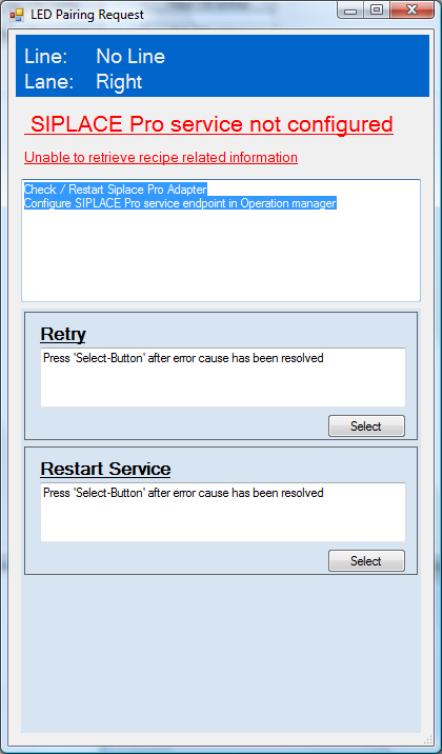
If the SIPLACE LED Pairing Controller recognizes that a required service cannot be found, the
following dialog is displayed.
Figure 6-1: Missing OIB connection
In this sample the SIPLACE Pro service is not configured.
► Perform the actions suggested in the upper field of the window.
► Select Retry to check the configuration again.
or
► Select Restart Service to start the SIPLACE LED Pairing Controller again.
LED Pairing / Installation Manual 05/2014 Edition
20
6.1.2 SIPLACE LED Pairing Controller database cannot be accessed
The connection to the SIPLACE LED Pairing Controller database is required for the Board
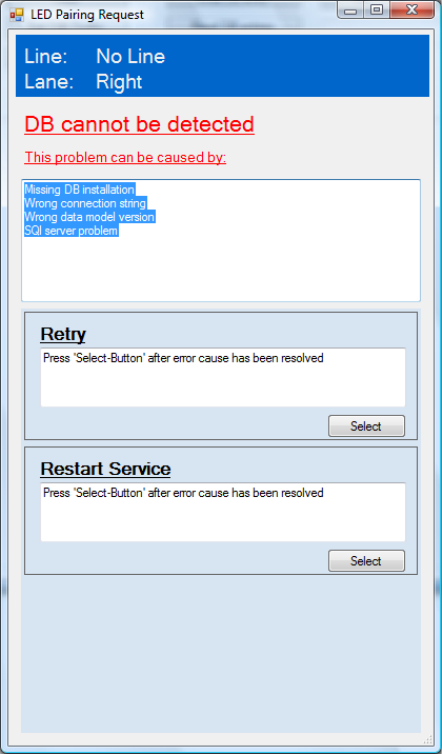
Grouping function. If the SIPLACE LED Pairing Controller database cannot be accessed, the
following dialog is displayed.
Figure 6-2: SIPLACE LED Pairing Controller database cannot be accessed
► Check the problems that are listed in the upper field of the window and perform the suitable
action(s).
► Select Retry to check the configuration again.
or
► Select Restart Service to start SIPLACE LED Pairing Controller again.