DeltaTherm_IR_REV_B-1.pdf - 第29页
Delt aTherm IR Cure Modul e Revision B / February 2020 Page 29 of 41 Globa l Settin gs Figure 22 : Global Se ttings 1. Press Un it Selection to toggle between Metric a nd Standard . 2. Press Process Timeout to enable or …
DeltaTherm IR Cure Module
Revision B / February 2020
Page 28 of 41
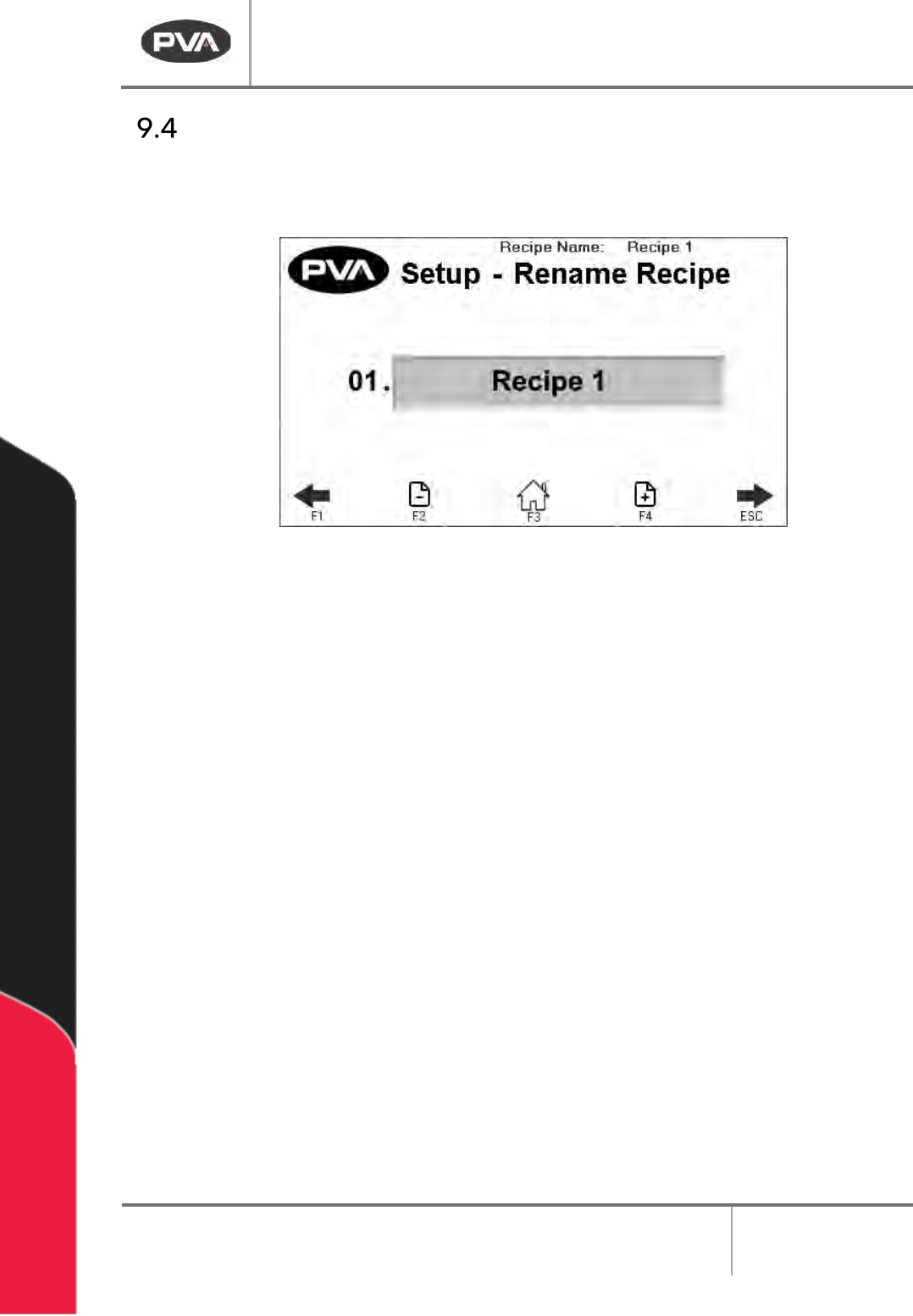
Rename Recipe
• Use the arrows on the screen or the “F1” and “ESC” button to scroll to the Setup-
Settings screen.
Figure 21: Setup - Rename Profile
• Use the + - Page icons or the F2 and F4 keys to scroll through the recipe names.
• You can have a maximum of 30 profiles.
• Select the name you want to change in the text box.
• The keyboard will be shown, type the new name and select enter. The new name will
be saved. Recipe names are limited to 15 characters.
DeltaTherm IR Cure Module
Revision B / February 2020
Page 29 of 41
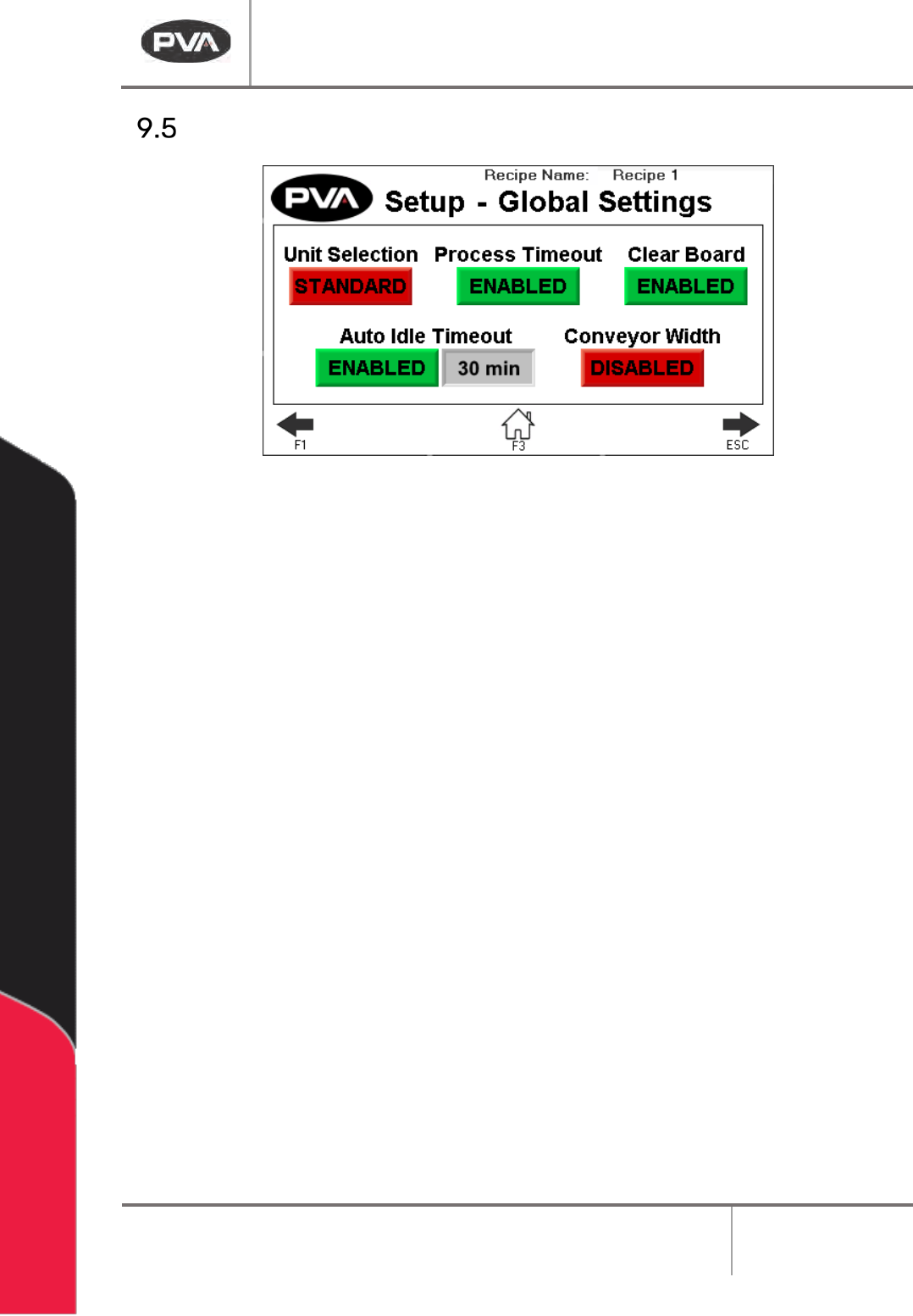
Global Settings
Figure 22: Global Settings
1. Press Unit Selection to toggle between Metric and Standard.
2. Press Process Timeout to enable or disable board process timeout in Auto Cycle.
3. Press Clear Board to enable or disable the clear board check when entering Auto
Cycle. If disabled, upon entering Auto Cycle, boards in the oven will not move
downstream until the oven is at temperature and ready to process boards.
4. Press Auto Idle Timeout to enable or disable the idle timeout in Auto Cycle. When
enabled, if no boards are being processed in the specified timeout, a silent timeout
fault will occur and the oven will exit Auto Cycle, turning the heater panels off.
5. Press Conveyor Width to enable/disable the conveyor width move to current recipe
position after homing and when entering Auto Cycle.
DeltaTherm IR Cure Module
Revision B / February 2020
Page 30 of 41
Fault Recovery Procedure
Several errors can cause a fault condition. They are:
• The EMERGENCY STOP is engaged or there is an open door
• There is an exhaust or intake fan failure
• The parameters are out of range
• The module is over-temperature
• There is a solid-state relay failure
The following sections show an example of a machine error. For a complete list of error
messages, refer to Section 11
.
Recovery from Emergency Stop or Open Door Error
If the Emergency Stop button is engaged or the machine has a system error, perform the
following procedure to return the machine to the cycle stop state.
WARNING: If the Emergency Stop was engaged because of system failure, do not
disengage the Emergency Stop. Shutdown the system and have qualified personnel
repair the machine.
1. Disengage the Emergency Stop button or close all doors.
2. Select “Clear Fault”.
Recovery from an Exhaust or Intake Fan Failure
1. Select “Clear Fault” to stop the alarm or “Reset” to clear the fault.
2. Operate the fan in Manual mode to make sure the components operate correctly.
Recovery from a Parameter Out of Range Error
1. Select “Silence Horn” to stop the alarm or “Clear Fault” to clear the fault.
2. Operate the module in manual mode or restart the Auto Cycle. Look for the
parameter that causes the error.
3. If the error continues to repeat, refer to Section 12
.