DeltaTherm_IR_REV_B-1.pdf - 第30页
Delt aTherm IR Cure Modul e Revision B / February 2020 Page 30 of 41 Fault Recov ery Procedure Several err ors can cause a fault co ndition. They are : • The EMERGENC Y STOP i s engage d or there is an ope n door • There…
DeltaTherm IR Cure Module
Revision B / February 2020
Page 29 of 41
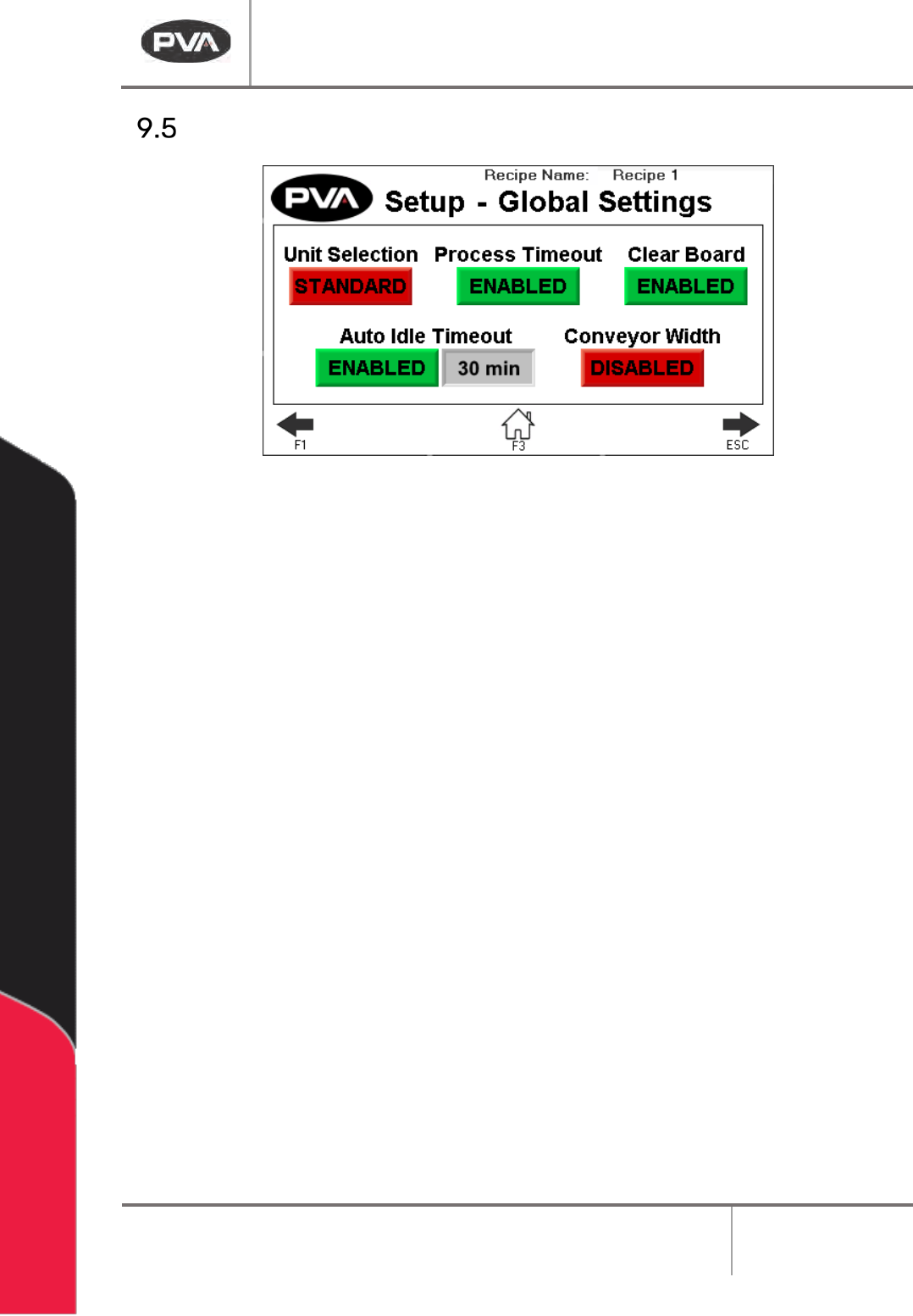
Global Settings
Figure 22: Global Settings
1. Press Unit Selection to toggle between Metric and Standard.
2. Press Process Timeout to enable or disable board process timeout in Auto Cycle.
3. Press Clear Board to enable or disable the clear board check when entering Auto
Cycle. If disabled, upon entering Auto Cycle, boards in the oven will not move
downstream until the oven is at temperature and ready to process boards.
4. Press Auto Idle Timeout to enable or disable the idle timeout in Auto Cycle. When
enabled, if no boards are being processed in the specified timeout, a silent timeout
fault will occur and the oven will exit Auto Cycle, turning the heater panels off.
5. Press Conveyor Width to enable/disable the conveyor width move to current recipe
position after homing and when entering Auto Cycle.
DeltaTherm IR Cure Module
Revision B / February 2020
Page 30 of 41
Fault Recovery Procedure
Several errors can cause a fault condition. They are:
• The EMERGENCY STOP is engaged or there is an open door
• There is an exhaust or intake fan failure
• The parameters are out of range
• The module is over-temperature
• There is a solid-state relay failure
The following sections show an example of a machine error. For a complete list of error
messages, refer to Section 11
.
Recovery from Emergency Stop or Open Door Error
If the Emergency Stop button is engaged or the machine has a system error, perform the
following procedure to return the machine to the cycle stop state.
WARNING: If the Emergency Stop was engaged because of system failure, do not
disengage the Emergency Stop. Shutdown the system and have qualified personnel
repair the machine.
1. Disengage the Emergency Stop button or close all doors.
2. Select “Clear Fault”.
Recovery from an Exhaust or Intake Fan Failure
1. Select “Clear Fault” to stop the alarm or “Reset” to clear the fault.
2. Operate the fan in Manual mode to make sure the components operate correctly.
Recovery from a Parameter Out of Range Error
1. Select “Silence Horn” to stop the alarm or “Clear Fault” to clear the fault.
2. Operate the module in manual mode or restart the Auto Cycle. Look for the
parameter that causes the error.
3. If the error continues to repeat, refer to Section 12
.
DeltaTherm IR Cure Module
Revision B / February 2020
Page 31 of 41
Recovery from an Over-Temperature Error
1. Select “Silence Horn” to stop the alarm or “Clear Fault” to clear the fault.
2. Let the module temperature decrease.
3. Operate the module in manual mode or restart Auto Cycle. Look for the parameter
that causes the error.
4. If the error continues to repeat, refer to Section 12
.
Recovery from an Auto Conveyor Adjust Error
In the conveyor homing procedure, two errors may occur:
Error 1: The conveyor passes the home position sensor and hits the hard stop on one side.
1. When the conveyors pass the sensor and hit the hard stop, engage the “Emergency
Stop” button.
2. Open the left cabinet and find fuse number 70.
3. Release the fuse and disengage the “Emergency Stop” button. This will move the
conveyor toward the sensor.
4. When the conveyor passes the sensor, engage the “Emergency Stop” button again.
5. Examine the integrity and the wiring of the sensor.
6. Install fuse number 70, and home the conveyor again.
Error 2: The conveyor passes the software limit and hits the hard stop on the other side.
1. Engage the “Emergency Stop” button.
2. Open the left cabinet and find the conveyor direction relay (CR11).
3. Pull the blue button and disengage the “Emergency Stop” button. The conveyor
will move away from the hard stop.
4. Engage the “Emergency Stop” button again. This will stop the conveyor.
5. Push the blue button so it is in the original position in the relay.
6. Examine the wire and the conveyor position encoder.