DeltaTherm_IR_REV_B-1.pdf - 第36页
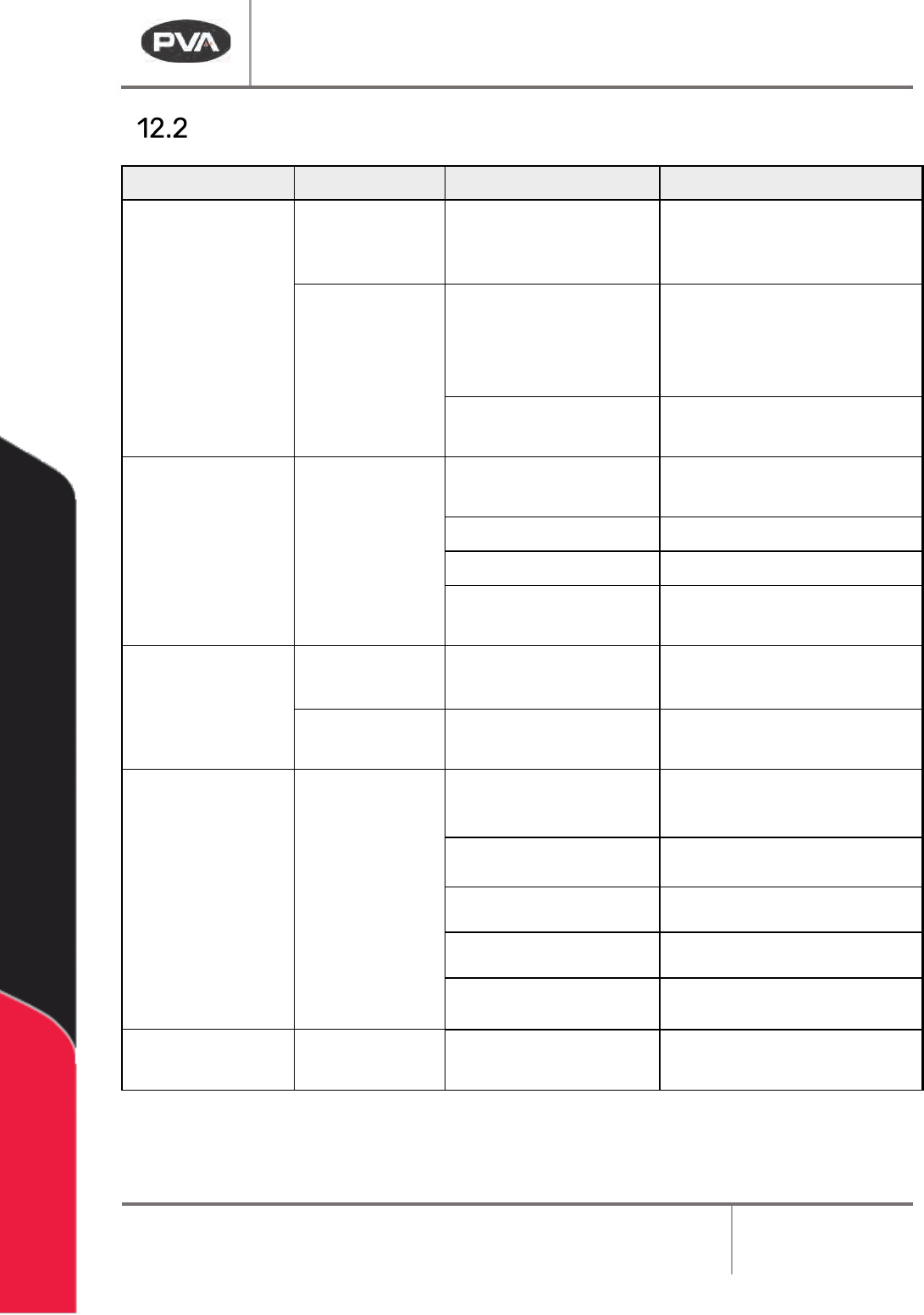
Delt aTherm IR Cure Modul e Revision B / February 2020 Page 36 of 41 Fault Di agnosi s Operat ion Ot her Symptoms Po ssible Cause Corr ectiv e Act ion The machine is ON. And the op erator interface does not have power Ca…
DeltaTherm IR Cure Module
Revision B / February 2020
Page 35 of 41
Troubleshooting
If Something Goes Wrong . . .
Some problems are easy to identify and solve, others may require more extensive help. This
troubleshooting section is designed to assist an operator in solving many problems before
seeking additional help.
Refer to this Troubleshooting section if a mechanical or electrical problem occurs before
you call Technical Support.
Calling Technical Support
The Technical Support staff is available to help solve any problems. The phone number is
+1 518-371-2684. Have the following information when you call for help:
• All the information on the OIT when the error occurred.
• The operation in progress when the machine developed trouble (when did it have
problems, what was it doing, etc.).
• If the error was not serious, attempt to repeat the error. If the error does not repeat,
the problem may have been operator generated.
DeltaTherm IR Cure Module
Revision B / February 2020
Page 36 of 41
Fault Diagnosis
Operation Other Symptoms Possible Cause Corrective Action
The machine is ON.
And the operator
interface does not
have power
Cables are loose or not
connected
Examine the cable connections
Correct any loose connections
The electrical
enclosure does
not have power
The electrical enclosure is
open and the safety switch
is in the open position
Close the electrical enclosure
The fuse is blown
Examine the fuse in the PLC
power supply and correct
Power On button
does not stay on
Safety relay failed
Examine the relay and replace if
necessary
The bulb is blown Examine the bulb and replace
A door is open Close all doors
The emergency stop is
engaged
Disengage the emergency stop
Board does not
transfer to or from
adjacent station
The SMEMA connection is
broken
Examine the cable connections
Correct any loose connections
A module in the system is
turned off
Turn on the inactive module
IR Panels do not
operate or they fail
The panel temperature is
set below room
temperature
Change the setpoint
The fuse is blown
Examine the related fuses in the
electrical enclosure
The solid-state relay
failed
Replace the relay
The temperature is out of
range
Increase the deviation
The module is over-
temperature.
Decrease the setpoint
Exhaust fan failure
The fuse is blown Examine and correct the related
fuses
Figure 24: Fault Diagnosis
DeltaTherm IR Cure Module
Revision B / February 2020
Page 37 of 41
Maintenance
Service Area
Weekly
Monthly
Conveyor System
Examine the sensors
for material and dust
buildup
Apply a small amount of high temperature chain
lubricant, such as Darmex 773ND or equivalent to
the chains.
Conveyor System Rails: Clean and lubricate with
Mobil DTE-24 or equivalent. You can also use a
thin film of the conveyor grease, Darmex 773ND or
equivalent.