KE2040 Instruction Manual_ver1.30.pdf - 第385页
5 − 43 5.2.4 General-purpose vision components 5.2.4.1 Overv iew of a general -purpose vision component The f ollowing types of component s are handled as a gener al-purpose vision component (“ GNRL. vision” displayed as…
5 − 42
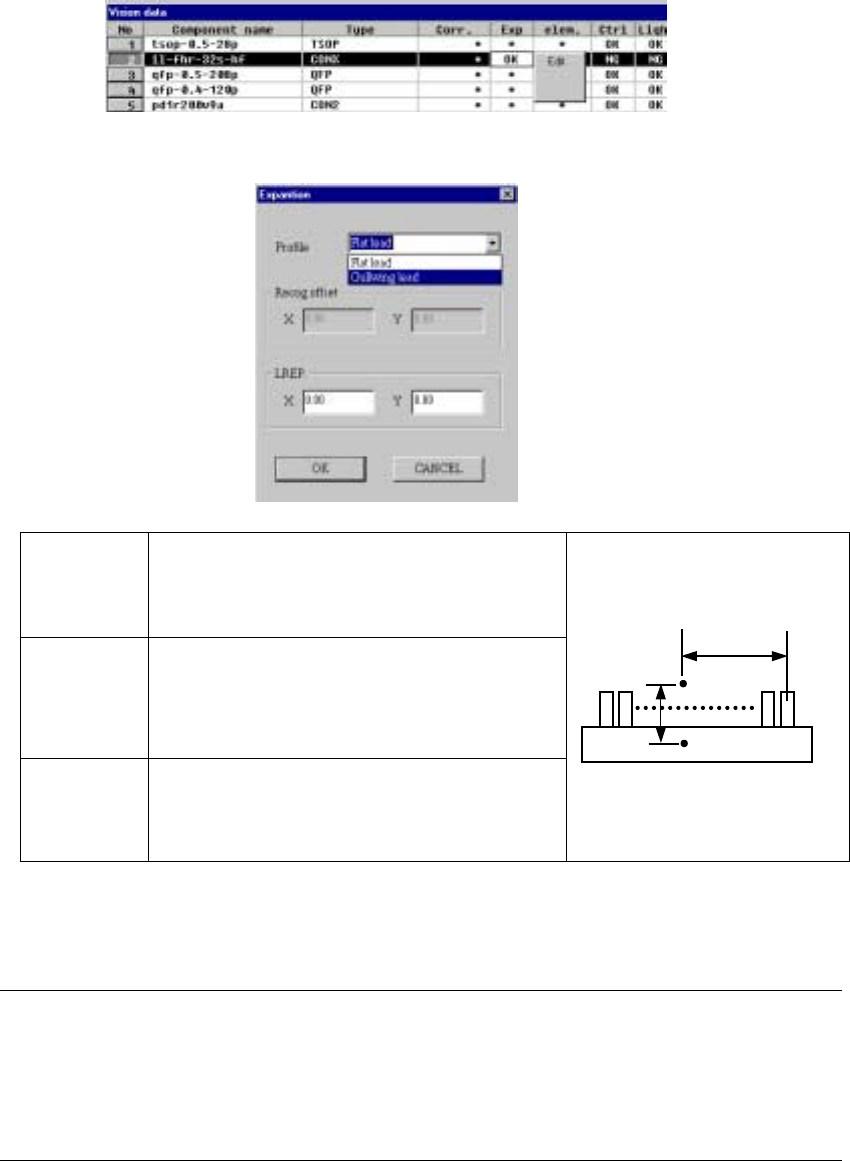
⑱ Exp (Expansion)
Set this item for an extended-lead connector, or unidirectional connector.
- When you click this item with the right button, the selection pop-up menu
appears on the screen.
▼ When you click the [Edit] command, the following screen appears.
Profile Set the shape of a lead.
- Flat lead
- Gullwing lead
By default, “Gullwing lead” is selected.
Recog offset
(Recognition
offset)
Displays the recognition center offset which was set on
the “Expansion” window invoked from the Component
data screen. You cannot edit any of these values on
this screen. This item shows the coordinates of the
lead center A with being viewed from the component
pick-up position C.
LREP.
(Rightmost
lead position)
Enter the coordinates of the rightmost lead position:
coordinates of the rightmost lead center B with being
viewed from the lead center A. The default value is
determined based on the lead pitch and number of
leads.
♦ When you finish entering all of data, click the <OK> button. The “Vision
data” screen reappears.
Notes:
①
The machine cannot recognize images of an extended-lead connector with
dividing it.
②
Note that only one point, the rightmost lead position is set on this screen, so
the recognition precision is insufficient.
C
CC
C
A
AA
A
B
BB
B
5 − 43
5.2.4 General-purpose vision components
5.2.4.1 Overview of a general-purpose vision component
The following types of components are handled as a general-purpose vision
component (“GNRL. vision” displayed as the component type):
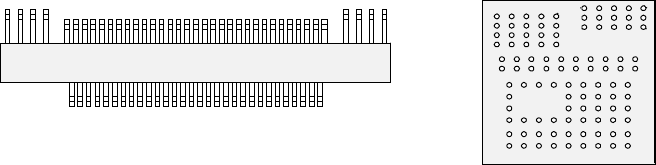
- Components having multi-pitch leads, components having various sized leads,
and components having leads at not-regulated positions (these components are
called “multi-lead” components; see Figure -1.)
- Area array components having two or more arrays (called “complex array
components”; see Figure -2.)
- Components having balls/lands on not-regulated positions (called “random
component”)
- Components having a side or corner (outline-recognized components)
• The components above are classified into the following sub-component types:
Multi-lead component: Lead component group
Complex array component and random component: Ball component
group
Outline-recognized component: Outline-recognized component group
• The data format definition of each type of components is as follows:
Multi-lead component, complex array component and outline-recognized
component → Element group/Element format
Random component → Extended array data format
* The “Element group/Element format” specifies an element to be recognized such
as a lead and ball, defines the group of the same elements (element group): the
pitch and/or quantity is the same, and specifies the direction and position of the
group.
The “Extended array data format” defines the element (ball and land) arrangement
with X and Y coordinates.
Figure -1 Figure -2
Ball component group
(Complex array component)
Lead component group (Multi-lead component)
5 − 44
5.2.4.2 Specifications of a general-purpose vision component
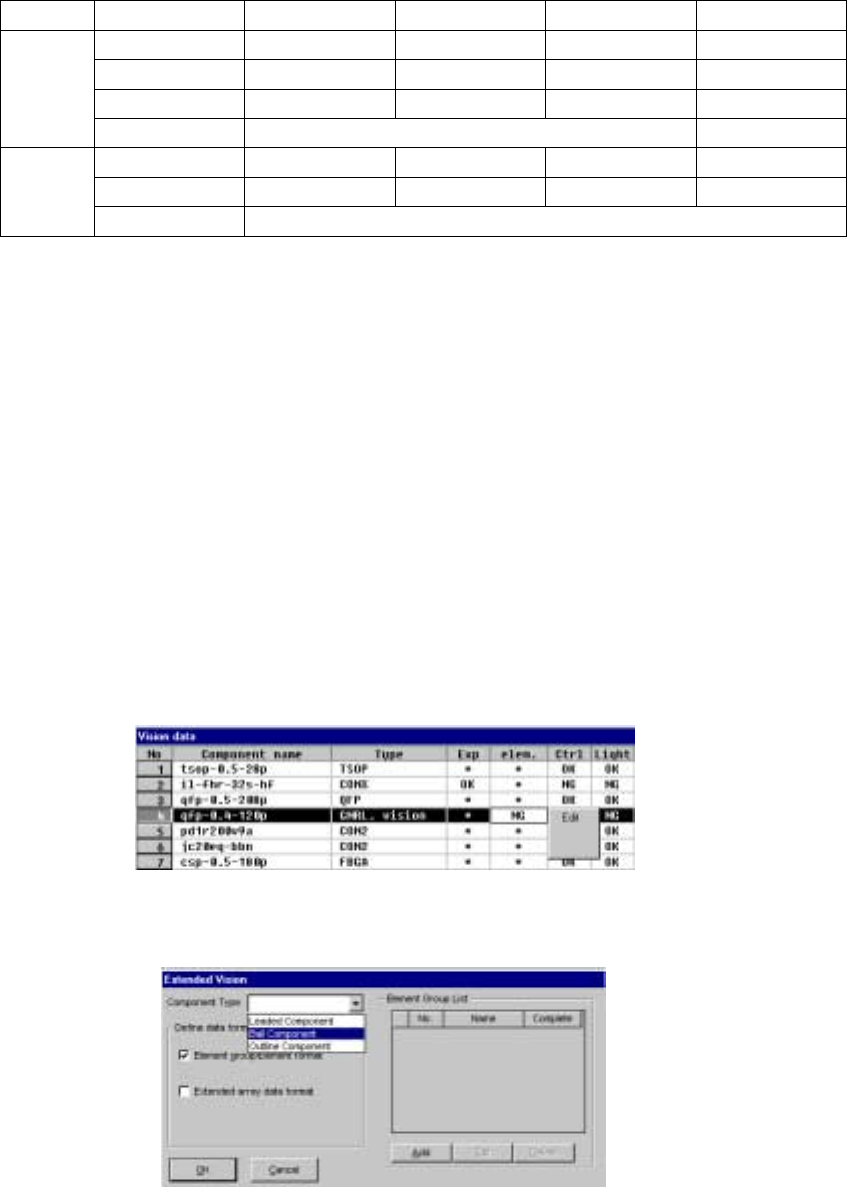
1) Quantity
- Up to 20 element groups can be defined per component.
- Only one element can be specified per element group.
2) Dimensions
Element Setting item Standard VCS Optional VCS1 Optional VCS2 Optional VCS3
Pitch 0.5 – 22.0 mm 0.4 – 15.0 mm 0.3 – 11.0 mm 0.3 – 6.5 mm
Wd (lead width) 0.22 – 10.0 mm 0.15 – 7.0 mm 0.12 – 5.0 mm 0.12 – 3.5 mm
Len (lead length) 0.4 – 10.0 mm 0.3 – 7.0 mm 0.2 – 5.0 mm 0.14 – 3.5 mm
Lead
element
Number of leads 1 to 384/element group
Pitch 1.0 – 22.0 mm 0.7 – 15.0 mm 0.5 – 11.0 mm 0.35 – 6.5 mm
Diameter 0.4 – 5.0 mm 0.28 – 3.5 mm 0.2 – 2.5 mm 0.14 – 1.5 mm
Ball/Land
element
Number of balls 3 to 6936/element group
3) Shape and size specifications of an outline-recognized component group
- The specifications of the corner/side shape are the same as those of the
outline-recognized component group (See “Limitation on components
depending on the recognition method” of “⑪ Contrast”, “5.2.3 Detailed
description of operation”).
- A filled circle and square marks can be used. A mark whose size is from 2
mm to 10 mm can be recognized with the standard VCS.
5.2.4.3 elem. (element)
This setting item is provided for components whose component type is set to “GNRL.
vision” in the “Type” cell and which cannot be recognized with normal Vision data
because their lead (ball) pitch or lead length is not the same as each other although
their component type is the same.
- When you click this setting item with the right button, the selection pop-up menu
appears on the screen as shown below.
• When you click the [Edit] command on the pop-up menu, the following screen
appears.