YSI_Prog_E.pdf - 第205页
Chapter 5 Inspection machine settings Contents 1 1.1 Registering a new operator 5- 1 1.2 Changing registered operator details 5- 4 1.3 Editing groups 5- 5 1.4 Editing access levels 5- 7 …
4-44
4
Inspection status
5
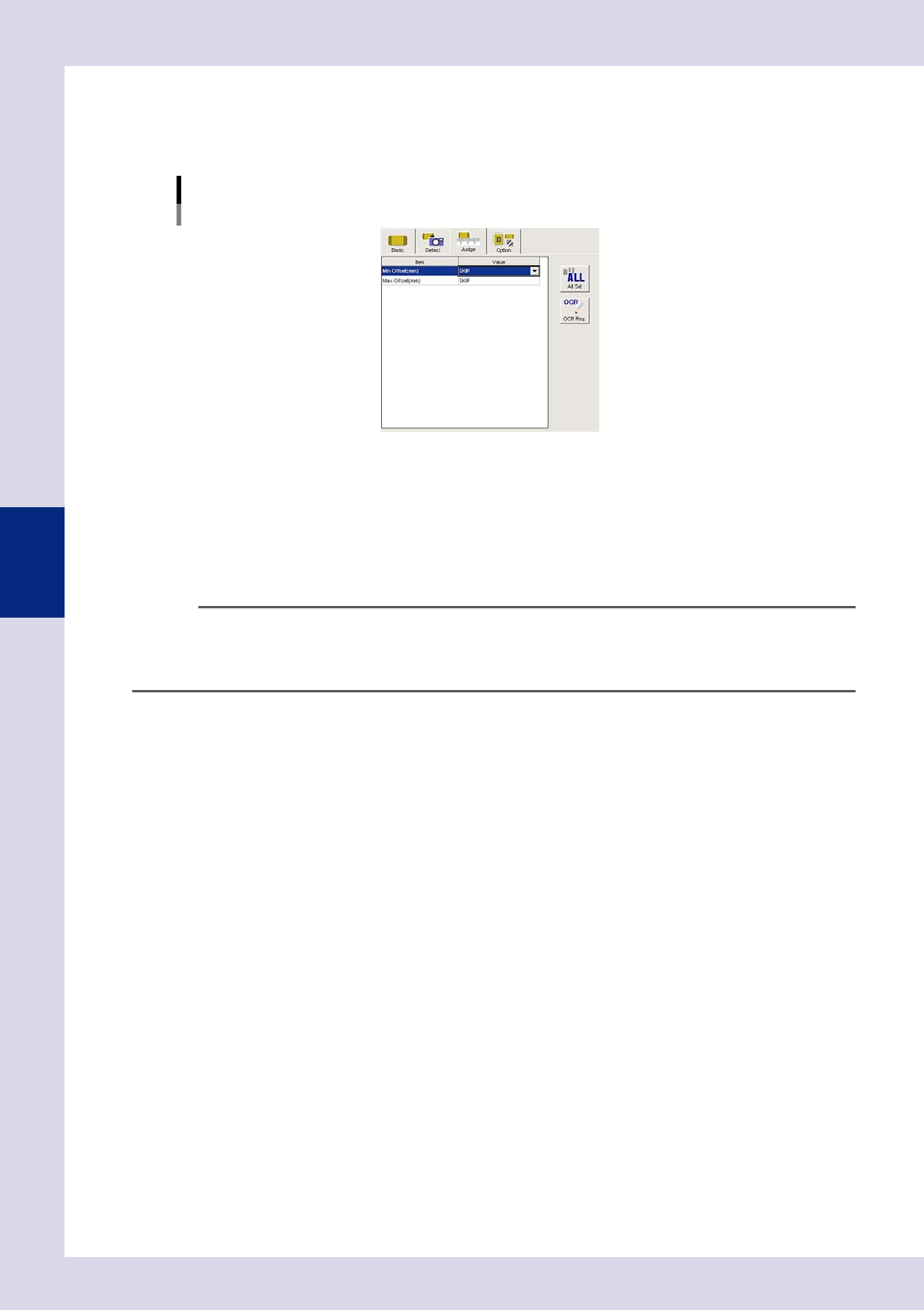
Set the "Judge" parameters.
Open the "Judge" tab, and enter the OK part height for "Min offset (mm)" and "Max offset (mm)". If the
standard has not been set, decide the minimum and maximum offset values based on the height
measurement result.
[Judge] tab
24466-P6-00
Min offset (mm)
An NG result is judged if the difference between the reference step reference height and point or line
measurement height is less than this value. Judgment is not made if set to "SKIP".
Max offset (mm)
An NG result is judged if the difference between the reference step reference height and point or line
measurement height is greater than this value. Judgment is not made if set to "SKIP".
n
NOTE
If height measurement is continued using the same reference height, copy and paste the step, and move it to the
height measurement location. The height reference will always be the previous height reference measurement step. If
the reference height measurement step position and height measurement step position are at a distance from one
another, measurement may be affected by board warp.
6
Perform a height measurement step test.
1. Select the height measurement step, and press the [Step] button to perform a step test. Test results
and detection data are displayed when testing is complete.
2. Take a note of and check the detection data, and then press the [End] button.
3. Refer to the detection data and review all parameters.
7
Perform a step test again.
If the test result is judged incorrectly, review all parameters.

Chapter 5 Inspection machine settings
Contents
1
1.1 Registering a new operator 5-1
1.2 Changing registered operator details 5-4
1.3 Editing groups 5-5
1.4 Editing access levels 5-7
8
2.1 Installation settings 5-9
2.2 Conveyor transfer settings 5-11
2
2.4 Server settings 5-13
2.5 Library settings 5-14
2.6 Editing signal tower settings 5-15
6
5-1
5
Inspection machine settings
1. Operator access control
All machine operations are restricted by password. This section describes operator registration and editing,
password setting, and level setting and editing.
n
NOTE
The settings described here can also be specified or edited by administrators with level 10 authority.
It is recommended that operator registration and work level editing be carried out before using the machine.
1.1 Registering a new operator
This section describes how to register a new operator, make group settings, and set an access level and
password.
1
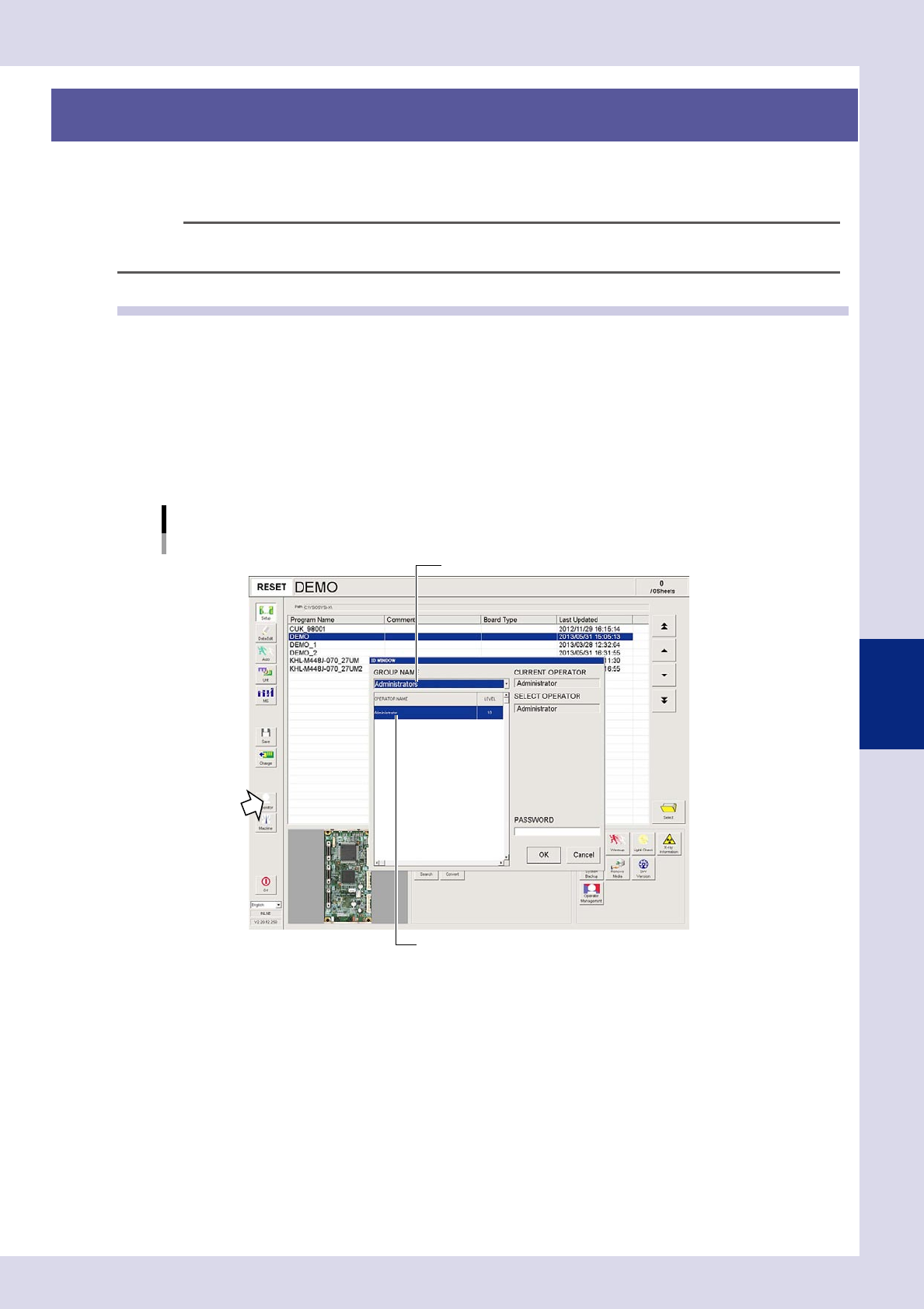
Press the [Operator] button to open the "ID WINDOW" screen.
2
Specify the group name and operator name, and then enter a password.
1. Select "ADMINISTRATORS" from the "GROUP NAME" drop-down list, and select "Administrator" (level
10) from the "OPERATOR NAME" list.
2. Enter a password and press the [OK] button. (If no password is set, press the [OK] button.)
Select "Administrator".
Select "Administrators".
"ID WINDOW" screen
24501-P6-00