00197714-01_IM_REQUIRED_STEPS_BEFORE_USING_SUPPORT_MEDIA_2.0_EN.pdf - 第32页
Required Steps be fore using Suppor t Media 2.0 12/2014 Edition 32 Figure 8-3 : Calling SIPLACE Pro Share Perm issions ► Click the Permissi ons button to access share per missions. Figure 8-4 : Adding Share permission s …
Required Steps before using Support Media 2.0 12/2014 Edition
31
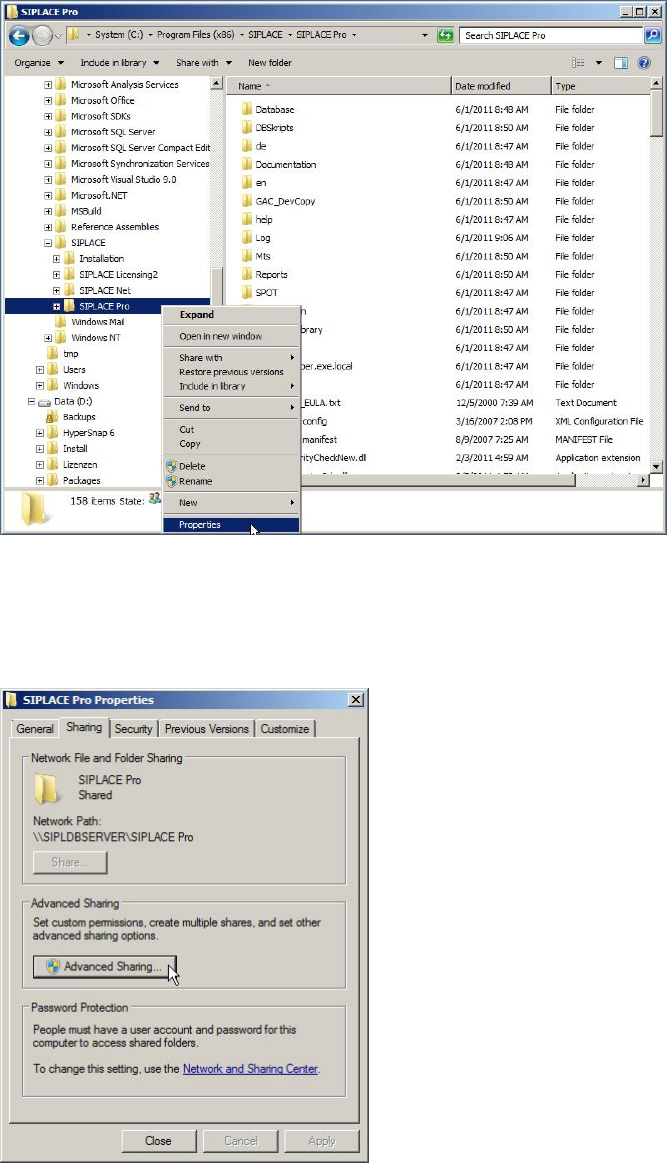
Figure 8-1: Calling Properties of SIPLACE Pro directory
► Open a new Windows Explorer window and browse to your SIPLACE Pro installation
folder
► Right-click the SIPLACE Pro folder and select Properties.
Figure 8-2: Sharing Properties of SIPLACE Pro folder
► Select the Sharing tab.
► Click at Advanced Sharing… to access the share permissions.
Required Steps before using Support Media 2.0 12/2014 Edition
32
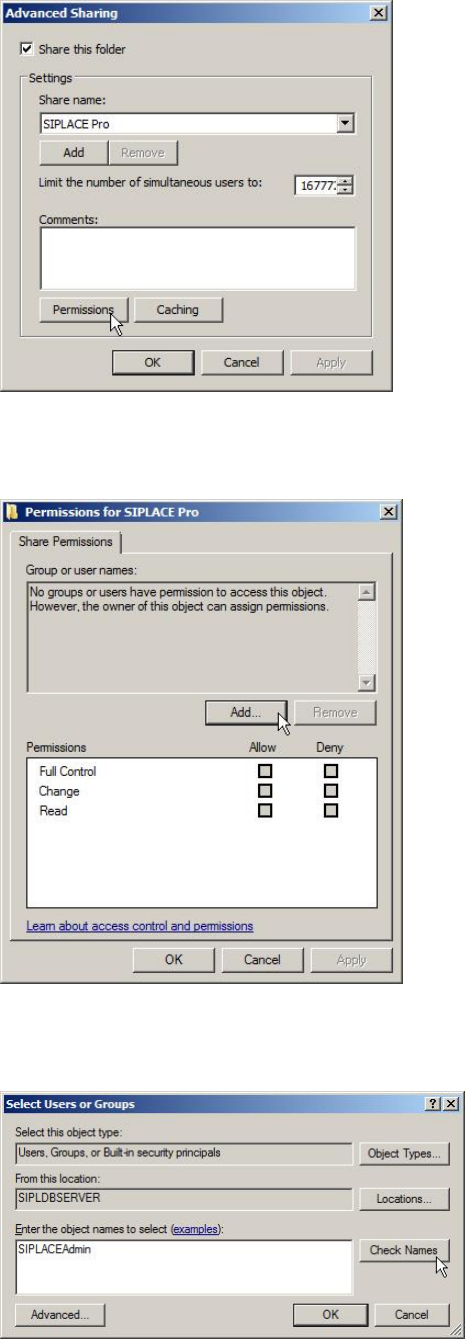
Figure 8-3: Calling SIPLACE Pro Share Permissions
► Click the Permissions button to access share permissions.
Figure 8-4: Adding Share permissions
► Click the Add… button.
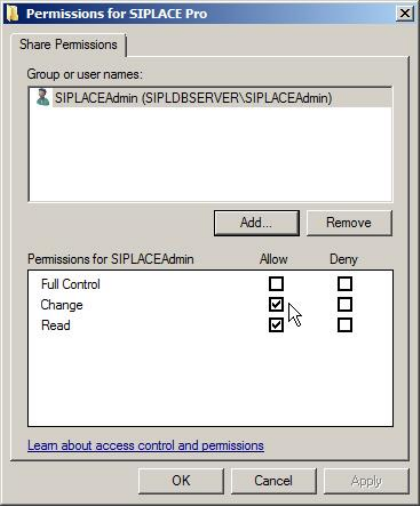
Figure 8-5: Adding SIPLACEAdmin account permissions
► Enter the SIPLACEAdmin account.
► Click on Check Names.
Required Steps before using Support Media 2.0 12/2014 Edition
33
Windows should detect the SIPLACEAdmin account.
► Click OK to close the window.
Figure 8-6: Giving SIPLACEAdmin change permissions on SIPLACE Pro share
► Go back to the previous window, select the SIPLACEAdmin account in the upper part
of the window.
► Check the checkbox besides Change in the Allow column.
► Click the OK button to apply the changes.
You have now prepared your SIPLACE Pro Server installation to be accessed by
SIPLACE Pro Client Setups.
8.2 Network Infrastructure
This chapter includes some hints and troubleshooting information, which you should be
familiar with when integrating computers in a network infrastructure.
8.2.1 Strictly distinguishing Networks
To avoid network identification and communication problems, you should:
– Use different IP subnet ranges for different networks; each network adapter should
access an own, dedicated IP subnet without overlapping.
– Only use the Default Gateway setting, if you have a default gateway.
– Avoid configurations where destination computers can be accessed using multiple
addresses. This means, don’t connect computers together using multiple network
cards and IP subnets – this makes no sense and provokes routing errors. For
example, MSMQ backchannel problems might occur if you do this.
– Use own, unique IP addresses and computer names for all computers in the network