00197714-01_IM_REQUIRED_STEPS_BEFORE_USING_SUPPORT_MEDIA_2.0_EN.pdf - 第37页
Required Steps be fore using Suppor t Media 2.0 12/2014 Edition 37 A wind ow similar to the foll owing opens. Figure 8- 12 : Advanced Net work Settings with SIPLACE_L AN networ k connection selected ► In the upper a rea,…
Required Steps before using Support Media 2.0 12/2014 Edition
36
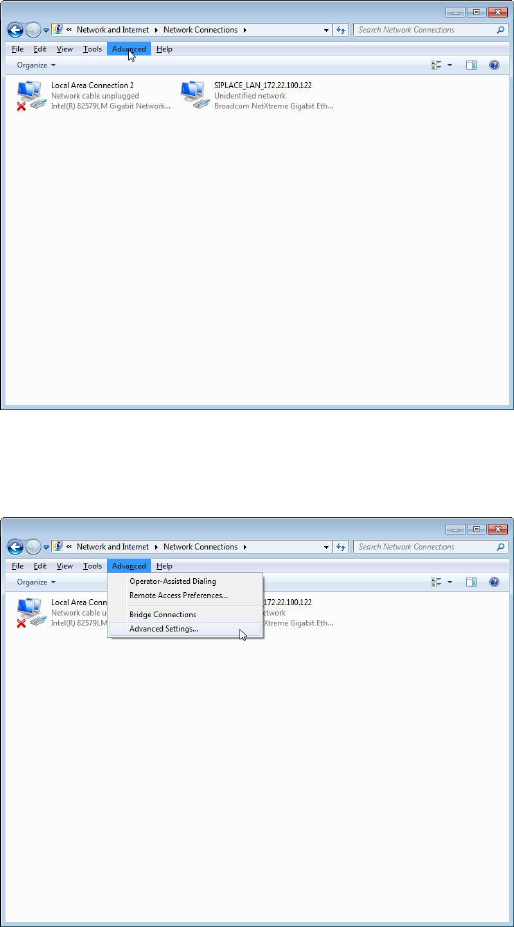
The window should look like the following.
Figure 8-10: Network Connections window with ALT key pressed and “Advanced” selected
► Click the item Advanced in the menu bar.
Figure 8-11: Selecting Advanced Settings from Network Connections
► Click the Advanced Settings… option.
Required Steps before using Support Media 2.0 12/2014 Edition
37
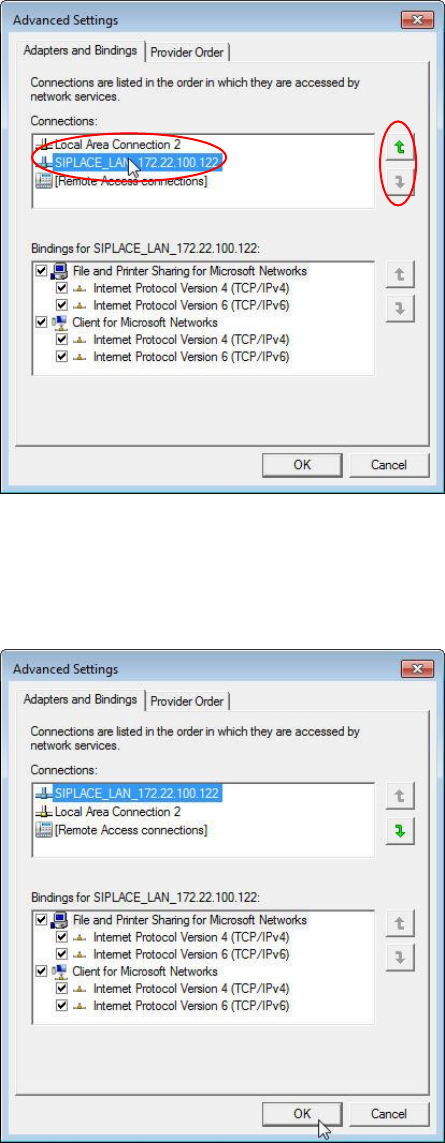
A window similar to the following opens.
Figure 8-12: Advanced Network Settings with SIPLACE_LAN network connection selected
► In the upper area, select the network connection for which you want to change the
order.
► Click the appropriate arrow button to move the connection up/down in the order.
Figure 8-13: Advanced Network Settings with Network Connections order changed
► After you changed the order complying with your wishes, click the OK button to apply
the setting.

Item-no. / Artikel-Nr.: 00197714-01
ASM Assembly Systems GmbH & Co. KG
Rupert-Mayer-Straße 44
81379 München
Deutschland
www.siplace.com