User Manual - SIPLACE Glue Feedeer.pdf - 第55页
4 Operation 4.2 Individual Functions in Stations Software 706.1 and Higher User Manual SIPLACE Glue Feeder 05/2020 55 4.2.5 Managing Parameter Sets NOTICE Access privileges In order to use this function, you need access …
4 Operation
4.2 Individual Functions in Stations Software 706.1 and Higher
54 User Manual SIPLACE Glue Feeder 05/2020
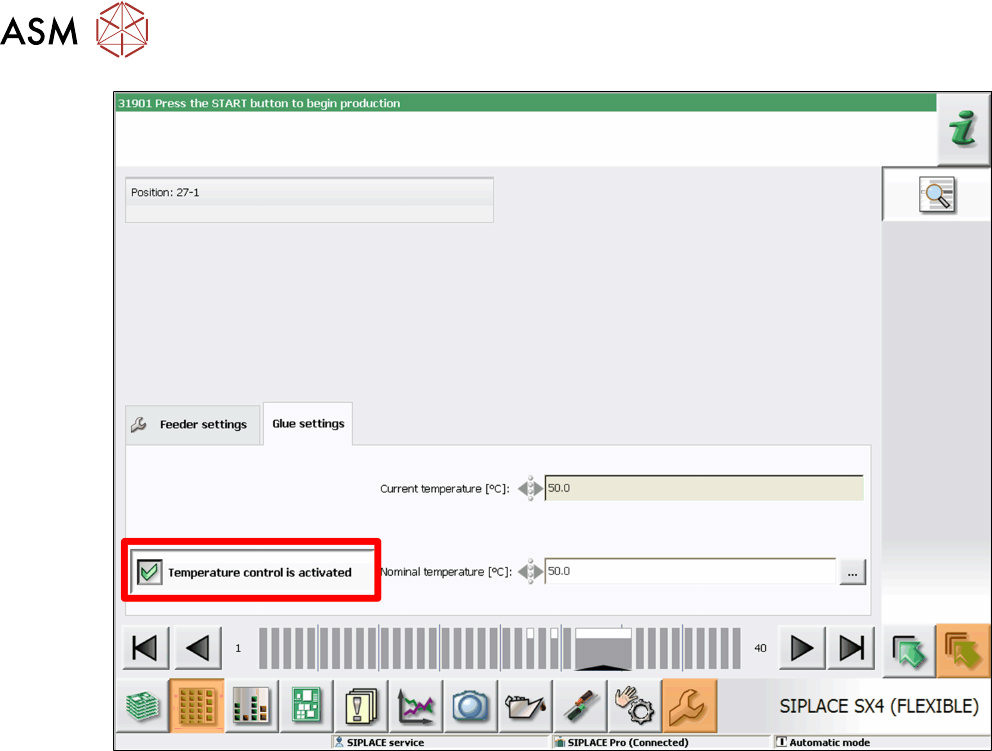
The glue is warmed up via a heating function fitted to the nozzle. This heating function is normally
enabled when a board with components requiring gluing is moved into the placement area. The
heating is switched on and remain active for 10 minutes. It remains active for an additional 10
minutes for each board moved into the placement area.
► For immediate warming up of the glue and to avoid waiting periods after moving in the board,
enable the option Temperature Control is Activated
.
4 Operation
4.2 Individual Functions in Stations Software 706.1 and Higher
User Manual SIPLACE Glue Feeder 05/2020 55
4.2.5 Managing Parameter Sets
NOTICE
Access privileges
In order to use this function, you need access to the Service level. This access privilege is
checked when you open the function.
The parameter sets are used to manage the settings with which the Glue Feeders on this station
should process the components to be placed.
The parameter sets contain the following information:
●
Diameter of each glue dot
– The distance between the components and the dispenser nozzle
– The number of shots used to make the glue dot.
●
The cycle time between 2 shots.
●
The glue temperature to be used for all glue dots.
●
The interval at which the dispenser nozzle is to be checked for contamination.
To manage parameter sets, proceed as follows:
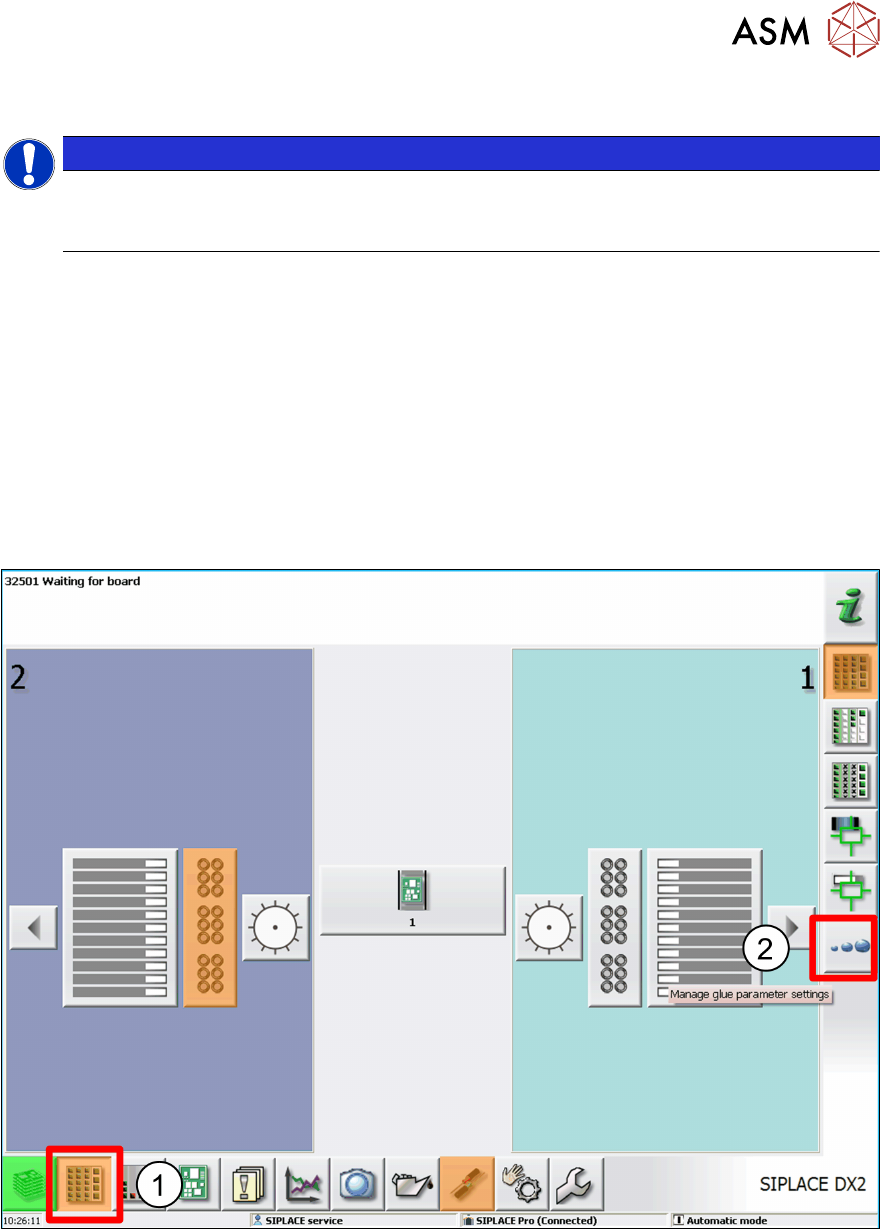
► Click on the Feeders, Components and Nozzles ... icon (1).
► Click on Manage Glue Parameter Settings. (2)
An overview of the existing parameter sets will be shown.
4 Operation
4.2 Individual Functions in Stations Software 706.1 and Higher
56 User Manual SIPLACE Glue Feeder 05/2020
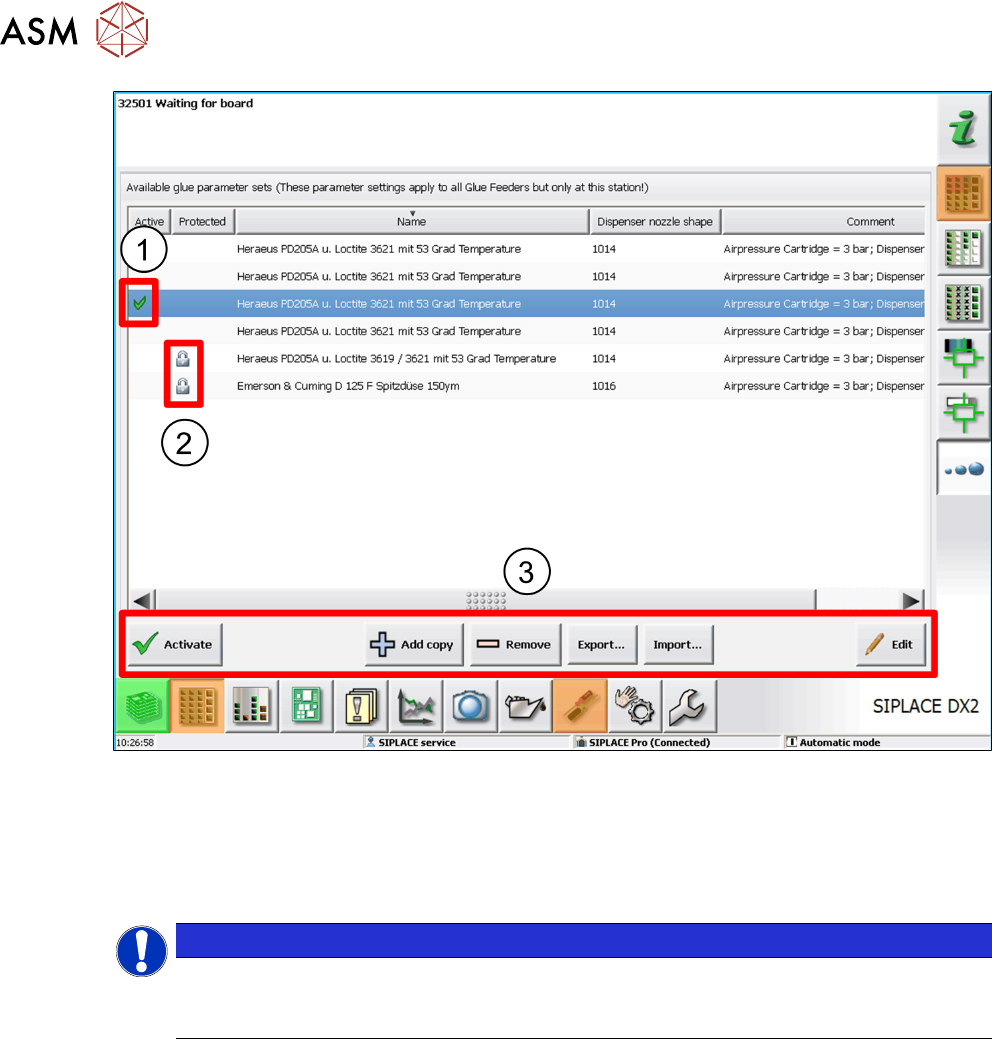
The icon in the Active(1) column marks the parameter set which is currently set for the Glue
Feeder at this station.
The standard parameter sets supplied are marked in the Protected column by a padlock icon(2).
These standard parameter sets contain the default settings suitable for both dispenser nozzle
types 1014 (flat) and 1016 (needle). To define your own parameter sets, copy the standard para-
meter set for the relevant dispenser nozzle and then modify it to suit your requirements.
NOTICE
Enable parameter set to match the dispenser nozzle
Make sure that the enabled parameter set always matches the dispenser nozzle which is
currently on the Glue Feeder.
Use the following buttons to open the various functions of this dialog (3):
Activate
Enables the marked parameter set. This parameter set will then be used immediately as the Glue
Feeder setting.
Add copy
Creates a copy of the marked parameter set. This copy can be used as a basis for a new para-
meter set and then adjusted accordingly.
Remove
Deletes a marked parameter set.
Export...
Starts a dialog in which you can save the marked parameter set in a folder of your choice. This
parameter set can then be used at another machine.
Import ...
Starts a dialog in which you can copy a parameter set from a folder of your choice. This parameter
set can then be used for the Glue Feeder or edited.
Edit
Starts a dialog in which you can adjust the marked parameter set to your requirements.