PR8111、PR8112_user_manual_eng_20191015H.pdf - 第11页
Operating Precautions 8 Connecting Cables • The maximum input volt age is 250 VDC. Attempting to measure volt age in excess of the maximum input could destroy the instrument and result in personal injury or death. • The …
Operating Precautions
7
How to install batteries: "Installing Alkaline Batteries" (p. 17)
How to connect the adapter:"Connecting the AC adapter" (p. 18)
If you connect the AC adapter while batteries are installed in the instrument, the AC
adapter takes precedence.
Using the Batteries
• To avoid electric shock, turn off the POWER switch and disconnect the AC adapter
and connection cables before replacing the batteries.
• After replacing the batteries, replace the cover and screws before using the instru-
ment.
• Battery may explode if mistreated. Do not short-circuit, recharge, disassemble or
dispose of in fire.
• Handle and dispose of batteries in accordance with local regulations.
• Keep batteries away from children
• Do not mix old and new batteries, or different types of batteries. Also, be careful to
observe battery polarity during installation. Otherwise, poor performance or damage from
battery leakage could result.
• Use only the specified type of battery (six LR20 alkaline batteries).
• To avoid corrosion and damage to this instrument from battery leakage, remove the bat-
teries from the instrument if it is to be stored for a long time (for a month).
• After use, always turn OFF the power.
• You can check the remaining battery life with the LED on the left side of the instrument. (p.
10)
Using the AC Adapter
• Use only the supplied Model 9418-15 AC Adapter. AC adapter input voltage range is
100 to 240 VAC (with ±10% stability) at 50/60 Hz. To avoid electrical hazards and
damage to the instrument, do not apply voltage outside of this range.
• To avoid electrical accidents and to maintain the safety specifications of this instru-
ment, connect the power cord provided only to a 3-contact (two-conductor +
ground) outlet.
• Turn the instrument off before connecting the AC adapter to the instrument and to
AC power.
• Before turning the instrument on, make sure the supply voltage matches that indi-
cated on the AC adapter. Connection to an improper supply voltage may damage
the instrument or AC adapter and present an electrical hazard.
• For safety reasons, disconnect the power cord when the instrument is not used and
before connecting it to a device to be tested.
• To avoid damaging the power cord, grasp the plug, not the cord, when unplugging it from
the power outlet.

Operating Precautions
8
Connecting Cables
• The maximum input voltage is 250 VDC. Attempting to measure voltage in excess
of the maximum input could destroy the instrument and result in personal injury or
death.
• The maximum rated voltage between input terminals and ground is 300 VAC, DC.
Attempting to measure voltages exceeding 300 V with respect to ground could
damage the instrument and result in personal injury.
• To avoid electrical accidents, confirm that all connections are secure. The
increased resistance of loose connections can lead to overheating and fire.
• To avoid experiencing an electric shock or causing a short-circuit at the input ter-
minals, only insulated crimp contacts should be used on wires being connected to
input pins. (The input terminal pin diameter is M6.)
1.1 Product Overview and Features
9
1
The PR8111 and PR8112 are compact, lightweight, highly portable pen recorders. You can select
from two power sources (AC adapter or dry-cell batteries) according to where the instrument is
being used, assuring your ability to record data immediately and easily with unparalleled reliability,
wherever you are.
Overview Chapter 1
1.1 Product Overview and Features
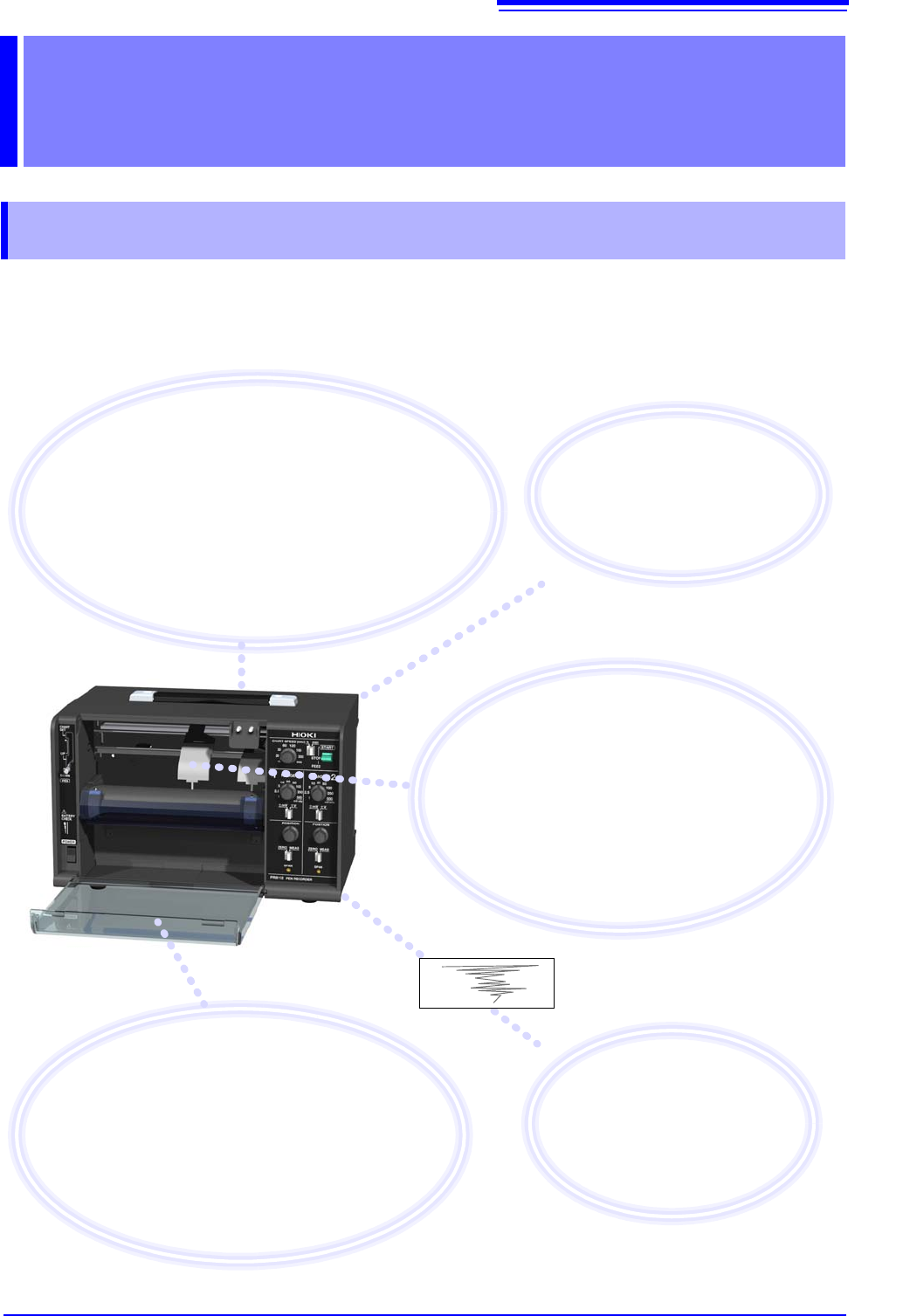
Record, verify, and notate
measurement results in the field
Measurement results are recorded on paper, allowing
them to be easily verified. You can also make notes on the
paper in the field. Additionally, the instrument can measure
voltage output from other equipment, allowing it to be used
in maintenance applications such as corrosion prevention
systems. It can also record analog output, for example
from sensors and physics or chemistry instruments.
Assess changes in easy-to-see
color waveforms by watching
pen movements
The instrument can use red, green, and blue
pens (option). Waveforms are easy to see, even
outdoors, and can be stored for extended periods
of time. Additionally, you can assess waveform
changes in real time simply by watching the in-
strument’s pens as they move.
Preserve important recordings
Record with the front cover open to protect
recording paper from dirt on the ground.
Record with the front cover closed to keep out
dust and wind.
You can also use the included drip-proof vinyl
cover to protect the instrument from water
droplets and dust.
Select the power source
according
to your location
The instrument can be operated us-
ing either the AC adapter or dry-cell
batteries.
Easily compare and
verify results on paper
You can easily discover changes
and abnormalities by comparing
recordings with previously record-
ed waveforms.