PR8111、PR8112_user_manual_eng_20191015H.pdf - 第19页
2.3 In stalling the Pe ns 16 Use only gen uine HIOKI P- 1200 series felt pens in the instrument. 2.3 Inst alling the Pens Colors: P- 1201 (red) , P-1202 ( green), P1 203 (blue) The letters A through C are appended to the…
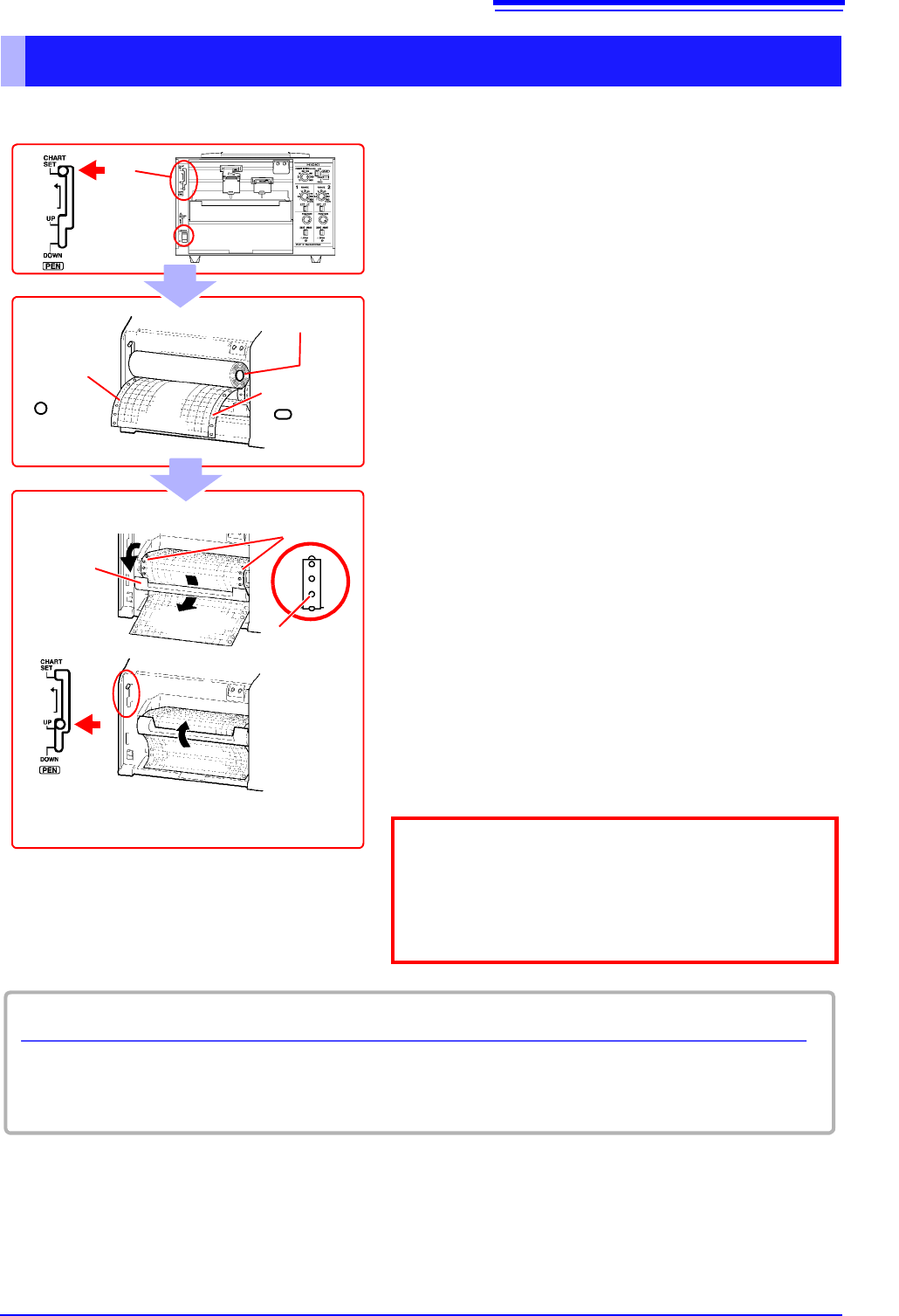
2.2 Loading Recording Paper
15
1
Loading Roll Recording Paper
2
Pen lever
1
Round
holes
Chart holder
Oval holes
3
1 Turn on the POWER switch.
2 Set the pen lever to the CHART SET (top)
position and lock the lever in place by moving
it to the left.
The platen will be raised, and the pens will auto-
matically move to the far right.
3 Load the recording paper into the chart holder
with the round holes on the left and the oval
holes on the right.
4 Open the chart cover, pass the top of the
recording paper through the opening, and pull
the top edge through.
5 Align the paper so that the sprockets engage
the round holes on its left edge.
6 In the same way, align the paper so that the
sprockets engage the oval holes on its right
edge.
7 Close the chart cover.
8 Set the pen lever to the UP (middle) position.
The platen will be lowered.
Chart cover
5,6
Sprockets
4
7
Lower the START/STOP/FEED switch to the FEED
position to feed the paper and verify that it has been
properly loaded. You can press and hold the switch in
the FEED position for at least 2 seconds to increase
the feed speed.
8
Remaining recording paper
The amount of recording paper remaining (in cm) is indicated on the left edge of the paper.
Red marks will appear on the right side of the paper when there is only about 100 cm of paper left.
2.3 Installing the Pens
16
Use only genuine HIOKI P-1200 series felt pens in the instrument.
2.3 Installing the Pens
Colors: P-1201 (red), P-1202 (green), P1203 (blue)
The letters A through C are appended to the above part numbers depending on the pen type (speed).
(A: standard; B: high-speed; C: low-speed)
See: "Options" (p. 2)
The P-1201A and P-1202A (PR8112 only) pens that ship with the instrument are the standard “A” type.
Use these pens for general recording work.
• If you need to record at a low paper feed speed of 120 mm/h or less…
Use “C” low-speed type pens (P-1201C, etc.) for less running.
• If you need to record at a high speed or want the waveform to dry more quickly…
Use “B” high-speed type pens (P-1201B, etc.).
• Be sure to stop pen operation before attempting to install or replace pens. Do not apply
excessive force to the pens during recording. Doing so may damage the instrument.
• After use, recap each pen. Leaving the pens uncovered may cause the pen tip to dry out,
making it impossible to record waveforms.
• Once a pen has run out of ink, developed a thick tip, or grown too short, it cannot be used
anymore. Replace it with a new pen.
• Store unused pens at room temperature, avoiding high temperature and humidity.
• Dispose of used pens in accordance with local regulations.
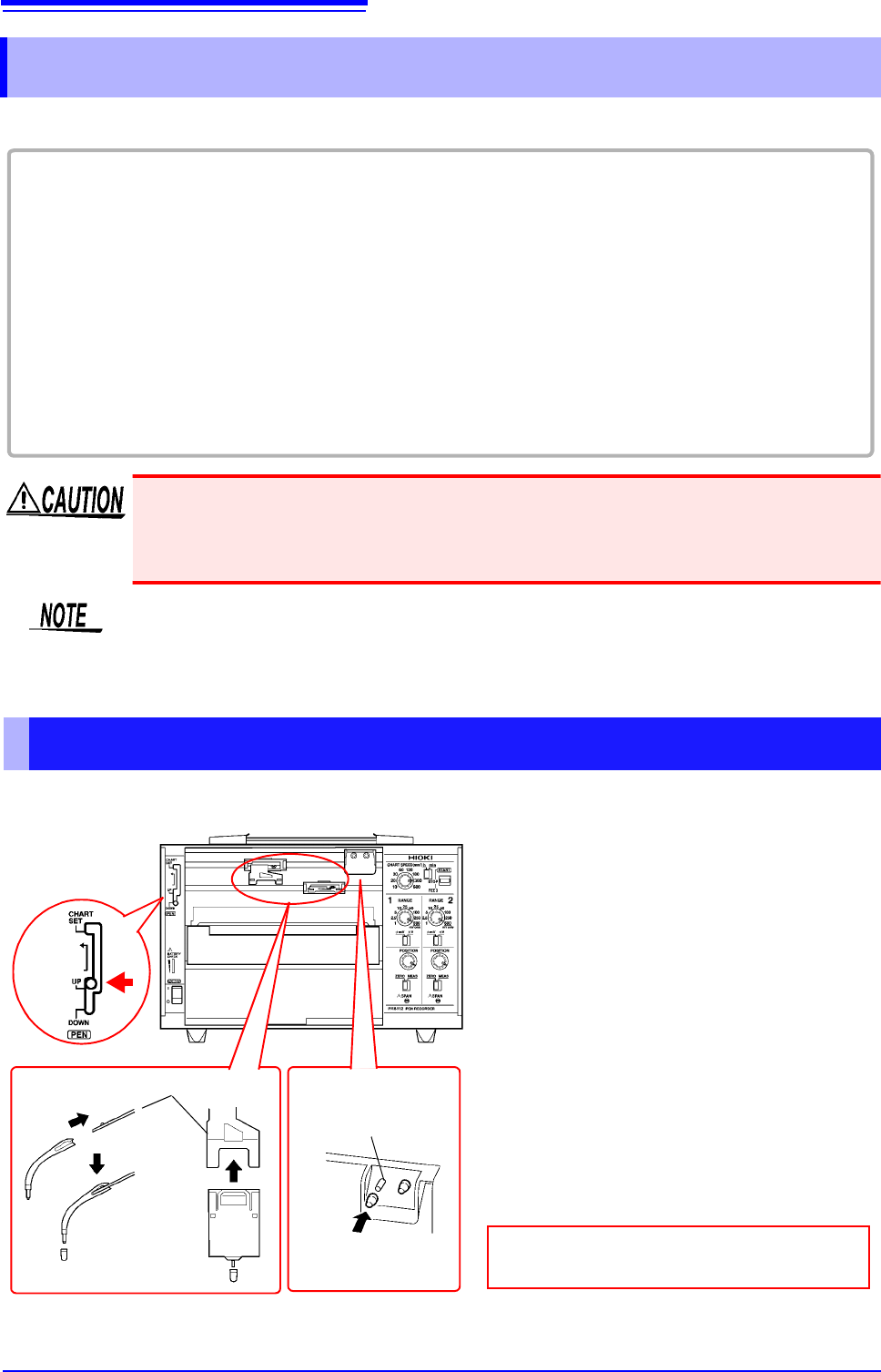
Installing Pens and Using the Pen Caps
1 Set the pen lever to the UP (middle)
position.
The pens will be raised from the recording
paper.
2 Firmly insert the pen as far as it will go
into the pen holder.
Verify that the pen has been inserted as
far as it will go.
3 Remove the pen cap and place it on
the pen cap storage pin.
Pull the cap toward you away from the
pen to remove it.
Pen lever
Pen holder
Pen cap storage
pins
1
2
Return the pen caps to the pen tips after
use to keep the pens from drying out.
For the PR881 (2-pen model), the forward (upper) pen holder is CH1, and the rearward (lower) pen holder is
CH2.
3
Viewed from side
2.4 Connecting the Power Source (Alkaline Batteries or AC Adapter)
17
1
You can power the instrument with either mains power or batteries, depending on where you’re
using it. If you use mains power while batteries are installed in the instrument, the AC adapter takes
precedence.
When you are unable to operate the instrument using mains power, you can power it with six LR20
alkaline batteries instead. The batteries will also serve as a backup power source in the event of a
power outage when using mains power.
2.4 Connecting the Power Source (Alkaline
Batteries or AC Adapter)
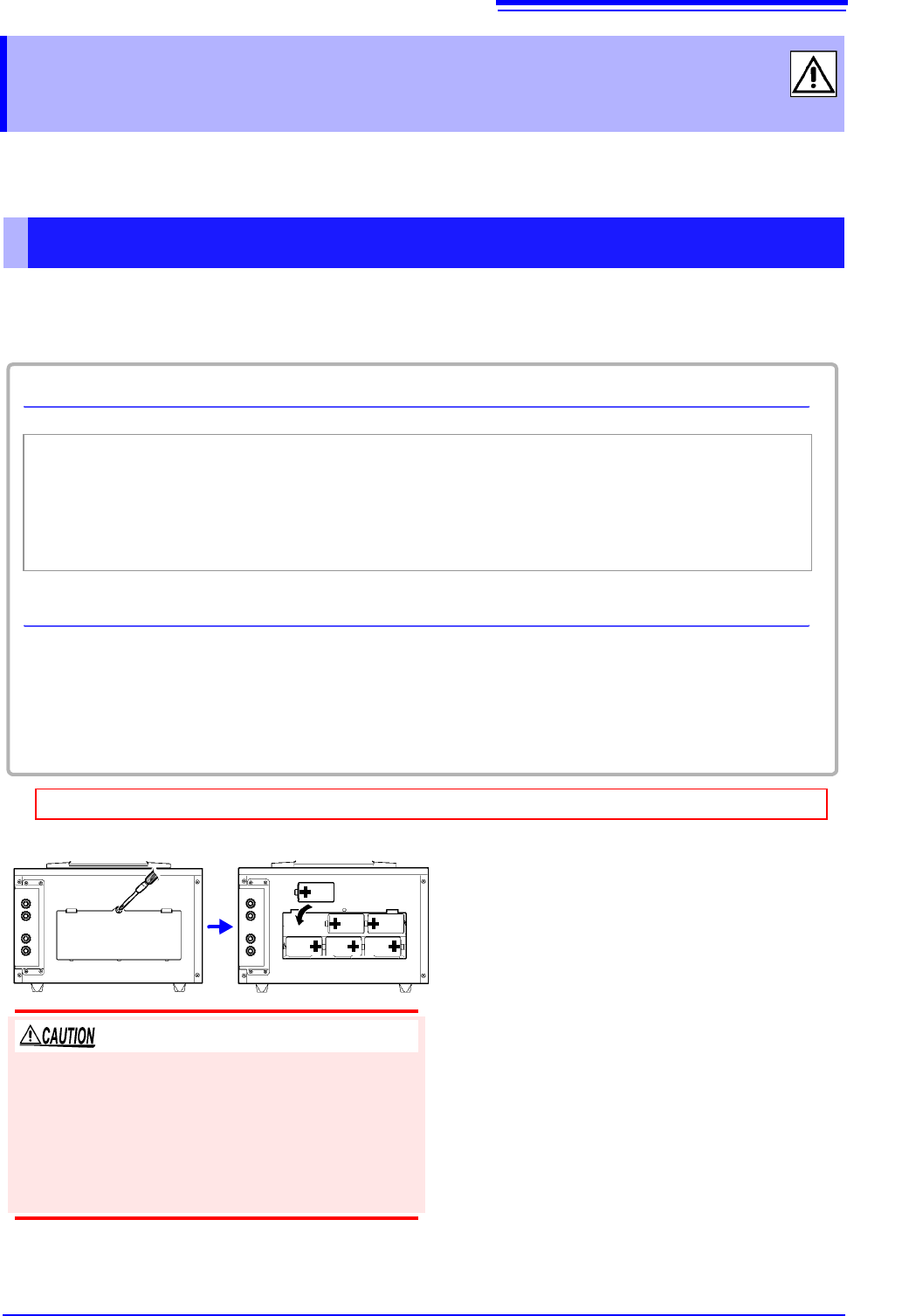
Installing Alkaline Batteries
Checking the remaining battery life
You can check how much battery life remains with the Power LED.
Green Indicates ample remaining battery life.
(Also lights up when powering the instrument with the AC adapter.)
Orange Indicates limited remaining battery life. It is recommend to have new batteries ready to use.
Red Indicates low remaining battery life.
It is recommended to replace the batteries in the instrument with new batteries.
Estimated operating times
• PR8111 (1-pen model): Approx. 50 hours
• PR8112 (2-pen model): Approx. 25 hours
When using the PR8112 (2-pen model) with just one pen, you can set the CH2 POWER switch on the
rear of the instrument to OFF to realize similar operating times as for the PR8111 (1-pen model).(p. 26)
Before installing batteries into the instrument, be sure to read "Using the Batteries" (p. 7).
Required: One Phillips head screwdriver, six LR20 alkaline batteries
1 Turn off the POWER switch.
If the instrument is connected to the AC adapt-
er and cables, disconnect them.
2 Use the screwdriver to remove the screws
holding the battery cover in place on the
back of the instrument and remove the
battery cover.
3 Install six new LR20 alkaline batteries.
4 Reattach the battery cover and tighten it
securely in place with the screws
removed in step (2) above.
The battery cover is held in place by M3-size screws.
To ensure safe operation, affix the battery cover with
screws. Avoid mixing new and old batteries or differ-
ent types of batteries. Note the positive and negative
poles and exercise care not to install the batteries
backwards. Doing so may result in degraded perfor-
mance or cause the batteries to leak.