Galaxy EX Squeegee Module.pdf - 第12页
SQUEEG EE MODULE REPLACEMENT PRO CEDURES 10. 12 Tech nical Refere nc e Manu al Ch apte r Issue 4 , Jun 18 3. Fit the required co nfigurati on of squee g ees to th e p rinthead mech a ni sm sq ue eg ee m o unts. NOTE Sque…
SQUEEGEE MODULE
REPLACEMENT PROCEDURES
Chapter Issue 4, Jun 18 Technical Reference Manual 10.11
Fitting The
Squeegee
Printhead
Mechanism
The following procedure details how to fit the squeegee printhead mechanism
to the machine:
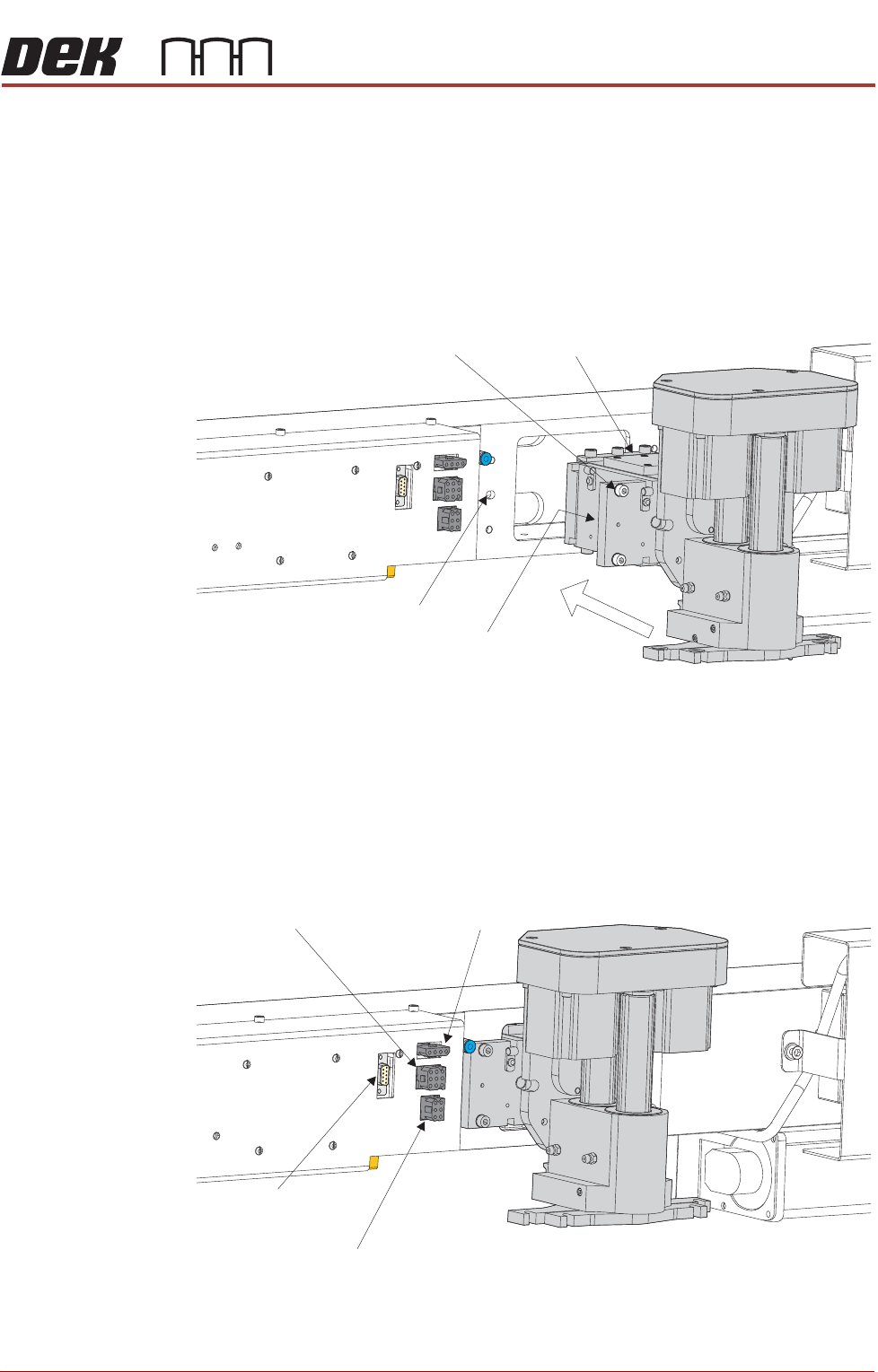
1. Carefully position the rear of the printhead mechanism (spring beam
assembly) into the print carriage so that both printhead mechanism dowels
locate into the print carriage locating holes. Secure the unit to the print car-
riage by means of the four captive screws, ensuring the pneumatic pipe is
not trapped.
2. Connect the following connectors to the print carriage, left hand side:
• Rear Squeegee Motor
• Front Squeegee Motor
• Home Sensors
• Squeegee Pressure Amplifier
Captive Screw (in 4 positions) Spring Beam Assembly
Locating Dowel
(in 2 positions)
Print Carriage Locating
Hole (in 2 positions)
Rear Squeegee
Motor (9SK17)
Front Squeegee
Motor (9SK16)
Home Sensors
(9SK08)
Squeegee Pressure
Amplifier (N3SK16)
SQUEEGEE MODULE
REPLACEMENT PROCEDURES
10.12 Technical Reference Manual Chapter Issue 4, Jun 18
3. Fit the required configuration of squeegees to the printhead mechanism
squeegee mounts.
NOTE
Squeegee fitting information is detailed in the Replacement Procedures
section of this chapter.
4. Switch the mains isolator to ON.
5. Press the Start button.
6. Ensure the machine recognizes the squeegee module fitment by display-
ing Squeegees Uninitialised during the machine initialisation sequence.
Squeegee Drive
Belt Replacement
To prepare the machine to replace a broken squeegee drive belt carry out the
following procedure:
1. From the Ready page select Open Cover Commands.
2. Select Carriage To Front.
3. Select Back.
4. Select Shut Down.
5. Select Continue.
6. Switch the mains isolator to OFF.
7. Open the front printhead cover.
8. Remove squeegees if fitted.
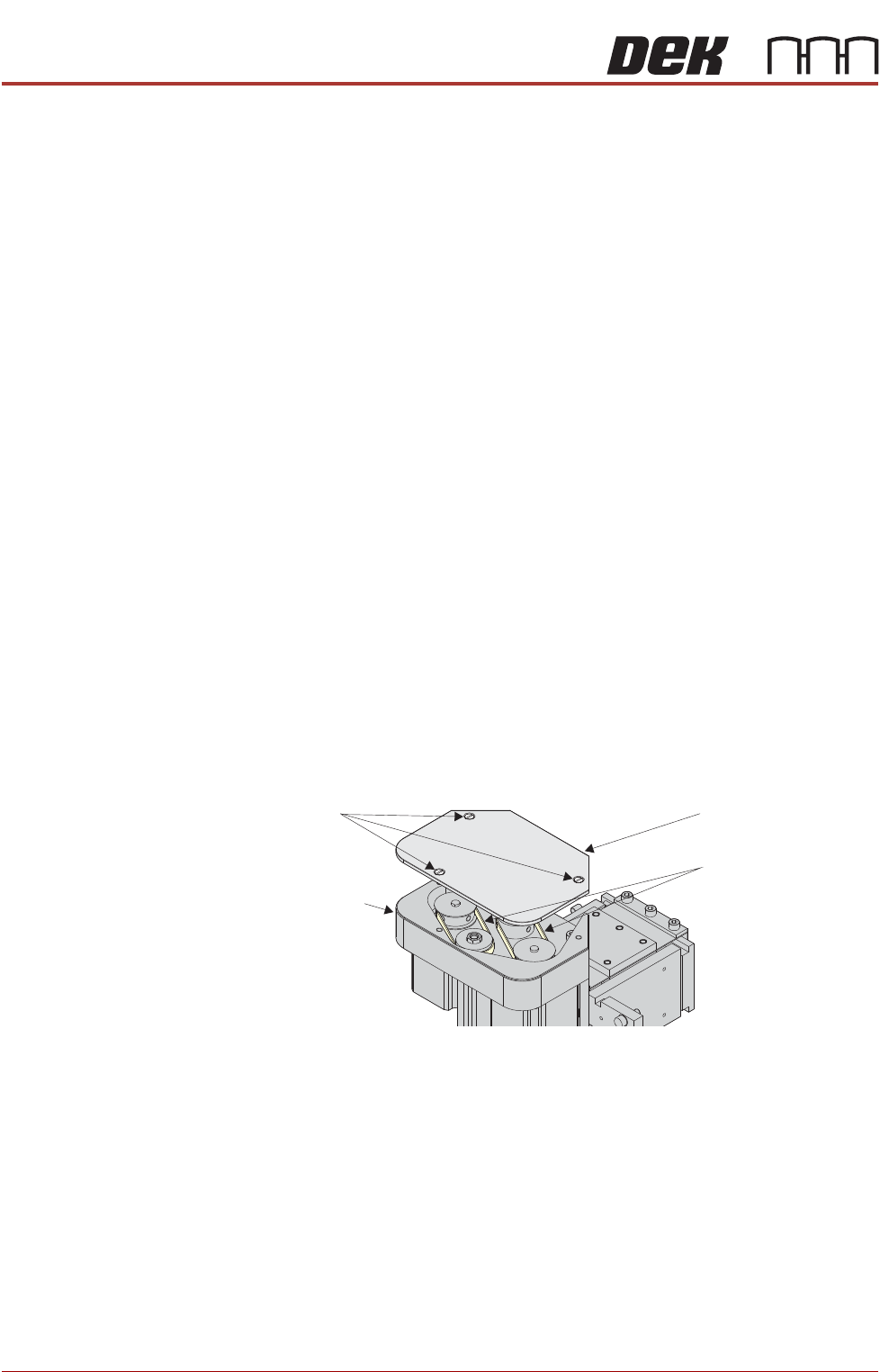
9. Remove the drive belt cover plate from the squeegee printhead mecha-
nism and remove the broken drive belt.
Rear Squeegee
Drive Belt
To replace a broken rear squeegee drive belt carry out the following
procedure:
1. The rear squeegee drive belt (right hand stepper motor) can be replaced
without having to remove the printhead mechanism from the print carriage.
Drive Belt Cover Plate
Drive Belts
Squeegee Printhead
Mechanism
Securing Screws
SQUEEGEE MODULE
REPLACEMENT PROCEDURES
Chapter Issue 4, Jun 18 Technical Reference Manual 10.13
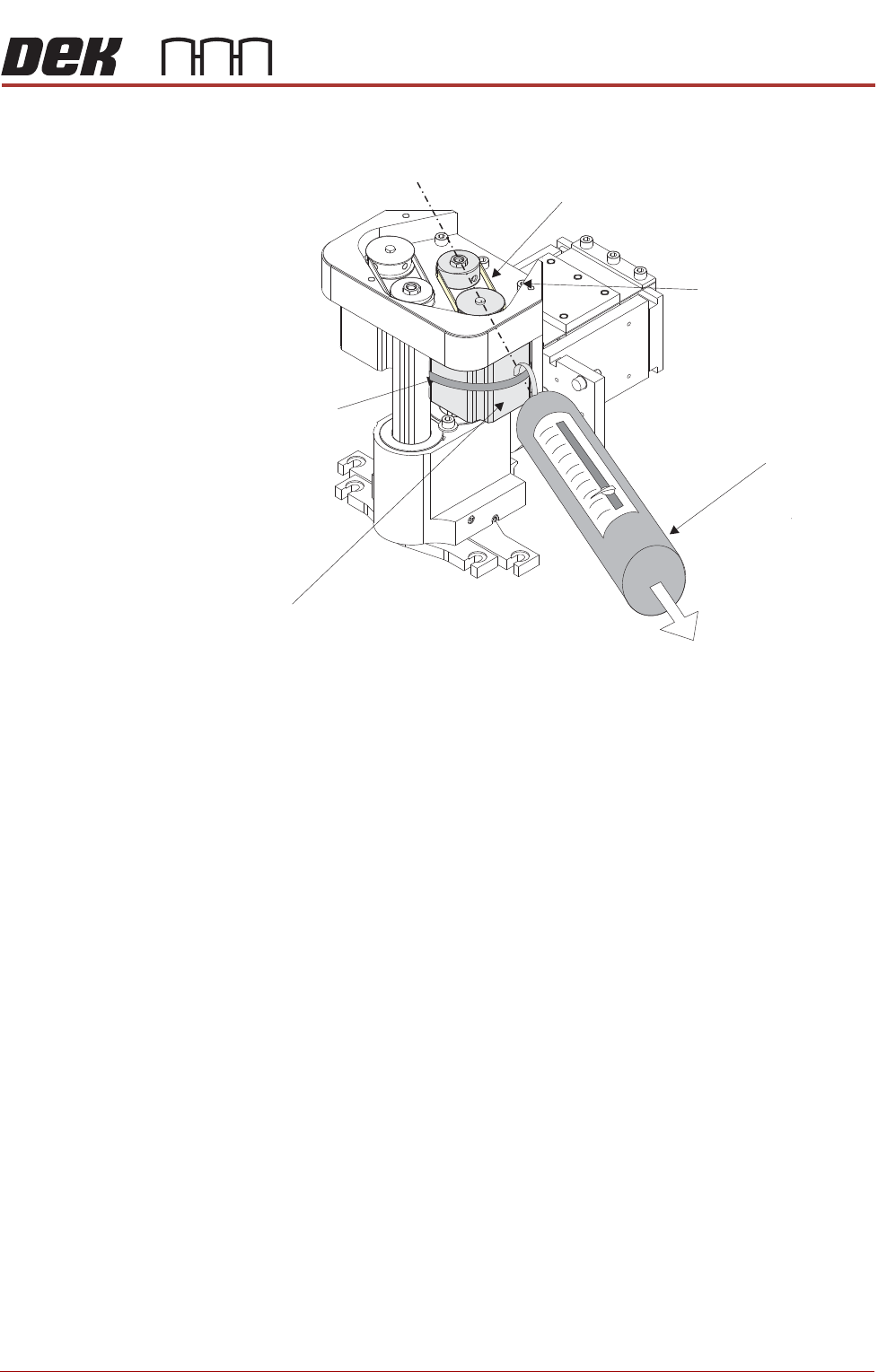
2. Slacken off the three screws securing the right hand motor to the motor
support plate.
3. Fit the new belt in position.
4. Using a cable tie wrap or similar, provide a loop around the top of the body
of the motor enabling the motor to be pulled using a force meter. Ensure
that the force meter is pulled in the direction which the drive belt is fitted,
figure above refers.
5. Pull the force meter until a tension of 3 to 4kgs is monitored on the meter.
Tighten the three screws whilst the motor is under tension.
Front Squeegee
Drive Belt
To replace a broken front squeegee drive belt carry out the following
procedure:
1. To replace the front squeegee drive belt (left hand stepper motor), the
printhead mechanism must be removed from the print carriage.
Tension in Direction of
Drive Belt Orientation
Right Stepper Motor
Rear Squeegee Motor Tensioning
Force Meter
Motor Securing Screw
Position (3 positions)
Looped Cable Tie
Drive Belt