Galaxy EX Squeegee Module.pdf - 第4页
SQUEEG EE MODULE OVERVI EW 10. 4 Te chni cal Ref ere nce Ma nual Ch apte r Issue 4 , Jun 18 Latera l Squeegee Adjust Me chanism An op ti on f or pr int in g on 3D s tenc il s i s th e Lat er al Sq ueeg ee Adj us t Me cha…
SQUEEGEE MODULE
OVERVIEW
Chapter Issue 4, Jun 18 Technical Reference Manual 10.3
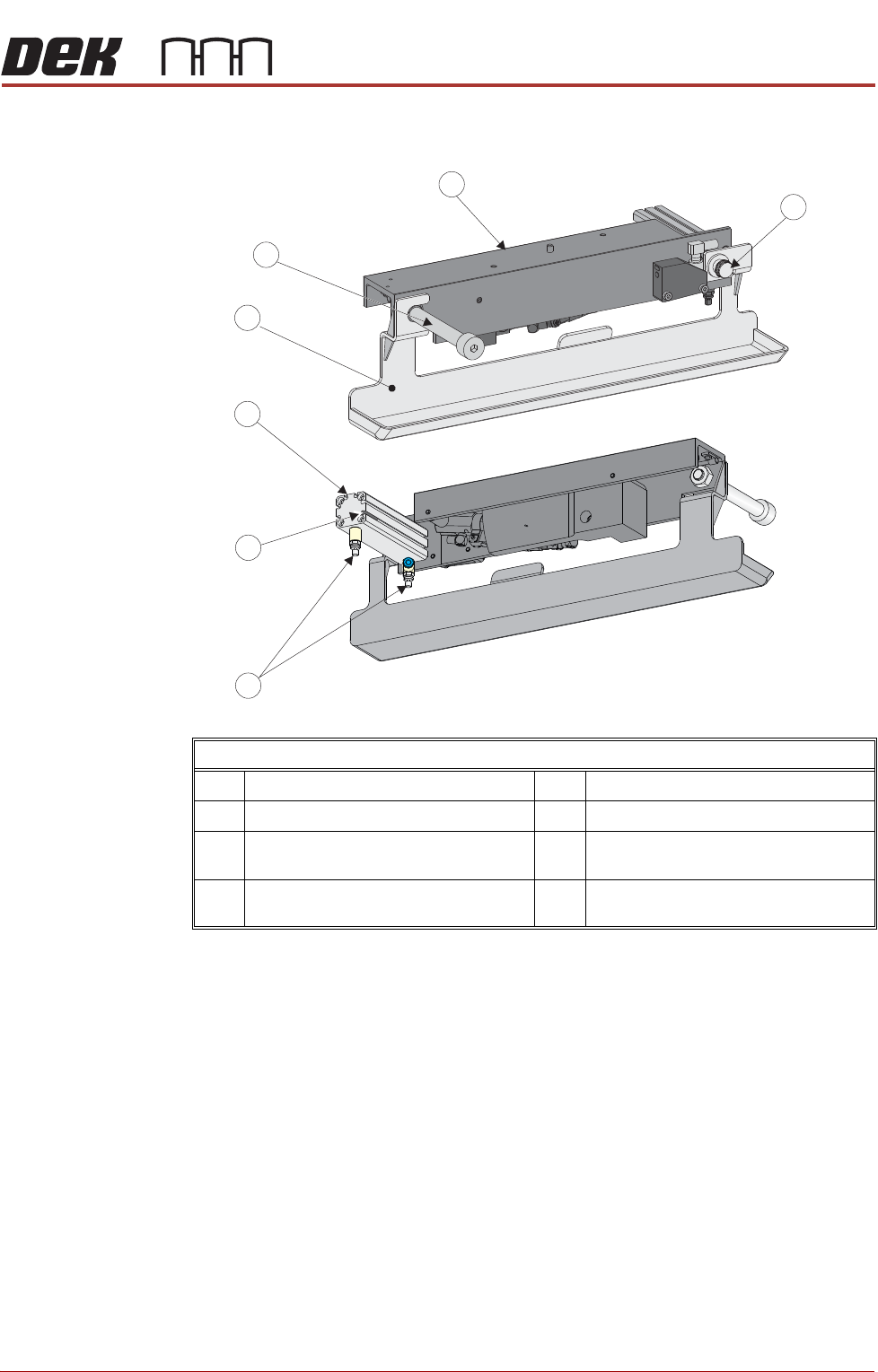
Squeegee Drip
Tray
NOTE
If Lateral Squeegees are fitted, the drip tray is taller in height; to accommodate
the extra height the ‘tray’ width is reduced.
The squeegee drip tray mechanism secures to the underneath of the print
carriage. The drip tray pneumatic actuator extends the drip tray below the
squeegees to prevent print medium from dripping onto the screen during print
carriage initialisation or auto screen loading.
The squeegee drip tray mechanism is also used to accommodate the auto
screen loader mechanism, refer to the Adjustable Screen Mount (ASM)
Module chapter for more information.
The drip tray retracted sensor is used by software to check that the pneumatic
actuator has retracted the drip tray before lowering the squeegees.
Squeegee Drip Tray Overview
1 Squeegee Drip Tray Thumbscrew 5 Squeegee Drip Tray
2 Speed Control Valves (Rear View) 6 Drip Tray Guide Shaft
3 Drip Tray Retracted Sensor (Rear
View)
7 Squeegee Drip Tray Mechanism
4 Drip Tray Pneumatic Actuator (Rear
View)
SQUEEGEE MODULE
OVERVIEW
10.4 Technical Reference Manual Chapter Issue 4, Jun 18
Lateral Squeegee
Adjust Mechanism
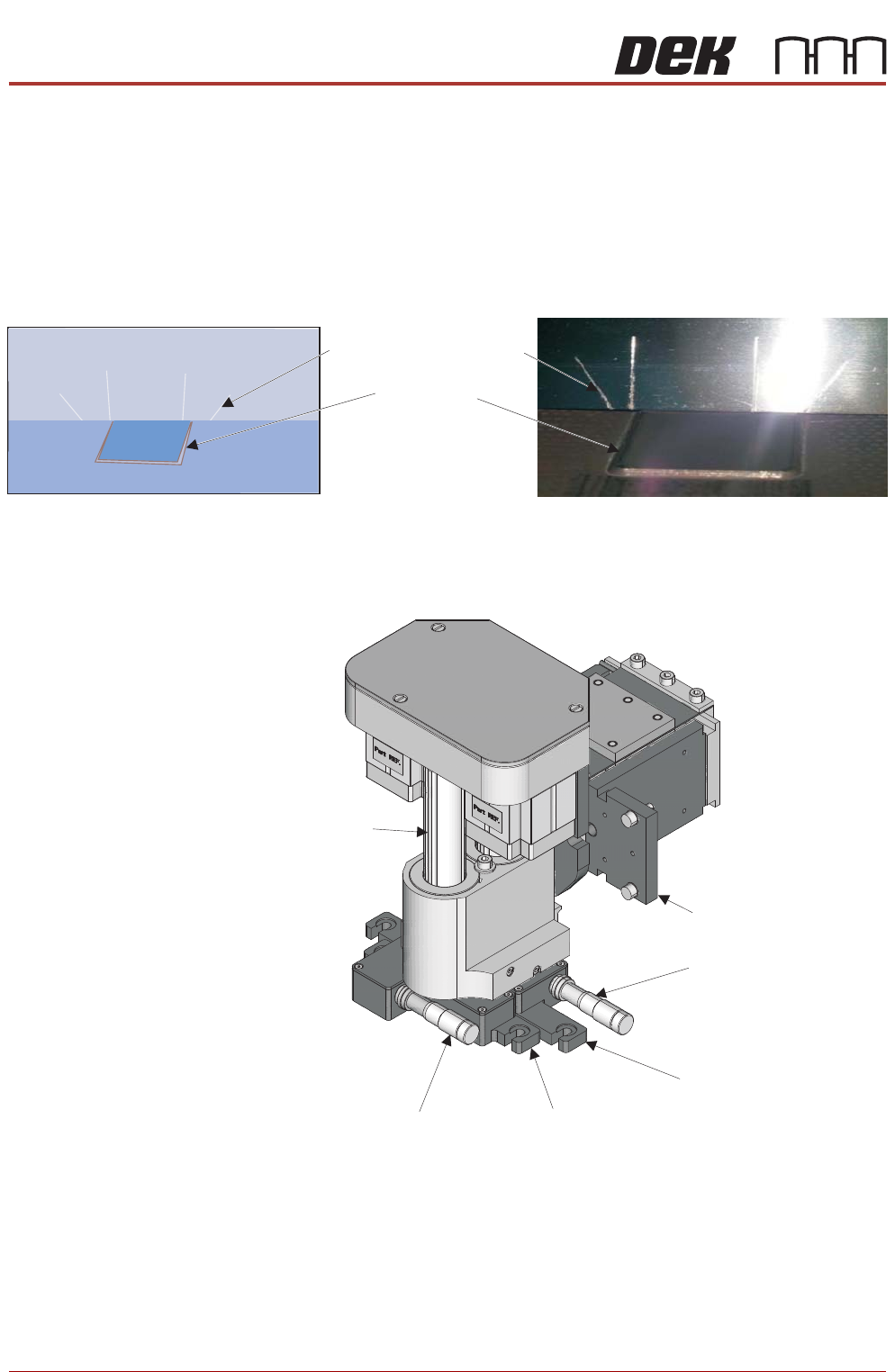
An option for printing on 3D stencils is the Lateral Squeegee Adjust
Mechanism. When printing 3D stencils, slit-edge squeegee blades are used,
front and rear. The printing edge of each squeegee blade has slits cut into it
that correspond to the raised surfaces of the stencil. As the squeegee
traverses the image, the slits rise up over the leading edge (or fall into the
recesses) of the stencil’s surface features.
Figure 10-2 Slit Edged Squeegee (depicting mis-alignment)
With the squeegee blades fitted (not shown above) they can be adjusted in the
X direction using the front and rear lateral adjusters (micrometer scales).
Stencil Step
Slitted Squeegee Blade
Squeegee Placed Above the Stencil Step
Diagramatic Representation
Squeegee Mechanism (squeegees not shown)
Squeegee Mechanism
Squeegee Mount (Rear)
Squeegee Mount (Front)
Lateral Adjuster (Rear)
Lateral Adjuster (Front)
Front Drive Shaft
SQUEEGEE MODULE
OVERVIEW
Chapter Issue 4, Jun 18 Technical Reference Manual 10.5
NOTE
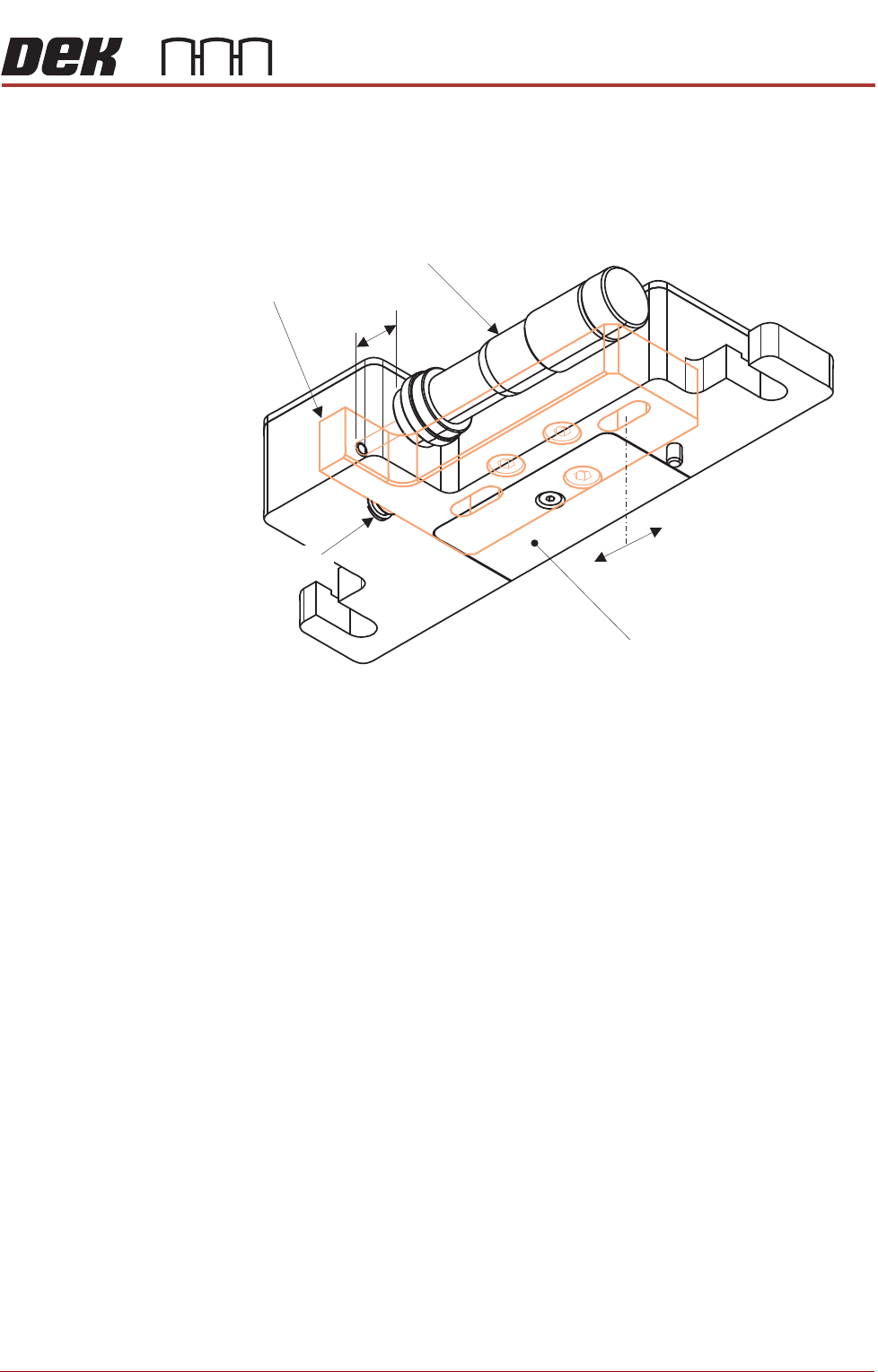
Both lateral adjusters are set up ‘centred’ at the 11mm mark on the
micrometers. There is a maximum of 4mm adjustment either side of this
setting.
Figure 10-3 Front Squeegee Mount (viewed from underneath)
Internally, an adjuster block is attached to each drive shaft of the squeegee
mechanism.
The micrometer centre position is preset, by the user, this centralises the
movement of the lateral squeegee mount in the X direction.
Two slots in the adjuster block allow a total of 8mm of movement; the lateral
squeegee mount is locked in position with two cap headed screws located in
the top of the block. By slackening off these screws, up to 4mm of adjustment
either side of centre can be achieved. A return spring facilitates adjustment in
both directions.
At product changeover, the squeegee blade positions need to be adjusted to
suit the new product alignment.
Lateral Squeegee Mount
4mm
+
-
Adjust Micrometer
Internal Adjuster Block
11mm
Return Spring