Galaxy EX Squeegee Module.pdf - 第27页
SQUEEG EE MODULE CALIBRATIONS Ch apte r Issue 4, J un 18 Tech nical R efere nce Ma nual 10. 27 14. Ens u re that t he cal ibra tion jig is s ecu red to the m oun t ing plat e a s sho w n i n the fol lowing graphic: 15. F…
SQUEEGEE MODULE
CALIBRATIONS
10.26 Technical Reference Manual Chapter Issue 4, Jun 18
CALIBRATIONS
Squeegee
Pressure
Calibration
Squeegee pressure calibration is carried out on machines after the following
circumstances:
• The squeegee mechanism is replaced
• The strain gauge bridge in the squeegee mechanism is replaced
• The rising table sensors have been replaced or adjusted
A force meter calibration jig and squeegee pressure plate are required to
perform the squeegee pressure calibration.
NOTE
1. Ensure that the rising table print reference height is set correctly before
commencing, (the calibration relies upon accurate positioning of the table to
make a reference).
2. Ensure that the Pressure Hardware parameter in Maintenance\Machine
Setup\Options is set to FITTED.
Use the following procedure to calibrate the squeegee pressure:
WARNING
BOARD CLAMPS. EXTREME CARE MUST BE EXERCISED WHEN WORKING IN
THE TOOLING AREA OF THE MACHINE TO AVOID INJURY. THE FOILS ON THE
FRONT AND REAR BOARD CLAMPS ARE VERY SHARP.
1. From the Ready page, select Unload Screen.
2. Open the front printhead cover.
3. Remove the screen from the machine.
4. Remove the tooling (if fitted) from the manual tooling plate.
5. Close the front printhead cover.
6. Press the System button.
7. Select Maintenance.
8. Select Calibrations.
9. Select Pressure.
10. Select Calibrat Readings.
11. The rails are checked for the presence of a board, the print carriage
moves to the calibration position, the rear rail moves to home position, the
table homes and the board clamps are closed.
12. The machine cover is unlocked and the message ‘Fit the pressure cali-
bration rig’ is displayed with the following window:
13. Open the front printhead cover.
SEMI 2
CALIBRATION DATA
Gain Factor
1.02
SQUEEGEE MODULE
CALIBRATIONS
Chapter Issue 4, Jun 18 Technical Reference Manual 10.27
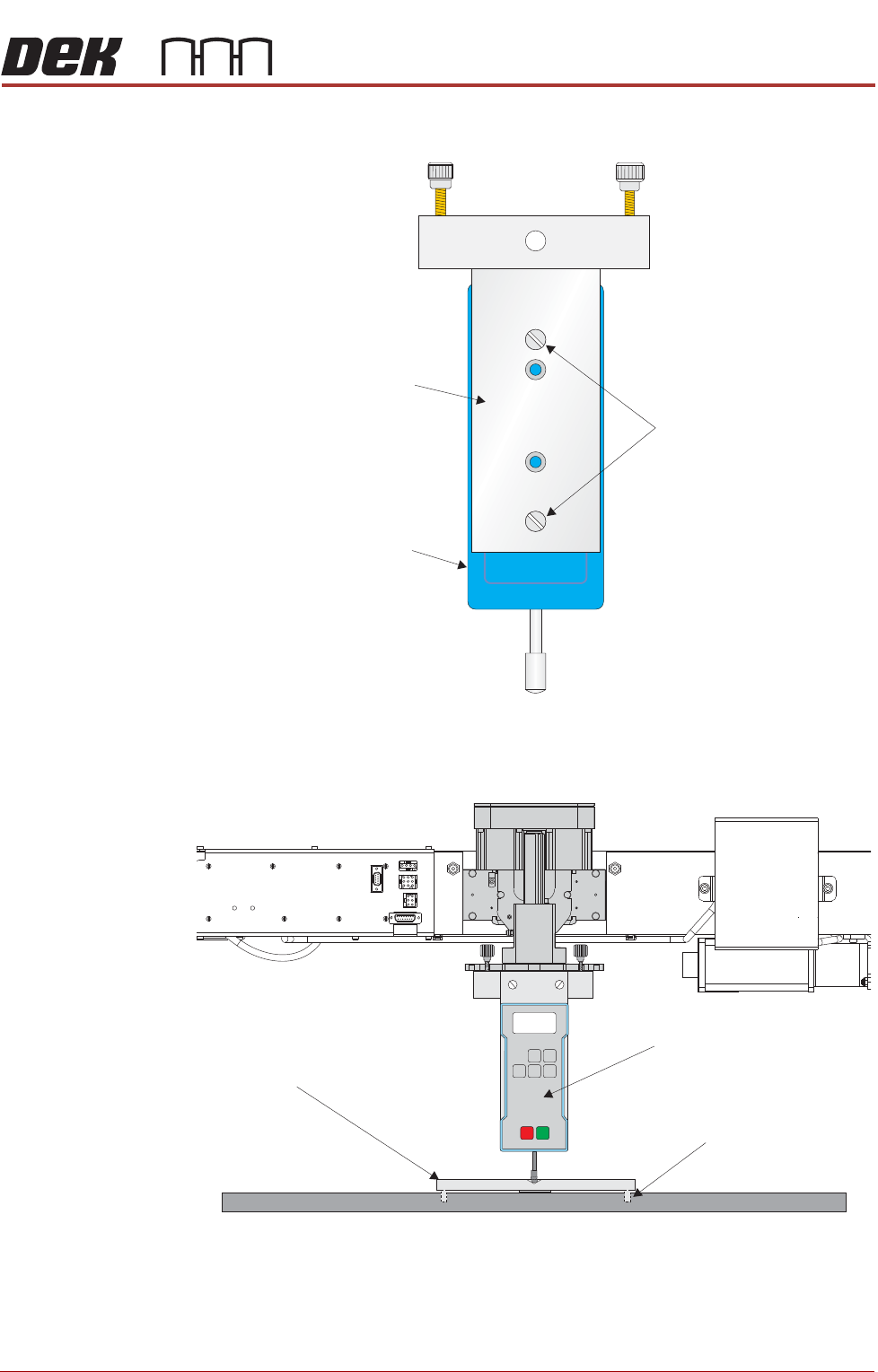
14. Ensure that the calibration jig is secured to the mounting plate as shown in
the following graphic:
15. Fit the calibration jig to the front squeegee position.
Mounting Plate
Mounting Holes
Calibration Jig
A
A
S
S
View on Front Squeegee MechanismUnderneath Rising Tableand
View on Front of Rising Table and Squeegee Mechanism
Squeegee Pressure Plate
Locating Dowel
(in 2 positions)
O
OFF
I
ON
UNITS
Zero
MAX TXD
RESET
00.00
P ortable Force Gauge
(Calibration Jig)
SQUEEGEE MODULE
CALIBRATIONS
10.28 Technical Reference Manual Chapter Issue 4, Jun 18
16. Fit the squeegee pressure plate to the rising table ensuring that the locat-
ing dowels insert the holes of the rising table.
NOTE
During the squeegee pressure calibration the dwell height of the rear
squeegee is 15mm regardless of the set up value. This height is set during
calibration only.
17. Switch the force meter ON and check the reading is 0kg, (ensure the force
meter is not in contact with the squeegee pressure plate).
18. Select Continue.
19. The front squeegee mechanism steps down until a change in pressure is
detected and continues stepping down until the pressure value stored on
the machine is reached. If the calibration jig displays 10kg, go to Step 25.
20. Select Jog Rig.
21. Use the left and right jog buttons to move the front squeegee mechanism
up or down until the calibration jig displays 10kg.
NOTE
Achieving exactly 10kg may not be possible as some calibration jigs display
down to three decimal places.
22. Select Set Calib.
23. Select Exit.
24. The front squeegee mechanism moves to the home position. The mes-
sage ‘Confirm that the pressure calibration jig has been removed.’ is
displayed.
25. Remove the calibration jig and the squeegee pressure plate from the
machine. On completion select Yes, the table resets, the print carriage
moves to home position, board clamps open and the rear rail moves to the
board width setting.
26. Carry out the Squeegee Reference Height calibration.
Squeegee
Reference Height
Squeegee reference height is carried out on machines after the following
circumstances:
• Squeegee pressure calibration
• Squeegee change
Use the following procedure to set the squeegee reference height:
1. If a Ptest.dat file is not required, go to Step 7.
2. Select Maintenance.
3. Select Test Cycles.
4. Select Data Logging On.
5. Select Back.
6. Select Back.
7. Select Setup Product.
SEMI 2