Galaxy EX Squeegee Module.pdf - 第8页
SQUEEG EE MODULE REPLACEMENT PRO CEDURES 10. 8 Te chni cal Ref ere nce Ma nual Ch apte r Issue 4 , Jun 18 14. Disconnect b o t h curl y air li nes from the se lf-seal pneumat ic connector s sit- uat e d eith er side of t…
SQUEEGEE MODULE
REPLACEMENT PROCEDURES
Chapter Issue 4, Jun 18 Technical Reference Manual 10.7
REPLACEMENT PROCEDURES
ProFlow to
Squeegees
CAUTION
SOLDER PASTE AND SOLVENTS. WHEN USING OR HANDLING ANY SOLDER
PASTE OR SOLVENT FORMULATION THE MANUFACTURERS’ SAFETY DATA
SHEETS MUST BE STRICTLY ADHERED TO.
MANDATORY
TOXIC CHEMICALS MAY BE PRESENT. EYE PROTECTION MUST BE WORN.
MANDATORY
TOXIC CHEMICALS MAY BE PRESENT. SAFETY GLOVES MUST BE WORN.
Instances may occur when the machine is required to print using the squeegee
module configuration. The following procedure details how to revert the
machine from ProFlow use to the squeegee configuration:
Removing ProFlow 1. Select Maintenance.
2. Select Diagnostics.
3. Use Next or Previous to highlight ProFlow.
4. Select Select Module.
5. Ensure Home ProFlow is highlighted.
6. Select Run Diagnost.
7. Select Exit.
8. Select Exit.
9. Select Back.
10. Select Open Cover Commands.
11. Select Carriage To Front.
12. Select Back.
13. Select Shut Down and switch the mains isolator to OFF.
SQUEEGEE MODULE
REPLACEMENT PROCEDURES
10.8 Technical Reference Manual Chapter Issue 4, Jun 18
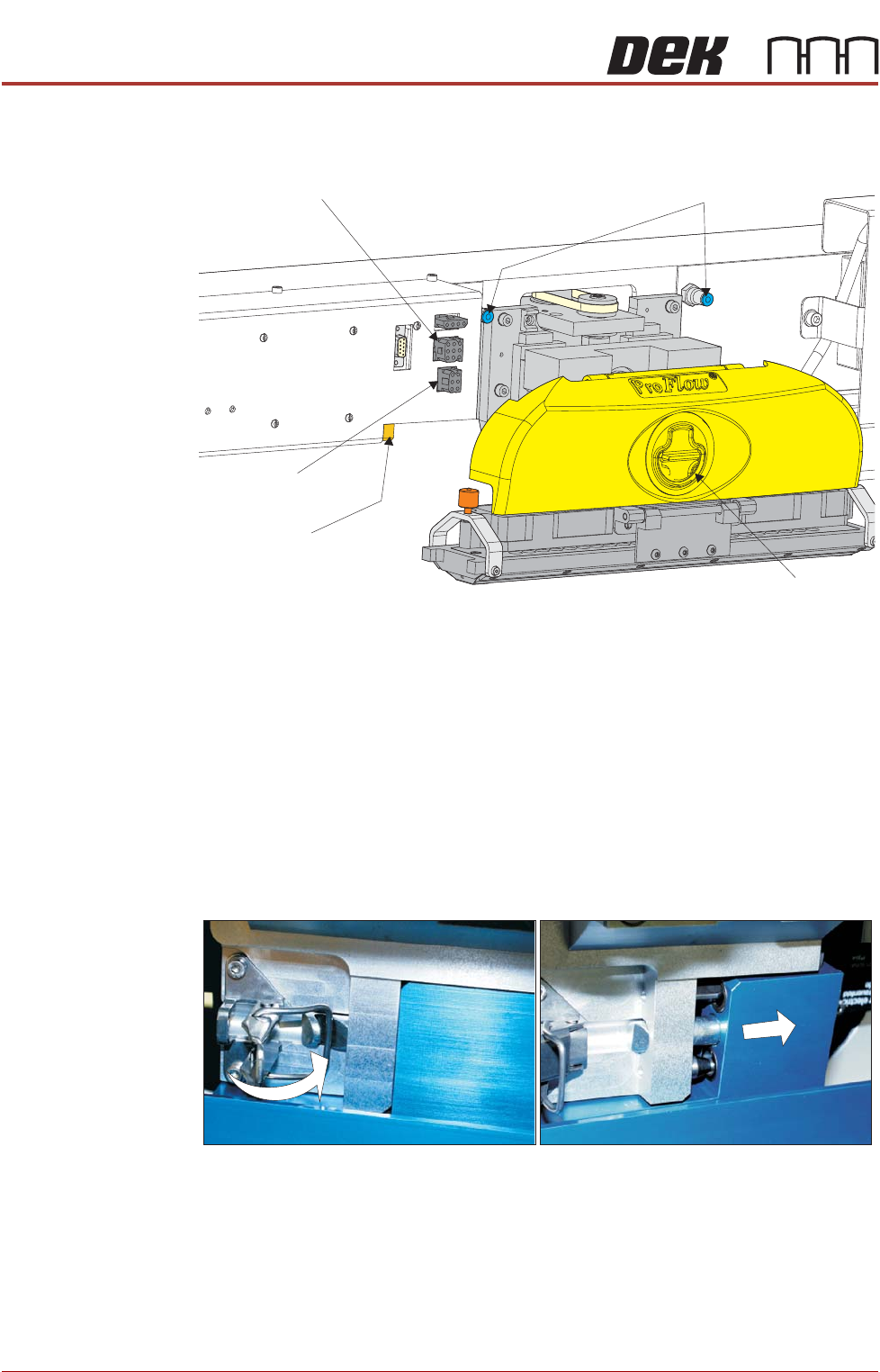
14. Disconnect both curly air lines from the self-seal pneumatic connectors sit-
uated either side of the ProFlow printhead mechanism.
15. Disconnect the three ProFlow mechanism connectors from the print car-
riage, left hand side:
• ProFlow Motor
• Home Sensor
• ProFlow Paste Level Sensor
16. Manually raise the ProFlow pressure mechanism by pulling the latch on
the front of the unit and lifting the mechanism to the fixed raised position.
17. Open the locking clip, securing the transfer head to the pressure mecha-
nism and carefully slide the transfer head out and away from the pressure
mechanism as indicated in the graphic below.
Pneumatic Connectors
Latch
ProFlow Motor
(9SK17)
Home Sensor
(9SK08)
ProFlow Paste Level
Sensor (9PL62)
SQUEEGEE MODULE
REPLACEMENT PROCEDURES
Chapter Issue 4, Jun 18 Technical Reference Manual 10.9
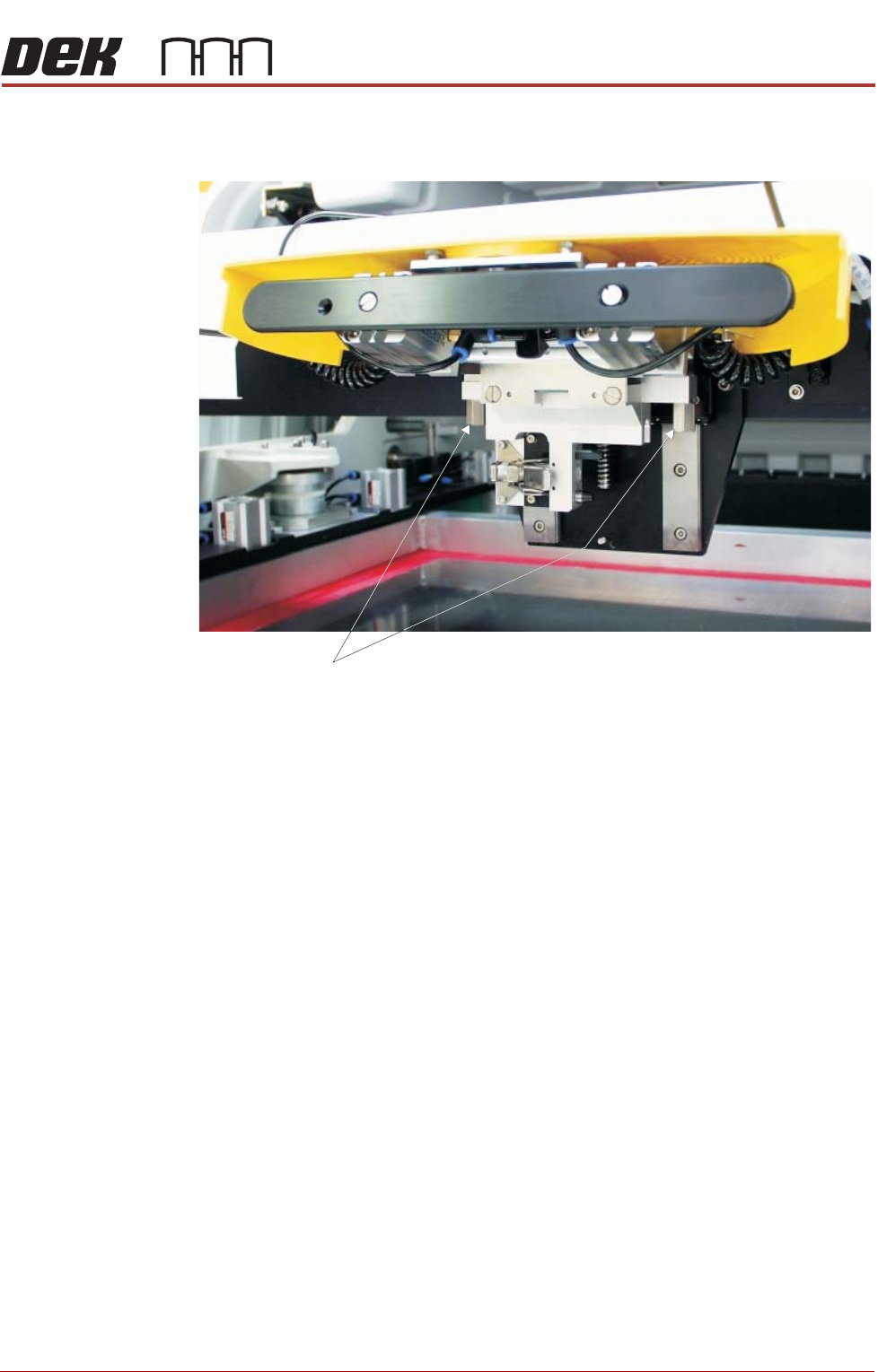
18. Release the pressure mechanism from the printhead mechanism by
unscrewing the two securing bolts, using a 5mm Allen key.
Securing Bolts