Galaxy EX Squeegee Module.pdf - 第15页
SQUEEG EE MODULE REPLACEMENT PRO CEDURES Ch apte r Issue 4, J un 18 Tech nical R efere nce Ma nual 10. 15 8. Tighten t he three scr ews whil st the mo tor is un de r tens io n. 9. On c om ple tion re -fit the p rinth ea …
SQUEEGEE MODULE
REPLACEMENT PROCEDURES
10.14 Technical Reference Manual Chapter Issue 4, Jun 18
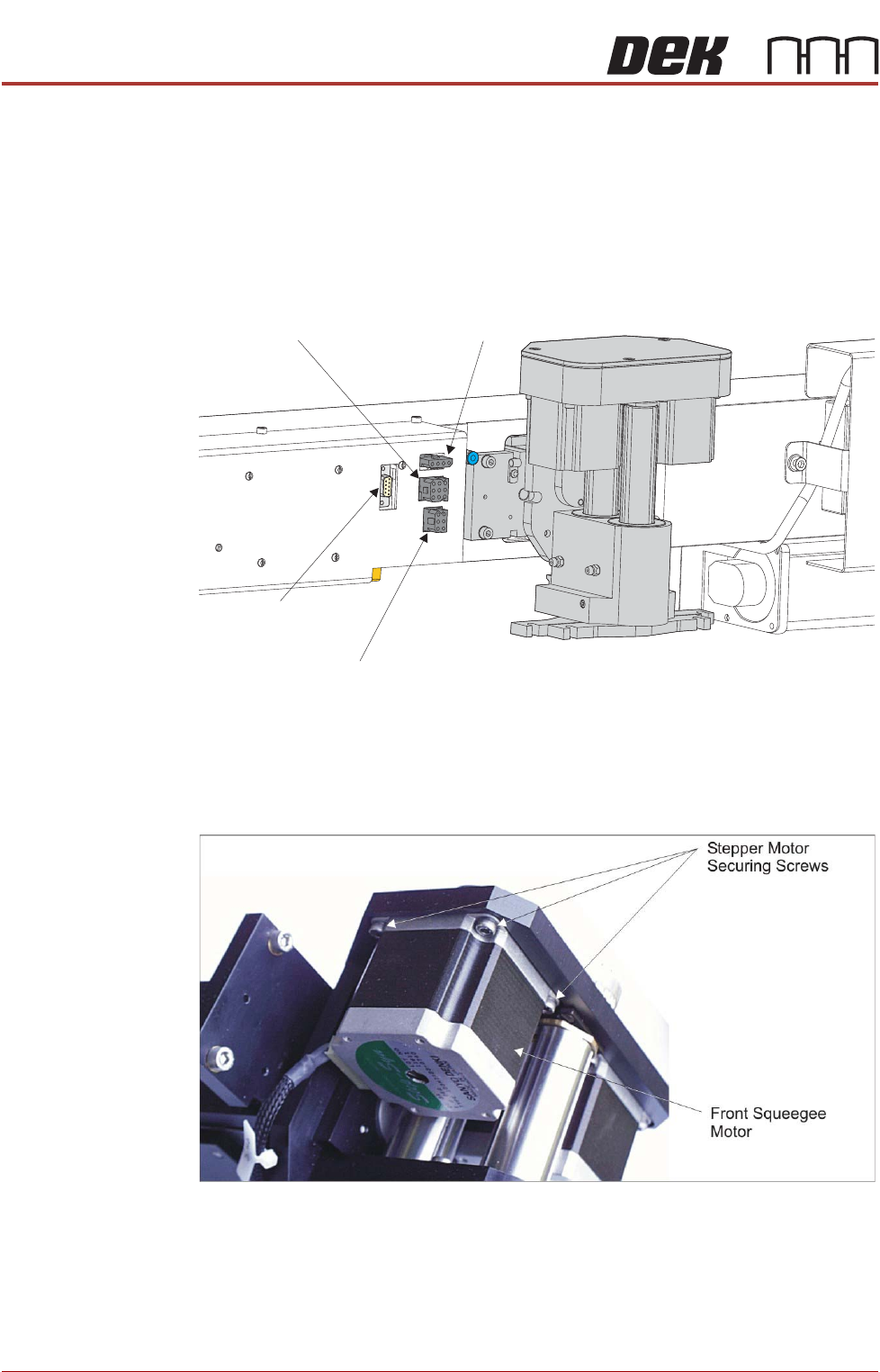
2. Disconnect the following connectors from the print carriage, left hand side:
• Rear Squeegee Motor
• Front Squeegee Motor
• Home Sensors
• Squeegee Pressure Amplifier
3. Remove the printhead mechanism by unscrewing the four screws secur-
ing the unit to the print carriage.
4. Placing the unit on a secure surface, slacken off the three screws securing
the left hand motor to the support plate.
5. Fit the new belt in position.
6. Using a cable tie wrap or similar, provide a loop around the top of the body
of the motor enabling the motor to be pulled using a force meter. Ensure
that the force meter is pulled in the direction which the drive belt is fitted,
Rear Squeegee Motor Tensioning figure example refers.
7. Pull the force meter until a tension of 3 to 4kgs is monitored on the meter.
Rear Squeegee
Motor (9SK17)
Front Squeegee
Motor (9SK16)
Home Sensors
(9SK08)
Squeegee Pressure
Amplifier (N3SK16)
SQUEEGEE MODULE
REPLACEMENT PROCEDURES
Chapter Issue 4, Jun 18 Technical Reference Manual 10.15
8. Tighten the three screws whilst the motor is under tension.
9. On completion re-fit the printhead mechanism to the print carriage refit the
drive belt cover plate and re-connect all leads to the print carriage, left
hand side.
10. Refit the squeegees.
Fitting the
Squeegees
It is usual to fit two trailing edge squeegees and use the machine in the Print/
Print mode.
When fitting a single squeegee (trailing edge or diamond section) to the
machine, it must be fitted to the front squeegee mount only.
The following procedure describes a double trailing edge squeegee
configuration fit to the machine printhead mounting assembly.
1. From the Ready page, select Product Changeover.
2. Select Change Squeegees.
3. The print carriage is driven to the front position.
4. Open the front printhead cover.
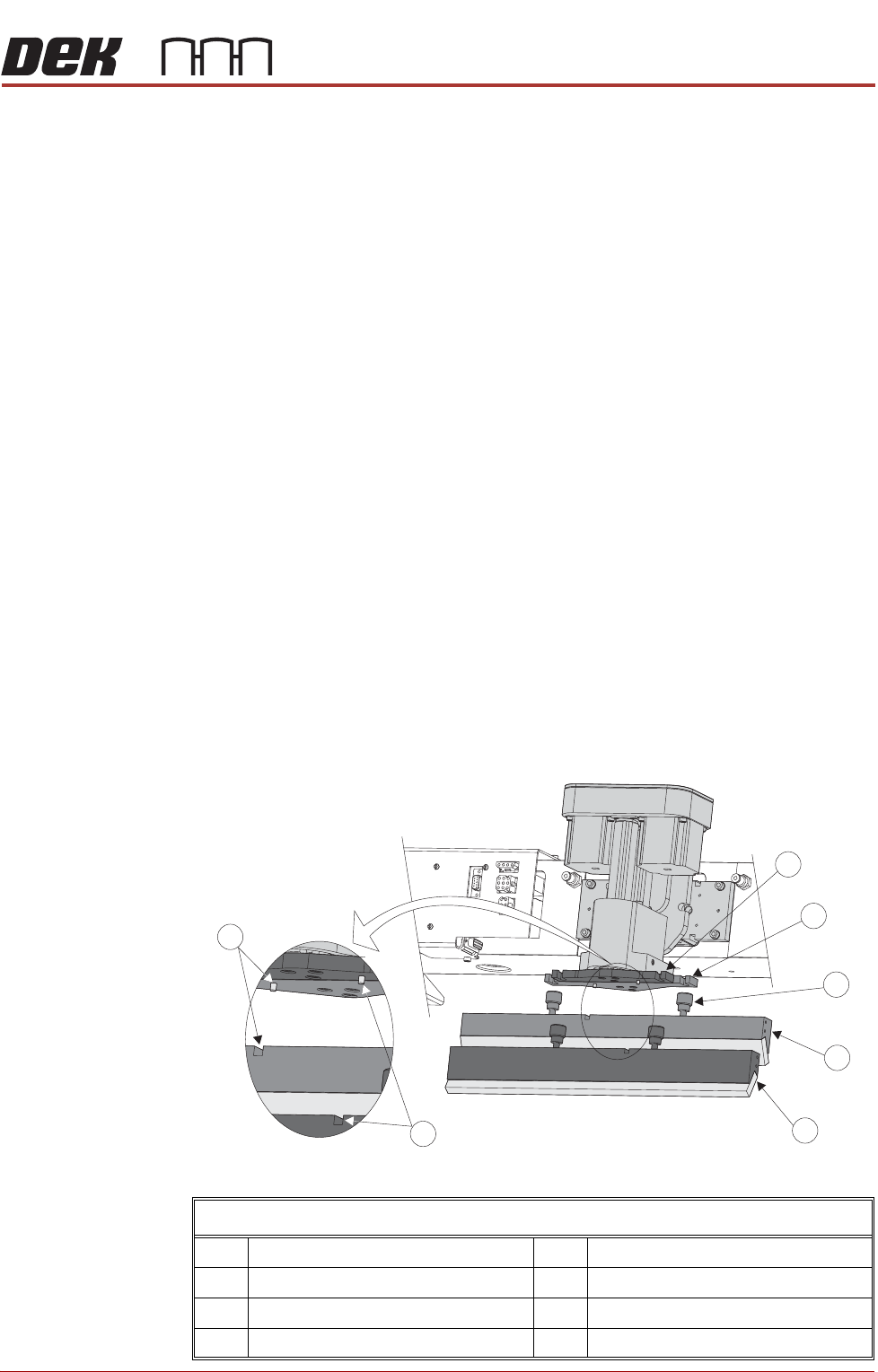
5. Fit the rear squeegee to the rear squeegee mount tightening the thumb-
screws finger tight.
NOTE
The locking thumbscrews on the rear squeegee are positioned wider apart
than those fitted to the front squeegee and the keyway slot is positioned on the
left hand side of the rear squeegee.
Fitting the Squeegee Blades
1 Front Squeegee Mount 5 Front Squeegee
2 Rear Squeegee Mount 6 Front Squeegee Key and Keyway Slot
3 Locking Thumbscrew (in 4 positions) 7 Rear Squeegee Key and Keyway Slot
4 Rear Squeegee
1
2
3
4
5
6
7
Fitting Squeegees
SQUEEGEE MODULE
REPLACEMENT PROCEDURES
10.16 Technical Reference Manual Chapter Issue 4, Jun 18
6. Fit the front squeegee to the front squeegee mount ensuring the thumb-
screws are tightened finger tight.
NOTE
The locking thumbscrews on the front squeegee are positioned closer together
than those fitted to the rear squeegee and the keyway slot is positioned on the
right hand side of the front squeegee.
7. Close the front printhead cover.
8. Press the System button.
9. Select Continue.
10. Select Back.
11. Carry out Squeegee Reference Height calibration, Calibrations section of
this chapter refers.
Standard
Squeegees
Mounts to Lateral
Squeegee Mounts
NOTE
The lateral squeegee - squeegee mechanism, is identical to a standard
squeegee mechanism. Refer to the sections: Fitting The Squeegee Printhead
Mechanism and Squeegee Drive Belt Replacement procedures.
To change from a printer with standard squeegee mounts fitted to having
lateral squeegee mounts fitted proceed as follows:
1. Power up the printer to allow it to initialise. The squeegees move to their
home positions.
2. Power down the printer.
3. Open the printhead front cover.
4. If fitted, remove and stow the standard squeegee blades safely away.
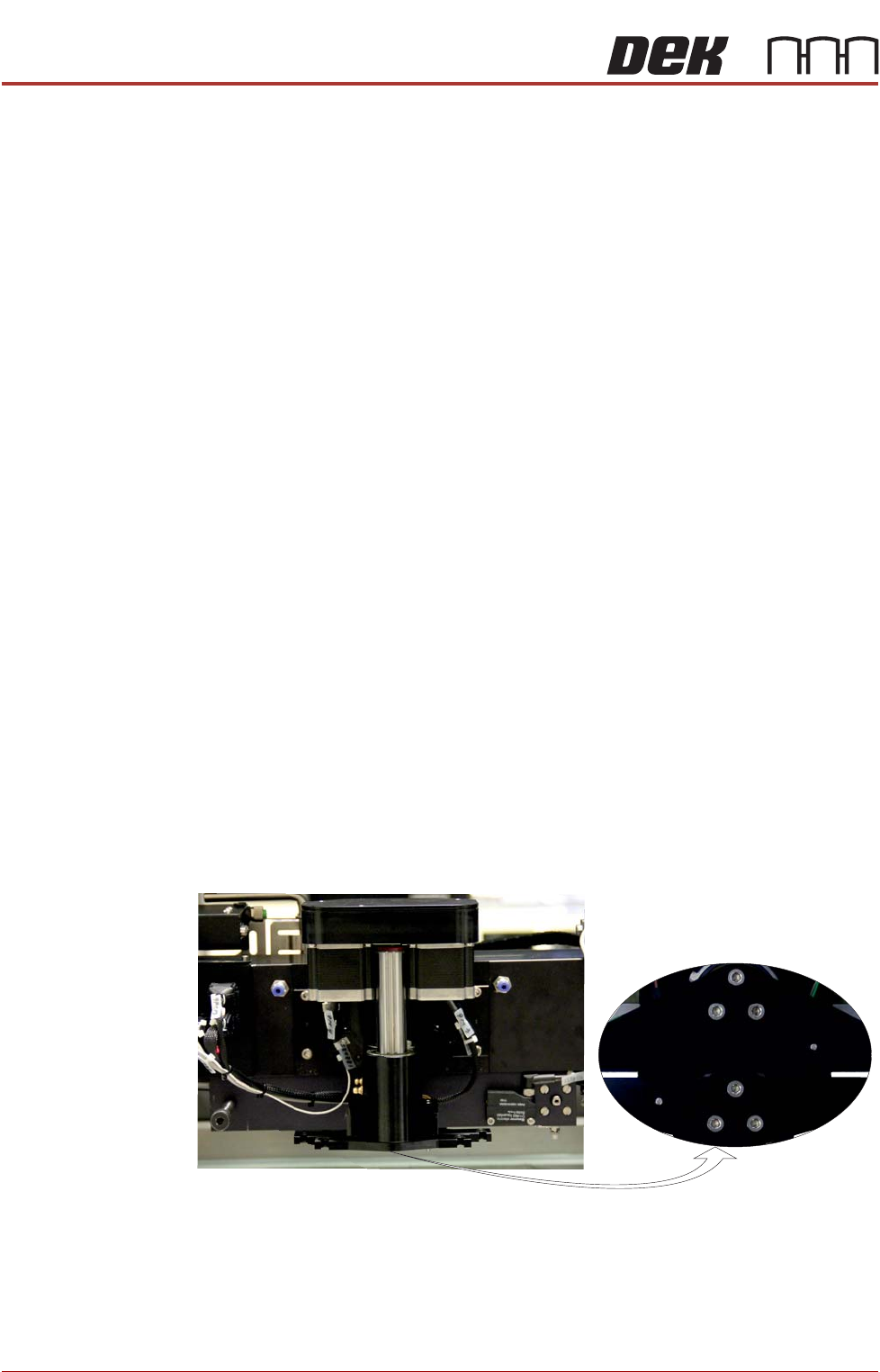
5. At the bottom of the squeegee mounts locate the three M4 cap headed
screws.
6. Using a 3mm Allen key, remove both squeegee mounts and stow them,
with their screws, safely away.
View on Front of Print Carriage