Galaxy EX Squeegee Module.pdf - 第6页
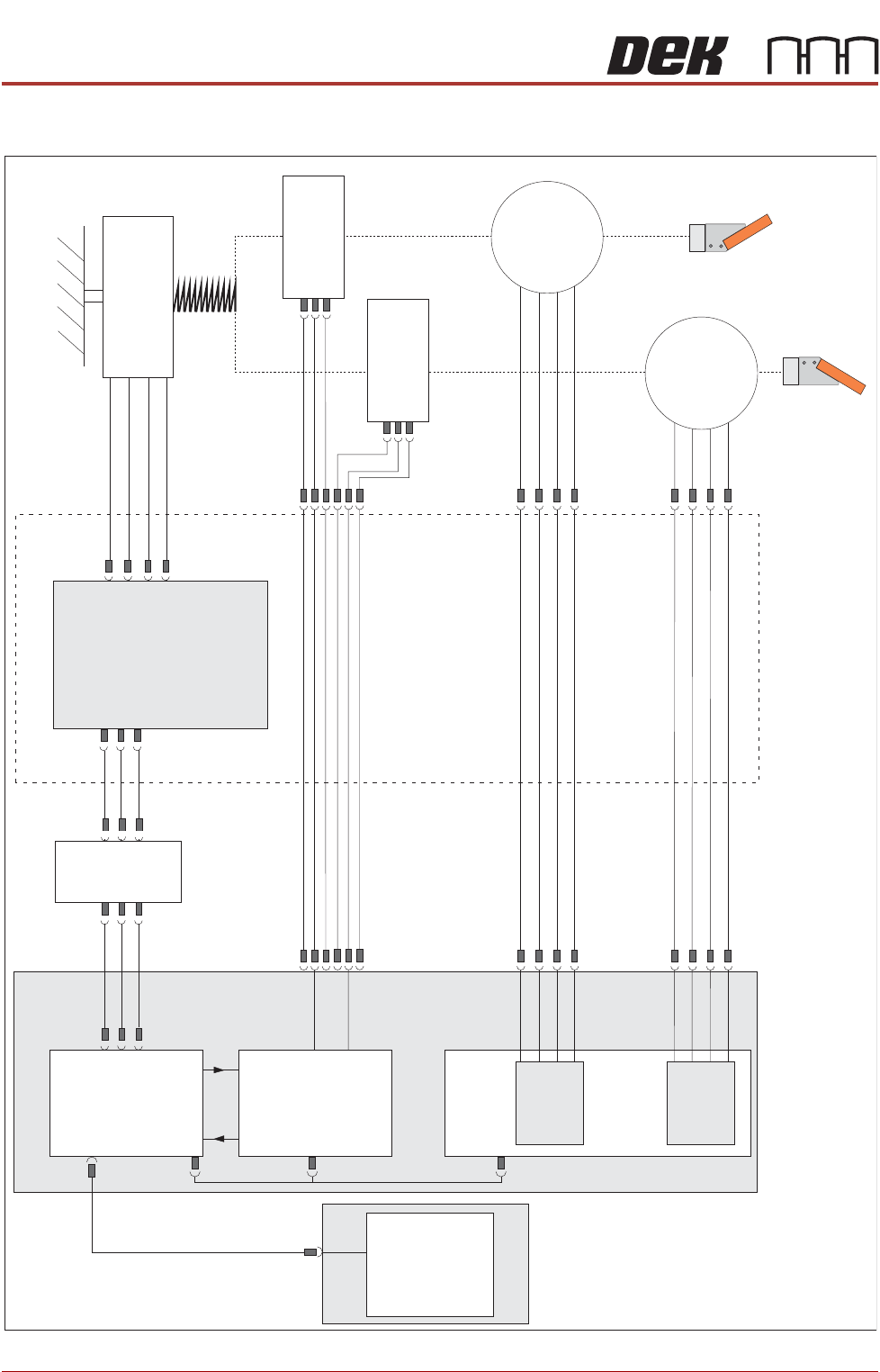
SQUEEG EE MODULE ELECTRICAL SCHEMATIC 10. 6 Te chni cal Ref ere nce Ma nual Ch apte r Issue 4 , Jun 18 ELECTRICAL S CHEMA TIC Squeegee Front Home ( 9 S E0 4) Squeegee Rear Home ( 9 S E0 5) Rear Squeegee Stepper Motor ( 9…
SQUEEGEE MODULE
OVERVIEW
Chapter Issue 4, Jun 18 Technical Reference Manual 10.5
NOTE
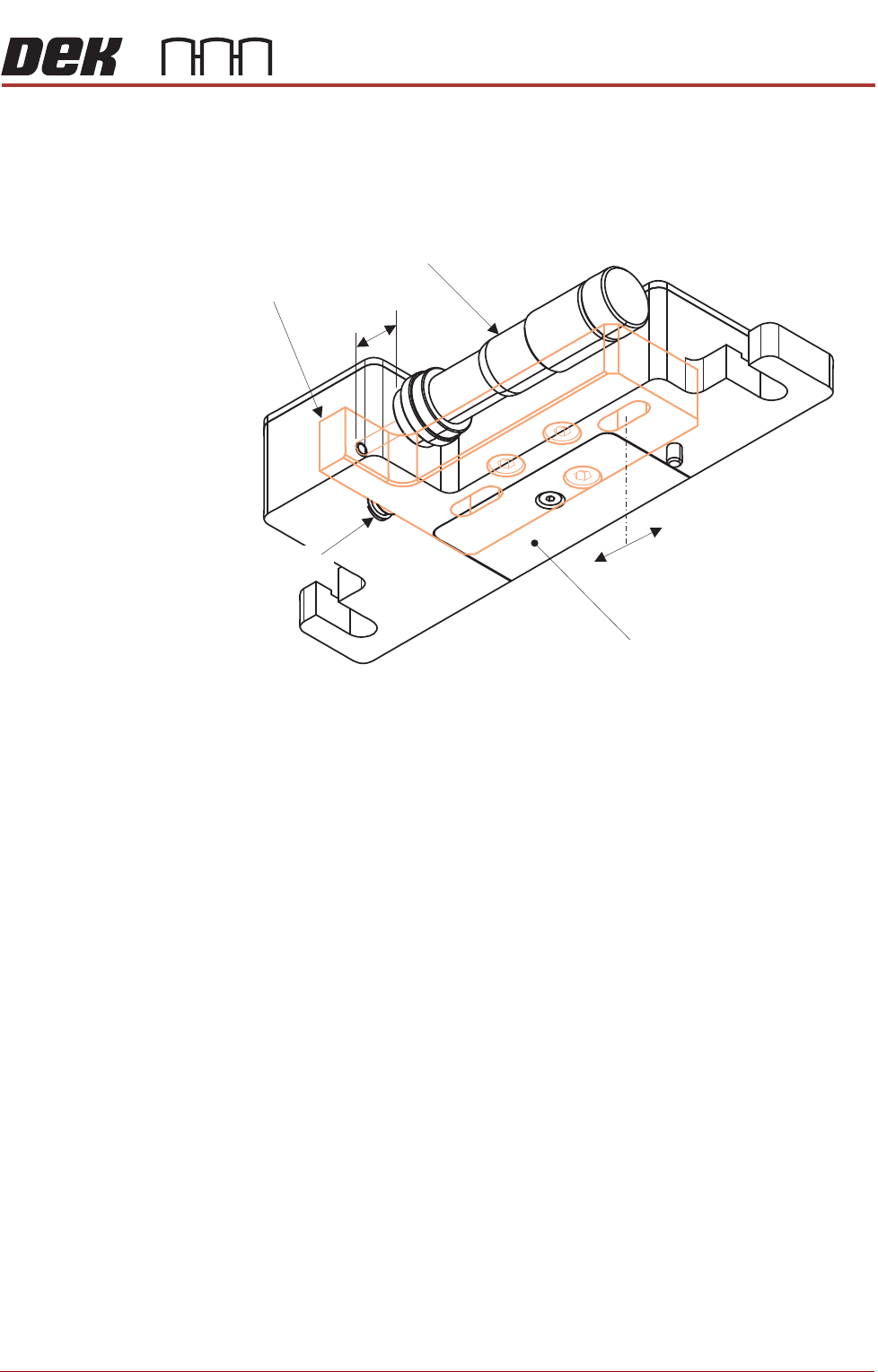
Both lateral adjusters are set up ‘centred’ at the 11mm mark on the
micrometers. There is a maximum of 4mm adjustment either side of this
setting.
Figure 10-3 Front Squeegee Mount (viewed from underneath)
Internally, an adjuster block is attached to each drive shaft of the squeegee
mechanism.
The micrometer centre position is preset, by the user, this centralises the
movement of the lateral squeegee mount in the X direction.
Two slots in the adjuster block allow a total of 8mm of movement; the lateral
squeegee mount is locked in position with two cap headed screws located in
the top of the block. By slackening off these screws, up to 4mm of adjustment
either side of centre can be achieved. A return spring facilitates adjustment in
both directions.
At product changeover, the squeegee blade positions need to be adjusted to
suit the new product alignment.
Lateral Squeegee Mount
4mm
+
-
Adjust Micrometer
Internal Adjuster Block
11mm
Return Spring
SQUEEGEE MODULE
ELECTRICAL SCHEMATIC
10.6 Technical Reference Manual Chapter Issue 4, Jun 18
ELECTRICAL SCHEMATIC
Squeegee
Front
Home
(9SE04)
Squeegee
Rear
Home
(9SE05)
Rear
Squeegee
Stepper
Motor
(9M4)
Motor 1 B-
Motor 1 B+
Motor 1A-
Motor 1A+
Motor 2 B-
Motor 2 B+
Motor 2A-
Motor 2A+
Print Carriage
9PL16
9PL08
9PL17
0V
+V
-IN
+IN
Strain Gauge Bridge
(9SE6)
Spring Beam
9SK11
9SK12
Print Carriage I/O
Node 3
N3PL16
M36PL35
N3SK2
N6PL3
CAN BUS
PC
Motherboard
M36PL35
USB
M36Pl28
NextMove ES
(I/O Node 1)
NextMove
Interface
Dual Stepper
Card X2
M36 Machine Control
Step 3
Step 4
Front
Squeegee
Stepper
Motor
(9M3)
M36PL21
M36PL12
M36PL21
CAN
In
Rising
Table
Node 6
N6SK2
SQUEEGEE MODULE
REPLACEMENT PROCEDURES
Chapter Issue 4, Jun 18 Technical Reference Manual 10.7
REPLACEMENT PROCEDURES
ProFlow to
Squeegees
CAUTION
SOLDER PASTE AND SOLVENTS. WHEN USING OR HANDLING ANY SOLDER
PASTE OR SOLVENT FORMULATION THE MANUFACTURERS’ SAFETY DATA
SHEETS MUST BE STRICTLY ADHERED TO.
MANDATORY
TOXIC CHEMICALS MAY BE PRESENT. EYE PROTECTION MUST BE WORN.
MANDATORY
TOXIC CHEMICALS MAY BE PRESENT. SAFETY GLOVES MUST BE WORN.
Instances may occur when the machine is required to print using the squeegee
module configuration. The following procedure details how to revert the
machine from ProFlow use to the squeegee configuration:
Removing ProFlow 1. Select Maintenance.
2. Select Diagnostics.
3. Use Next or Previous to highlight ProFlow.
4. Select Select Module.
5. Ensure Home ProFlow is highlighted.
6. Select Run Diagnost.
7. Select Exit.
8. Select Exit.
9. Select Back.
10. Select Open Cover Commands.
11. Select Carriage To Front.
12. Select Back.
13. Select Shut Down and switch the mains isolator to OFF.