SIPLACE D系列Servicemanual.pdf - 第62页
Service Wo rk Gantry D3 62 Servicemanual (internal ve rsion) SIPLACE D Series X Unplug the proximity switch cable (2) and pull it forwards, out of the head mount. X Undo the 8 screws (4 x at fr ont/ 4x at back) fastening…
Service Work
D3 Gantry
Servicemanual (internal version) SIPLACE D Series
61
4.1.3.5 Replacing Gantries
Overview of gantry versions
SIPLACE HF to Ma. No. A219: [03020302S]
SIPLACE HF from Ma. No. A220: [03025822S]
SIPLACE X series to Ma. No. B078: [03025822S]
SIPLACE X series from Ma. No. B079: [03039725]
SIPLACE D3, SIPLACE X4i gantry 2+4: [03039725]
SIPLACE X4I gantry 1+3: [03027255]
Preparation
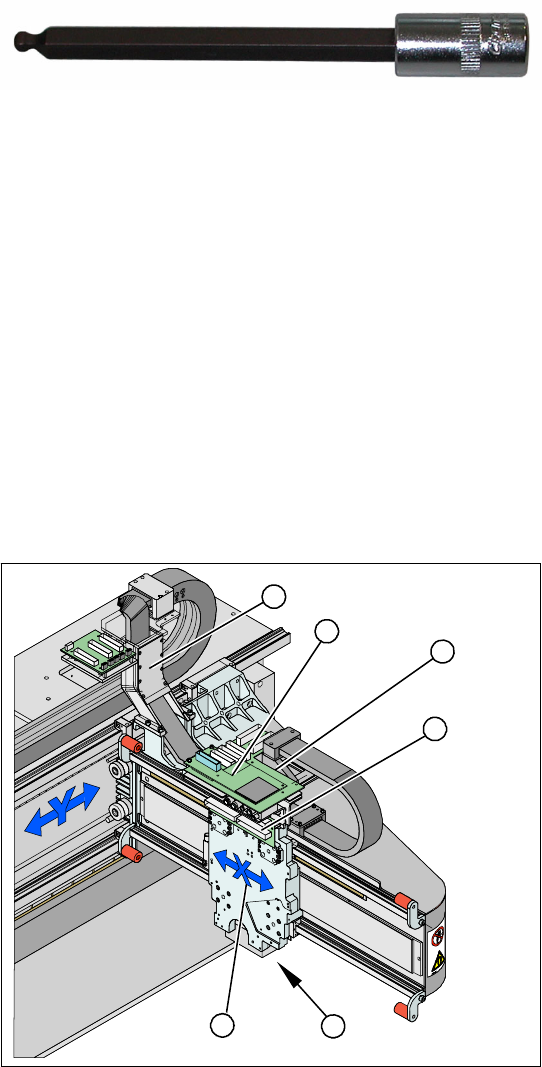
Tools and Equipment
Blue covers [00355787-xx]
Torque wrench [00376625-xx]
Set of socket wrenches [00376516-xx]
Hexagonal ball-type insertion ¼“ size 5
100 mm [00386341-xx]
see adjacent photo.
Depending upon the configuration of the machine,
you will need to remove the relevant modules,
covers and cover plates before you can dismantle
the gantry.
Legend
1. X drive (primary) with head mount
2. X mount with trailing cable
3. Head adapter board
4. Mount with PCB camera
5. Head Board
6. Trailing cable console
X Dismantle the placement head.
X Remove the head adapter board (3). The X
mount fixtures (2) are now accessible.
X Unplug the following cables from the head
board (5) and remove them from the X mount
(2):
X motor cable
X axis scanner head
Temperature sensor (if supplied).
5
5
6
1 4
3
2
Service Work
Gantry D3
62 Servicemanual (internal version) SIPLACE D Series
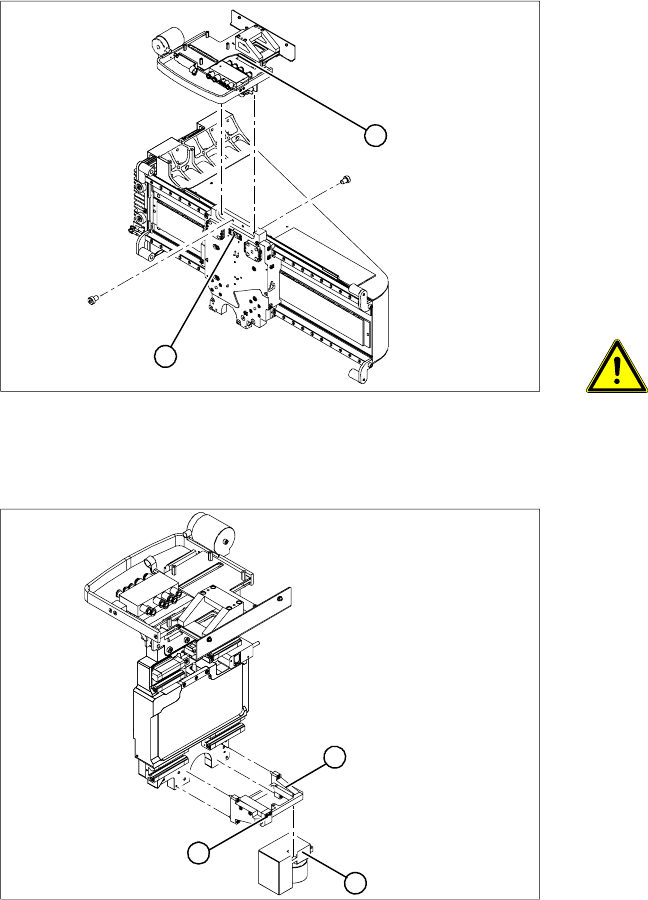
X Unplug the proximity switch cable (2) and pull
it forwards, out of the head mount.
X Undo the 8 screws (4 x at front/ 4x at back)
fastening the X mount (1) and pull these up
and out, together with the trailing cable.
X Loosen the two trailing cable pressure plates
on the X gantry.
X Remove the trailing cable as far as the trailing
cable console (see section (4.1.3.4 Replacing
the Trailing Cable (IGUS) for D3/X4I/X Series
from B-079 [03021065-xx]
J
48 ) ).
X Fasten the X mount at a suitable point.
CAUTION:
Make sure that the flat ribbon cable and
the pneumatic hoses are not rubbed
against any parts or folded.Look out for
sharp edges.
2
1
X Undo the 4 screws fastening the PCB camera
mount (1). Remove the complete unit,
including PCB camera (3) and damping
bracket (2).
X Remove the connection cable fixtures from the
gantry.
X For strain-relief purposes, fix the mount (1) to
a suitable place. Take care not to damage the
camera.
1
3
2
Service Work
D3 Gantry
Servicemanual (internal version) SIPLACE D Series
63
Dismantling the Magnet Cover and the Magnetic Strip
Removal
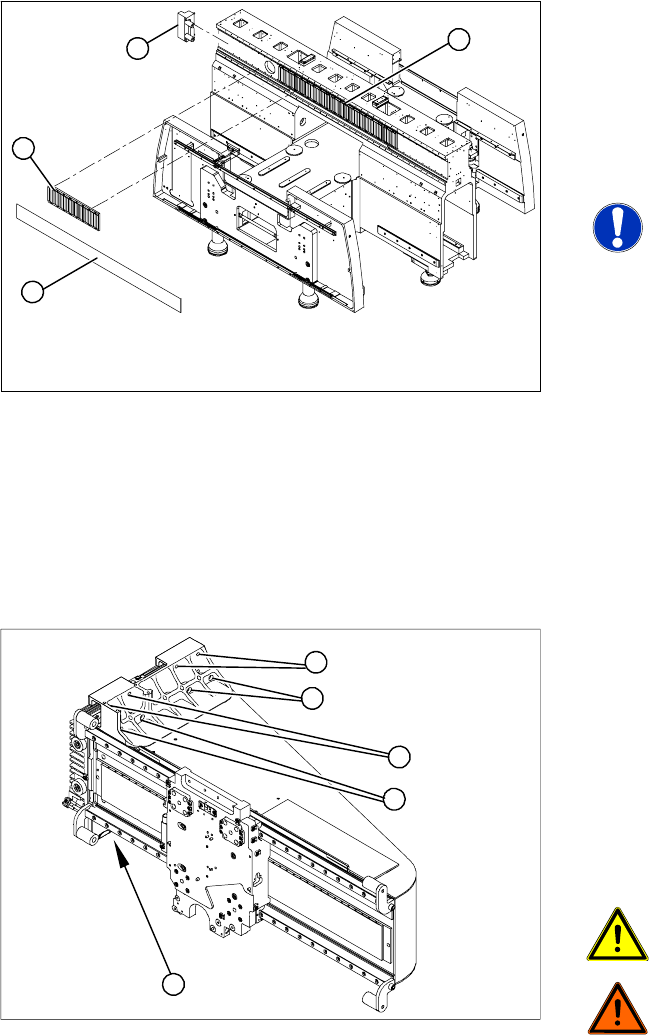
X Lift the magnet cover plate (1) at the side with
the long magnetic strip and then fix the end of
the cover plate to the X gantry with adhesive
tape. You can now access the long magnetic
strip.
X Lever up the blue covers and loosen the 16
screws fastening the long magnetic strip (4).
NOTE:
If the blue cover is damaged (kinks,
cracks etc.), replace it during
reinstallation. White or pale patches in
the plastic indicate areas of damage.
X Remove the long magnetic strip (4).
X Close the magnet cover plate and fix it to the
machine base.
X Remove the bumper (3) from the side with the
long magnetic strip (4).
X Push the gantry over the magnet cover plate
and out of the magnetic strip's area of
influence.
1
4
3
2
Legend
1. 8 fastening screws at the top (M6 x 14)
2. 8 fastening screws at the bottom (M6 x 22)
X First remove 14 of the 16 screws (6 from the
top and 8 from the bottom).
X Please note that the screws are of different
lengths. Mark the positions of each screw to
ensure that they are correctly replaced after
service work.
CAUTION:
The gantry is heavy (approx. 37 kg).
DANGER:
Please take special care when working
in the vicinity of the powerful magnetic
fields produced by the X axis magnetic
strip. Risk of serious injuries through
trapped limbs.
X Enlist the help of a second strong person.
X Stand firmly next to the gantry and hold it with
both hands, while the other person removes
the remaining two screws.
X Lift the gantry off the guide trolley and carry it
out of the machine.
1
1
1
1
2