00198171-02_Technical_Training_FSE_TX-Series_EN.pdf - 第160页
10 JTF-ML 10.4 JTF (JEDEC Tray Feeder) - Power and Communication 160 Technical Training FSE SIPLACE TX-Series 01/2018 10.4 JTF (JEDEC Tray Feeder) - Power and Communication 1. Feed motor 5. Cylinder clamping Y 2. Power c…
10 JTF-ML
10.3 JTF (JEDEC Tray Feeder) - Operation
Technical Training FSE SIPLACE TX-Series 01/2018 159
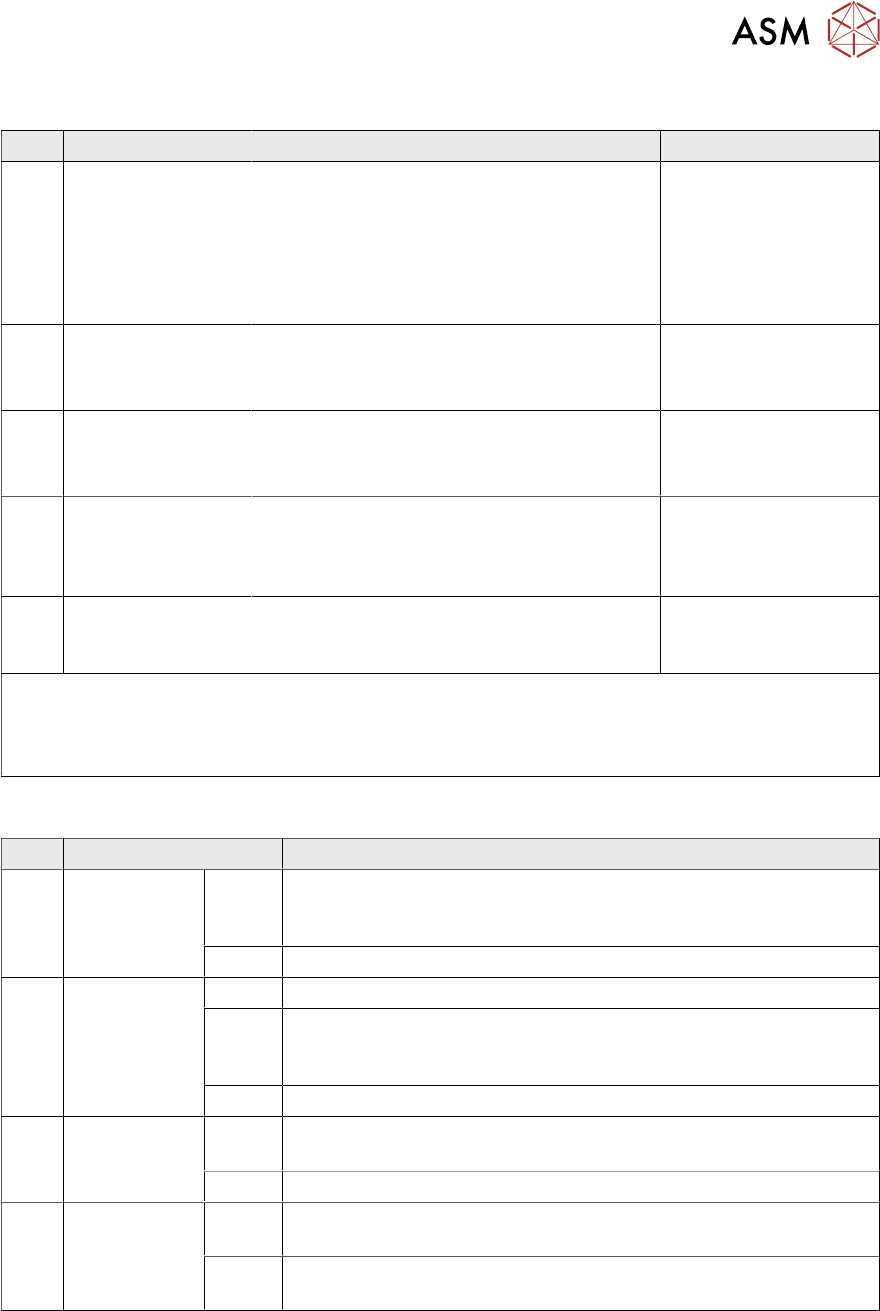
10.3.2 Button Description
No. Item Description Remarks
1 Index 1 & 2
●
Index 1 and 2 (same time) trigger a tray
exchange. The next tray in order will be
presented.
●
After the last tray the magazine drives
down and waits.
●
Open close the door to go on.
Not Active in produc-
tion mode.
2 Stop button
●
The stop button kills the air and motors
immediately.
●
A signal is sent to the host.
Active in production
mode.
3 Reset button
●
The reset button resets the feeder after
a Stop or Error condition.
●
A signal will be sent to the host.
Active in production
mode.
4 Inhibit button
●
Inhibits the feeder from receiving a tray
exchange command from the host,
push again and the Inhibit condition is
switched off.
Active in production
mode.
5 Elevator down
●
Enables to replace individual trays dur-
ing operation and without interrupting
production.
Not Active in produc-
tion mode
Continuous Run
Disconnect power cable of JTF, keep the button Inhibit(4) pressed and connect the power cable
for several seconds, the JTF will beginning with continuous run until press stop (2) or disconnect
the cable.
10.3.3 LED indication
No. Item/ Status Description
7 Green LED
- Ready
On Indicates a tray successfully reached the pick-position. A signal is
sent to the host. The LED goes off once the tray leaves the pick-
position.
Off Not ready to pick components, or, tray exchange is happening.
8 Orange LED
-Stop/ Error
On Stop-Condition, after pushing Stop.
Flash Error Condition. During the tray exchange a failure has happened.
The blinking pattern tells about what code. The signal is sent to
the host. Check RS232 Error Codes.
Off Normal operation.
9 Yellow LED
-Inhibit
On The Yellow LED indicated Inhibit, a signal is sent to the host. The
feeder does not accept tray exchanges.
Off Normal operation.
10 Blue LED
-Full/ Empty
On After a manual index of the last tray (highest slot number) in the
magazine the Blue LED goes on.
Off It indicated EMPTY, the elevator goes down. Open/close door to
reset condition.
10 JTF-ML
10.4 JTF (JEDEC Tray Feeder) - Power and Communication
160 Technical Training FSE SIPLACE TX-Series 01/2018
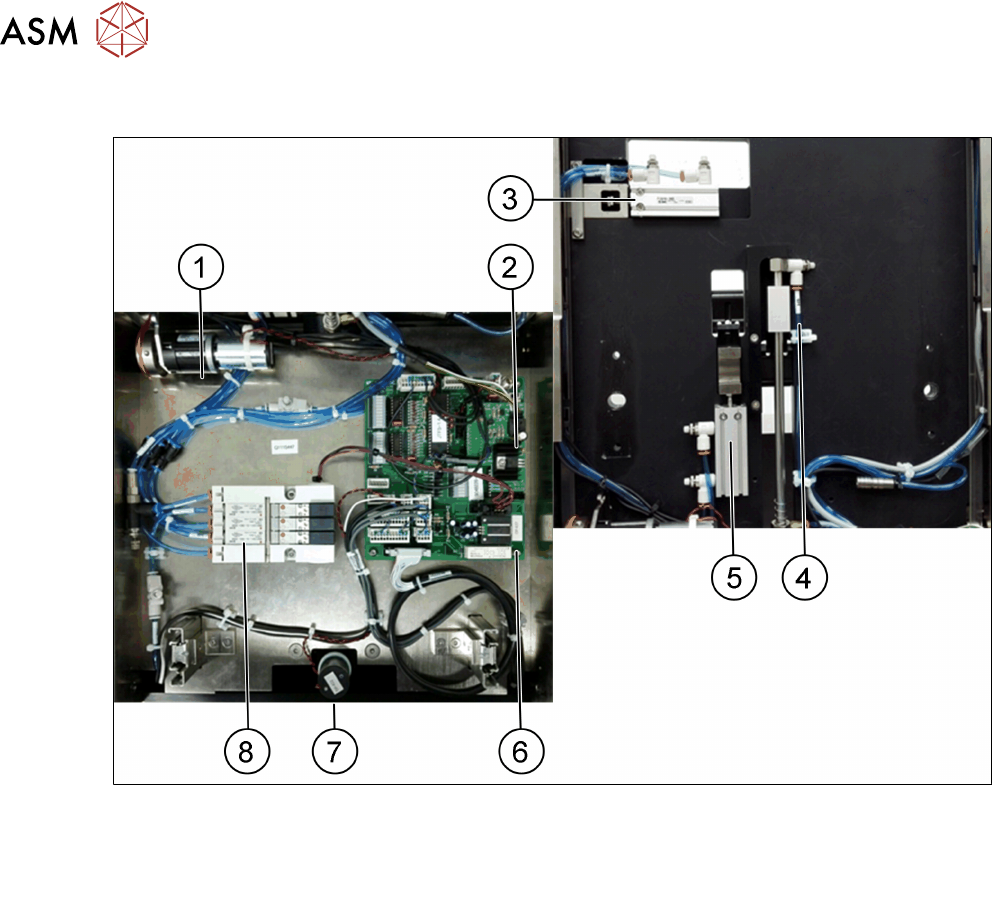
10.4 JTF (JEDEC Tray Feeder) - Power and Communication
1. Feed motor 5. Cylinder clamping Y
2. Power cable connector 6. Control board
3. Cylinder clamping X 7. Motor (lifting axis)
4. Tray pusher cylinder 8. Air distributor
10 JTF-ML
10.5 JTF (JEDEC Tray Feeder) - Adjustment
Technical Training FSE SIPLACE TX-Series 01/2018 161
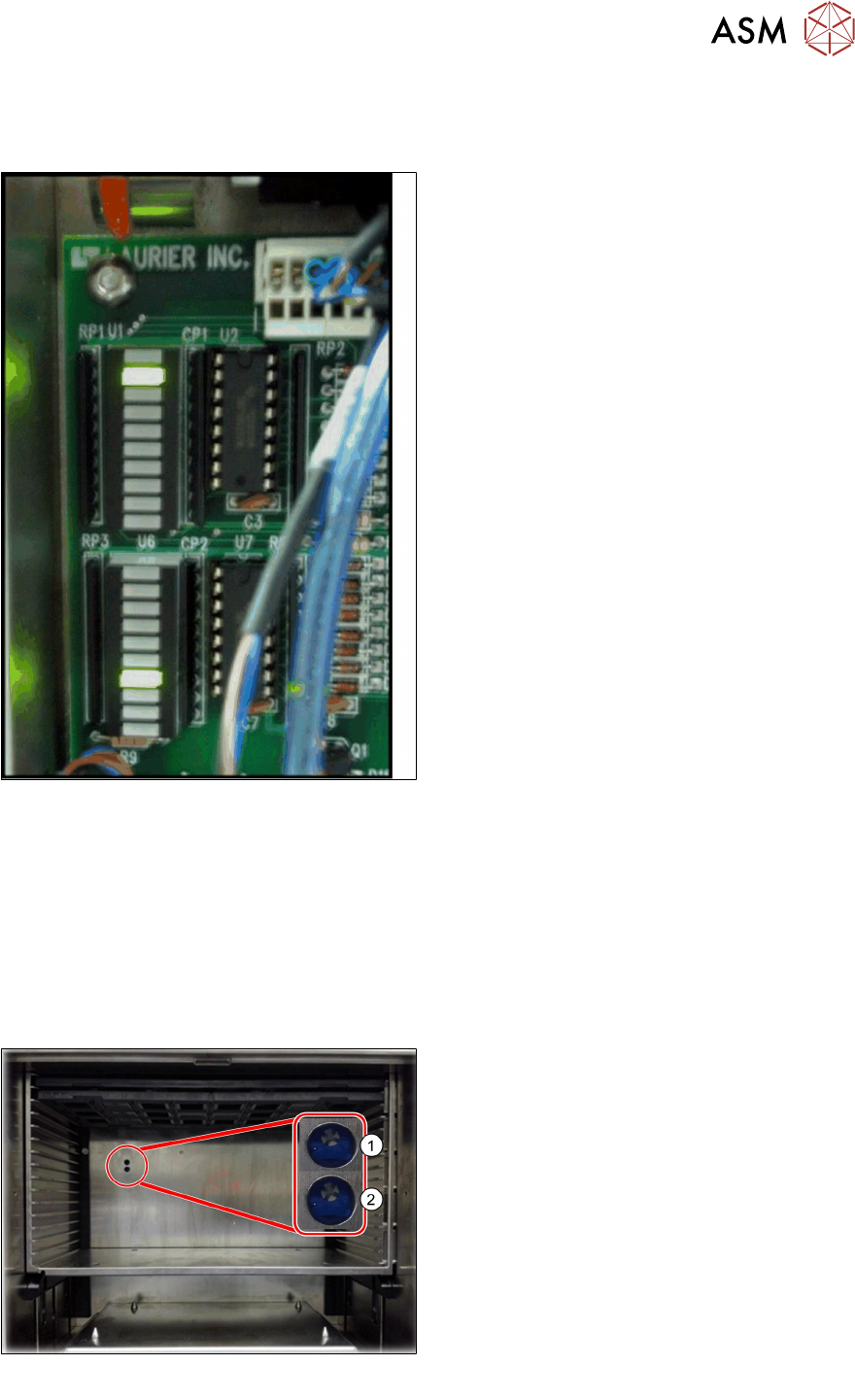
Control Board LED Status
All sensors and buttons are monitored on the LED bars on the controller PCB. This is a nice help to
determine errors on the feeder.
Place Function of Sensors
U1-3 Forward slow down sensor
U1-4 Stop at end
U1-5 Tray position
U1-6 Reset button
U1-7 Reset button
U1-8 nil
U6-1 Inhibit button
U6-2 Elevator down button
U6-4 Stop at stack, end stop sensor
U6-5 Reverse slow down sensor
U6-6 Elevator high end
U6-7 Elevator low end
U6-8 Door open
U6-9 Index 1 AND 2
10.5 JTF (JEDEC Tray Feeder) - Adjustment
The "conveyor slow down" sensor stops a tray from stopping too abruptly when it reaches the end
of the conveyor. (An abrupt stop can cause the components to pop out of the tray.)
The sensor is located near the end of the conveyor, when the leading edge of the tray passes this
sensor, the conveyor shifts to slow speed operation.
This can be adjusted using the potentiometer shown below, as the tray returns back into to the
feeder, it passes a second sensor. This slows the tray before it reaches the base.
The time the feeder waits before switching to slow speed can be adjusted using a potentiometer.
1. Potentiometer delay:
Return slow down sensor clockwise.
The conveyor ramp down delay is adjusted
so that the tray arrives at the back more
quickly.
2. Potentiometer delay:
Forward slow down sensor clockwise.
The conveyor ramp down delay is adjusted
so that the tray arrives at the front more
quickly.
If the potentiometer is turned with too much
force, it can be "stripped" so that it will not work
correctly anymore. This will require the control
board to be replaced. To avoid this problem, be
careful when adjusting the potentiometer.
See service manual for full details on setup and adjustment for conveyor unit.