YesAX V3.1.2 - Software User Manual.pdf - 第205页
SPC Data Logg ing 15 -1 15 - SPC Dat a Logging 15.1 Inspection Data AXI/AOI is the best tool to gather product quality data. It is a powerful process control tool. Yes AX software can log inspection data into a database …

14-18 Advance Inspection Features
Unlike the alternate template feature where the software switches them automatically to find the
best match. Switching between alternate part numbers is a completely manual affair. However,
operators are reminded of the presence of alternate part number with an icon on the Review
Failed Parts dialog when the location is under review. Moreover, switching between alternate
part numbers can be initiated in both operator and recipe programmer mode.

SPC Data Logging 15-1
15 - SPC Data Logging
15.1 Inspection Data
AXI/AOI is the best tool to gather product quality data. It is a powerful process control tool.
YesAX software can log inspection data into a database via ODBC (Open Database
Connectivity). Two main tables and a few supporting tables are created. The two main tables are:
SPC_Data, and Defect List. The Defect List data comes from the defect.ini file which lists all
the defects.
In the SPC_Data table the following fields are logged:
SystemID
AXI machine that did the inspection.
Inspector
The log-in user name.
Assy
Inspection Recipe. Usually the assembly name.
WO
Work order number.
IDate
Date and time of the inspection
SN
Serial Number of the board.
RefID
Reference ID
Ref2
Additional reference information.
DefectCode
Defect Code
PartTotal
Total number of parts inspected.
MarkTotal
Total number of markings inspected
LeadTotal
Total number of lead banks inspected
SolderTotal
Total number of solders inspected
BrdCount
Board Count (0 or 1)
PartFail
Part failed (0 or 1)
MarkFail
Mark failed (0 or 1)
LeadFail
Lead failed (0 or 1)
SolderFail
Solder failed (0 or 1)
IspTime
Time in seconds spent during inspection
RDate
The date and time of the defect review. (Can be different from IDate if
reviewed offline.)
ReviewTime
Time in seconds spent during the review
Reviewer
The log-in user that did the defect review. (Can be different from
Inspector if reviewed offline.)
Custom1
User defined custom field 1.
Custom2
User defined custom field 2.
RecType
Record type: I-Inspect, R-Review, W-Rework, IR –Inspect and Review.
Side
T for Top side, B for bottom side
FC
False Call, 1 or 0
Reworked
Rework completed, 1 or 0
PN
Part number
Pkg
Package
BrdFail
Board failed (0 or 1)
15-2 SPC Data Logging
All the inspection recipes, from all the AXI machines in the facility, report to a single SPC_Data
table. One record represents one defect. A board with 5 defects on 3 parts will have 5 records
with identical SystemID, Inspector, Recipe, WO and IDate fields. A board with no defects will
still have one record with the RefID and DefectCode fields blank. The fields which hold 0 or 1
are summed to make up the final reports. A board that has 5 failures will have one record with
BrdCount equal to 1 and the rest with BrdCount equal to 0. This way the 5 failures will only be
accredited to one board.
The SN field records the serial number of the board. In the case of a panelized recipe, if the user
chooses to have one serial number per panel (Block Skip Enabled but Block SN disabled), then
the SN would be a concatenation of the panel serial number and the Block ID. For example, the
serial number is Board-001, the SN for the master block would be Board-001-0, the SN for the
second block would be Board-001-2, etc. If each block has a unique barcode (and Block SN is
enabled) then the SN field will contain the serial number (Barcode) for each block.
By default the software creates the database files in MS Access 2000 format in the name of
YesDB.mdb, in the folder C:\AOI_Data\SPC_DataLog\. When there is more than one station
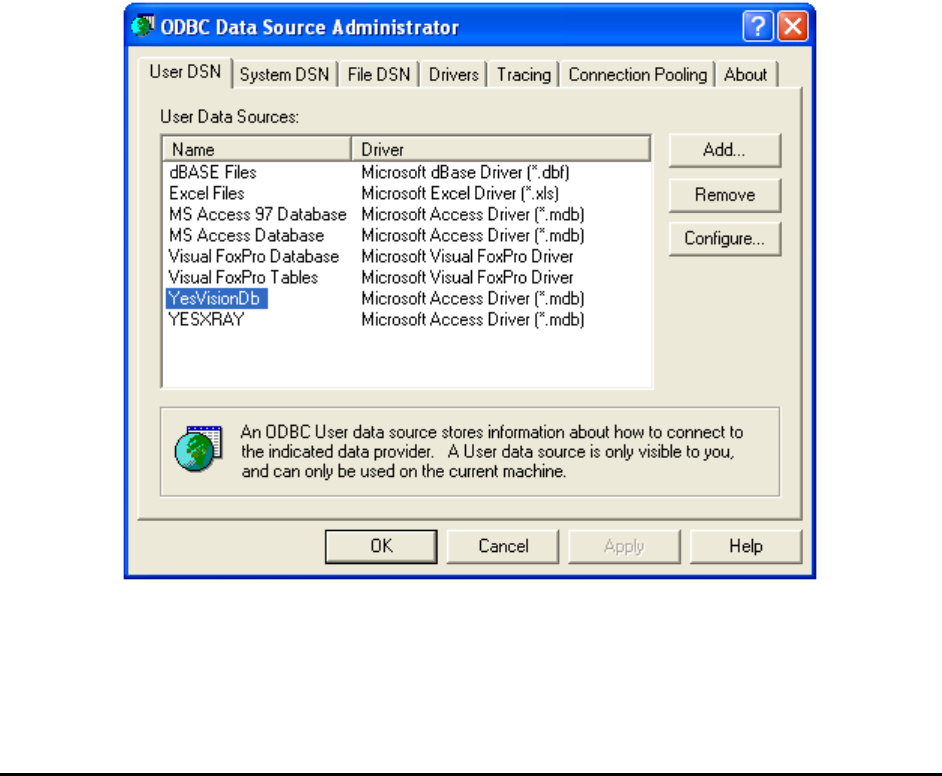
generating SPC data, have all stations send data to a single database. Use the ODBC data source
administrator to set up the database. The ODBC data source administrator is accessed via
Control Panel\Administrative Tools\Data Source (ODBC).