YesAX V3.1.2 - Software User Manual.pdf - 第221页
Panelized Board Inspection 16 -7 With By BLKTAG selected you can select two modes for the machine to read the BLKTAGs : Pre-Scan or No Pre-Scan. If Pre-Scan is selected, the system reads all the BLKTAG ’s before inspecti…
16-6 Panelized Board Inspection
16.3 BLKTAG and X-out
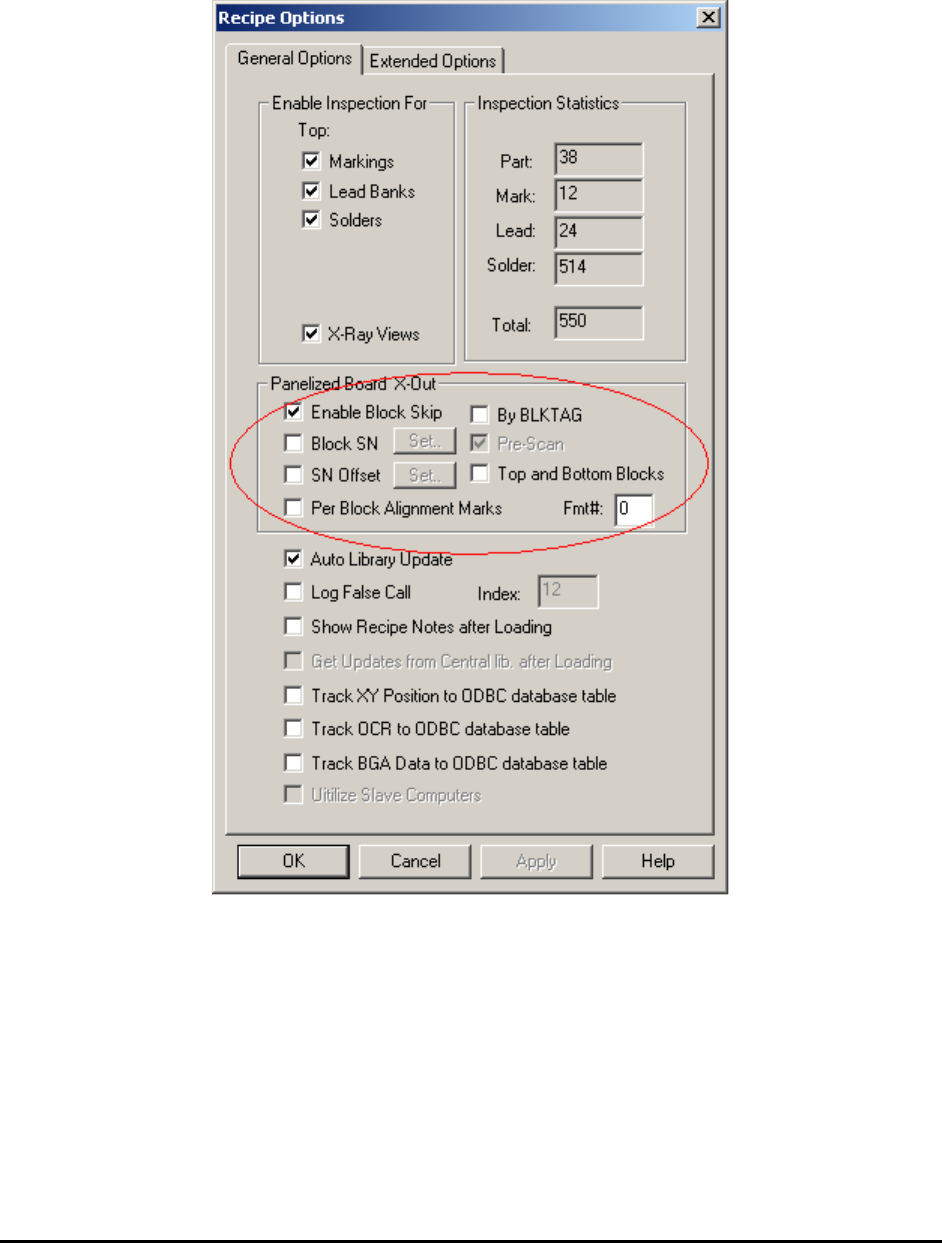
One or more panels may be unpopulated (X Out) on a panelized board. Go to Vision>Recipe
Option from the Main Menu
The Enable Block Skip option enables the system to skip the unpopulated areas.. With the By
BLKTAG disabled you can interactively select the block or blocks needed to be skipped from
the map view every time a new board is loaded. If By BLKTAG is enabled, the system searches
for a marker for the block. If the marker is there, the block is inspected. A block marker can be
trained by training a part with a Ref.ID of xx-BLKTAG. For example, the block label for block
1 would be 01-BLKTAG. To skip a block, place a label to cover its block marker.

Panelized Board Inspection 16-7
With By BLKTAG selected you can select two modes for the machine to read the BLKTAGs:
Pre-Scan or No Pre-Scan. If Pre-Scan is selected, the system reads all the BLKTAG’s before
inspecting any part. This is good for large blocks and small numbers of blocks. (e.g. 4 and up). If
the board consists of a large number of very small blocks (e.g. 10x10 array) it would take a long
time for the machine to read all the block tags. Do not select Pre-Scan. Let the machine inspect
all parts and the block tags together.
The inspection results are adjusted based on the presence or absence of the block tags. For
example, if 02-BLKTAG is not found, block 02 is considered “skip”, then the defective parts
from block 02 are removed from the defect report.
16.4 Block Fiducials
For panelized boards, it is a standard practice to route or score the boundaries of the circuits to
facilitate their eventual separation. The separation process is called de-panelizing. The routing
and score weaken the integrity of the PCB; causing the circuits to shift relative to each other
during the reflow process. Use the block fiducials to compensate for the block to block positional
inaccuracy. A block fiducial is a mark on the block which can be used as a positional reference
for all other parts on the block.
To use a block fiducial, first make sure all part overlays on the master block are well aligned
with the parts. Then select a positional reference mark on the master block, train a part and set its
reference ID to BLKFIDU. Train a mark inspection box on the reference mark. Give the part a
PN to help later parameter updates. Duplicate the BLKFIDU to all other blocks by selecting
Update Block from the Edit menu.
Using one block fiducial (BLKFIDU) for each block compensates for XY positional inaccuracy
for the block, which is usually sufficient for most panelized board designs.
You could also use 2 block fiducials (BLKFIDU and BLKFID2) for each block. With 2 block
fiducials you can also compensate for rotational inaccuracies. When you use 2 block fiducials,
BLKFIDU has to be to the left of BLKFID2. For best results, the middle point on a line drawn
from BLKFIDU to BLKFID2 should be close to the center of the block.
16.5 Alternate Reference ID Format
For YesAX the default Reference ID format for a panelized board uses a leading 2 or 3 digit
number and a dash to present the block number. For example, if the master block reference ID is
R1, then the corresponding reference ID for block 2 would be 02-R1. This default format has a
format number of 0. YesAX also allows an alternate format called format 1. It uses a trailing
alphabet to present the block ID. For example, if the master block reference ID is R1_A, then the
corresponding reference ID for block 2 would be R1_B.