00194081-01.pdf - 第100页
3 Technical data User Manual SIP LACE CF 3.10 Nozzle changer for the 6-segment C ollect&Place head Software Version SR.408.xx 03/2006 US Edition 100 CAU TIO N 3 Before y ou fill m agazine , make sure tha t all the n …
User Manual SIPLACE CF 3 Technical data
Software Version SR.408.xx 03/2006 US Edition 3.10 Nozzle changer for the 6-segment Collect&Place head
99
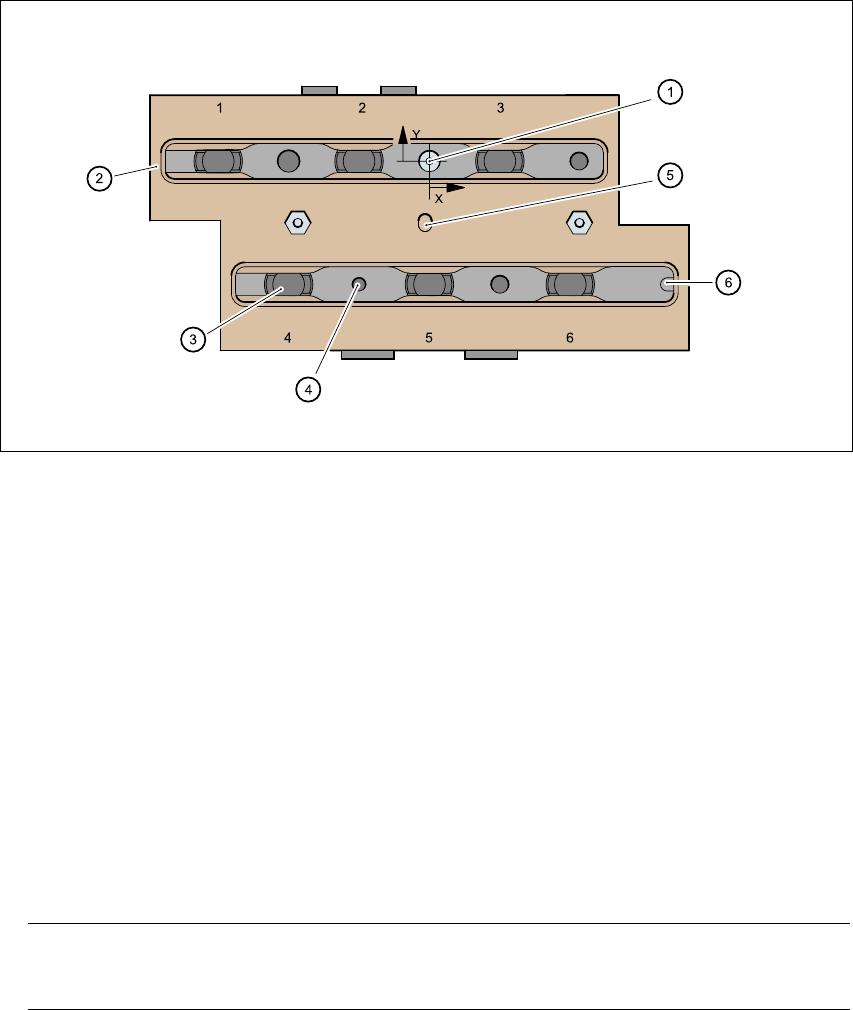
Fig. 3.10 - 2 Magazine and nozzle holders
3
(1) Positioning fiducial
(2) Locking plate
(3) Nozzle garage
(4) Hole for the parallel pin for centering the magazines
(5) Hole for the parallel pin of the slide mechanism
(6) Slot for the parallel pin for centering the magazines
3.10.4 Notes on operation
Æ
When you fill a magazine with a certain nozzle type for the first time, attach an adhesive label
to identify the type.
PLEASE NOTE 3
Fill the magazines off the machine and always replace complete magazines. 3
Æ Open the locking plate and place the nozzles in the nozzle garages.
Æ Close the locking plate so that the nozzles cannot drop out of the magazines.
3 Technical data User Manual SIPLACE CF
3.10 Nozzle changer for the 6-segment Collect&Place head Software Version SR.408.xx 03/2006 US Edition
100
CAUTION 3
Before you fill magazine, make sure that all the nozzles on the Collect&Place head have
been returned to their magazines. 3
Æ Programming the nozzle changer is described in the SIPLACE C Pro user manual.
PLEASE NOTE 3
Æ Do not allow components to drop onto the magazines. If they do, they could jam the locking
plate.
Æ Do not allow components to drop onto free feeder module locations. They will stick to the
magnetic bar. Production may have to be interrupted if the feeder modules are not placed on
the component table correctly. You should therefore regularly clean the magazines and free
locations.
User Manual SIPLACE CF 3 Technical data
Software Version SR.408.xx 03/2006 US Edition 3.10 Nozzle changer for the 6-segment Collect&Place head
101
3.10.5 Emptying the reject bin
The reject bin holds around 50 nozzles from the 9xx family. To avoid interruption of the place-
ment sequence, you should regularly empty the reject bin.
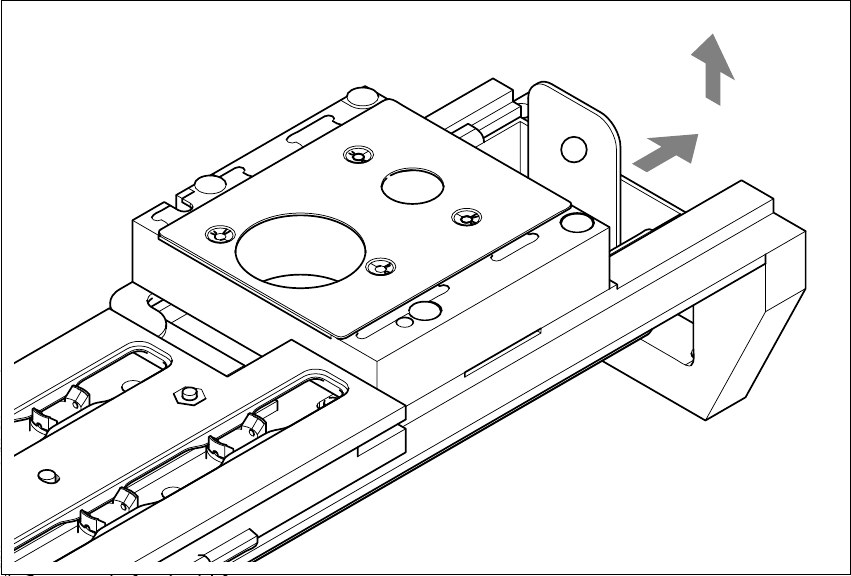
Fig. 3.10 - 3 Emptying the reject bin, 6-segment Collect&Place head
3
(1) Remove the reject bin
Æ Pull the reject bin out of its retainer in the direction indicated by the arrow, and lift the bin out
of its holder.
Æ To return the reject bin, push it back into the retainer.
1