00194081-01.pdf - 第23页
User Manual SIPLAC E CF 2 Operational safety Software Version SR.408.xx 03/2006 US Edition 2.1 Safety instructions 23 2.1.6 Safety instruct ions for laser unit s Permis sion to o perate comp onents that are cl assifie d …

2 Operational safety User Manual SIPLACE CF
2.1 Safety instructions Software Version SR.408.xx 03/2006 US Edition
22
Æ NEVER open one of the protective covers if you are not totally familiar with the use and func-
tioning of the machine! Do not open the protective covers during operation unless you are told
to do so in this Manual or in the station software dialog.
Æ Only trained and qualified personnel may set the key switch to setup mode ("I").
During operation, do not set the key switch to the "I" position (setup mode) unless prompted to
do so in this manual or by the station software. 2
Æ NEVER place your head or arms in the gantry and lifting table traveling range while the station
is switched on!
Æ For your own safety, wear work clothes that conform to the guidelines of the professional as-
sociation, i.e. no wide sleeves etc.
Æ Reduce the risks by not wearing scarves, chains or ties at your work post.
Æ People with long hair must wear a protective head covering.
WARNING 2
The system is electrically driven. When electrical devices are in use, certain parts carry dangerous
voltage levels.
Æ Switch off at the main switch and disconnect the placement system from the power supply be-
fore carrying out any work on live components.
Æ Lock the systems as described in Section 2.9, page 59.
There is a risk of death, severe injury and/or considerable damage to equipment if these instruc-
tions are not followed.
2.1.5.3 Safety of plant and equipment
Æ Never make changes, however minor, unless you are totally aware of the effect they will have
on the overall functioning of the system.
Æ The stations must always be set up, retooled and maintained by appropriately trained person-
nel.
Æ Only use Siemens A&D original spare parts and authorized accessories. The use of other parts
will affect safety and will invalidate the liability for any consequential damage.
Æ Do not make modifications to the safety equipment. In particular, NEVER bypass circuit-break-
ers or remove safety devices.

User Manual SIPLACE CF 2 Operational safety
Software Version SR.408.xx 03/2006 US Edition 2.1 Safety instructions
23
2.1.6 Safety instructions for laser units
Permission to operate components that are classified as lasers is withdrawn if
– mechanical damage to the unit is observed, or
– any work is done on the mechanical or electrical parts of the unit. Even damaged or missing
screw locking paint on laser components (e.g. cover plates, fasteners, adjusting potentiom-
eter) counts as work.
– Only SIEMENS A&D service engineers, or the machine owner's service engineers who
have been trained by SIEMENS A&D are allowed to replace laser components.
– Repairs to laser units are carried out at the SIEMENS A&D factory exclusively.
2.1.7 Important notes on environmentally-friendly disposal of materials and
components
SIPLACE systems are manufactured using only materials and parts that can be easily separated
and disposed of in an environmentally-friendly way. Hazardous materials are not necessary for
the installation, dismantling or operation of the system.
PLEASE NOTE 2
The owner of the system has sole responsibility for the proper environmentally-friendly disposal
of machines, working materials, consumables and wear parts.
Æ Please observe your national statutory provisions for waste disposal and environmental pro-
tection.
2 Operational safety User Manual SIPLACE CF
2.2 Warning labels Software Version SR.408.xx 03/2006 US Edition
24
2.2 Warning labels
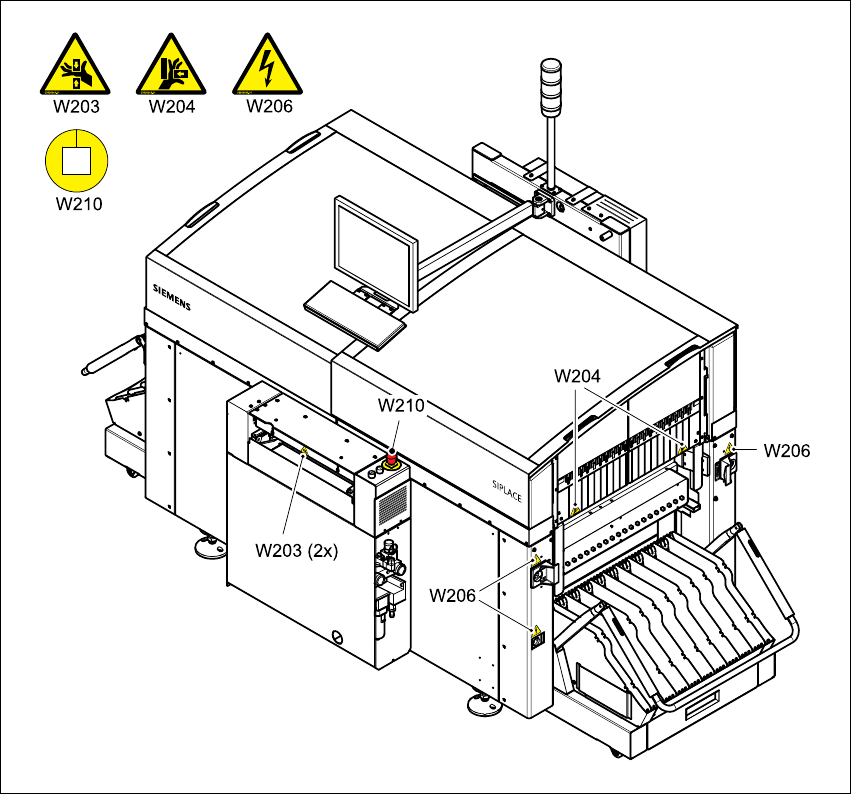
2.2.1 Warning labels W201, W203, W204, and W206 on the machine
The warning labels are made from soft PVC film, and are abrasion-proof, light-fast and resistant
to water and weathering.
Their design meets the requirements of ISO 3864-2 and ANSI Z535.4.
2
Fig. 2.2 - 1 Warning labels on the machine - part 1
Item W203 item no. 03009342-01
Item W204 item no. 03009343-01
Item W206 item no. 03009345-01
Item W210 item no. 03009350-01