00194081-01.pdf - 第157页
User Manual SIPLAC E CF 6 Component han dling Software Version SR.408.xx 03/2006 US Edition 6.2 Technical data for the S feeder modules 157 6.2.18 W affle-p ack tray holder The waffle-pack tr ay holde r allows c omponent…

6 Component handling User Manual SIPLACE CF
6.2 Technical data for the S feeder modules Software Version SR.408.xx 03/2006 US Edition
156
6.2.17.2 Technical data
6
6
6
6.2.17.3 Parameters for surf tape feeder modules
The parameters for the surf tape feeder module can be modified on the SIPLACE Pro computer.
Tape widths 8/12/16 mm
Recommended tape and component
sizes
8 mm: for 1 x 1 mm² - 2.3 x 2.3 mm² components
12 mm: for 2.3 x 2.3 mm² - 5 x 5 mm² components
16 mm: for 3.8 x 3.8 mm² - 9.5 x 9.5 mm² components
Packaging accuracy of the bare die on
the surf tape
Bare die size up to 2.3 x 2.3 mm²: +/- 100 µm, 6 σ
Bare die size over 2.3 x 2.3 mm²: +/- 200 µm, 6 σ
(related to the center of the pocket)
Required distance between the edges
of the bare dies to the tape pocket Min. 0.4 mm
Pusher needle Single or triple needle depending on the die size
Tape material Metric
Tape standard IEC 286-3, DIN-IEC-286, EIA 481, and JIS C 0806
Tape reel diameter 7" to 15"
Footprint of the feeder module 1 location on the component table
User Manual SIPLACE CF 6 Component handling
Software Version SR.408.xx 03/2006 US Edition 6.2 Technical data for the S feeder modules
157
6.2.18 Waffle-pack tray holder
The waffle-pack tray holder allows components to be picked up from individual waffle-pack trays.
The waffle-pack trays are changed manually.
6
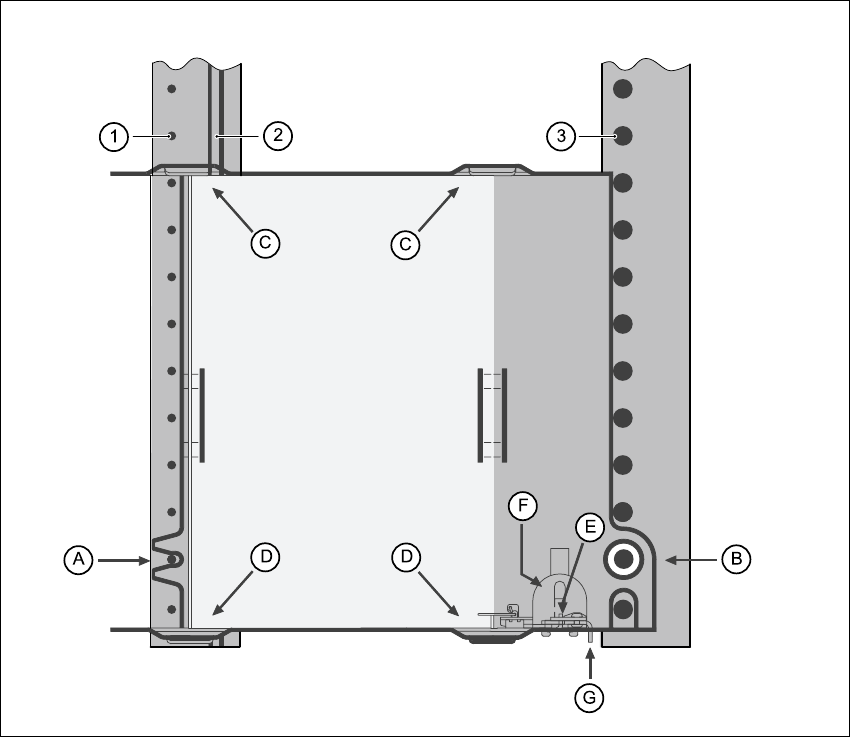
Fig. 6.2 - 18 Installation
(1) Centering pins
(2) Magnetic rail
(3) Centering ball
The waffle-pack tray holder is placed on the component table as for a feeder module. There are
two different versions of the support, the only difference being the width.
Holder for large waffle tray (260x360mm², fills 9 locations)
item no. 00116430-01 and 6
Holder for small waffle tray (136x360mm², fills 5 locations)
item no. 00116432-01 6
6
6 Component handling User Manual SIPLACE CF
6.2 Technical data for the S feeder modules Software Version SR.408.xx 03/2006 US Edition
158
PLEASE NOTE 6
The support for the waffle-pack magazine must only be placed on the right-hand side of the SI-
PLACE CF. It can only be positioned so that the right edge fills no more than track 73. 6
6.2.18.1 Assembly
Æ Insert the front side of the waffle-pack tray holder into the associated centering pin (A in Fig.
6.2 - 18
).
Æ Then position the hole on the rear side of the waffle-pack tray holder onto the centering ball on
the component feeder table (B in Fig. 6.2 - 18
).
Æ Make sure the waffle-pack tray is resting securely on the component feeder table.
Æ Position one side of the waffle-pack tray carrier in the mounting (C in Fig. 6.2 - 18). Then press
the other side into the mounting (D in Fig. 6.2 - 18
).
Æ Slide the waffle-pack tray up against the stop (E in Fig. 6.2 - 18).
Æ Secure the waffle-pack tray carrier by pressing the thrust pad (F in Fig. 6.2 - 18) downwards.
Æ To remove the waffle-pack tray carrier, press the thrust pad once more.
PLEASE NOTE
Using the holder for small waffle-pack trays (136mm) a waffle-pack tray (JEDEC or CENELEC
waffle-pack tray) can be fitted directly to the holder, in other words, without a waffle-pack tray car-
rier being used. However, the thrust pad will require changing.
WARNING
All locations must be equipped with feeder modules in order to guarantee operational reliability.
If there are not enough feeder modules available, unassigned locations should be fitted with a
hand guard (dummy feeder module). When a waffle-pack tray holder is set up, the remaining
locations have to be protected again with a hand guard.
6.2.18.2 Changing the retainer
Æ Hold the retainer (G in Fig. 6.2 - 18) firmly. Press the thrust pad downwards (F in Fig. 6.2 - 18)
and remove the retainer by pressing it out sideways.
6.2.18.3 Data entry
Define the waffle-pack trays as described in the SIPLACE Pro operating instructions.