00198365-03_UM_JTF-ML2_TX12_V1-V2_EN.pdf - 第77页
5 Tasks on the machine 5.3 Operating the JEDEC tray feeder in the station software User Manual SIPLACE TX V1/V2 Series JEDEC Tray Feeder (JTF-ML2) 11/2019 77 Fig.142: Track information - track 29 selected (example of SI…
5 Tasks on the machine
5.3 Operating the JEDEC tray feeder in the station software
76 User Manual SIPLACE TX V1/V2 Series JEDEC Tray Feeder (JTF-ML2) 11/2019
5.3.2 "Display, Check and Set up Feeders, Components and Nozzles" Menu
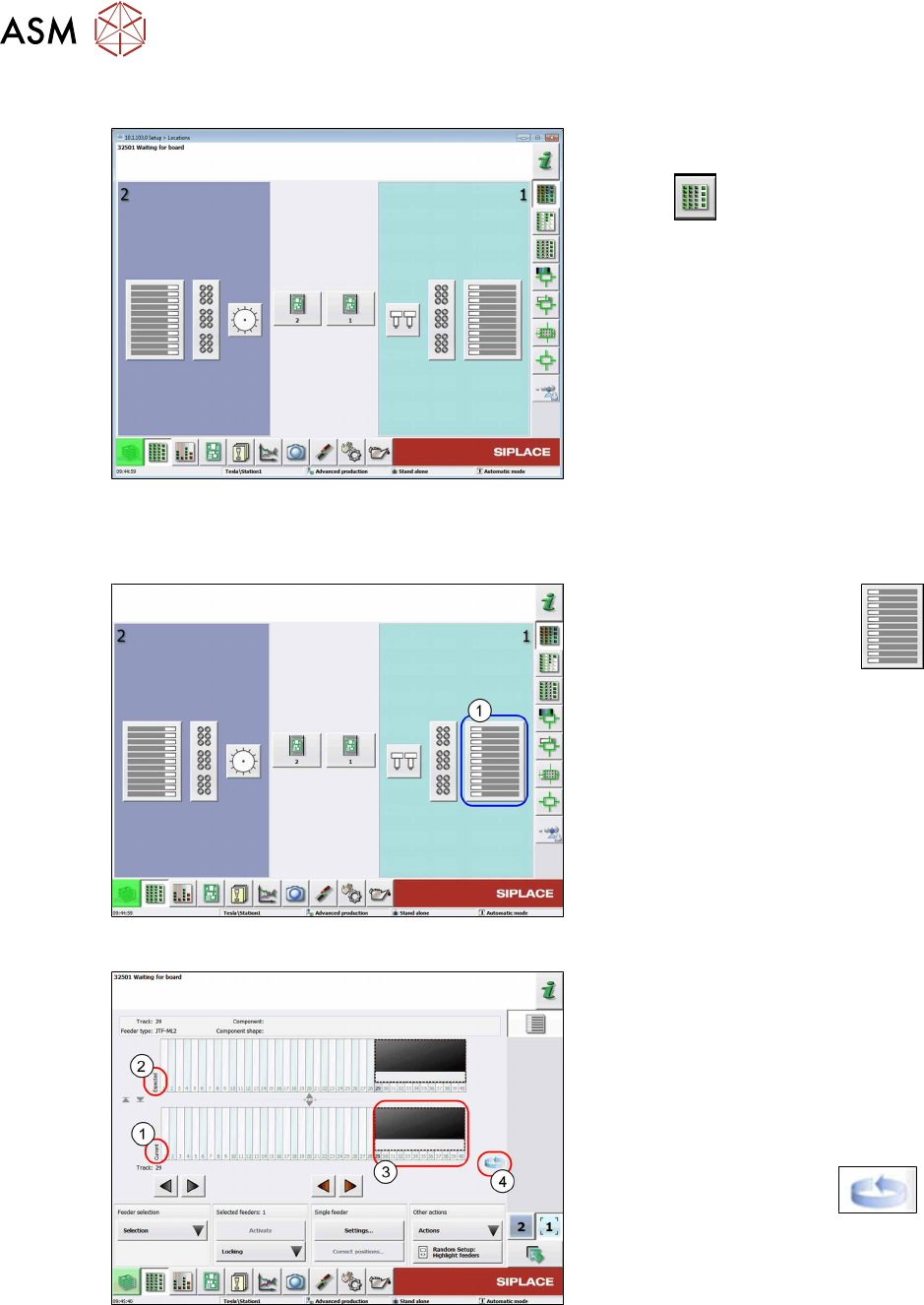
Fig.139: Select menu (example of SIPLACETX2)
► Select the Display, check and set up
feeders, components and nozzles
menu to display the sub views of
the relevant locations.
5.3.3 Selecting the JEDEC Tray Feeder at the Location
Fig.140: Select Location
► Select the relevant location
(1)
to display the view of the current setup.
Fig.141: Current setup - location 1 selected (example of
SIPLACETX2)
1. Current setup (currently set-up feeders)
2. Expected setup (setup expected by
SIPLACE Pro)
3. SIPLACEJTF‑ML2 on track 29
4. Change button for switching to the
Track information submenu.
► Press the change button to
display the Track information sub-
menu.
5 Tasks on the machine
5.3 Operating the JEDEC tray feeder in the station software
User Manual SIPLACE TX V1/V2 Series JEDEC Tray Feeder (JTF-ML2) 11/2019 77
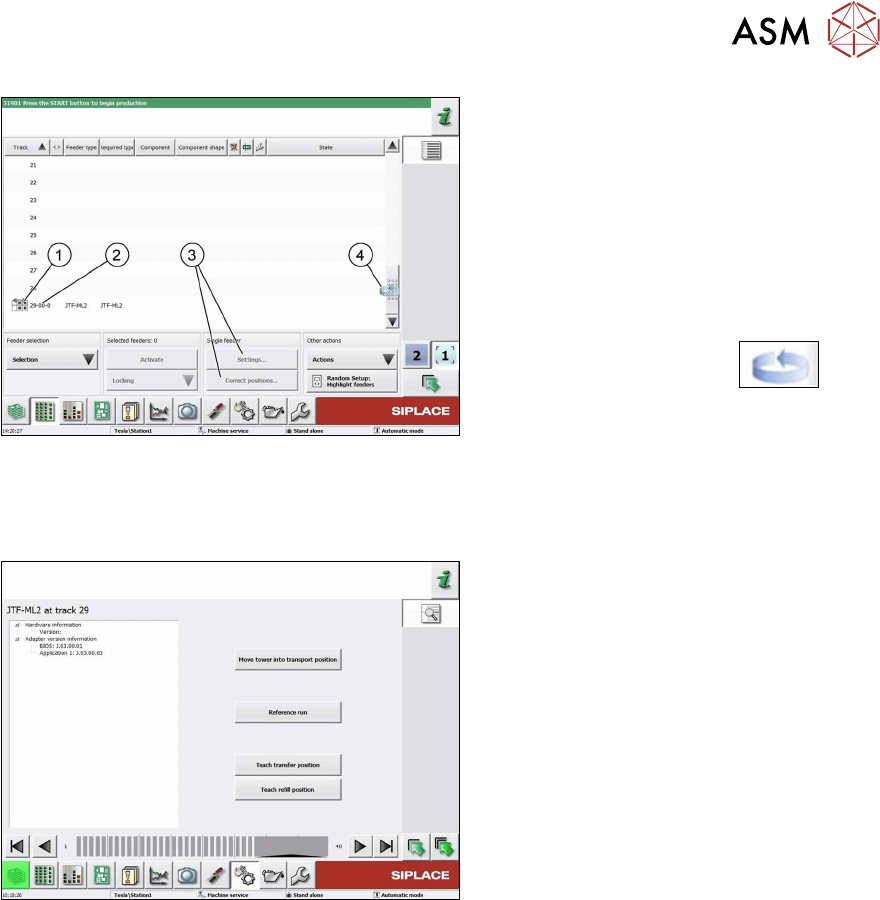
Fig.142: Track information - track 29 selected (example of
SIPLACETX2)
1. SIPLACEJTF‑ML2
2. Abbreviation for the SIPLACEJTF
feeder (visualization)
3. The settings menu is not active until the
relevant track has been selected (high-
lighted in blue color).
4. Change button to switch back to the
Current setup view
► Press the change button to
display the Current setup submenu.
5.3.4 SIPLACEJTF-ML2 – Additional Functions
Fig.143: SIPLACEJTF-ML2 – Additional Functions
●
Move tower into transport position
Move the tower into parking position
before removing tower from machine.
●
Reference Run
The module will be checked for general
readiness.
The cassettes are moving up and down
(control visually).
An error message is shown if any prob-
lems are encountered.
●
Teach transfer position
Whenever the tower or the conveyor of
the SIPLACE JTF-ML2 has been
mounted to the machine, the teach
transfer position has to be teached
again.
●
Teach refill position
Reteach the refill position if a cassette
does not slide easily into the tower.
5 Tasks on the machine
5.3 Operating the JEDEC tray feeder in the station software
78 User Manual SIPLACE TX V1/V2 Series JEDEC Tray Feeder (JTF-ML2) 11/2019
5.3.5 JEDEC Tray Feeder Settings
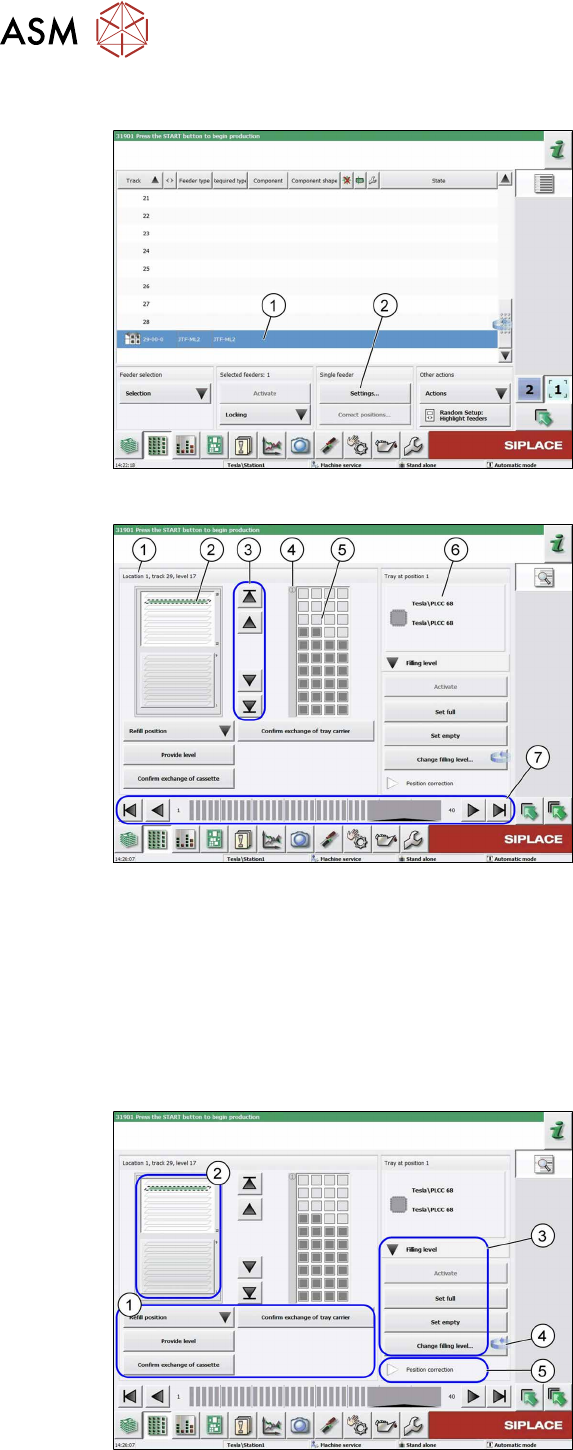
Fig.144: Track 11 highlighted (example of SIPLACETX2)
► Select the JEDEC tray feeder for the
relevant track (1).
ð The feeder is highlighted in blue
color and the Settings menu (2) is
enabled for this feeder.
Fig.145: JEDEC tray feeder settings
(example of SIPLACETX2)
This view is displayed by selecting the Set-
tings button in the Single Feeder menu:
1. The selected tray is framed and dis-
played as Level 5.
2. Tray occupancy of the JEDEC tray
feeder
If the component is set up, the tray will
be displayed in green.
3. Selection buttons for trays (selection
via cursor is possible as well)
4. Position 1 for orientation
5. Picture of the selected tray (tray 5)
visualizing the current occupancy.
In this example, this first row has
already been picked up. (Gray = occu-
pied, white = empty)
6. Information on the component that is
currently in the feeding position.
7. Feeder on location (arrow keys for se-
lecting the feeder)
5.3.6 JEDEC Tray Feeder Settings – Functions
Fig.146: JEDEC tray feeder settings - functions
(example of SIPLACETX2)
The Settings menu provides a rough dis-
tinction of the functions:
1. Operating functions of the trays (see
below)
2. Cassette overview
3.
Filling level functions for selected tray
(see below)
4. Change button to switch to the level
view of the JEDEC tray feeder
5.
Position correction... for trays