00198365-03_UM_JTF-ML2_TX12_V1-V2_EN.pdf - 第84页
6 Maintenance 6.1 Overview maintenance tasks 84 User Manual SIPLACE TX V1/V2 Series JEDEC Tray Feeder (JTF-ML2) 11/2019
6 Maintenance
6.1 Overview maintenance tasks
User Manual SIPLACE TX V1/V2 Series JEDEC Tray Feeder (JTF-ML2) 11/2019 83
6 Maintenance
NOTICE
Further Information:
For maintenance, please read the following documents:
► Job card "SIPLACE JTF-ML2 Maintenance – Workflow 1" (Weekly)
[EN: 00198422‑xx] [DE: 00198427‑xx] [ZH: 00198432‑xx]
► Job card "SIPLACE JTF-ML2 Maintenance – Workflow 2" (3-Monthly)
[EN: 00198423‑xx] [DE: 00198428‑xx] [ZH: 00198433‑xx]
► Job card "SIPLACE JTF-ML2 Maintenance – Workflow 3" (6-Monthly)
[EN: 00198424‑xx] [DE: 00198429‑xx] [ZH: 00198434‑xx]
6.1 Overview maintenance tasks
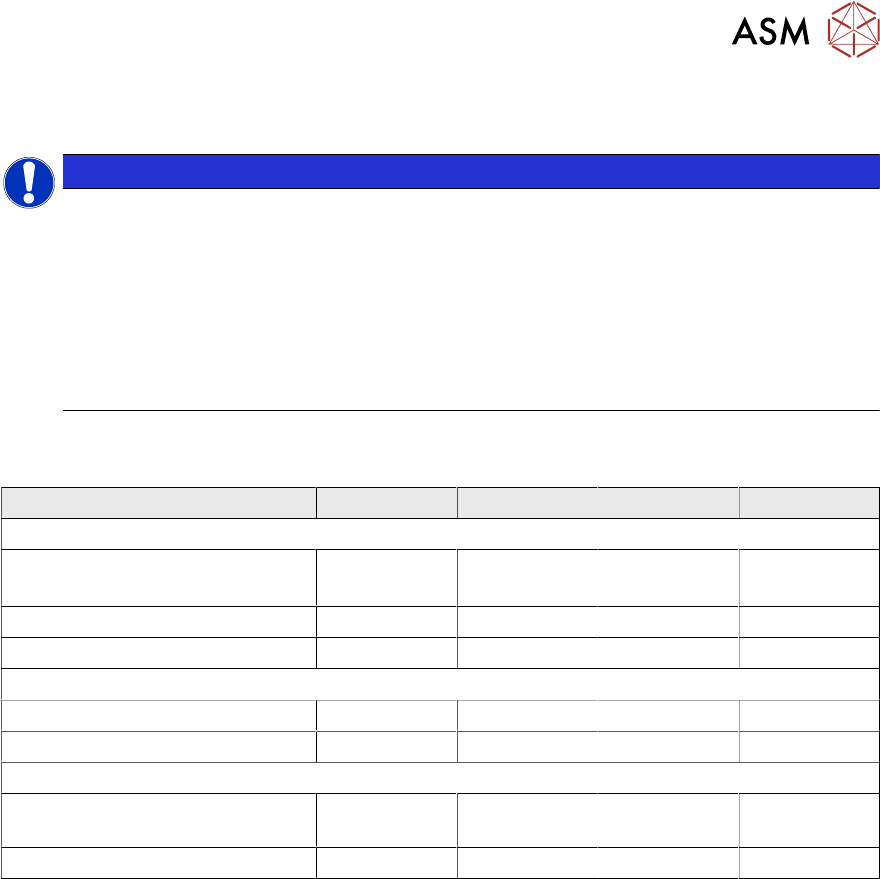
Maintenance Tasks Workflows Workflow 1 Workflow 2 Workflow 3 Workflow 4
Maintenance tasks (weekly)
Clean conveyor (SIPLACE
JTF-ML2)
X X X X
Clean cassette X X X X
Clean tower X X X X
Maintenance tasks (3-monthly)
Kicker LM guide X X x
Pusher LM guide X X X
Maintenance tasks (6-monthly)
Ball screw of the lifting axis
(tower)
X X
Lifting LM guide (tower) X X

6 Maintenance
6.1 Overview maintenance tasks
84 User Manual SIPLACE TX V1/V2 Series JEDEC Tray Feeder (JTF-ML2) 11/2019
7 Appendix
7.1 Excerpts from the Service Manual
User Manual SIPLACE TX V1/V2 Series JEDEC Tray Feeder (JTF-ML2) 11/2019 85
7 Appendix
For the settings and calibration of the nozzle changer and nozzle station as well as removal and
connections of the FCU, use the relevant service manuals.
7.1 Excerpts from the Service Manual
The following chapters are excerpts from the service manual for your machine. If required, further
information is provided there.
●
Service manual SIPLACE TX-Series V1 [DE:00198149‑xx] [EN:00198150‑xx]
●
Service manual SIPLACE TX-Series V2 [DE:00198538‑xx] [EN:00198539‑xx]
7.1.1 Replacing the Feeder Control Unit (FCU)
Parts, Equipment and Tools
●
X-FCU V2, TX-/X-Series [03096377-xx]
Overview
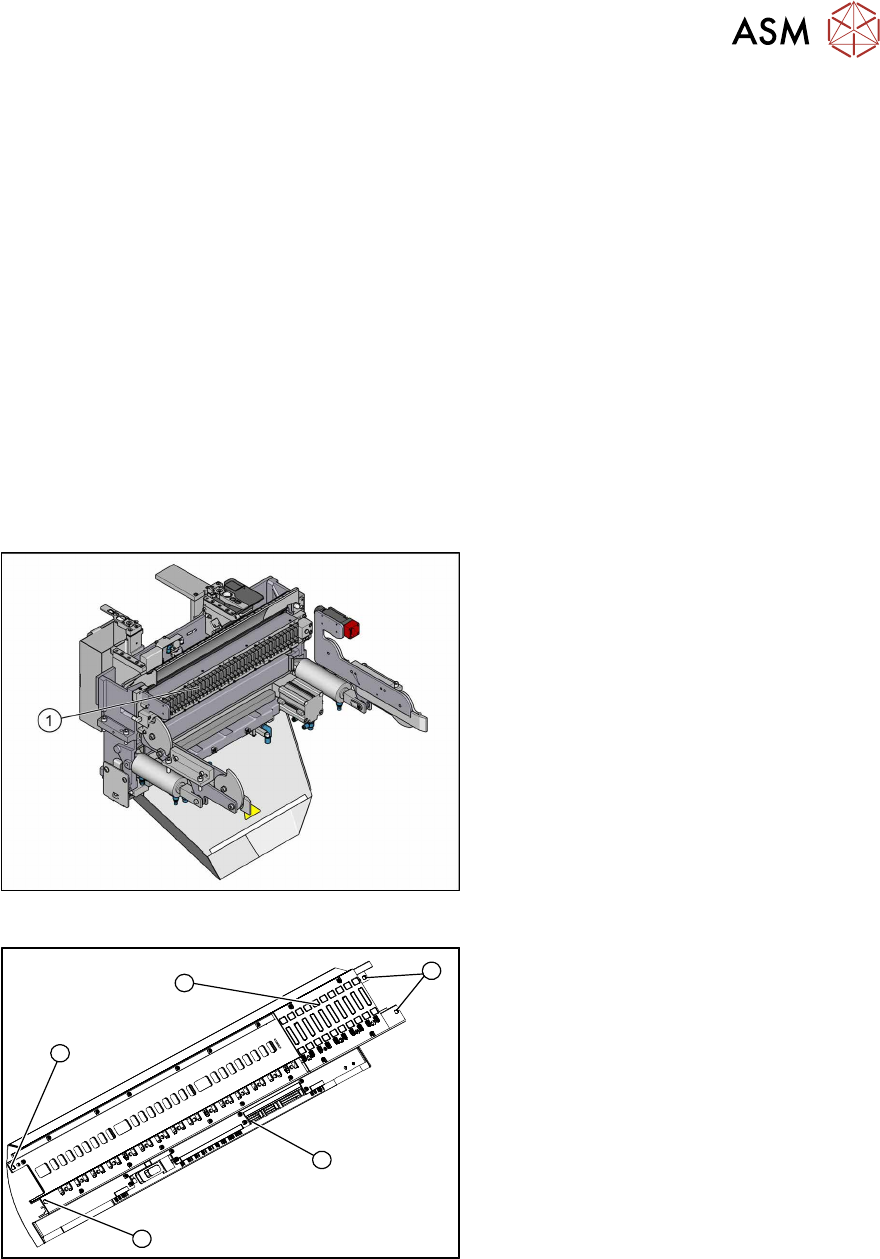
Fig.153: FCU on COTi
1. Feeder control unit
The feeder control unit is installed at the loc-
ations in the COTi.
3
3
1
3
2
Fig.154: FCU overview
1. FCU assembly
2. Terminal strip
3. Screws fastening the FCU
Depending on the version, there will be
four or six screws.
Removal
► Switch off the machine, disconnect it from the power supply and secure it to prevent
unauthorized reactivation.
► Remove the feeder unlocking device.