00193790-01.pdf - 第79页
Installation and Getting Started with CACCIA 2 English Issue 07/2004 2.4 System Requirements 13 2.4.2 Software Configuration The foll owing so ftware conf iguration is nec essary f or succes sful ins tallation of CAC CIA…
2 English Installation and Getting StartedwithCACCIA
2.4 System Requirements Issue 07/2004
12
2.4 System Requirements
The system configurations recommended for CACCIA are described in the following sections of
this manual.
2.4.1 Recommended Configuration for Hardware
The following hardware requirements are necessary for successful installation of CACCIA.
2.4.1.1 PC
– Windows NT version 4.0 or higher/ Windows 2000 / Windows XP
– At least 128 MB main memory
– Diskette drive
– Monitor with 1280 x 1024 resolution
– Keyboard and mouse
– Available PCI or USB slot (depending on board)
– CD-ROM drive
– USB connection for Memory Stick (if installed)
2.4.1.2 Laptop
– Windows NT version 4.0 or higher/ Windows 2000 / Windows XP
– At least 128 MB main memory
– Available PCMCIA slot, USB slot
– CD-ROM drive
Installation and Getting Started with CACCIA 2 English
Issue 07/2004 2.4 System Requirements
13
2.4.2 Software Configuration
The following software configuration is necessary for successful installation of CACCIA:
– Windows NT (SVP 6)
(available via ..Tools / Common / Service packs on the installation CD)
– Windows 2000 (SVP 3)
(available via www.windows-update.com)
–WindowsXP(SVP1)
(available via www.windows-update.com)
– Administration rights for the computer during installation
2 English Installation and Getting StartedwithCACCIA
2.5 License Conditions Issue 07/2004
14
2.5 License Conditions
To useall CACCIAfunctions,youwillneed alicense. Withouta license, you can only usethebasic
functions. For example, you will be able to use all download functions but will not be able to send
data or commands to the machine.
You need a license to edit machine data. Individual CACCIA licenses are awarded for each
computer and each user. After applying for a license, your CACCIA version will be activated and
the full function spectrum made available.
WARNING
Licenses CACCIA versions may only be used by authorized and specially trained personnel
(CACCIA training).
Inappropriate use of CACCIA will cause severe damage to the machine and put the operating
personnel at risk.
2.5.1 Requesting and Activating the License
In order to apply for a license, the computer on which your CACCIA version is installed must have
an e-mail client. You must be able to send and receive e-mail from this computer.
→ Start CACCIA. Open the Windows Start menu and select Program Files → CACCIA →
CACCIA or use the icon on your desktop.
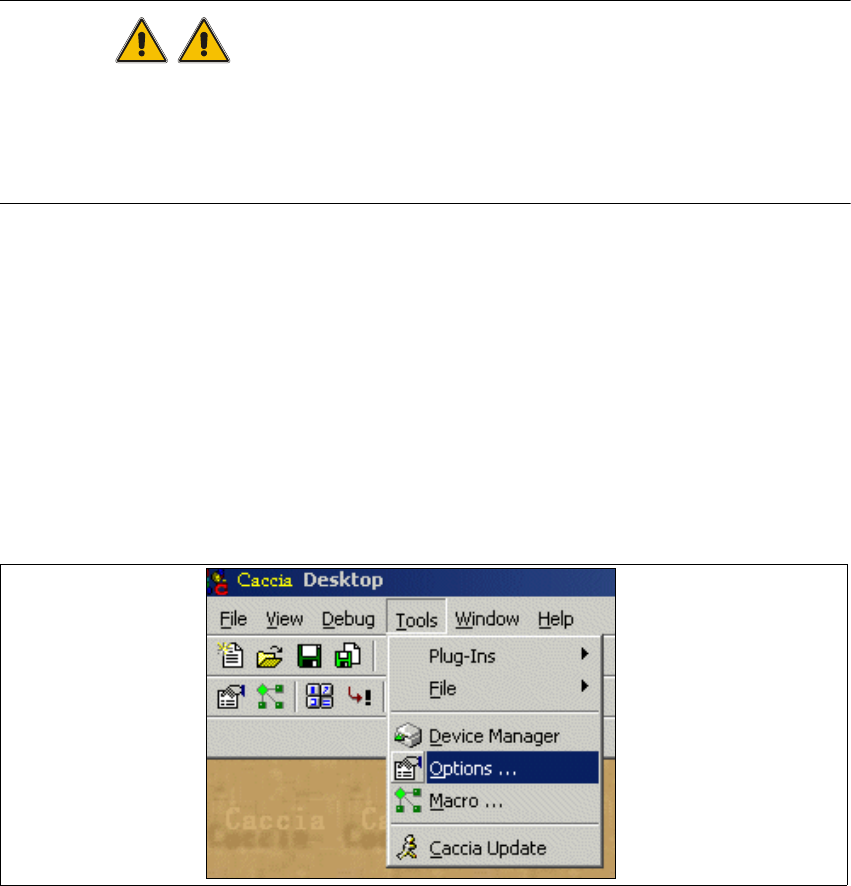
→ Select the menu Tools → Options.
Fig. 2 - 7 License