00196478-08_MM_SX12DX12_en.pdf - 第40页
Minor Maintenance Maintenance Tasks for the Convey or 4.5.1 Tools, Consumables, Spa re and Wear Parts 40 Maintenance Manual SIPLACE SX1/SX2/DX1/DX2 4.5 4 . 5 M a in t e n a n c e T a s k s f o r t h e C o n v e y o r Mai…
Minor Maintenance
4.4.4 Performing Maintenance Tasks Maintenance Tasks for Nozzles
Maintenance Manual SIPLACE SX1/SX2/DX1/DX2 39
4.4.4.2
4.4.4.2 Replacing the Plastic Nozzles
Replacing the Plastic Nozzles
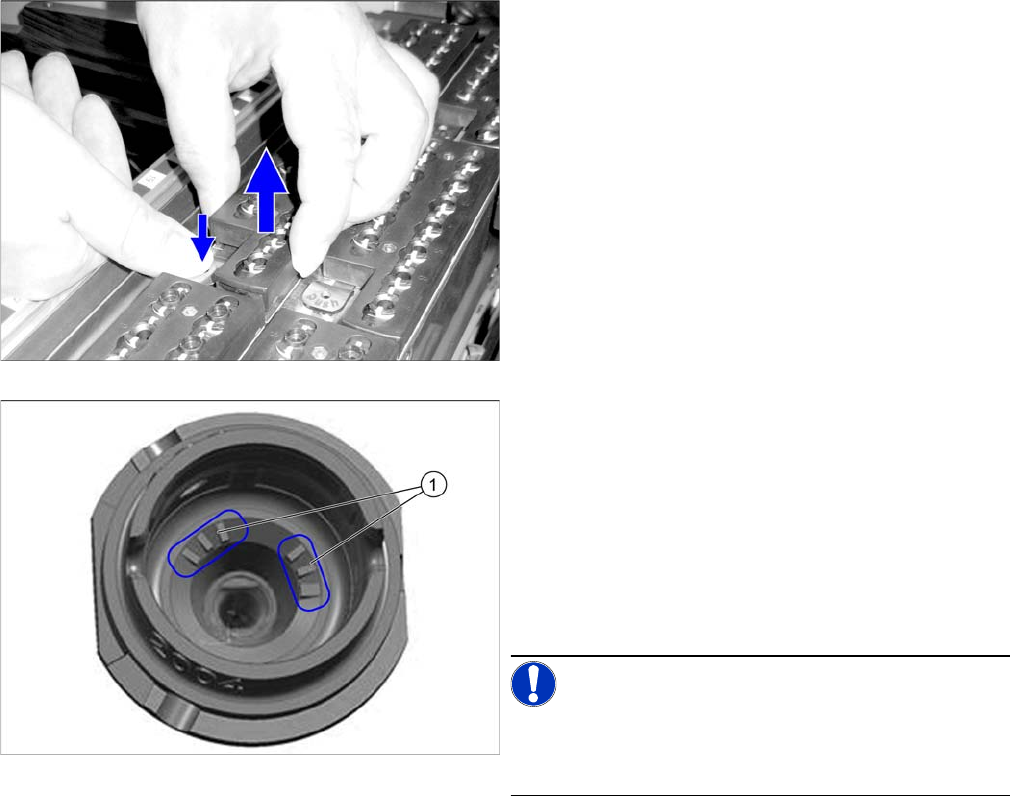
► Remove a full nozzle magazine from the nozzle
changer. When handling a nozzle magazine which is
not full, make a note of the orientation in the nozzle
changer, to ensure correct reinsertion later on.
► Check the nozzles.
Replace damaged nozzles.
► If you are using nozzles with a nozzle ID (1), vacuum
the nozzle shaft (dust, components).
If you are unable to clean here, replace the nozzle.
► Place the nozzle magazine back in the nozzle chang-
er. When handling a nozzle magazine which is not
full, pay attention to correct orientation in the nozzle
changer.
NOTICE!
Prepare additional nozzle magazines according to the
current nozzle configuration and replace the complete
magazine.
Minor Maintenance
Maintenance Tasks for the Conveyor 4.5.1 Tools, Consumables, Spare and Wear Parts
40 Maintenance Manual SIPLACE SX1/SX2/DX1/DX2
4.5
4.5 Maintenance Tasks for the Conveyor
Maintenance Tasks for the Conveyor
4.5.1
4.5.1 Tools, Consumables, Spare and Wear Parts
Tools, Consumables, Spare and Wear Parts
▪ Cotton gloves [00359087-xx]
▪ ESD wristband [00320279-xx]
▪ Vacuum cleaner
4.5.2
4.5.2 Preparatory Steps
Preparatory Steps
Caution Conveyor - No PCB Must Be in the Conveyor
Note Co nveyor - Re commendation: Ad justing Sides via S oftware for Acces sibility
► Move the component trolley out of the machine.
See also
1.2 Preparatory Work... [ ➙ 12]
4.5.3
4.5.3 Performing Maintenance Tasks
Performing Maintenance Tasks
4.5.3.1
4.5.3.1 Vacuuming the Transport, Nozzle Changer and Insert
Vacuuming the Transport, Nozzle Changer and Insert
4.5.4
4.5.4 Final Work
Final Work
► Restore the original conveyor configuration.
CAUTION
No board
There must be no PCBs in the machine during the following tasks.
NOTICE
Accessibility
We recommend using the following procedure for better access:
► Use the station software to adjust the conveyor sides in such a way that you can easily
reach all conveyor belts as well as the whole area below the sides.
CAUTION!
Loose components on the PCB conveyor could cause
faults.
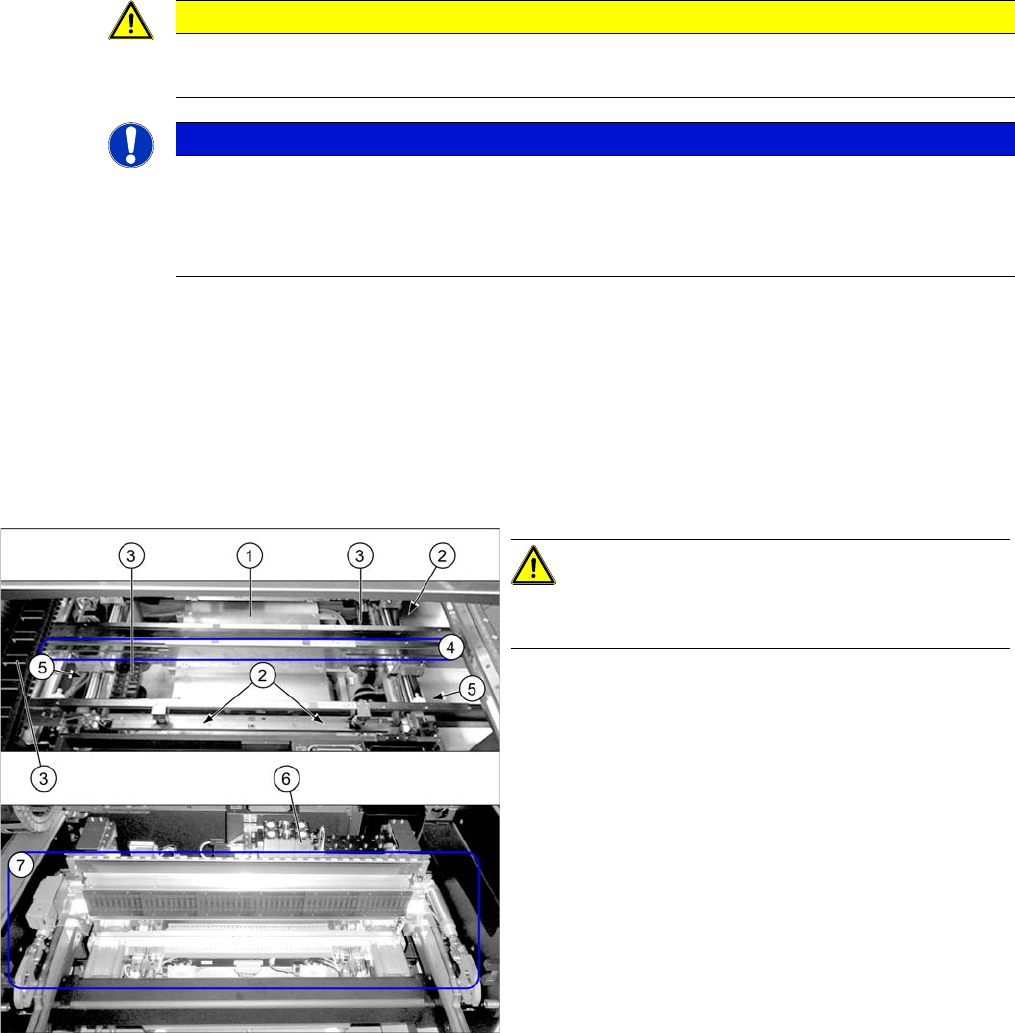
► Use the vacuum cleaner to remove all loose compo-
nents on and around the PCB conveyor. Pay particu-
lar attention to the following areas:
1. Lifting table (also at the side of it)
2. Width adjustment including toothed belt (where ac-
cessible)
3. Trailing cables in the conveyor and at the gantry
4. Conveyor belts (at all sides)
5. Ball screws (2x)
6. Nozzle changers
7. Docking unit, tape cutter
Major Maintenance
Maintenance Intervals for Major Maintenance
Maintenance Manual SIPLACE SX1/SX2/DX1/DX2 41
5
5 Major Maintenance
Major Maintenance
5.1
5.1 Maintenance Intervals for Major Maintenance
Maintenance Intervals for Major Maintenance
1005 - Major - Trained Personnel
1100 - Filter E lements
2005 - Major - Basic Machine - SXDX12 V1 V2
2105 - Major - Component F eed-In – SXDX12 V1
2205 - Major - Optical Systems – SXDX12 V1 V2
CAUTION
Only trained personnel
These maintenance tasks may only be carried out by appropriately trained and qualified per-
sonnel.
CAUTION
Filter elements
The maintenance intervals given for inspecting and replacing the filter elements only apply to
the specified compressed air quality (see user manual). If other qualities are used, the mainte-
nance intervals should be shortened accordingly.
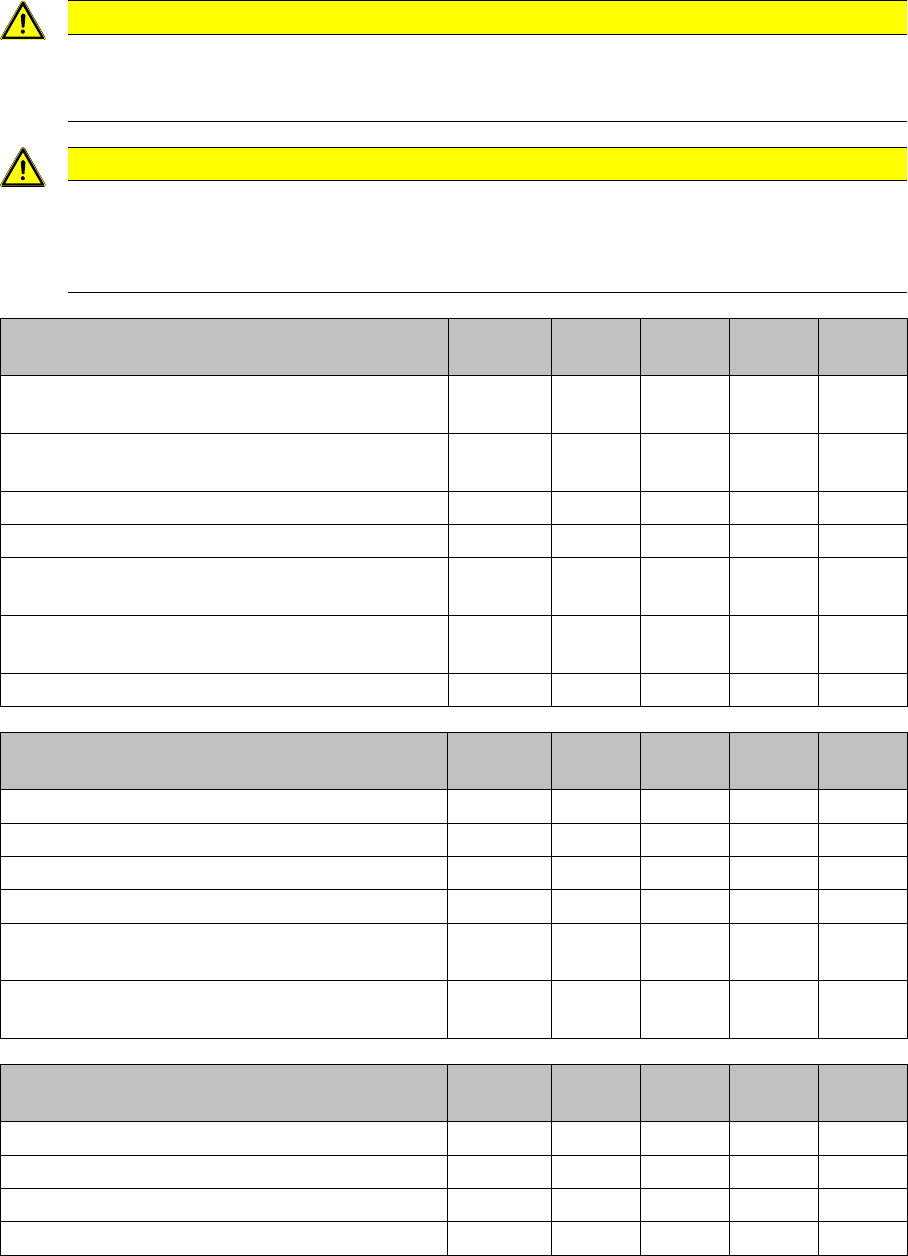
Maintenance tasks
Basic machine
Duration
[min]
Each
week
Every 3
months
Every 6
months
Every 12
months
Checking the safety features on machines with 1
(2) gantries.
4 (6) X
Checking and Cleaning/Replacing (if required) the
Compressed Air Filter
2X
Cleaning/Replacing the Head Exhaust Air Filter 1 X
Cleaning the Protective Covers 2 X
Checking/Cleaning/Replacing the Gas Pressure
Shock Absorbers on the Protective Covers
4X
Checking the Guide Rollers on the Protective Cov-
ers
2X
Checking the Buffers on the Protective Covers 2 X
Maintenance tasks
component docking unit
Duration
[min]
Each
week
Every 3
months
Every 6
months
Every 12
months
Function Test of Used Tape Cutter 2 X
Greasing the Tape Cutter 5 X
Greasing the Cutting Blade 2 X
Greasing the COT Insert 1 X
Greasing the Locator Bearing on the Component
Trolley for X Feeders
1X
Greasing the Centering Strip on the Component
Trolley/Feeder Table for X Feeders
1X
Maintenance tasks
Optical systems
Duration
[min]
Each
week
Every 3
months
Every 6
months
Every 12
months
Cleaning the IC and FC Cameras 4 X
Cleaning the PCB Barcode Scanner 2 X
Cleaning the Stationary 3D Sensor Module 2 X
Vacuuming the Coplan PC 2 X