Profiler 用户手册.pdf - 第155页
USR-PRO-6.0S(V6.00 ~ ) 5. Profiler Backup Service Fujitrax Profiler 用户手册 141 3. 搜 索需要参考的 Standby 数据库。 a. 要定义数据库,请先准备电路板 ID。 h. 在 “Service Name” 字 段输入 Standby 数 据库名称,然后 单击 [Next]。 i. 单击 [Comple te]。 b. 打开备份 Standby 数据库的文件…
5. Profiler Backup Service USR-PRO-6.0S(V6.00~)
140 Fujitrax Profiler 用户手册
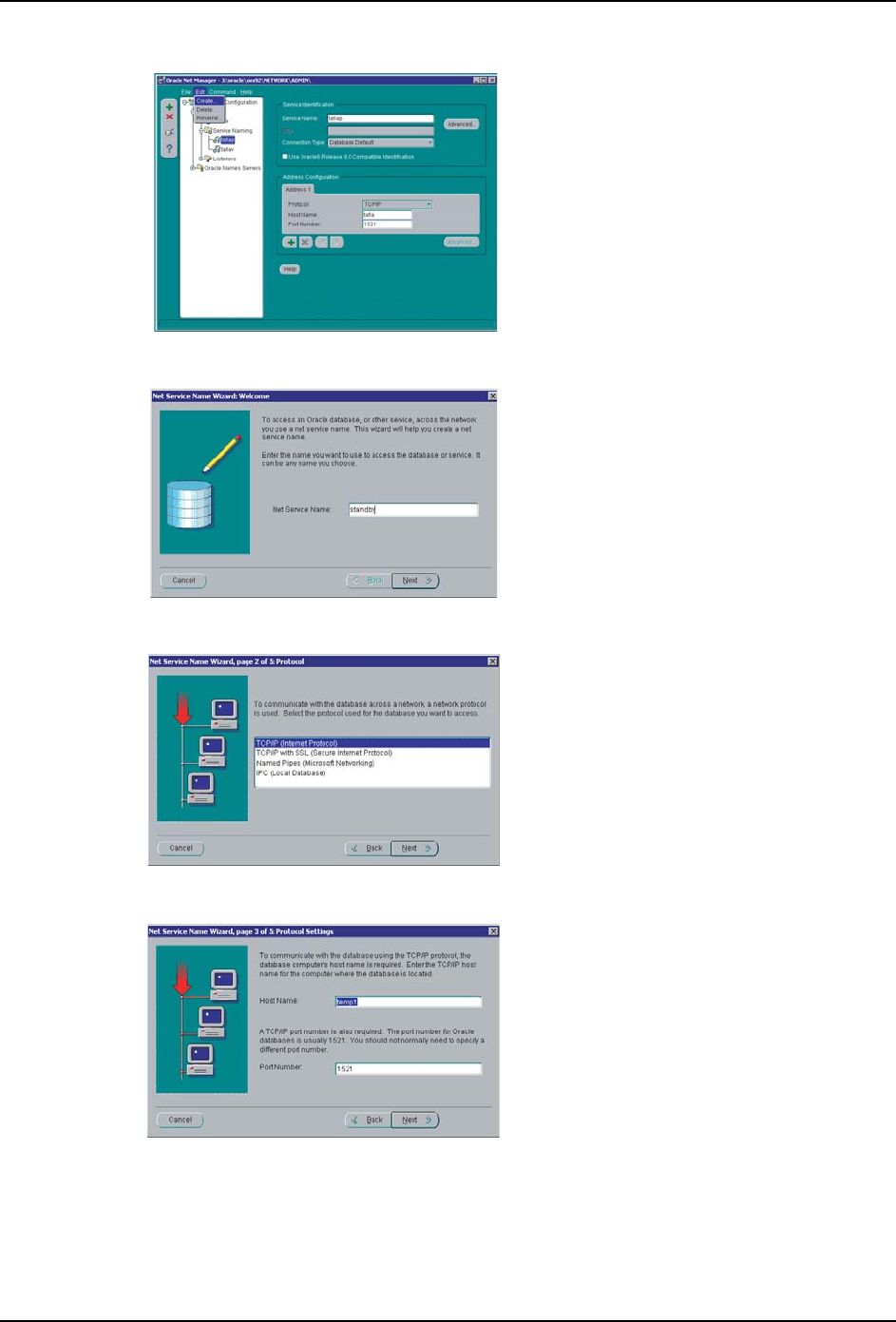
d. 请从左侧菜单中选择 [Service
Naming],然后从工具栏 [Edit] 菜单
中选择 [Create]。
e. 输入 Standby 数据库的服务程序名
称。
f. 从左侧显示项目中选择 “TCP/IP
(Internet Protocol)”,然后单击
[Next]。
g. 在 “Host Name” 字段中输入查看用
PC 主机名。保持 “Port No.” 不变,
然后单击 [Next]。
FTPU119E
FT
PU120E
FT
PU121E
FT
PU122E
rkf1WS8F
rkf1WS8F
Downloaded at 2012/02/29 23:31 JST by 3MWE3568 DL#rkf1WS8F
USR-PRO-6.0S(V6.00~) 5. Profiler Backup Service
Fujitrax Profiler 用户手册 141
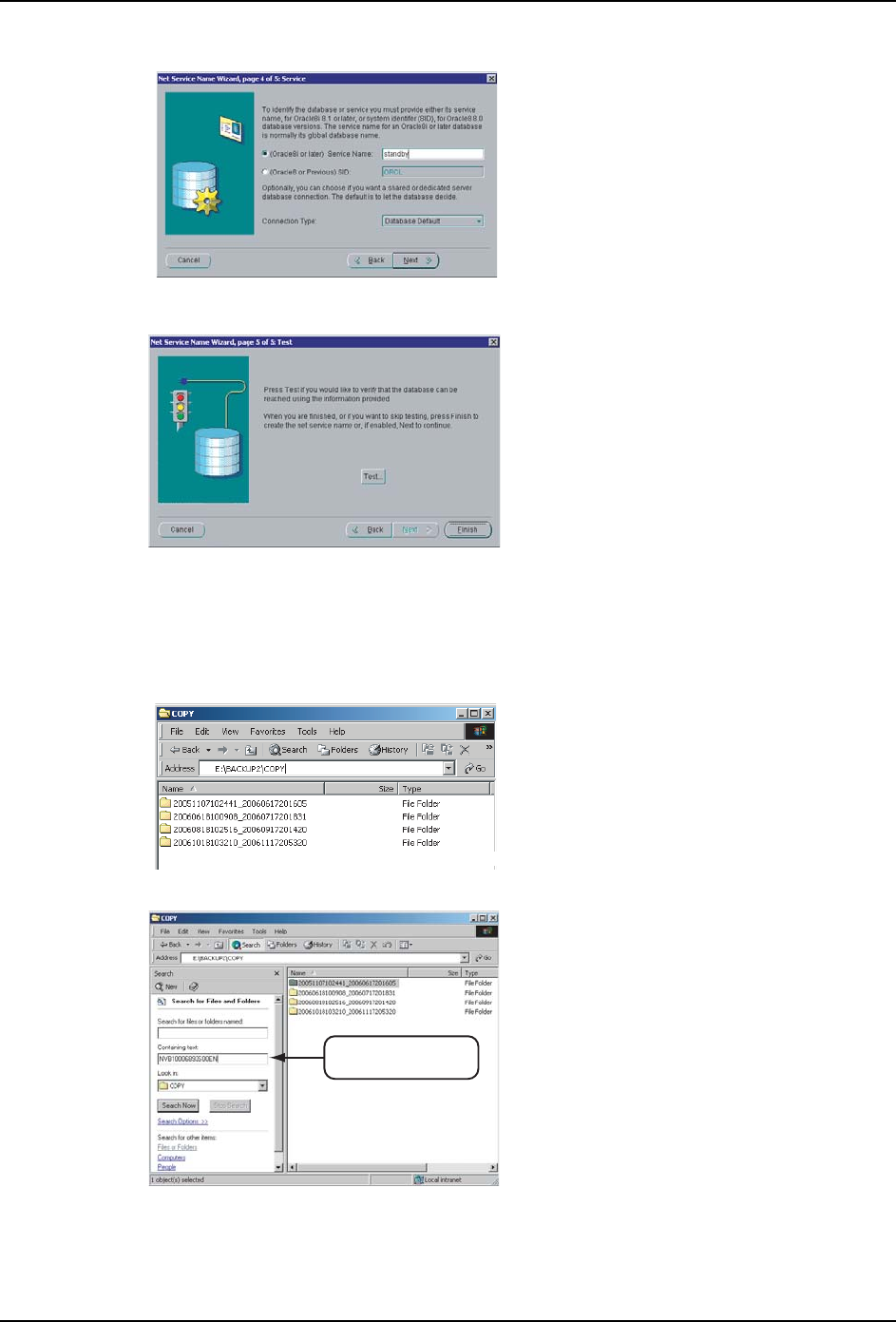
3. 搜索需要参考的 Standby 数据库。
a. 要定义数据库,请先准备电路板 ID。
h. 在 “Service Name” 字段输入
Standby 数据库名称,然后单击
[Next]。
i. 单击 [Complete]。
b. 打开备份 Standby 数据库的文件夹。
c. 单击[Search],然后在“Containing
text” 字段中输入电路板 ID。
FTPU123E
FTPU124E
FTPU125E
䕧ܹ⬉䏃ᵓ,'DŽ
FTPU126S
rkf1WS8F
rkf1WS8F
Downloaded at 2012/02/29 23:31 JST by 3MWE3568 DL#rkf1WS8F
5. Profiler Backup Service USR-PRO-6.0S(V6.00~)
142 Fujitrax Profiler 用户手册
4. 启动外部硬盘 Standby 数据库。
a. 打开定义了 Standby 数据库的
“E:\BACKUP2\COPY\20060517090000_20060617201605” 文件夹下的
\admin\standby\pfile。
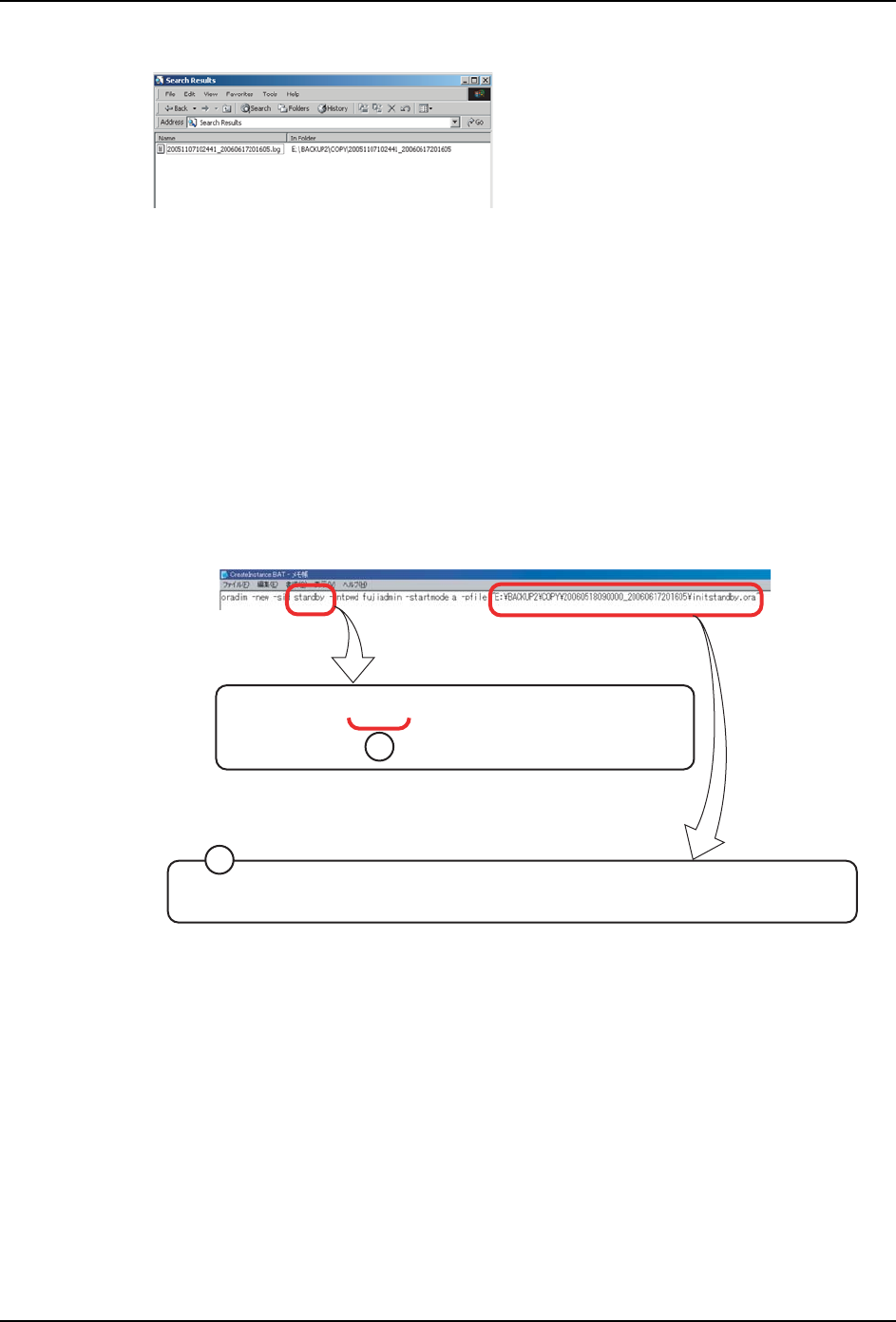
准备 “init*****.ora” 文件下的路径。
b. 将 Fujitrax 安装 CD 中的 Profiler Backup Service Instance File 文件夹下的
“CreateInstance.BAT” 文件复制到要运行数据库的 PC 中。
oradim -new -sid standby -intpwd fujiadmin -startmode a -pfile
E:\BACKUP\COPY\20060517090000_20060617201605\
admin\standby\pfile\initstandby.ora
c. 使用文本编辑器打开并编辑 “CreateInstance.BAT”。
d. 保存然后关闭文件。双击 “CreateInstance.BAT” 文件。
e. 将离线数据库 NET.CLIENT 设置在安装有 Profiler Web Server 的 PC 中。
关于 NET Client 的设置操作,请参考 "2.12 Profiling 报告 "。
d. 包含用于参考的 Standby 数据库的文
件夹定义完成。
e. E:\BACKUP2\COPY\20060517090000_2
0060617201605
A: 更改 Standby 数据库名称。
B: 将在 Profiler 备份设置中所指定的 Standby 数据库
备份目录下的
“\admin\standbyDBname\pfile\initstandbyDBname
.ora” 文件更改为完全路径文件名。
FTPU127E
㩹㪜㪑㪳㪙㪘㪚㪢㪬㪧㪳㪚㪦㪧㪰㪳㪉㪇㪇㪍㪇㪌㪈㪎㪇㪐㪇㪇㪇㪇㪶㪉㪇㪇㪍㪇㪍㪈㪎㪉㪇㪈㪍㪇㪌㪳㪸㪻㫄㫀㫅㪳㫊㫋㪸㫅㪻㪹㫐㪳㫇㪽㫀㫃㪼㪳㫀㫅㫀㫋㫊㫋㪸㫅㪻㪹㫐㪅㫆㫉㪸
A
oradim -new -sid standby -intpwd fujiadmin -startmode a -pfile
B
FTPU128
rkf1WS8F
rkf1WS8F
Downloaded at 2012/02/29 23:31 JST by 3MWE3568 DL#rkf1WS8F