Profiler 用户手册.pdf - 第166页
5. Profiler Backup Service USR-PRO-6.0S(V6.00 ~ ) 152 Fujitrax Profiler 用户手册 5.9.2 操作步骤 注意 )导出和导入数据库所需时 间根据数据量大小 而改变。 当保存一个多月的全部跟 踪水准 数据时,导出过程可能需要几个小时,导入过程需要几天。 备注 )备份 Profiler 数据库之前,请安装 Oracle 服务器和 Oracle 客户端,并创建 Standb…
USR-PRO-6.0S(V6.00~) 5. Profiler Backup Service
Fujitrax Profiler 用户手册 151
5.9 使用 Backup Service 前备份 Profiler 数据库
若持续保存跟踪数据而不使用备份服务,那么Profiler数据库中所收集的数据量将会很大。
当超出 Profiler 数据库保存期限的数据(将对这些数据使用备份服务)被保存到 Profiler
数据库中时,必须在使用该备份服务之前清空 Profiler 数据库。本节介绍了使用备份服务
之前从 Profiler 数据库备份大量数据的操作方法。
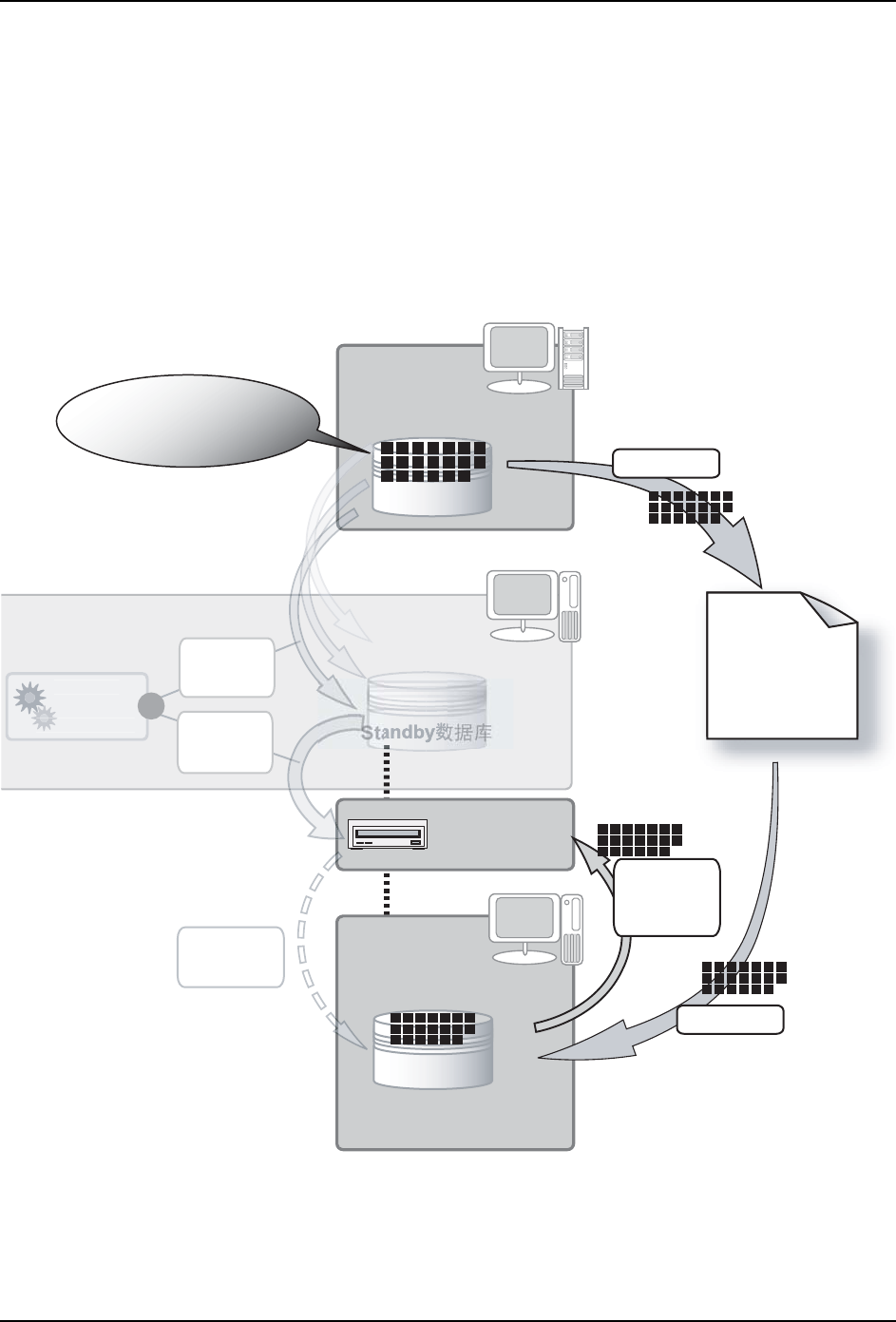
5.9.1 Profiler 数据库备份服务配置
以下为使用备份服务的环境示例。
FTPU181S
PC2
Windows
PC3
Windows
P
ro
f
iler
Backup
Service
PC1
Windows
Profiler᭄ᑧ
䞣ᬊ䲚ࠄⱘ䎳䏾᭄
ᇐߎⱘ
᭄ᑧ᭛ӊ
˄DMP᭛ӊ˅
ࠊStandby
᭄ᑧӑ
᭛ӊ
ᇐߎ
ᇐܹ
䚼
⹀Ⲭ
ᘶ
ӑ
᭄
ᑧ
˄ᇐܹࠡ߯ᓎЈᯊStandby᭄ᑧ˅
Standby᭄ᑧ
˄Јᯊ˅
ӑ
Standby
᭄ᑧ
ӑ
Profiler
᭄ᑧ
খ㗗Standby᭄ᑧ⫼
⬉㛥
Standby᭄ᑧ⫼
⬉㛥
Profiler᭄ᑧ⫼
⬉㛥
rkf1WS8F
rkf1WS8F
Downloaded at 2012/02/29 23:31 JST by 3MWE3568 DL#rkf1WS8F
5. Profiler Backup Service USR-PRO-6.0S(V6.00~)
152 Fujitrax Profiler 用户手册
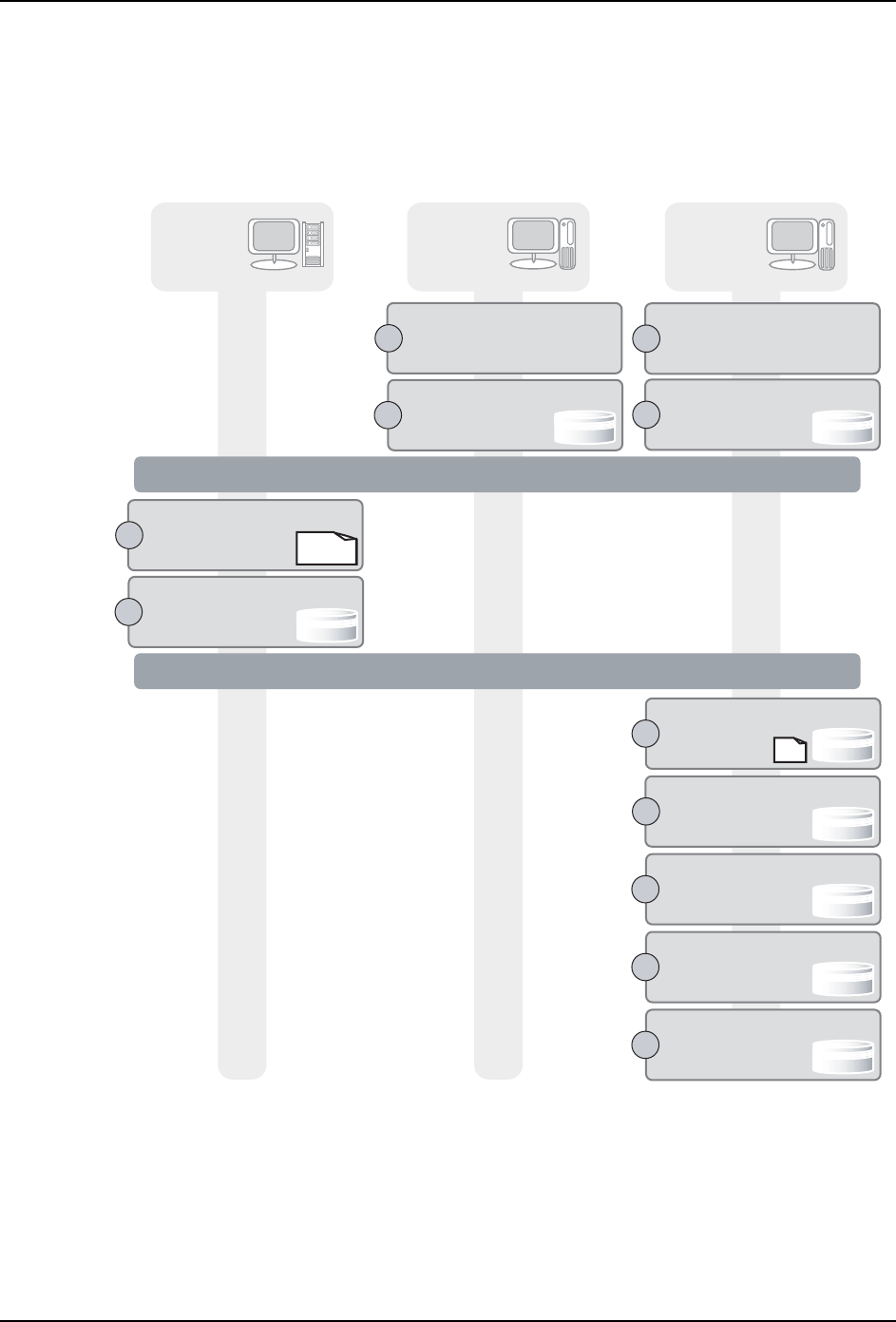
5.9.2 操作步骤
注意 )导出和导入数据库所需时间根据数据量大小而改变。当保存一个多月的全部跟踪水准
数据时,导出过程可能需要几个小时,导入过程需要几天。
备注 )备份 Profiler 数据库之前,请安装 Oracle 服务器和 Oracle 客户端,并创建 Standby
数据库。
FTPU182S
ᘶ⫳ѻ
PC2
Windows
ᅝ㺙Oracle᳡ࡵ఼
߯ᓎStandby᭄ᑧ
PC1
Windows
ҢProfiler᭄ᑧЁ
ߴ䰸᭄
Profiler
᭄ᑧ
ᇐߎProfiler᭄ᑧ
᠔ᇐߎⱘ
᭄ᑧ᭛ӊ
PC3
Windows
ᇚ᭛ӊᇐܹ
Standby᭄ᑧ
ᬍStandby
᭄ᑧؐ
ᣛᅮ䆒㕂ҹখ㗗
Standby᭄ᑧ
ӑ᭄
ҢProfiler Web
খ㗗᭄ᑧ
⏙ぎ᠔খ㗗᭄ᑧ
ⱘⱏᔩ
খ㗗Standby
᭄ᑧ⫼
⬉㛥
Profiler
᭄ᑧ⫼
⬉㛥
Standby
᭄ᑧ⫼
⬉㛥
Standby
᭄ᑧ
˄Јᯊ˅
Standby
᭄ᑧ
ذℶ⫳ѻ
ᅝ㺙Oracle᳡ࡵ఼
߯ᓎStandby᭄ᑧ
Standby
᭄ᑧ
˄Јᯊ˅
Standby
᭄ᑧ
˄Јᯊ˅
Standby
᭄ᑧ
˄Јᯊ˅
Standby
᭄ᑧ
˄Јᯊ˅
Standby
᭄ᑧ
˄Јᯊ˅
rkf1WS8F
rkf1WS8F
Downloaded at 2012/02/29 23:31 JST by 3MWE3568 DL#rkf1WS8F

USR-PRO-6.0S(V6.00~) 5. Profiler Backup Service
Fujitrax Profiler 用户手册 153
1. 安装 Oracle 服务器
在 Standby 数据库用电脑上安装 Oracle 服务器。
请按照在 Fujitrax 手册 CD 的 "Fujitrax Verifier 手册 " 部分列出的 Fujitrax Verifier
安装手册中 " 4. 安装 Oracle 应用程序 " 的说明安装 Oracle 服务器。
2. 创建 Standby 数据库
分别在 Standby 数据库用电脑和参考 Standby 数据库用电脑上创建 Standby 数据库。
请按照在 Fujitrax 手册 CD 的 "Fujitrax Profiler 手册 " 部分列出的 Fujitrax Profiler
安装手册中 " 6.3 创建 Standby 数据库 (当使用 Profiler Backup Service 时) " 的说明
创建 standby 数据库。
3. 导出 Profiler 数据库
请将 Profiler 数据库中的数据导出到一个文件中。
1. 为了保持数据完整性,请在导出数据时停止生产。
2. 请复制 Fujitrax 安装 CD 中用于备份 Profiler 数据库的文件夹 "ProfilerBackup
Files\Windows" 下的外壳程序脚本 ProfilerBackup.zip,并将其粘贴到到参考数据用电
脑上的一个存储位置,然后解压该文件。
解压该文件后,就创建了以下的文件结构。
FTPU183E
2TQHKNGT$CEMWR
53.HQNFGT
A2TQHKNGT'ZRQTVDCV
A2TQHKNGT&GNGVGDCV
A5VCPFD[+ORQTVDCV
A5VCPFD[%JCPIGFCVCDCV
A5VCPFD[&GNGVGDCV
rkf1WS8F
rkf1WS8F
Downloaded at 2012/02/29 23:31 JST by 3MWE3568 DL#rkf1WS8F