52339001系统-2.pdf - 第3页
Page 1 Installing eComStation fr om a Disk Image 52339001 Rev . C This document supports eComStation 2.x and higher and IM-UPS 6.0 and higher. Introduction This document provides instructions for installing eComStation. …

i
Installing eComStation from a Disk Image 52339001 Rev. C
This document supports eComStation 2.x and higher and IM-UPS 6.0 and higher.
Table of Contents
© 1998-2015 Universal Instruments Corporation. All rights reserved.
Use, duplication, disclosure, or transfer restricted by license from Universal Instruments Corporation.
Certain terms are trademarks of Universal Instruments Corporation in the United States and/or other countries. For a list of Universal Instruments
Corporation trademarks, see www.uic.com. All other trademarks are the property of their respective corporations.
Introduction ................................................................................................................................................................... 1
Determine the Motherboard in the Machine ................................................................................................................. 1
Procedure #1: Install eComStation (BCM MX61H Motherboards) ............................................................................. 3
Prerequisites ......................................................................................................................................................... 3
1. Boot Up Machine, Verify BIOS, Start Installation .......................................................................................... 3
2. Set Up the HDD Partition (New Hard Disk Only) .......................................................................................... 4
3. Enter Registration Information ........................................................................................................................ 5
4. Set Up Installable Volume (New Hard Disk Only) ......................................................................................... 5
5. Format Drive, Set Time, Configure Hardware ................................................................................................ 6
6. Configure Network .......................................................................................................................................... 7
7. Copy Files, Start Post-Installation Tasks ......................................................................................................... 8
8. Set Up Screen Resolution ................................................................................................................................ 8
9. Disable ePager ................................................................................................................................................. 8
10. Remove Installation Disc ............................................................................................................................... 9
11. Set Up Desktop Properties ............................................................................................................................. 9
12. Remove Reserved Drive Letter...................................................................................................................... 9
13. Delete Unused Desktop Widgets ................................................................................................................. 10
14. Set Up the Toolbar ....................................................................................................................................... 11
15. Configure TCP/IP Settings .......................................................................................................................... 12
16. Set Up Shortcut for DVD/CD Toys ............................................................................................................. 14
17. Final Shutdown Configuration .................................................................................................................... 14
Procedure #2: Install eComStation from a Disk Image (ITX or ATX Motherboards) ............................................... 16
Prerequisites ....................................................................................................................................................... 17
1. Boot Up the Machine ..................................................................................................................................... 17
2. Select the Image File...................................................................................................................................... 18
3. Select the Image File Partitions ..................................................................................................................... 19
4. Delete Pre-Existing Partitions ........................................................................................................................ 21
5. Resize the Partition ........................................................................................................................................ 23
6. Restore the Image .......................................................................................................................................... 26
7. Remove the CD and Reboot the Machine ..................................................................................................... 29
8. Post Requisites ............................................................................................................................................... 29
Changes To This Revision........................................................................................................................................... 30
Page 1
Installing eComStation from a Disk Image 52339001 Rev. C
This document supports eComStation 2.x and higher and IM-UPS 6.0 and higher.
Introduction
This document provides instructions for installing eComStation. Depending
on the machine, one of the procedures will be used.
• MX61H motherboard: Follow the procedure “Procedure #1:
Install eComStation (BCM MX61H Motherboard)”
• ITX or ATX Motherboards: Follow the procedure “Procedure #2:
Install eComStation from a Disk Image (ITX or ATX
Motherboards)”
Determine the Motherboard in the Machine
Determine what motherboard is installed in the machine, then use the
corresponding procedure:
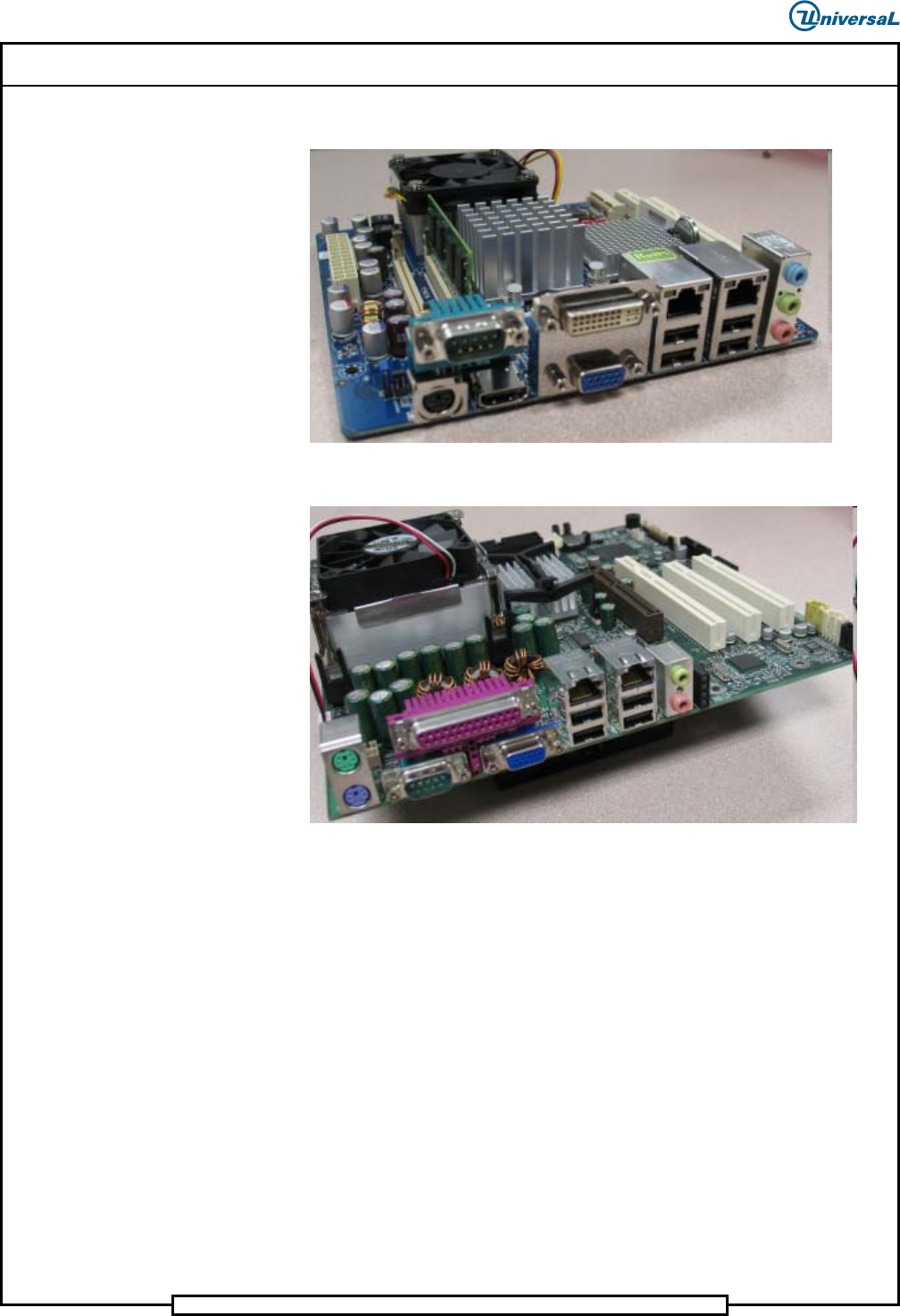
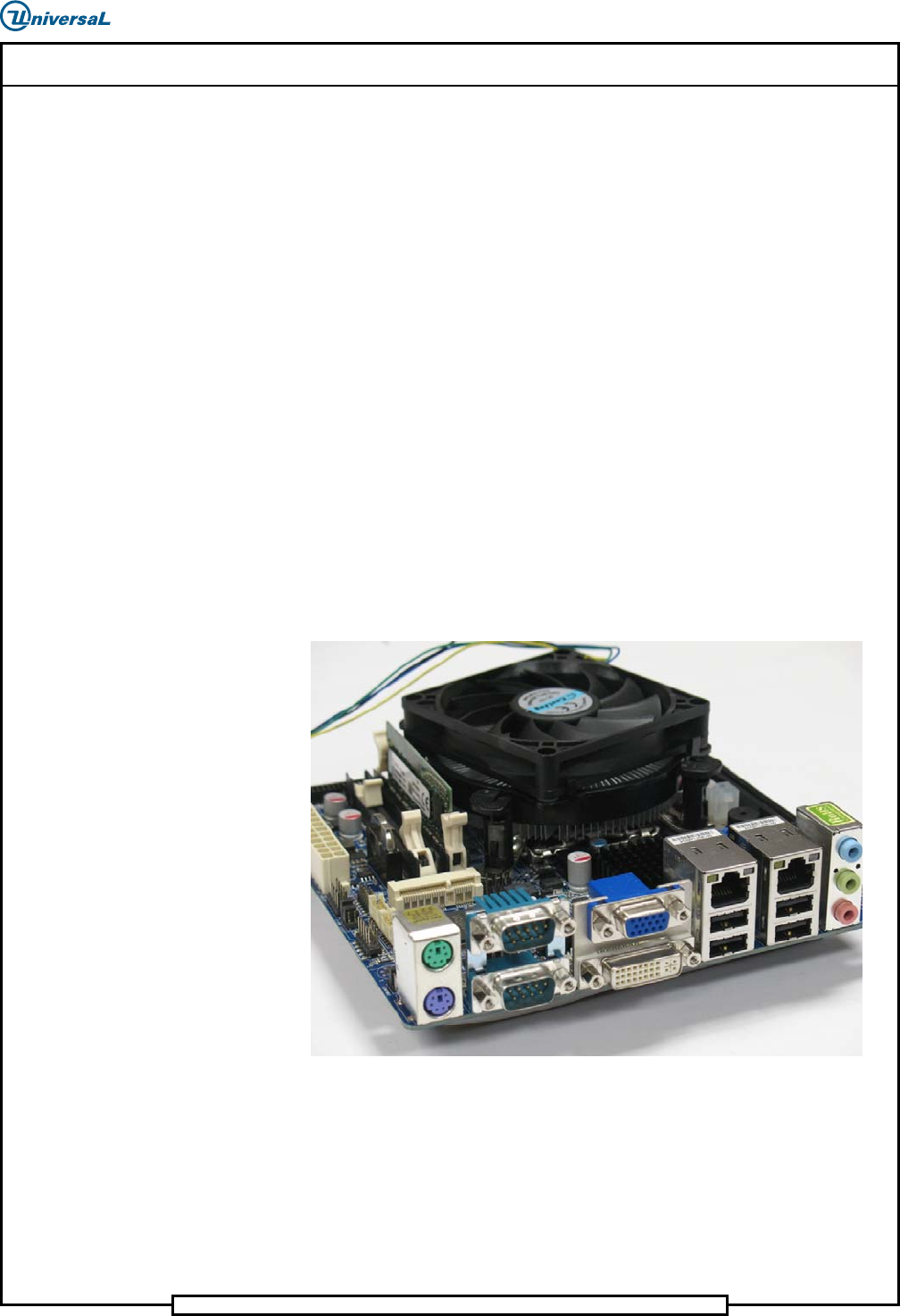
1. Look at the ports on the back of the VME Chassis.
2. Refer to the following pictures to identify the type of motherboard:
BCM MX61H Motherboard – Use Procedure #1: