[Superset] Chapter5_SPC Plus_ENG_20100827TW.pdf - 第14页
Programmer's Manual | 14 Figure 3-2. PCBVie w Category Description ALL Queries dat a for all pads V alue Trend Uses the V alue T rend function Vo l u m e Searches a pad with the inspe ction results within a specific…
Programmer's Manual | 13
Category Description
Barcode Search Searches only the PCB with the entered bar code numbers
View Searches with the conditions entered on the search field window
List Export Saves the currently searched PCB information in file format
Result Export Saves the results of the selected PCB in the assigned file format
List Header Save Saves the currently configured header list
Volume VS Area Lists the volume and area relation with Scatter Chart format
Screen Capture Saves the main screen in picture file format
Repeatability Calculates or compares the repeatability of the specific PCB inspection result
Note:Clickingthelistheaderwillorganizetheresultswiththecategoryasthebase
Note: The setup for SearchLine from the category above should be done by the SPC Plus Config
™
program.
Note: The saving file type of List Export, Result Export, and Screen Capture from the categories above
shouldbeconfigur ed intheSetupmenuundertheviewmenu.
On the search condition input window, select the desired category and click the <View> button.
The entered condition corresponding to the PCB inspection results will be listed on the query
window.
3.2. PCBView
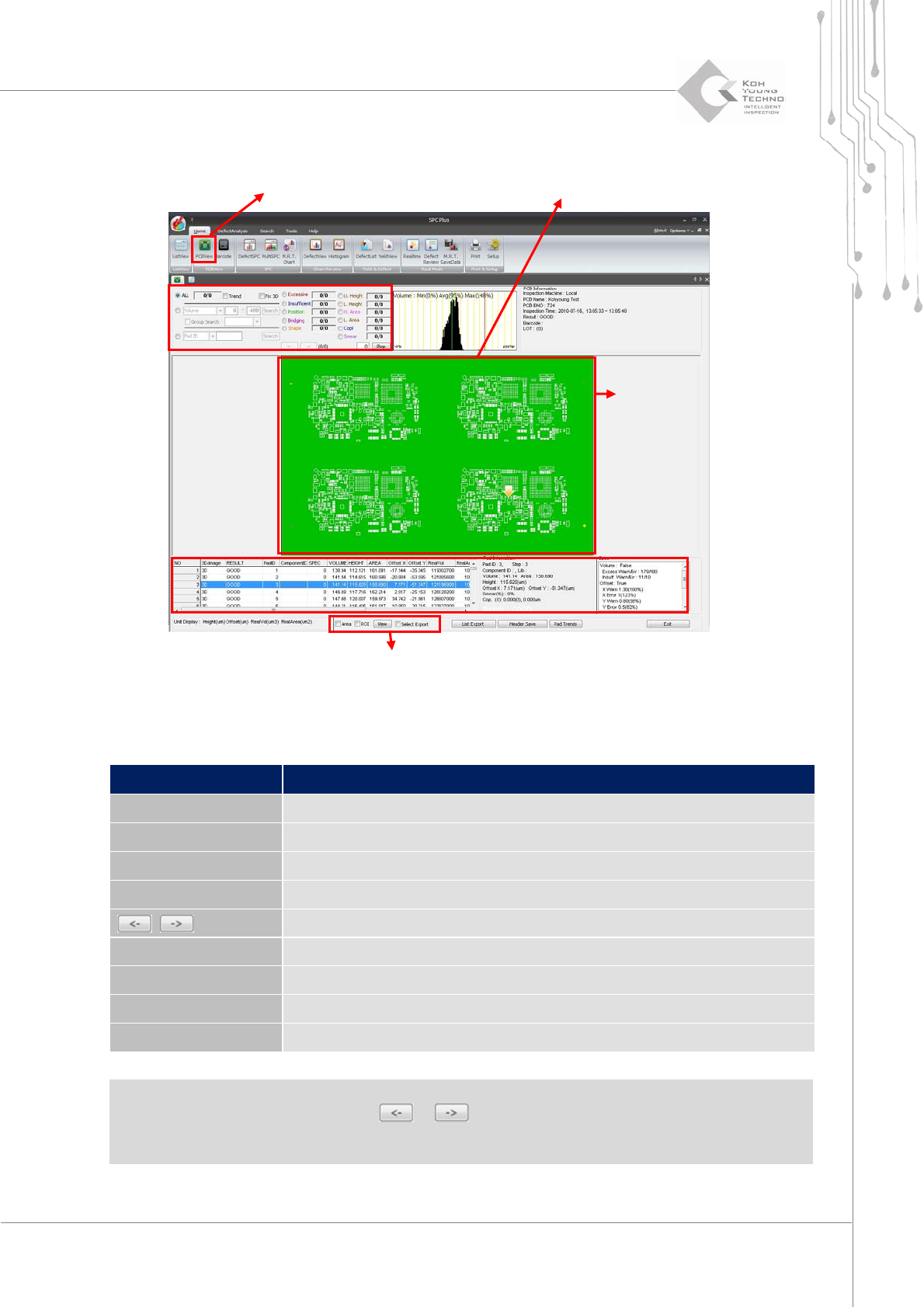
PCBViewisamenuthatcanqueryonePCBindetail.Whenworkingwithotherviewmenus,italso
configurestherangeforstatistics.PCBViewcanobtainthefollowinginformation:
DefectstatusofentirePC B
Informationofpadswheredefectoccurred
Resultsofallpads
Trendinformation
onthecorrespondingPCB
Double‐clickorenableaspecificPCBinListViewandclickthePCBViewicon.ThePCBViewscreen
forPCBwillappear.
Programmer's Manual | 14
Figure 3-2. PCBView
Category Description
ALL Queries data for all pads
Value Trend Uses the Value Trend function
Volume Searches a pad with the inspection results within a specific range
PadID Searches a pad with specific PadID or ComponentID
,
Searches the previous or next defective pads
Defect type Displays only the pads with the selected defect types
List Export Saves the searched PCB list as a file
Header Save Saves the currently configured header list
Pad Trend Displays a window showing the trend of the selected pad
Note: When there is a defective pad in the corresponding PCB, changing the conditions on the
conditioninputwindoworclickingthe or buttonshowsthedefectiv e padindetail.
Note: The ValueTrendfunctioninthecategoryabovewillbedescribedfurtherinthenextpage.
Condition Input Window
PCB Query Window
Conversion Print Function
PCB Query Window
Condition Input Window
SP
Pad Information Query Window
Programmer's Manual | 15
3.2.1. VALUE TREND FUNCTION
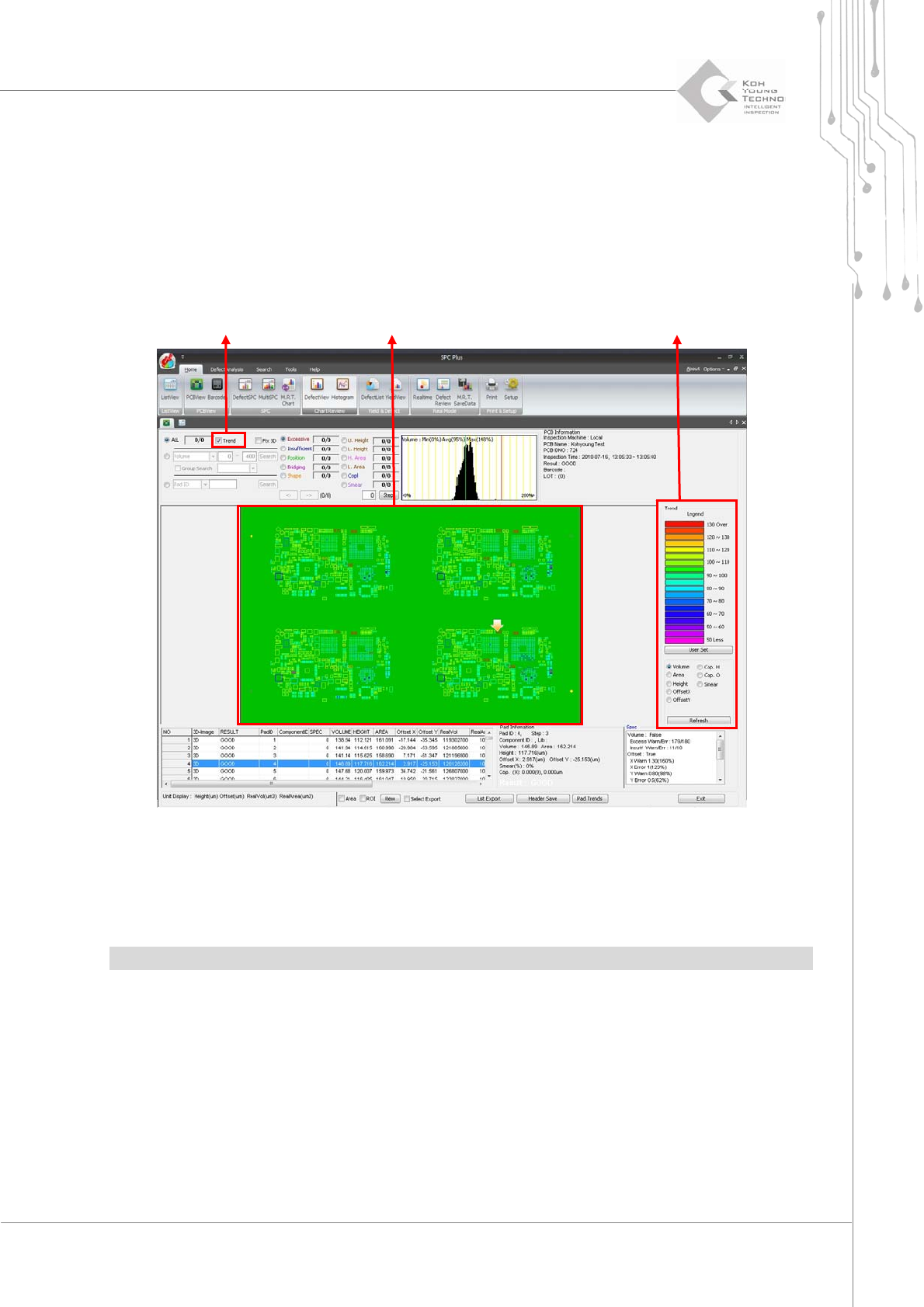
ValueTrendisthefunctionoffindingatrendofthesolderingappliedononePCB.
Proceedwiththefollowingtousethisfunction:
1. Click the PCBView icon.
2. Click Value Trend on the PCBView screen. The following screen appears:
Figure 3-3. Value Trend function
WhenthedesireddefecttypeisselectedfromthelistnexttotheTrendselectbutton,thetrendof
theselectedcategorywillappearontheTrendscreen.
Note:Thestandardvalueforthecolorcanbechangedbyclickingthe<UserSet>button.
Trend Select Button
Trend Legend Setup Window