[Superset] Chapter5_SPC Plus_ENG_20100827TW.pdf - 第38页
Programmer's Manual | 38 3.11.1. B ASIC S ETUP T AB The Basic Setup tab of the Setup dialo g box configures the default wo r k envir o nm ent and file printing environment. Th e …
Programmer's Manual | 37
ClickingthePrinticoncausesthePreviewpopupwindowtoappea rasshowninthefigureabove.
ToprintthePreview screenwithaprinter,clickthe<Print>buttonatthetopofthepop‐upwindow.
Note:Toconfigurethecurrentprinter,clickthe<DefaultPrinter>b utton.
3.11. Setup
SetupisthemenuthatcansettheworkenvironmentofSPCPlus
™
andfileprintingenvironment.
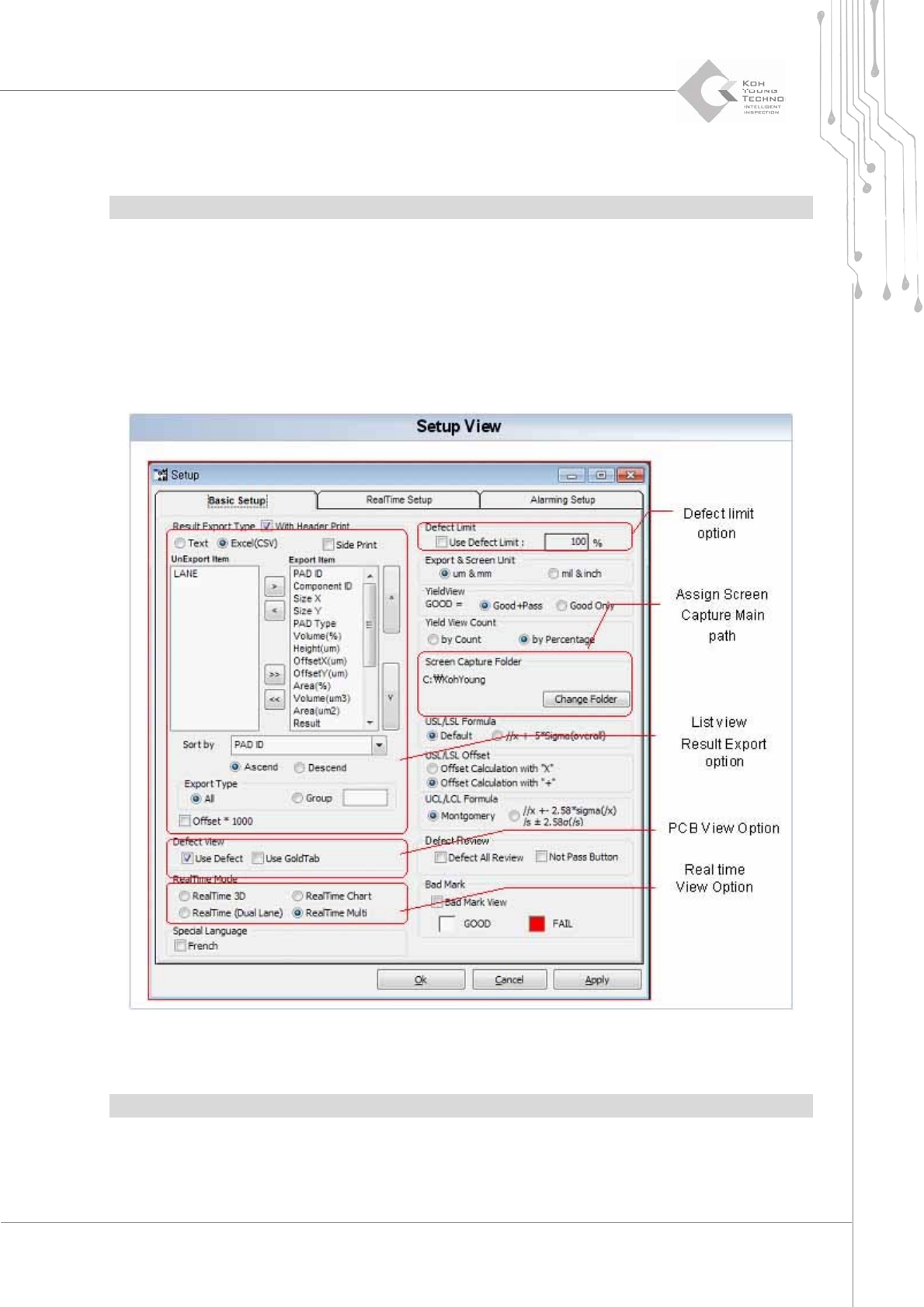
ClickingtheSetupiconwilldisplaythefollowingdialogbox:
Figure 3-17. Setup
Note:Thismenumaydifferslightlyaccordingtothetypeofpurchasedequipment.
Programmer's Manual | 38
3.11.1. BASIC SETUP TAB
The Basic Setup tab of the Setup dialog box configures the default work envir o nment and file
printingenvironment.TheBasicSetupmenucanbecategorizedin tothefollowing5categories:
ListViewResultExportOption
PCBViewOption
Real‐TimeViewOption(Def ect View)
DefectLimitOption
AssignScreencapturemainpath
List View Result Export Option
Sets up the environment to print the reports that can be done in the ListView menu; the form of
printingfile,component,orunitstobeusedforprint i ng andotherscanbeconfigured .
PCB View Option
When the PCB View menu is used, configure such that the defect pads are read first or all the pads
are read at once. Using the PCB View menu will reduce the time for reading a file in PCB View.
Category Description
Export Result Type When saving the PCB file as a file in ListView, selects a file type
UnExport Item Selects a category that will not be included in the file
Export Item Selects a category to be included in the file
Sort By When saving to a file, selects a standard for organizing the list
Export Type
Selects a file type to be printed
All: Prints the entire pad
Group: Prints the grouped pads
Offset * 1000
Displays the offset values in 1000 times of multiplication
Category Description
Defect View
Set such that only the categories with defects in PCBView are displayed in
the list
(Increases the work speed of PCBView)
Displays the data for the defective pads of Use Defect
Use GoldTab: Displays the data for the defects of GoldTab

Programmer's Manual | 39
Real-Time View Option (Defect View)
Select a screen for Real time.
Note:Thismenumayhavedifferentcategoriesperversion.
Defect Limit Option
Function for excluding defect results that are greater than a certain ratio (e.g., bare board inspection,
printer adjustment, etc.) when calculating statistics in Defect SPC or Defect View.
Assign Screen Capture Main Path
Clicking the <Screen Capture> button sets the location of the saving folder (excluding YieldView).
3.12. Real Time
Realtime isthemenuthat checks the status and inspection resultsofSPIequipmentin realtime.
Thismenuhasthefollowing3screenmodes:
Real‐TimeChart
Real‐Time3D
Multi‐RealTime
Note:SettheReal‐timecomponentinSetup.
Category Description
Real-Time Mode
Selects a Real-Time screen
Real-Time 3D
Real-Time Chart
Real-Time (Dual Lane)
Multi-Real Time