[Superset] Chapter5_SPC Plus_ENG_20100827TW.pdf - 第21页
Programmer's Manual | 21 3.4. DefectSPC DefectSPC is the menu for calculating the statistics of the inspecti on results of the selected PCB and progress capability index. The …
Programmer's Manual | 20
Seethefollowingforthedescriptionsofthefigureabove:
PartIDTop5:Displaystherankof eachpartIDhavingdefect sforeachdefect
Display quantities of defect types: Displays the quantities of respective defects on all the
selectedPCBs
Defectpartchart: Defectchartof
eachpart
Parts‐inspectingcondition:SearchconditionofthePar t IDTop5correspondingparts
Category Description
All, Array, Panel - All: Defect quantity of the selected PCB
- Array: Defect quantity of the selected array
- Panel: Defect quantity of the selected panel
Selection list Lists the PCB that is not indicated by limitation in Defect Limit in Setup and
indicated PCB as a list
Save screen Saves the current screen in picture file format
Close Closes the current work
Note: When processing inspection, more detailed information can be obtained by entering
ComponentIDintheJOBfile.
Note:ThefilesavepathofSaveScreenfromthecategoryabovecanbeconfiguredinSetup.
Programmer's Manual | 21
3.4. DefectSPC
DefectSPCisthemenuforcalculatingthestatisticsoftheinspectionresultsoftheselectedPCBand
progress capability index. The X bar‐S chart, X bar‐R chart, and IMR(X‐Bar‐Rs) Chart of the
correspondingPCBareprovidedtohelpsolveproblems.
Proceedwiththefollowingtouse
thismenu:
1. Select more than 2 PCBs from ListView and click the DefectSPC icon.
2. The SPC Condition dialog box will appear.
3. Select the desired category from the SPC Condition dialog box and click the <OK> button.
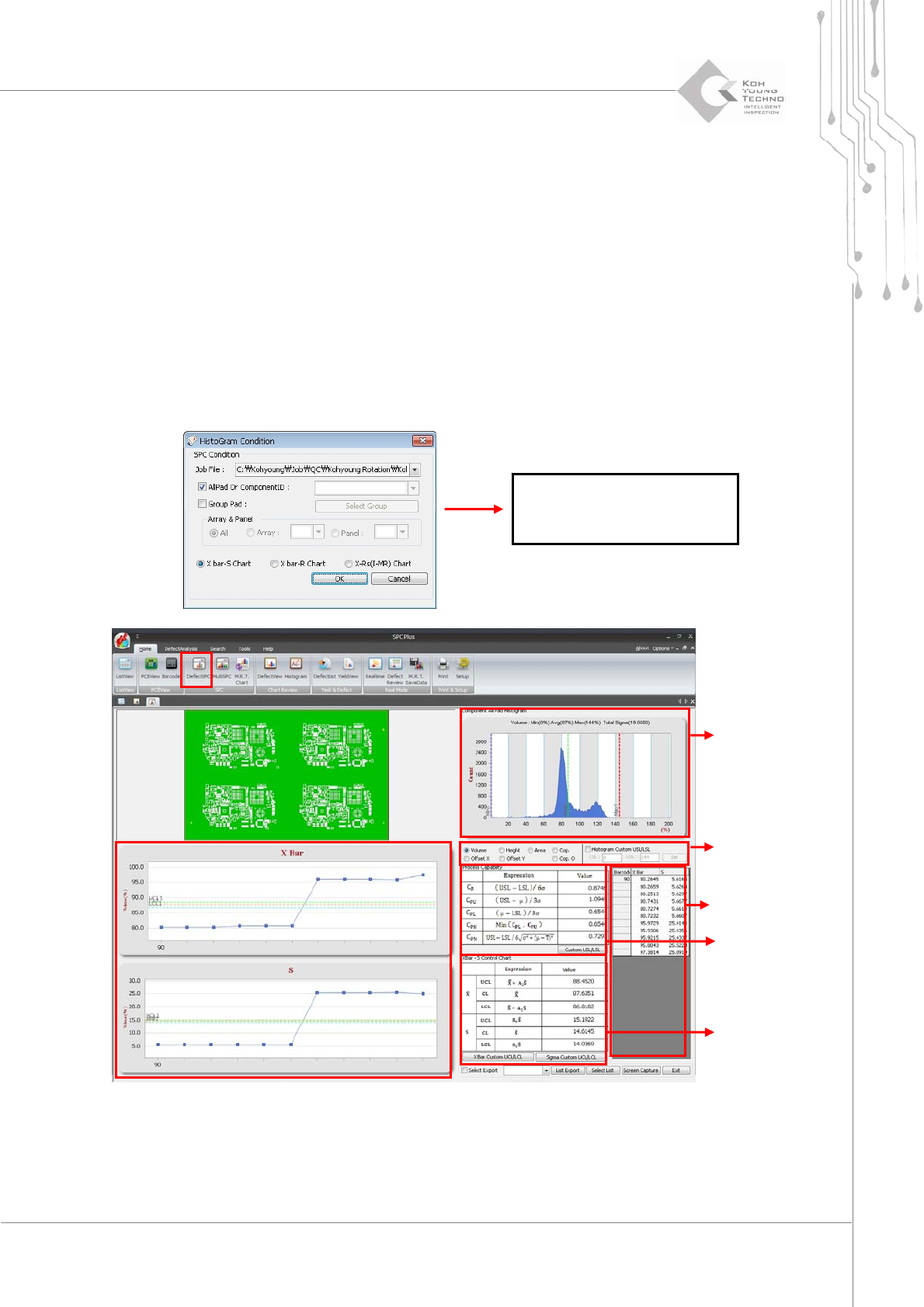
Figure 3-5. DefectSPC
See the following for the descriptions of the figure above:
Select category: When the desired category is selected, the histogr am and average &
The details of this dialog box
(SPC Condition) are described
in the next chapter.
Histogram
Select category
C
P
& C
PK
Average & standard deviation
Values for each try
Programmer's Manual | 22
standarddeviationchangeaccordingly.
Histogram:Displaysthevalueoftheselectedcategoryinthebargraph
C
P&CPK:Progr esscapabilityindexof theselectedPCB
Category Description
Custom USL/LSL
Assigns the USL value or LSL value separately when finding the
progress capability index
X-bar custom UCL/LCL Manually assigns the UCL and LCL values to be used in the X-bar chart
Sigma Custom UCL/LCL
Manually assigns the UCL and LCL values to be used in the Sigma
chart
List Export Saves the currently displayed chart values in file format
Select List
Lists the PCB not indicated by limitation in Defect Limit in Setup and
indicated PCB as a list
Screen Capture Saves the current screen in picture file format
Note: The DefectSPC is the menu that is more suitable for calculating the statistics for a specific
ComponentIDthanallpads.
Note: The file save path of ScreenCapture from the category above can be configured in Setup of the
viewmenu.
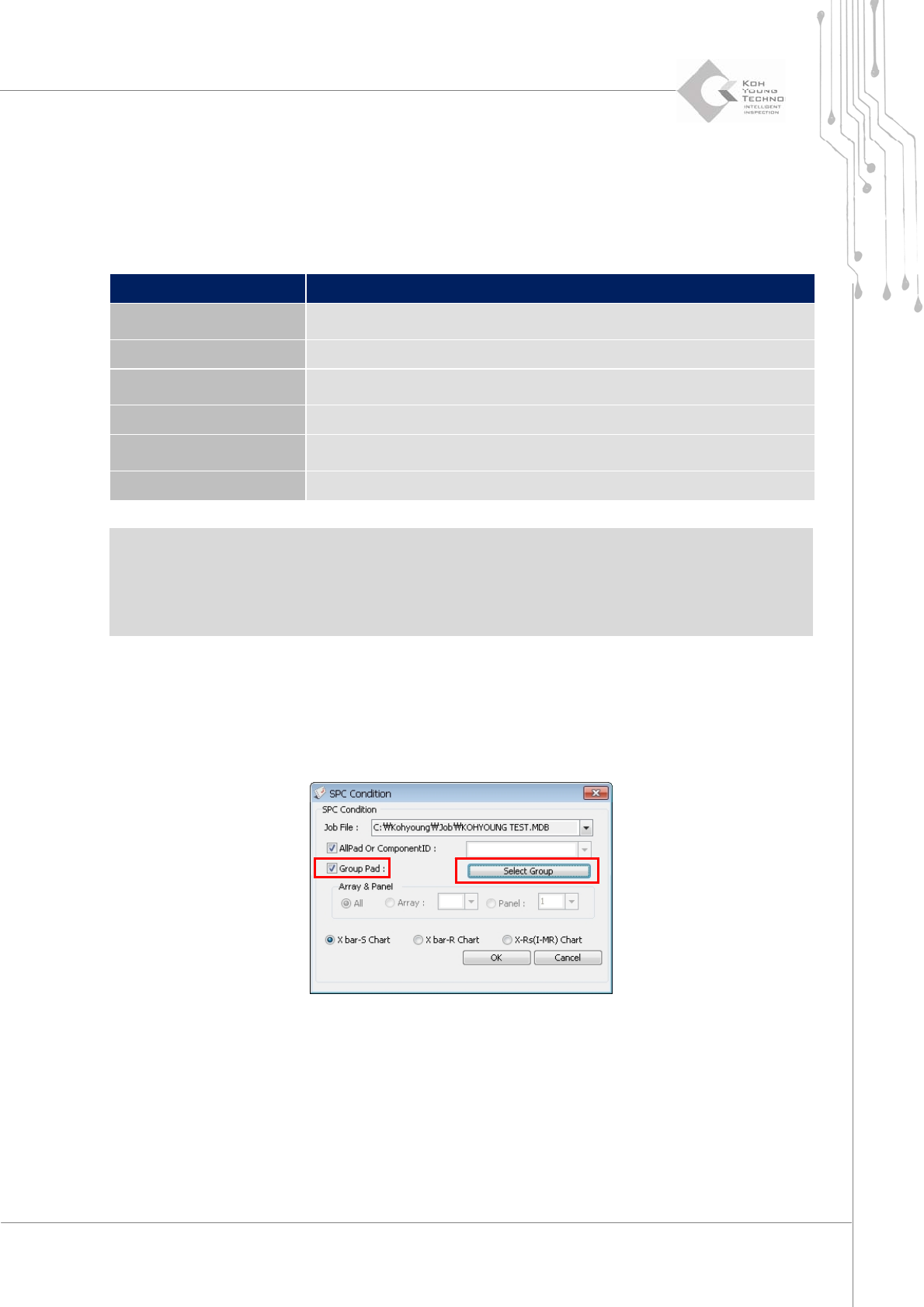
SPC Condition Dialog Box
WhenanoptionisconfiguredintheSPCConditiondialogbox,thestatisticsofthespecif ic areaof
PCBonlycanbecalculated.
Figure 3-6. SPC Condition Dialog Box