192277 - Micron Technical Reference V9 Volume 1.pdf - 第239页
SQUEEGEE MODULE REPLACEMENT PROCEDURES Chapter Issue 8, May 19 Technical Reference Manual 9.7 15. D isconnect both curly air lines from the self-seal pneumatic connectors situated either side of th e ProFlow printhead me…

SQUEEGEE MODULE
REPLACEMENT PROCEDURES
9.6 Technical Reference Manual Chapter Issue 8, May 19
REPLACEMENT PROCEDURES
ProFlow to
Squeegees
Instances may occur when the machine is required to print using the squeegee
module configuration.The following procedure details how to revert the machine
from ProFlow use to the squeegee configuration:
Removing ProFlow 1. Select Maintenance.
2. Select Diagnostics.
3. Use Next or Previous to highlight ProFlow.
4. Select Select Module.
5. Ensure Home ProFlow is highlighted.
6. Select Run Diagnost.
7. Select Exit.
8. Select Exit.
9. Select Back.
10. Select Open Cover Commands.
11. Select Carriage To Front.
12. Select Back.
13. Select Shut Down.
14. Switch the mains isolator OFF; lockout the isolator.
SQUEEGEE MODULE
REPLACEMENT PROCEDURES
Chapter Issue 8, May 19 Technical Reference Manual 9.7
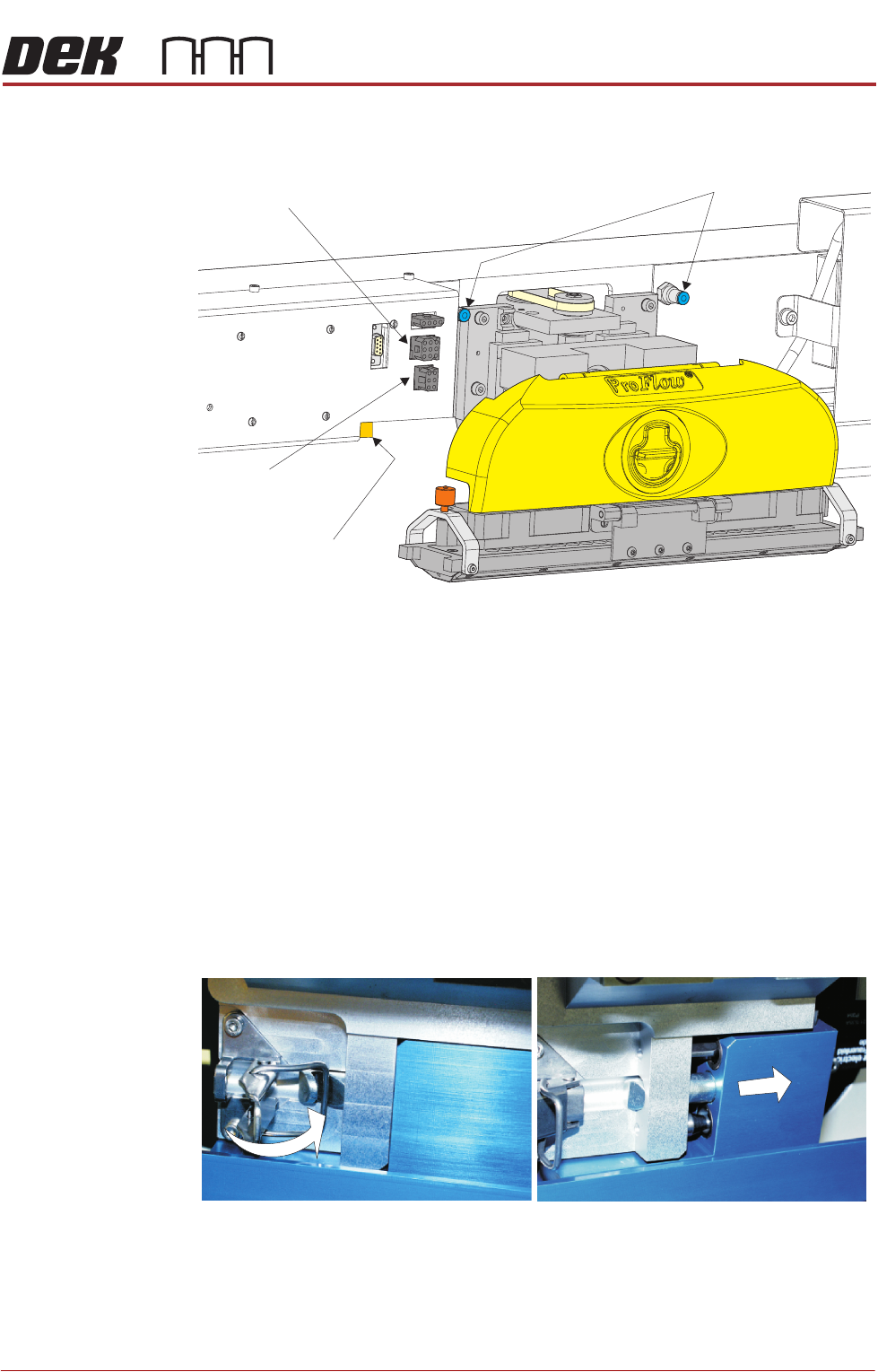
15. Disconnect both curly air lines from the self-seal pneumatic connectors
situated either side of the ProFlow printhead mechanism.
16. Disconnect the three ProFlow mechanism connectors from the print car-
riage, left hand side:
• ProFlow Motor
• Home Sensor
• ProFlow Paste Level Sensor (if Time to Go is enabled, an amplifier is
connected to 9PL61 and the connection is made to 9PL62 on the ampli-
fier).
17. Manually raise the ProFlow pressure mechanism by pulling the latch on the
front of the unit and lifting the mechanism to the fixed raised position.
18. Open the locking clip securing the transfer head to the pressure mechanism
and carefully slide the transfer head out and away from the pressure
mechanism as indicated in the figure below.
Pneumatic Connectors
ProFlow Motor
(9SK17)
Home Sensor
(9SK08)
ProFlow Paste Level
Sensor (9PL61)
SQUEEGEE MODULE
REPLACEMENT PROCEDURES
9.8 Technical Reference Manual Chapter Issue 8, May 19
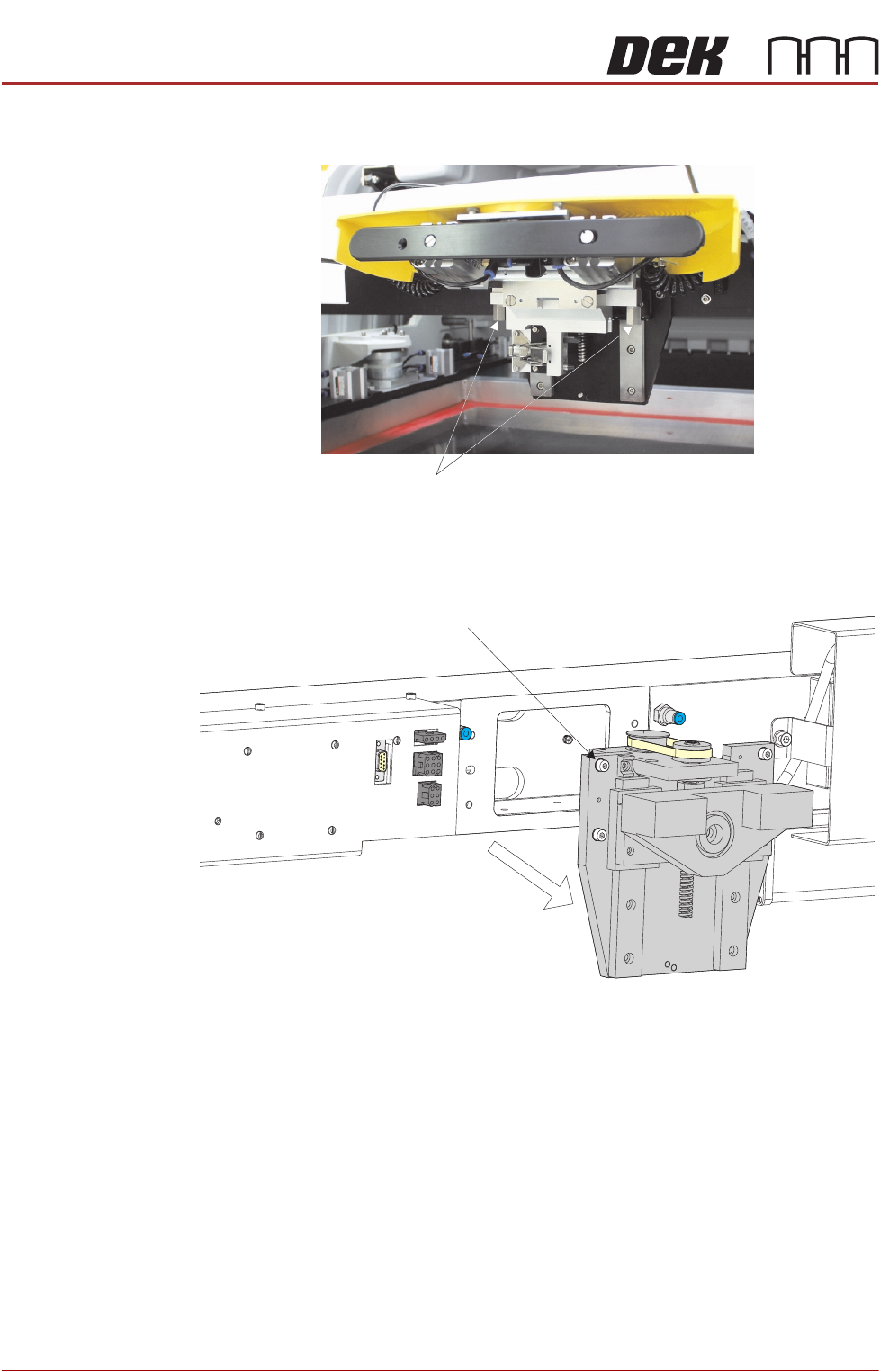
19. Release the pressure mechanism from the printhead mechanism by
unscrewing the two securing bolts, using a 5mm Allen key.
20. Loosen the four captive screws securing the ProFlow printhead mechanism
to the print carriage using a 4mm Allen key. Carefully remove the mecha-
nism from the print carriage.
Securing Bolts
Captive Screw (in 4 positions)