00197500-04_IM_Material_Manager_2.1_EN.pdf - 第19页
Installing the MaterialManager Installation Manual SIPLACE Material ManagerV2.1 19 Configuring Material Manager – E-Mai l Escalation tab In this tab you set the e-mail add resses of the recipients to w hom the autom ati…

Installing the MaterialManager
18 Installation Manual SIPLACE Material ManagerV2.1
Database Settings
Database Server
Name of the server hosting the Material Manager database.
Database Port
Number of the port that shall be used to communicate with the host of the Material Manager database.
Material Requirement List
Material requirement list settings for the storage.
Use Royonics Warehouse System
If this option is enabled, the storage management will not be performed by the Material Manager but by
Royonics Warehouse.
Split Material List
If this option is enabled, only one packaging unit per material and lane will be picked in the first run. The
additionally required refill material will be listed on a new material requirement list.
Max Reels per Material
Defines the maximum quantity of packaging units of a material that may be picked. If the quantity is in
-
sufficient, an additional material requirement list will be created. This makes sure that no vast quantity
of material is picked.
Inventory
Setting for the end-of-period inventory.
Inventory result path
Path for the inventory result file. If no path is specified, the file cannot be written. Make sure that the local
user ID "Network service" under which the Application Server runs has write access to this folder.
Browse…
Here you navigate to the folder in which you want to store the inventory result file.
Installing the MaterialManager
Installation Manual SIPLACE Material ManagerV2.1 19
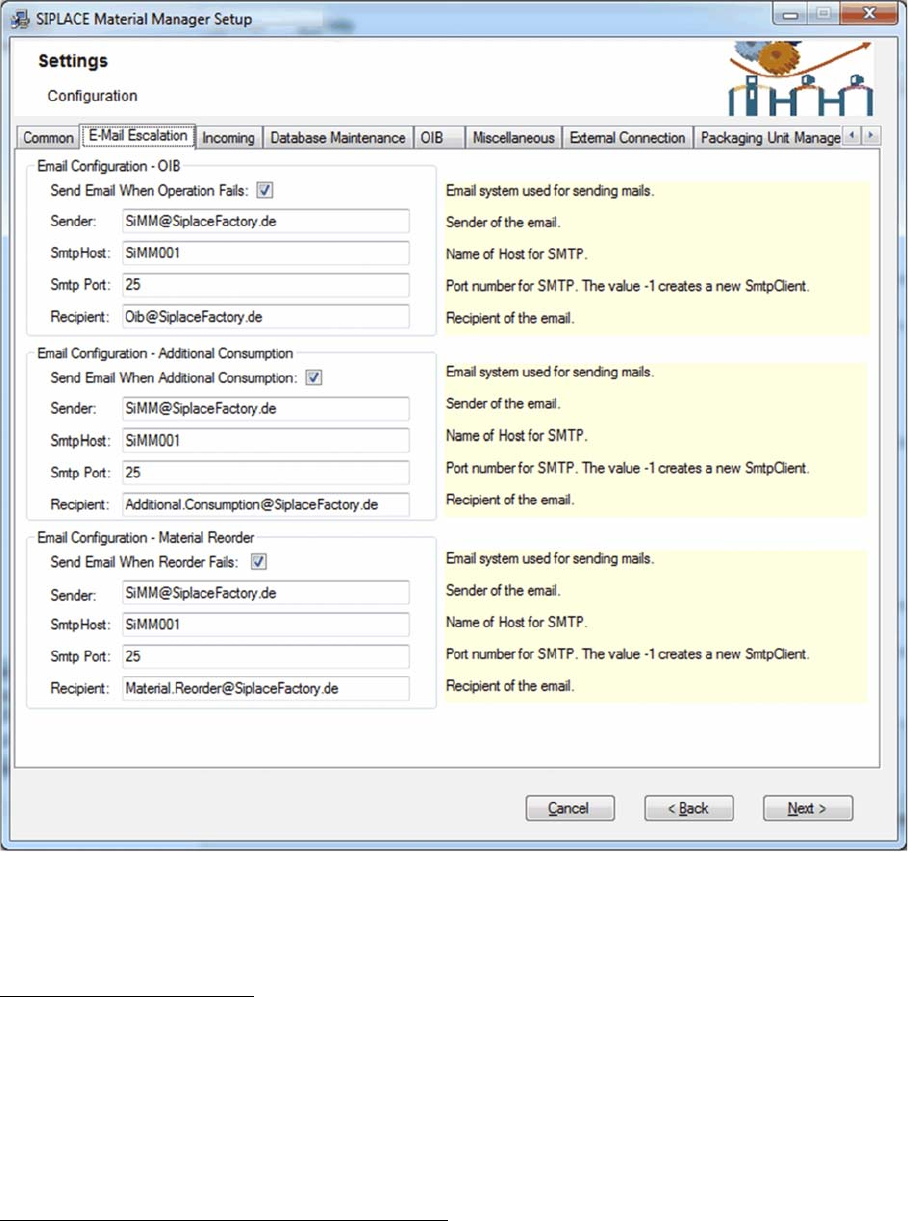
Configuring Material Manager – E-Mail Escalation tab
In this tab you set the e-mail addresses of the recipients to whom the automatically triggered escalation
e-mails will be sent.
Email Configuration – OIB
Settings for escalation e-mails concerning the OIB configuration
Send email when operation fails
If this option is enabled, an escalation e-mail will be sent if the communication with a SIPLACE system
over OIB failed. This may happen, e.g. if messages from the Material Manager to Setup Center cannot
be sent or messages from Setup Center cannot be processed.
The description of the other options can be found below.
Email Configuration – Additional Consumption
Settings for escalation e-mails concerning the additional consumption.
Send email when additional consumption
If this option is enabled, an escalation e-mail will be sent if the additional consumption of a material ex
-
ceeds a certain percentage. The default threshold value is 10%.
The description of the other options can be found below.

Installing the MaterialManager
20 Installation Manual SIPLACE Material ManagerV2.1
Email Configuration – Material Reorder
Settings for escalation e-mails concerning the reorder of material.
Send email when reorder fails
If this option is enabled, an escalation e-mail will be sent if the material reorder failed. This may happen,
e.g. if an automatically triggered material reorder could not be transmitted or if a supply system reports
that it cannot deliver the requested material.
The description of the other options can be found below.
Further Options
The following data can be set for all types of escalation e-mails:
Sender
E-mail address of the sender.
SmtpHost
Name of the SMTP host.
SmtpPort
Port number of the SMTP host.
Recipient
E-mail address of the recipient