AN353423548483en-000201.pdf - 第10页
• • • 4 Device Configuration 4.1 Before Configuring the Device N O T I C E The error LED flashes whenever the device is receiving power but is not connected to a network. The error LED will flash occa- sionally during th…
1.
2.
•
•
•
•
•
•
3 Installation
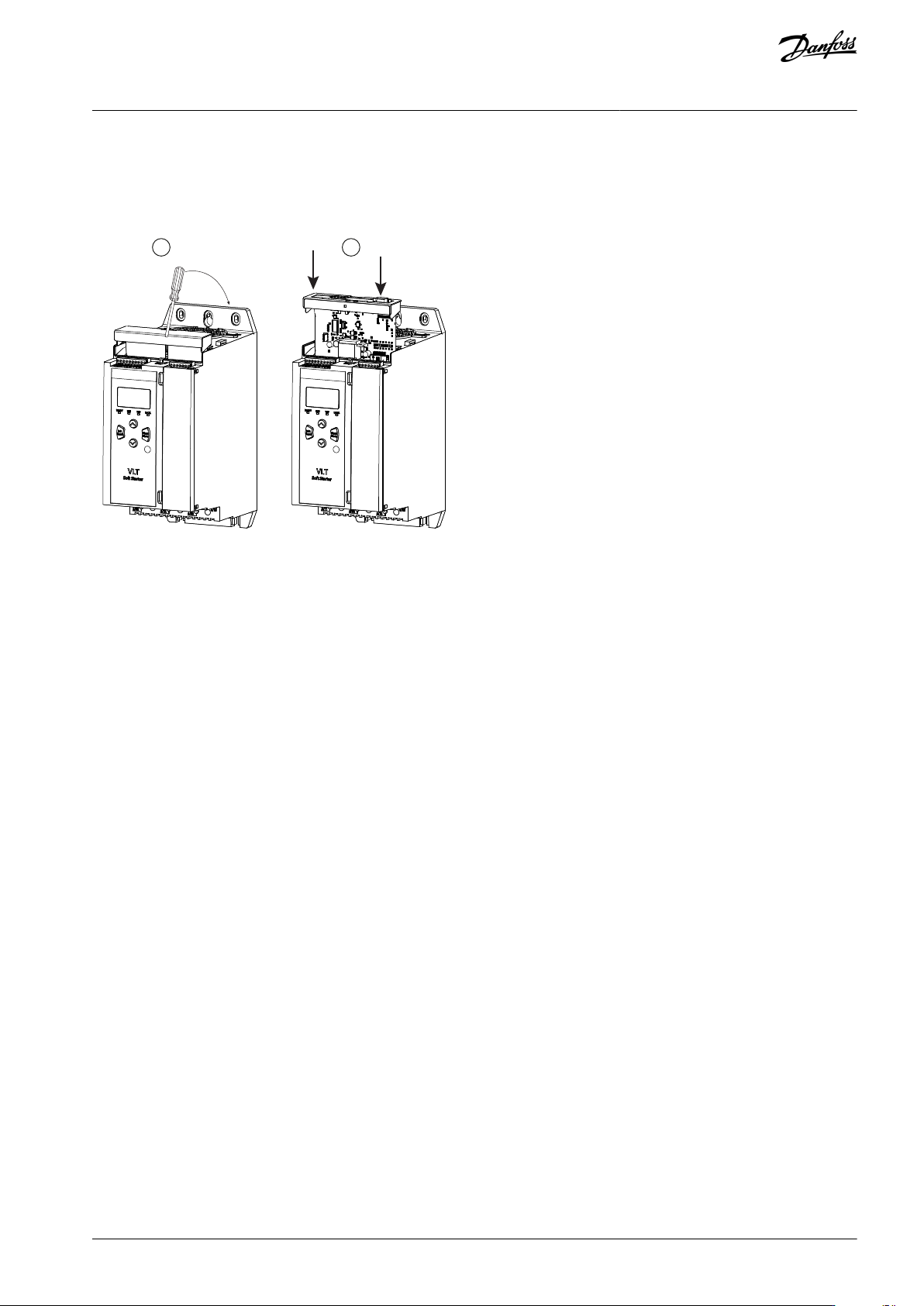
3.1 Installing the Expansion Card
1 2
e77ha739.10
Illustration 2: Installing the Expansion Card
Procedure
Push a small flat-bladed screwdriver into the slot in the center of the expansion port cover and ease the cover away from
the soft starter.
Align the card with the expansion port. Gently push the card along the guide rails until it clicks into the soft starter.
3.2 Network Connections
3.2.1 Ethernet Ports
The device has 2 Ethernet ports. If only 1 connection is required, either port can be used.
3.2.2 Cables
When connecting to the device, make sure that the cables are of 1 of the following categories:
Category 5
Category 5e
Category 6
Category 6e
3.2.3 EMC Precautions
To minimize electromagnetic interference, Ethernet cables should be separated from motor and mains cables by 200 mm (7.9 in).
If the Ethernet cable must cross motor or mains cables, the crossing should be at an angle of 90°.
3.3 Network Establishment
The controller must establish communications directly with each device before the device can participate in the network.
3.4 Addressing
Each device in a network is addressed using a MAC address and an IP address.
The device can be assigned a static IP address during configuration or can be configured to accept a dynamic IP address (via
DHCP).
The MAC address is fixed within the device and is printed on a label on the front of the device.
AN353423548483en-000201 / 130R0945 | 9Danfoss A/S © 2022.10
Installation
EtherNet/IP Card
Installation Guide
•
•
•
4 Device Configuration
4.1 Before Configuring the Device
N O T I C E
The error LED flashes whenever the device is receiving power but is not connected to a network. The error LED will flash occa-
sionally during the configuration process.
N O T I C E
At power-up, the communication card loads the IP address stored in the soft starter.
4.2 Configuration Methods
Network communication parameters for the communication card can be set via the soft starter or via the on-board web server.
The card uses a static IP address by default. To enable DHCP addressing, set parameter 12–20 DHCP to Enable or change the
setting via the on-board web server.
The IP address can be set via the programmable parameters of the soft starter.
The web server can configure the IP address and messaging settings for MQTT/OPC UA operation.
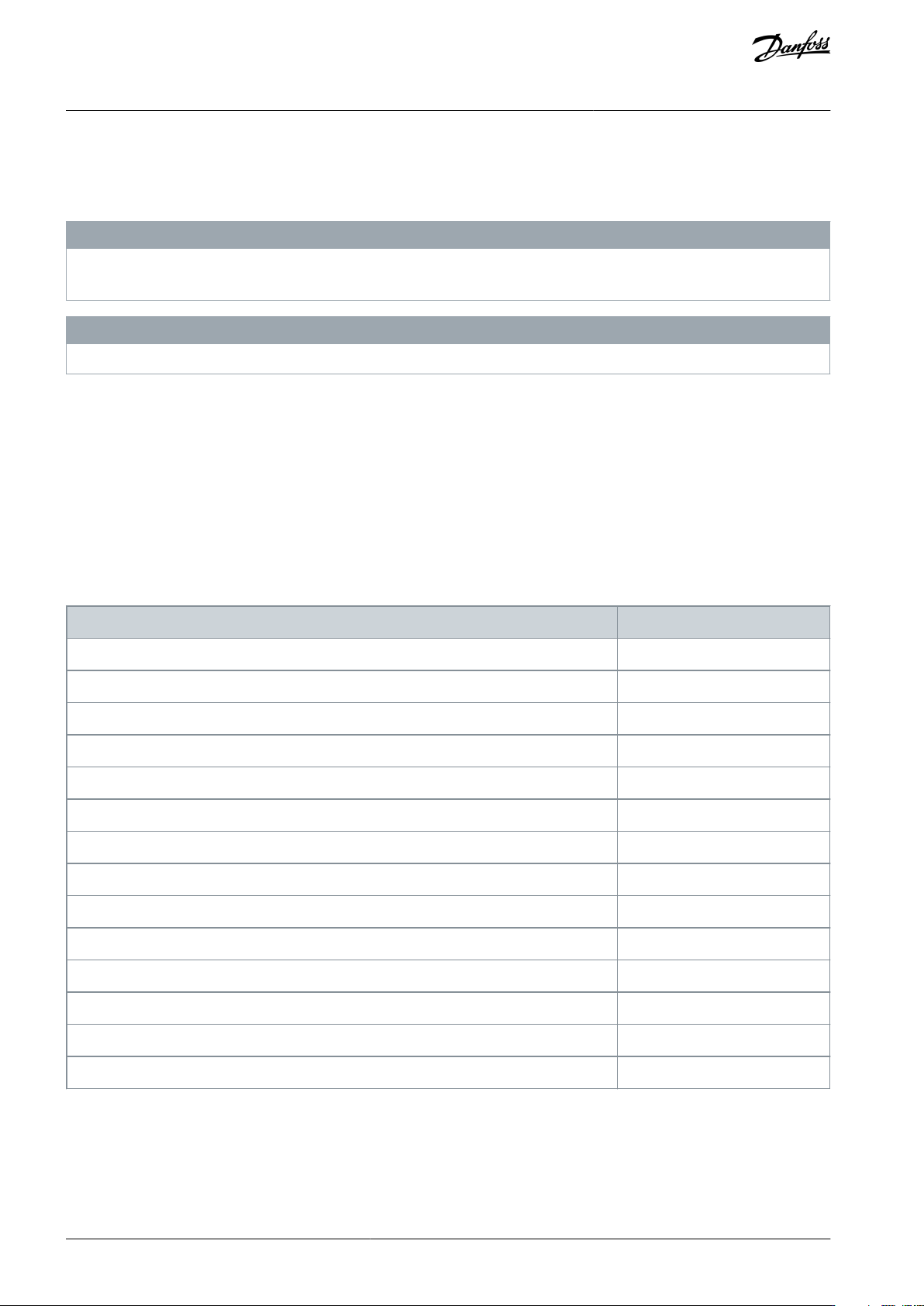
4.3 Parameters for Configuring Network Settings
Use parameters 12-8 to 12-21 to configure the network address. The parameters can be set via the Main Menu, via the Setup Tools,
or by uploading a configuration file via USB Save & Load.
Parameter
Default
12-8 Gateway Address
192
12-9 Gateway Address 2
168
12-10 Gateway Address 3
0
12-11 Gateway Address 4
100
12-12 IP Address
192
12-13 IP Address 2
168
12-14 IP Address 3
0
12-15 IP Address 4
2
12-16 Subnet Mask
255
12-17 Subnet Mask 2
255
12-18 Subnet Mask 3
255
12-19 Subnet Mask 4
0
12-20 DHCP
Disable
12-21 Location ID
0
AN353423548483en-000201 / 130R094510 | Danfoss A/S © 2022.10
Device Configuration
EtherNet/IP Card
Installation Guide
1.
4.4 Enabling Network Control
N O T I C E
If the reset input is active, the soft starter does not operate. If a reset switch is not required, use parameter 7-9 Reset/Enable Logic
to set the reset input to normally open or fit a link across terminals RESET, COM+ on the soft starter.
Procedure
Set parameter 1-1 Command Source to Network for the soft starter to accept commands from the EtherNet/IP Card.
4.5 On-board Web Server
4.5.1 Connect to the Device
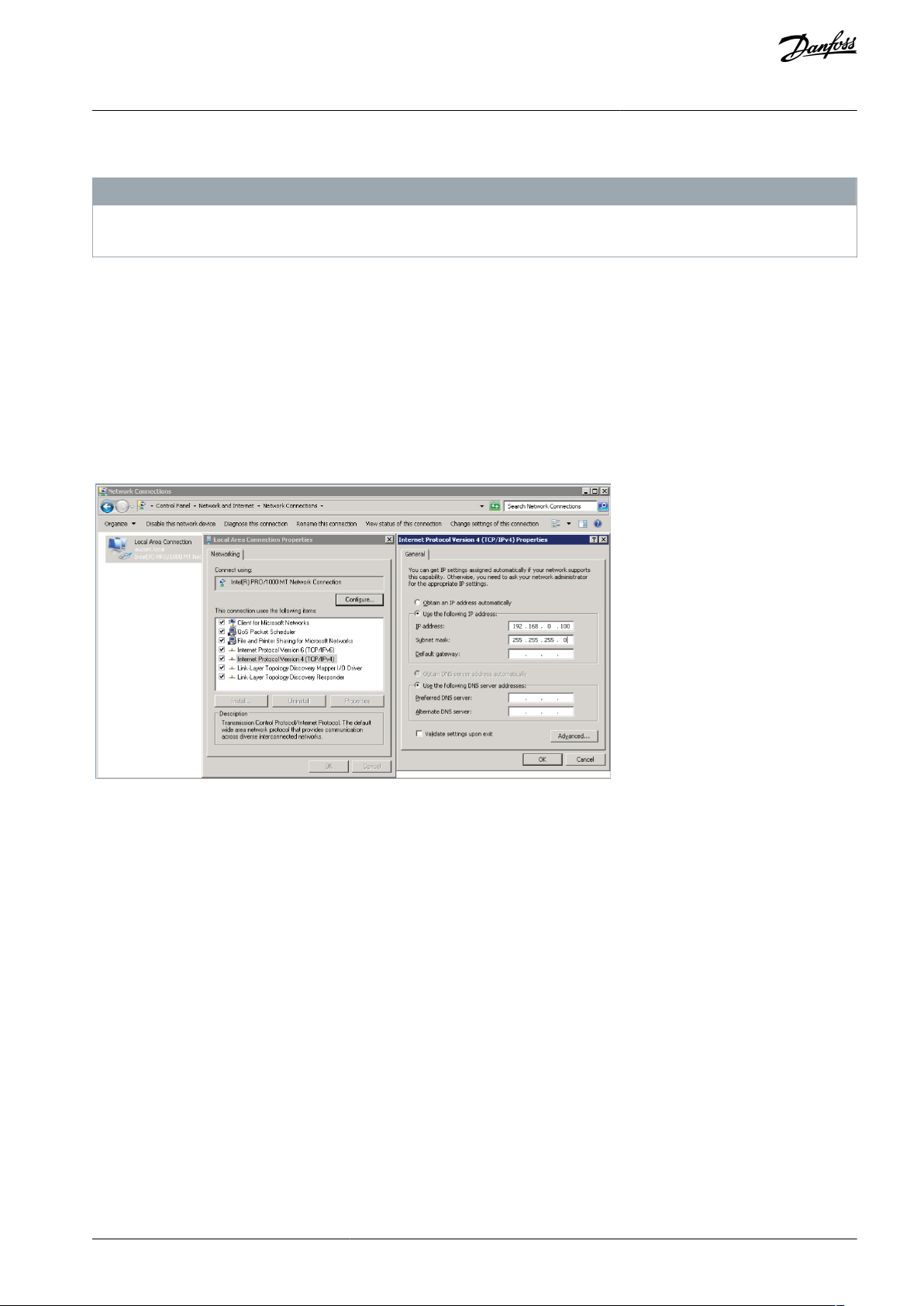
To configure settings using the on-board web server, the EtherNet/IP Card must be installed in a soft starter, control power must be
available, and the option card and computer must both be connected to the Ethernet network.
The computer must use a fixed IP address (not DHCP) and the same subnet mask as the option card. The default IP address for the
card is 192.168.0.2. The default subnet mask is 255.255.255.0.
e77ha807.10
Once connected, the web server reports basic information about the card and the soft starter.
AN353423548483en-000201 / 130R0945 | 11Danfoss A/S © 2022.10
Device Configuration
EtherNet/IP Card
Installation Guide