DeltaTherm_IR_REV_C.pdf - 第20页
DeltaTherm IR Cure Module Revision C / Sept ember 2022 Page 20 of 41 Manual Mode IR Panels 209B208B208B The panel temp erature is sh own for each zon e. A zone is an ar ea in the oven that is controlled and monitored ind…
DeltaTherm IR Cure Module
Revision C / September 2022
Page 19 of 41
• 60B59B59BWhen in Auto Cycle, the DeltaTherm IR Cure Module operates the exhaust fan
and the intake fan.
• 61B60B60BThe IR panels will start and increase to the set system parameters. It may take a
few minutes to increase to the set values.
• 62B61B61BWhen the machine is in the range of the system parameters, auto cycle will start.
Differences in the parameters may occur to maintain optimum conditions.
274B273B273BNote: With two-sided IR ovens, the upper panels may indicate temperatures higher
than the setpoint due to absorption of energy from the lower panels. This is normal.
• 63B62B62BIf the DeltaTherm IR Cure Module is the last machine in a line, the alarm will
signal when a board exits. This only occurs if a downstream SMEMA signal is not
present.
• 64B63B63BWhen the conveyors stop for a board to be removed, the cure module will
maintain the parameters. The module will not time-out if a board is not removed.
• 65B64B64BIn Auto Cycle, the PLC will send a signal through the RS485 cable to the next
machine every 5 seconds to tell the next machine the width of the conveyor.
• 66B65B65BPush the Home Button on screen or F3 Key to leave Auto Cycle at any time.
Boards in the system are not removed when you exit.
275B274B274BNote: Make sure all boards have exited the system before you exit Auto Cycle.
DeltaTherm IR Cure Module
Revision C / September 2022
Page 20 of 41
Manual Mode
IR Panels
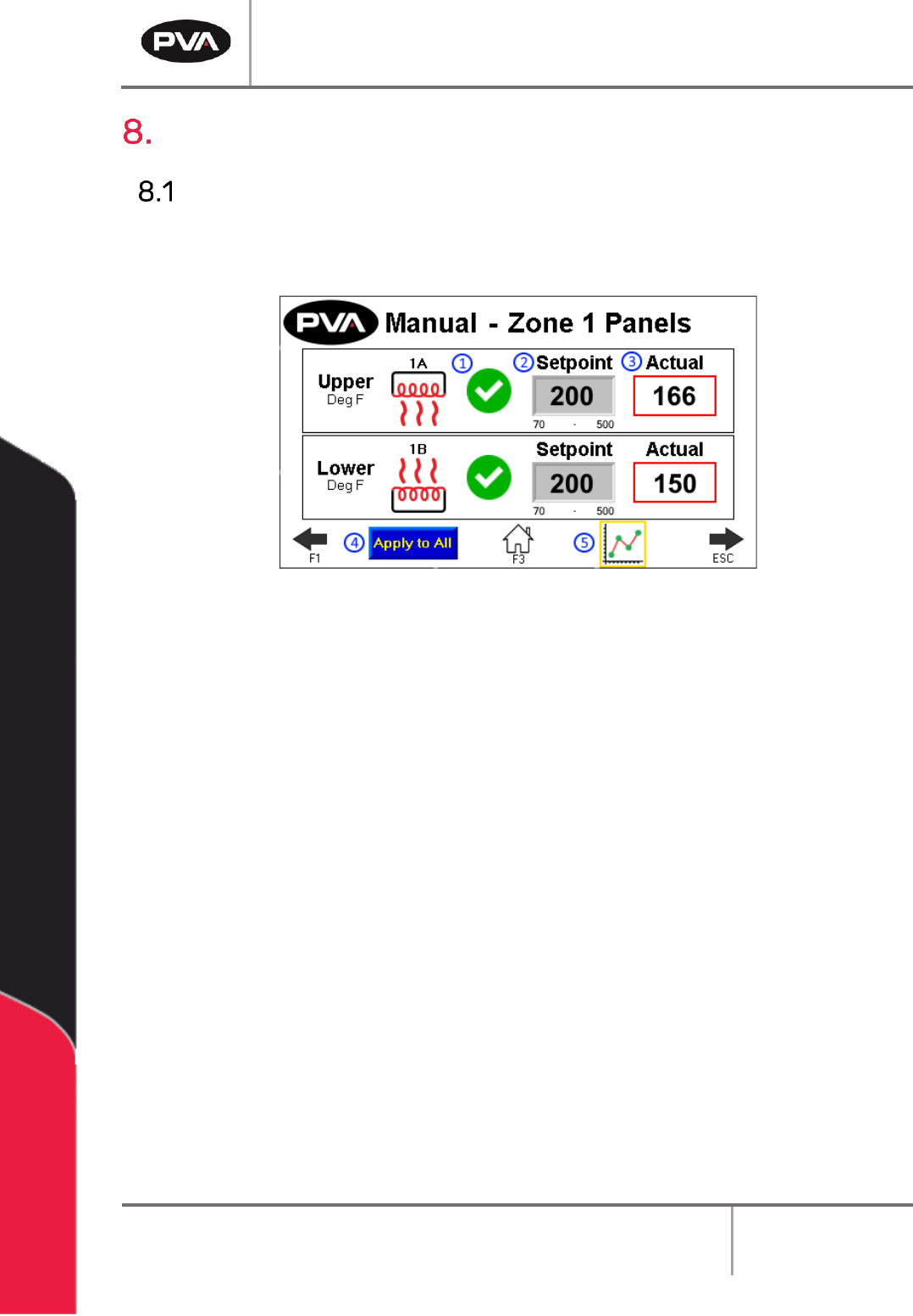
209B208B208BThe panel temperature is shown for each zone. A zone is an area in the oven that is
controlled and monitored independent of other areas. Usually an oven has four zones.
210B209B209B
11B11B11BFigure 12: Manual IR Panels
1. 67B66B66BSelect the Heater Panel switch to turn the desired panel on or off. The indicator to
the left of the switch will show the heat output. The heater panel will heat up to the
current setpoint.
2. 68B67B67BThe Setpoint boxes are the target set points for each zone and heater panel. To
change the target Setpoint, press the designated box. A new screen will be shown.
• 69B68B68BThe left side box in the Zone Control area is the target temperature (display
temperature is filtered) for each zone and the deviation point for that zone.
• 70B69B69BTouch the screen and a keypad will be shown.
• 71B70B70BEnter the necessary value.
• 72B71B71BPush ENT, and the zone screen will be shown again.
3. 73B72B72BThe Actual boxes show the actual temperatures (display temperature is filtered) for
each zone.
4. 74B73B73BSelect Apply to All to copy the setpoints of the Zone 1 upper and lower heater panel
to every zone and panel.
5. 75B74B74BSelect the View Trend icon to view each panel’s temperature history on a graph.
DeltaTherm IR Cure Module
Revision C / September 2022
Page 21 of 41
Conveyor Speed
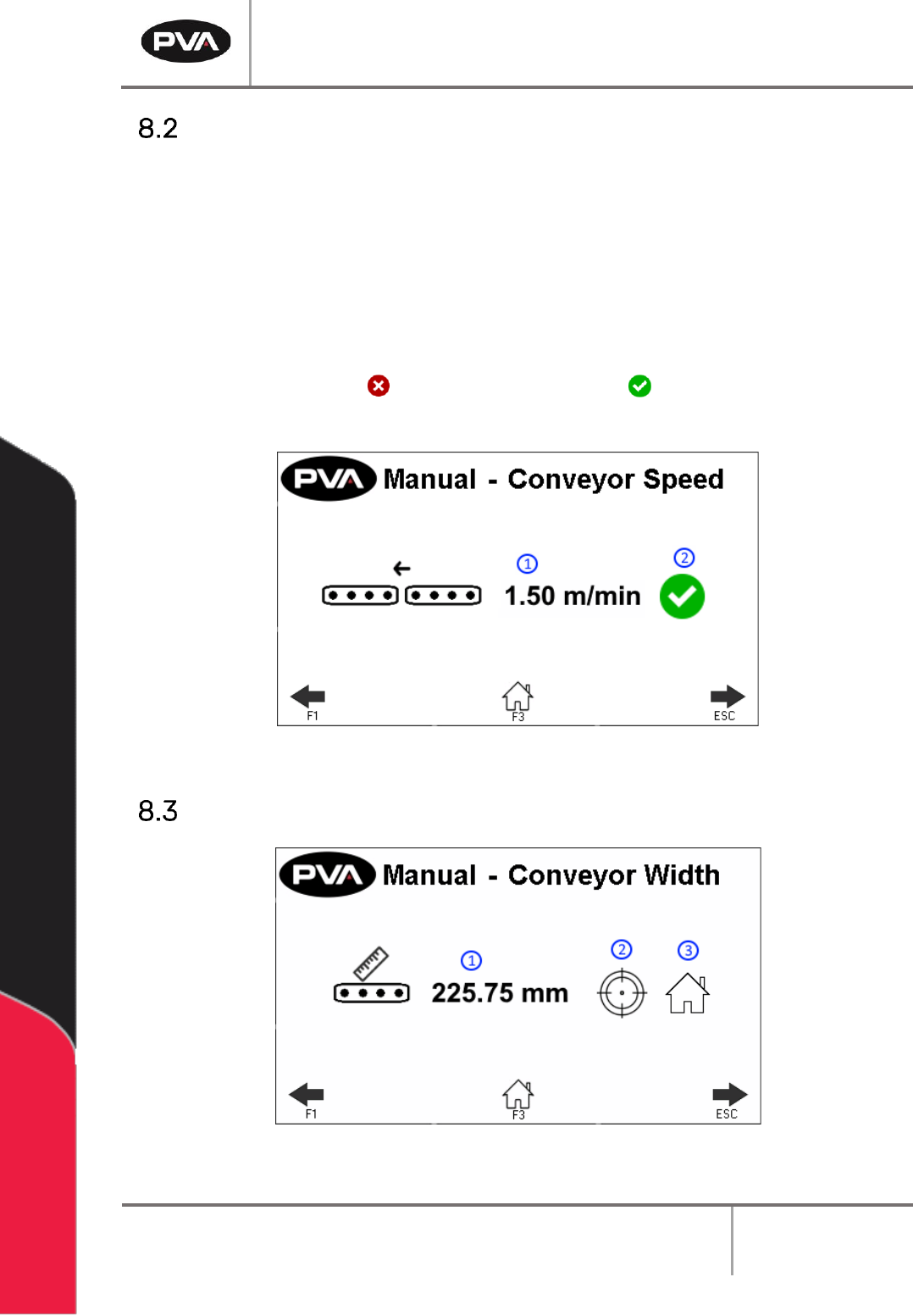
211B210B210BThe Conveyor Speed can be set in Manual mode.
1. 76B75B75BSelect the Speed box to manually enter conveyor speed. The metric/standard u nit
range is .03 – 15.3m/min (.1 - 50.2ft/min).
• 77B76B76BThe keypad will be shown, enter the necessary value.
• 78B77B77BSelect ‘ENT’ to save.
2. 79B78B78BPress the red X icon or green checkmark icon to toggle the conveyor
between on and off.
212B211B211B
12B12B12BFigure 13: Conveyor Control in Manual Mode
Conveyor Width
213B212B212B
13B13B13BFigure 14: Conveyor Width in Manual Mode