CP643规格书.pdf - 第16页
7.2 Camera T ypes Refer to the table below for an overview of the different camera types and the corresponding lighting methods. 7.3 Supported CSPs * If incorrect orientation is detected, a vision error is issued and the…
– 12 –
CP-643E/643ME Specifications
Edition 3.0
7. Vision System
7.1 Two-Camera Unit (Parts Recognition)
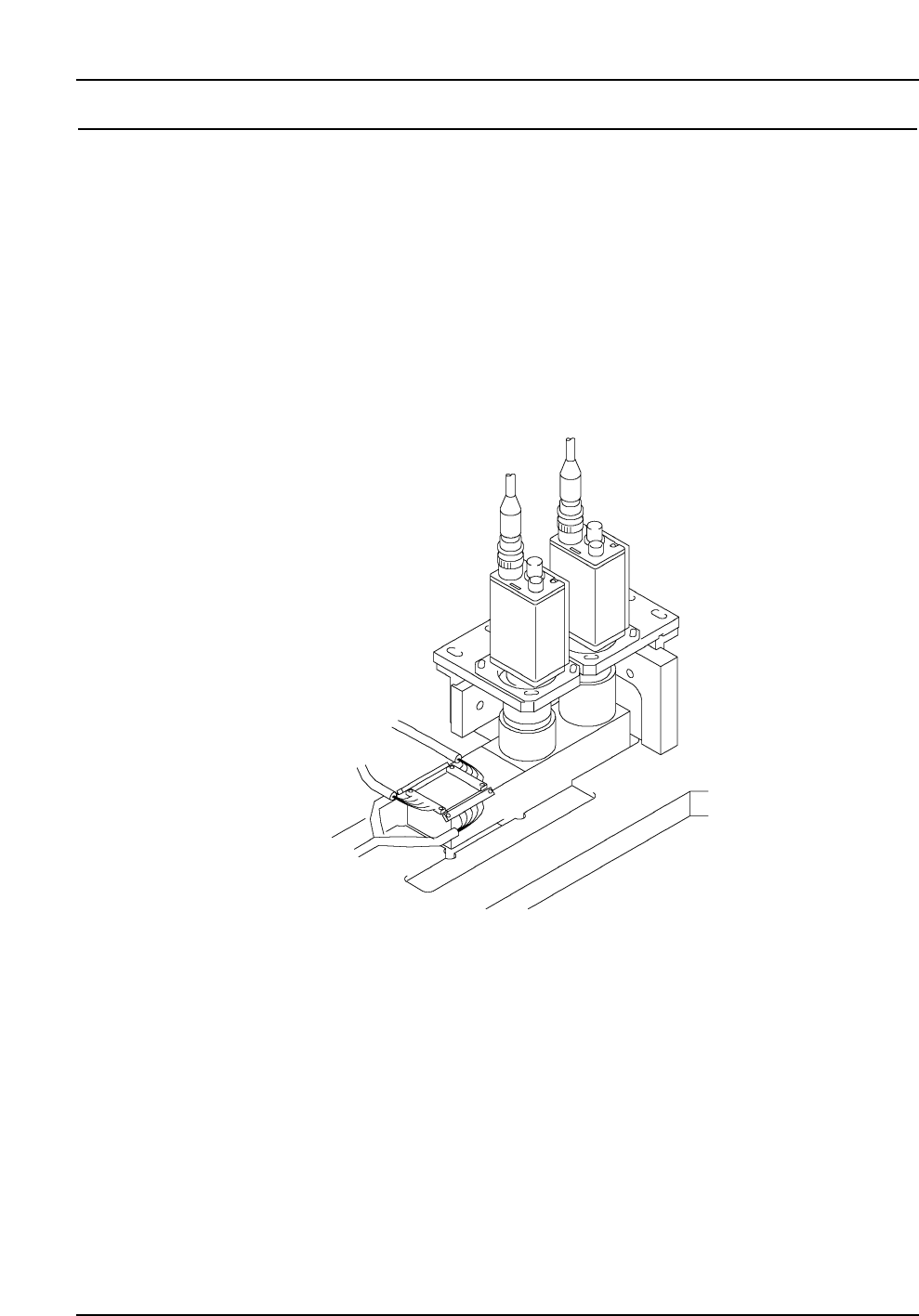
The CP-643E/643ME is equipped with two cameras, each camera being used to process
different parts. A high resolution narrow view camera is used to acquire images of small
components such as 0603s (in. 0201s), 1005s (in. 0402s) and super small SOTs, and a wide
view camera is used for components such as SOICs, PLCCs and CSPs. In addition, the
ability to change between backlighting or frontlighting enhances the unit’s capability to
obtain a sharp outline of a part, or identify parts such as PLCCs by their J-leads.
Notes: Specify the camera type, narrow or wide view, in part data.
If a part larger than 3.2 x 1.6 mm is inspected using the narrow view camera, the
placing cycle time may be lengthened. The narrow view camera is intended for
inspecting small components at high resolution.
If a part smaller than 3.2 x 1.6 mm is inspected using the wide view camera, the placing
accuracy may be adversely affected. The wide view camera is designed for large
components from 3.2 x 1.6 mm size parts to SQFP 48 pin parts.
7.2 Camera Types
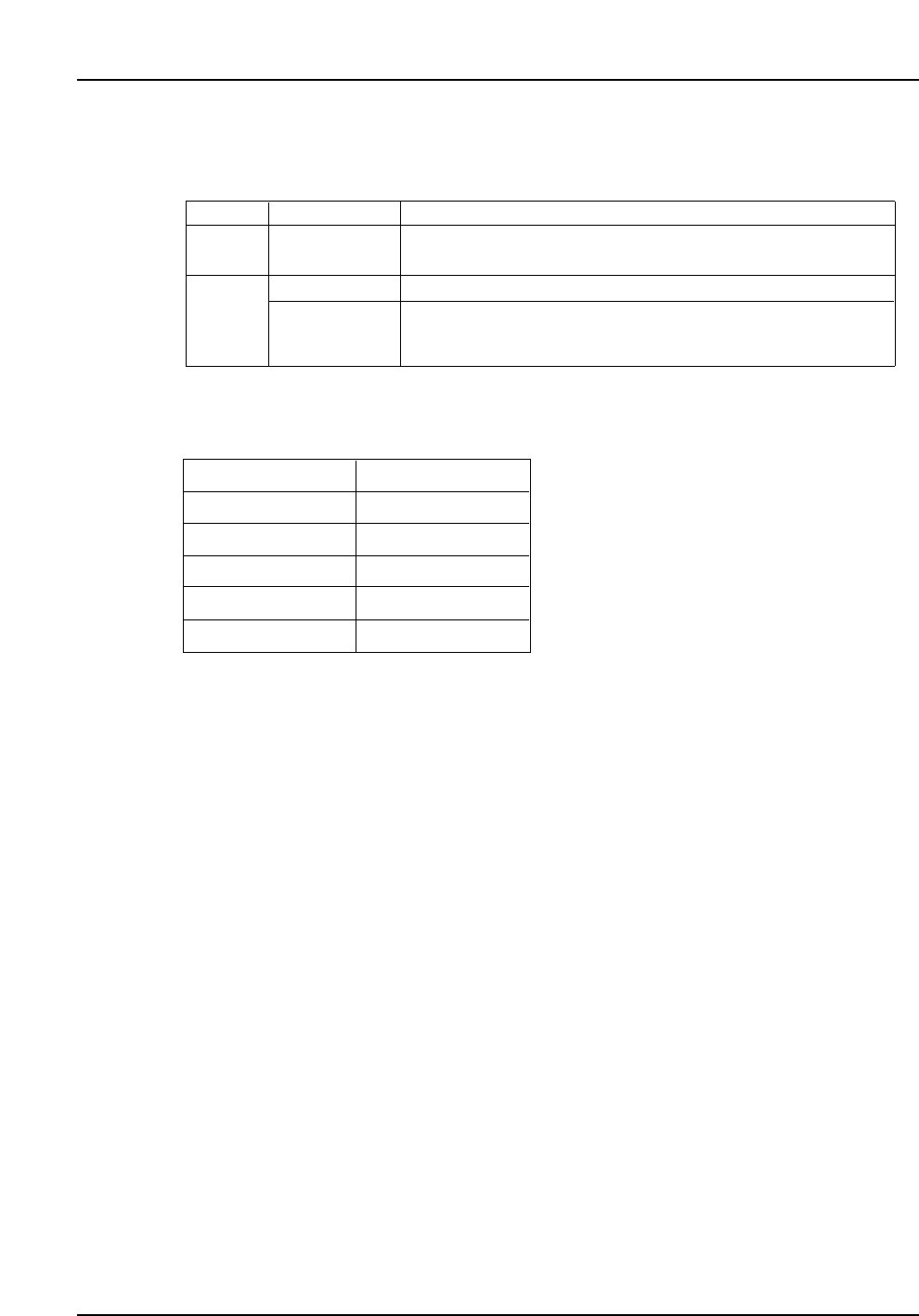
Refer to the table below for an overview of the different camera types and the
corresponding lighting methods.
7.3 Supported CSPs
* If incorrect orientation is detected, a vision error is issued and the part is rejected. This
function can be used on the condition that all bumps are registered in the part data and
the bump detection rate is set to 100%.
Notes: Detection of missing bumps does not include flattened or deformed bumps.
Parts with complicated bump arrays which require 17 lines or more of element data, can
be specified in F4G or FujiCam. Up to 16 lines of element data can be specified in
MCS2. (For matrix-type bump arrays, an unlimited number of rows and columns can
be described in just two lines in element data.)
The pitch of at least three bumps in each outer row must be aligned.
For information on parts that are not included, or parts whose size is increased by
package coating etc., contact Fuji.
Item
Max. size
Min. bump pitch
Min. bump dia.
Min. bump gap
Orientation check
Specifications
20 x 20 mm
0.5 mm
0.3 mm
0.2 mm
Possible *
Lighting
Backlight
Camera
Narrow
Applicable parts
0603 (in. 0201), 1005 (in. 0402), 1608 (in. 0603),
2125, 3216, SSMin, SMin, etc.
3216 to Max. 20 mm x 19 mm
Max. 20 x 20 mm (including CSPs)
Frontlight processing is limited to J-leaded and bump parts
Backlight
Frontlight
Wide
– 13 –
CP-643E/643ME Specifications
Edition 3.0

8. Machine Control System
8.1 Machine Control Specifications
Coordinate input method Absolute
Acceleration control (XY-table) In 5 levels: UHi, Hi, Mid, Low, ULow
Controllable axes A total of 9 axes: Cam, X, Y, Z, D1, D2,
Fθ, FRθ and nozzle change
CPU 32 bit
Maximum number of input sequences 5000 sequences/PCB (when two PCBs
are clamped, this is the total number of
sequences for both PCBs)
Program storage capacity 10 (at 1500 sequences/program)
Memory backup method Battery backup (lithium battery)
Data input method F4G system or FujiCam system
Data input units X-, Y- and Z-axes: 0.01 mm
θ-axis: 0.01˚
Communication RS-232C
Control panel Numeric keypad and function keys
Optical correction For PCB positioning and part pick-up
displacement
Notes: Data input and data transmission to and from the CP-643E/643ME is conducted by
means of the F4G system or FujiCam. Use of the F4G system requires the following
hardware and software.
• PC on which the software can be installed (to be provided by the customer).
• C/C (communication center software).
• Software modules such as F4GO, F4GP, F4GM, depending on customer’s
requirements.
Use of the FujiCam system requires the following hardware and software.
• PC on which the software can be installed (to be provided by the customer).
• FujiCam software.
A computer on which the F4G system or FujiCam can be installed should be prepared by
the user before the machine is delivered.
– 14 –
CP-643E/643ME Specifications
Edition 3.0