CP643规格书.pdf - 第19页
– 16 – CP-643E/643ME Specifications Edition 3.0 9. Options 9.1 Classification by Installation Status The optional features are classified into three categories depending on when they are installed: A : Options which are …
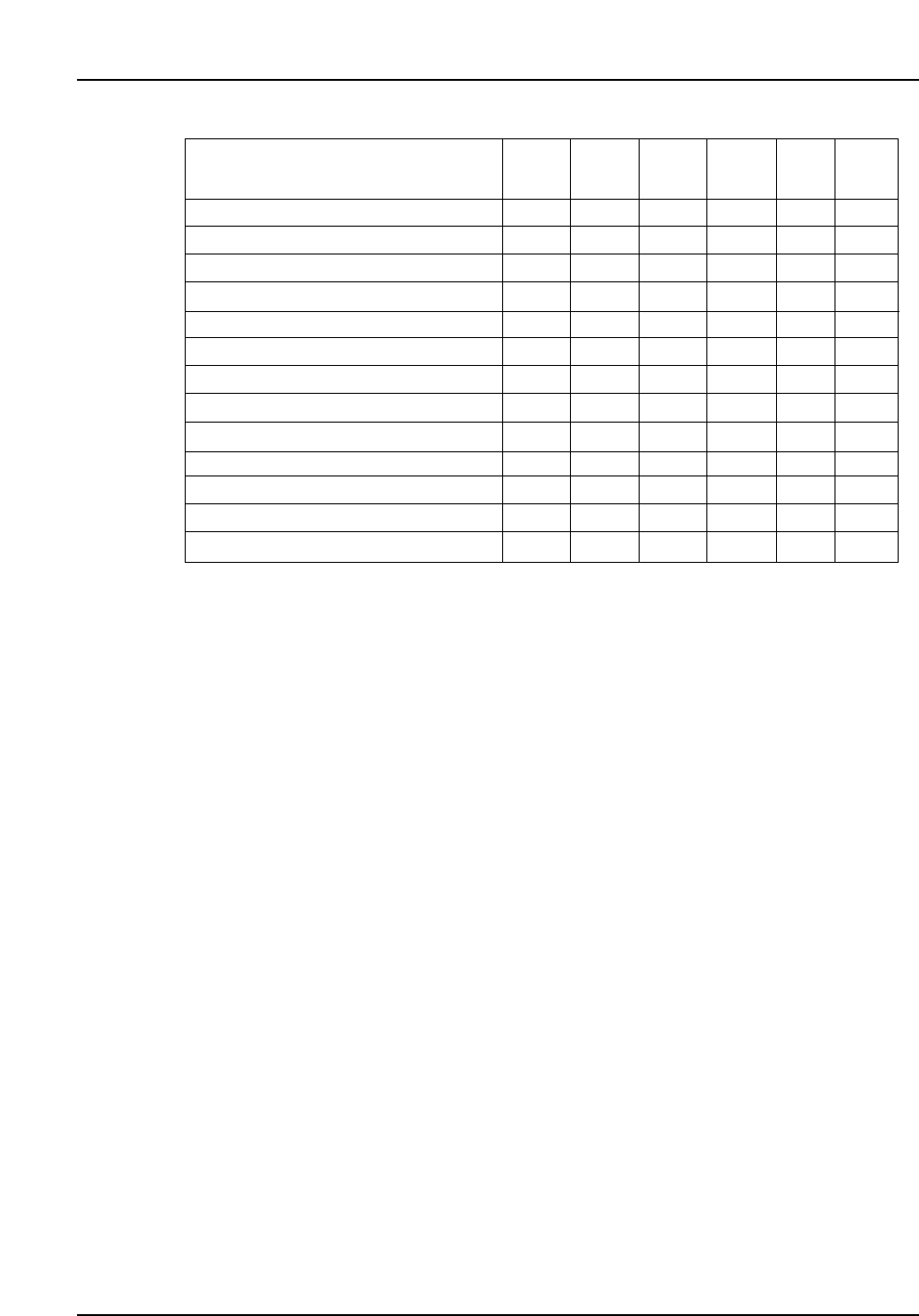
8.2 Signal Tower Specifications
Note : A blue light can be specified instead of green. Specify the desired signal tower
configuration when the machine is ordered.
By changing the relevant machine settings, it is possible to change the signal tower
display for the various conditions. For example, the “Machine waiting” status signal
can be changed from ‘green flash’ to ‘yellow on’.
Machine status
Automatic operation
PCB loading
Waiting for PCB
Waiting for PCB request from the next machine
Parts out warning
Machine stopped due to parts out
Machine stopped due to error
Statistical warning
Changeover operator call
Vision processing error
Machine waiting
Changeover
Production run complete
Green
On
✓
✓
Green
Flash
✓
✓
✓
✓
Yellow
On
✓
✓
Yellow
Flash
✓
✓
✓
Red
On
✓
Red
Flash
✓
– 15 –
CP-643E/643ME Specifications
Edition 3.0
– 16 –
CP-643E/643ME Specifications
Edition 3.0
9. Options
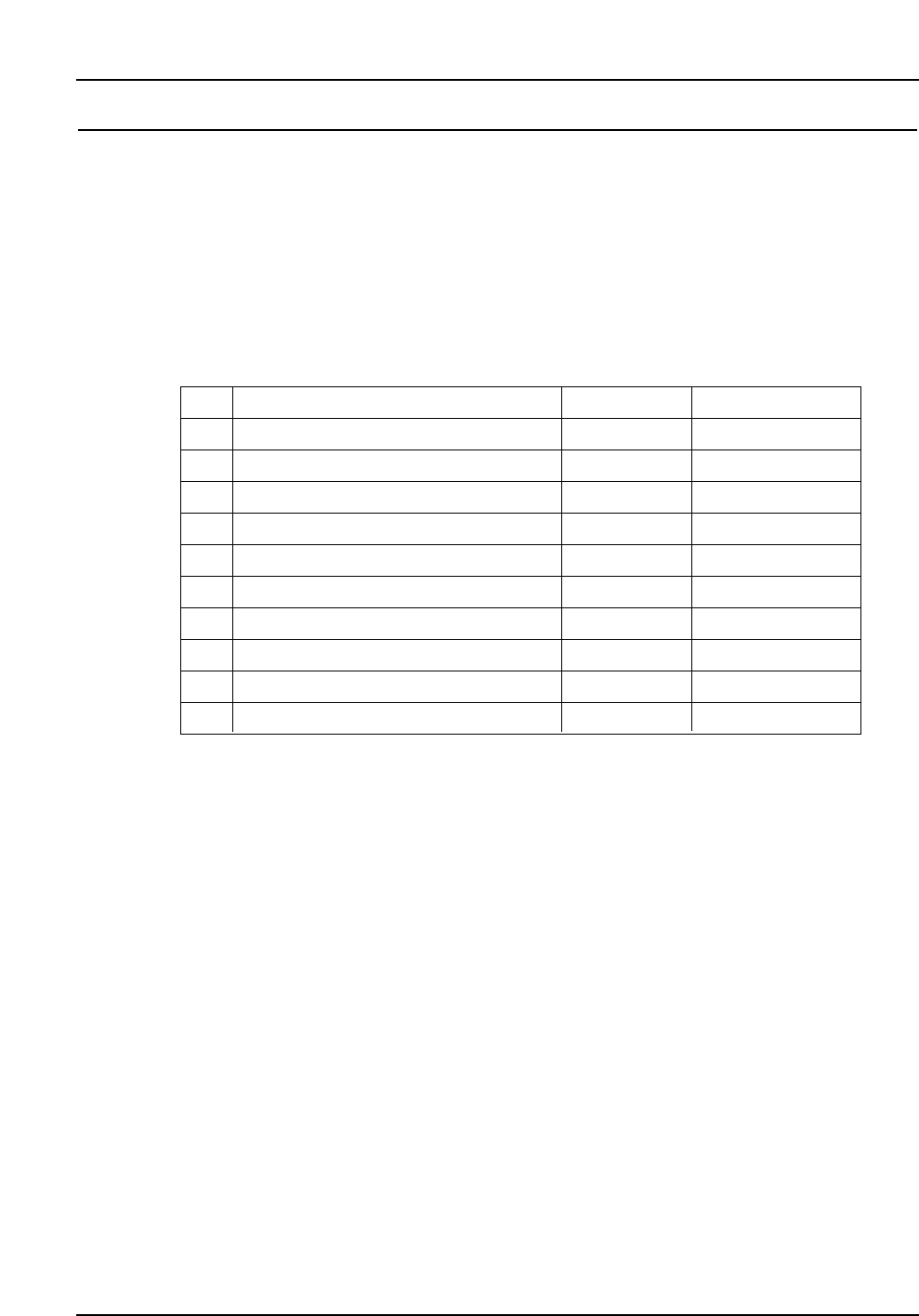
9.1 Classification by Installation Status
The optional features are classified into three categories depending on when they are
installed:
A : Options which are ordered along with the machine.
B : Options which can be installed on-site.
C : Options which can be purchased.
Item
Reference pin unit
PCB support
Nozzles (spare)
Support for thin PCBs
Tape feeders and bulk feeders
Feeder stand
Handy Terminal
Roller conveyor
HELPS
Other
No.
1
2
3
4
5
6
7
8
9
10
Category
B
B or C
C
A
C
C
C
A
A
Note
Under development
Under development

9.2 Details of Options
9.2.1 Reference Pin Unit
(1) This system uses pins to hold the PCB in position. It can also be used in
combination with fiducial marks.
(2) The following reference pins are available.
• Diameter 3.0 mm round or diamond shaped.
• Diameter 4.0 mm round or diamond shaped.
Note: The use of reference pins increases the PCB loading time by 0.3 seconds.
Contact Fuji if the reference pins are to be used with PCBs less than 1.0
mm in thickness.
9.2.2 PCB Support
(1) Back-up pins
It is possible to purchase further back-up pins to supplement the number
supplied with the CP-643E/643ME.
(2) Vacuum back-up pins
PCBs can be supported using vacuum pressure supplied through special
back-up pins. The vacuum back-up system comes with 10 vacuum back-up
pins. Extra pins can be purchased separately.
Note: The XY-table used with the vacuum back-up pins differs from the
standard XY-table. The standard back-up pins cannot be used with this
table. PCB loading time is lengthened by approximately one second when
using vacuum back-up pins. This may also vary depending on the
settings made for the speed of the XY-table.
– 17 –
CP-643E/643ME Specifications
Edition 3.0