Hybridklemmung mit Vakuumabfrage (Funktionsbeschreibung).pdf - 第31页
Functional description - Special design for t he hybrid clamping unit with vacuum check 02/2006 Edition 31 2.3.4 V acuum check The placement process does not start unless three conditions are fulfilled: 2 – The vacuum th…
Functional description - Special design for the hybrid clamping unit with vacuum check
02/2006 Edition
30
2.2 Requirements
Hardware: SIPLACE S-25 HM 2
Software: No special requirements 2
2.2.1 Activating the vacuum tooling option
The option is automatically activated with the plug-in contact of the vacuum tooling – solenoid
valve cable (00332746). 2
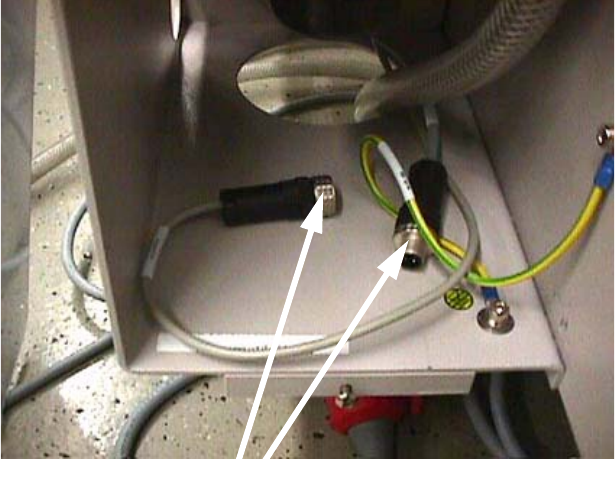
If this cable is plugged in so that the vacuum tooling is activated, then the width adjustment unit
can no longer move together. 2
2.2.2 Restrictions
The automatic width adjustment unit must have been deactivated. The barcode reader on the in-
put belt, the stopper on the input belt and the vacuum tooling in the handling area must have been
designed exclusively for the customer's wafer boat, which will be acceptance tested by Commis-
sioning in Munich. 2
2.3 Working principle with circuit diagrams
2.3.1 Digital half-bridge circuit
The digital half-bridge circuit is needed to adjust the speed of the input belt. This is necessary so
that the wafer boat moves slowly against the stopper onto the input belt. The digital half-bridge
card should be operated in parameter set 3 by default. 2
2.3.2 Vacuum tooling control (part no.: 00331378-01)
The "Vacuum tooling control“ module performs two functions: 2
– Delayed lowering of the lifting table
– Input belt after-run time
The lifting table is lowered after a delay. This delay ensures that the vacuum has fully dissipated
by the time lowering starts. The input belt after-run time is needed to ensure that the wafer boat is
carried as far as the stopper. 2
2.3.3 Photoelectric switches on the input and center belts
PCB position detection by means of a sonar sensor is not possible due to the built-in vacuum plate
and the stopper, so photoelectric switches are fitted on the input and center belts. 2
Functional description - Special design for the hybrid clamping unit with vacuum check
02/2006 Edition
31
2.3.4 Vacuum check
The placement process does not start unless three conditions are fulfilled: 2
– The vacuum threshold in the Keyence pressure sensor has been reached (approx. –650
mbar).
– The lifting table is "up".
– The center belt sensor is covered (photoelectric switch).
2.3.5 Deactivating the width adjustment unit
The conveyor side walls are prevented from moving together when the vacuum tooling / solenoid
valve connecting cable is plugged in. 2
2
2.3.6 Opticon barcode reader
Only the PCB barcode of the first substrate in the wafer boat has to be read. To guarantee this an
additional stopper is installed on the input belt. 2
2
2
2
2
Joining the connectors prevents the
conveyor side walls moving together.
Functional description - Special design for the hybrid clamping unit with vacuum check
02/2006 Edition
32
2.3.7 Input belt stopper
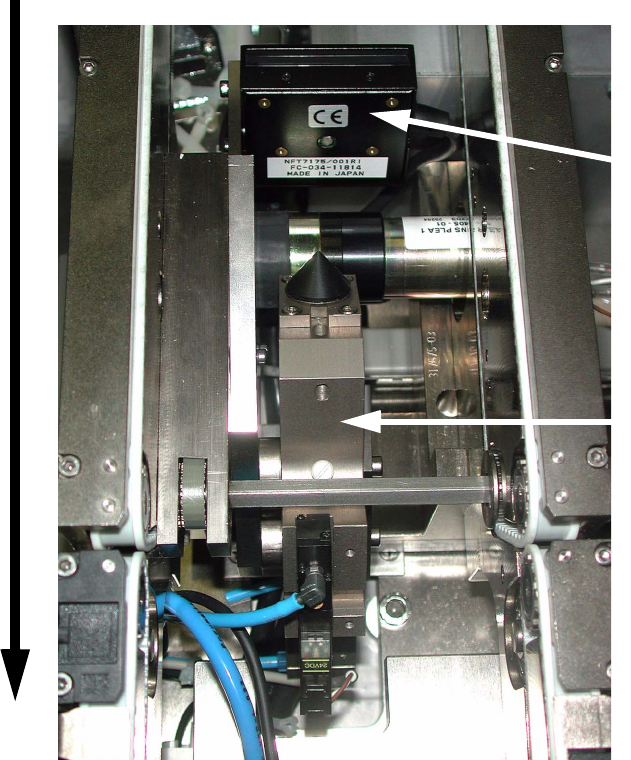
The stopper on the input belt ensures that it is always the first barcode in the wafer boat that is
read. It extends when the barcode reader is triggered and moves back in once the barcode has
been read (see picture). 2
2
2
2
2
2
2
2
Direction of PCB transport
Barcode scanner
Additional stopper
module on the input belt