Hybridklemmung mit Vakuumabfrage (Funktionsbeschreibung).pdf - 第40页
F unctional description - Special design for the hybrid clamping unit with vacuum check 02/2006 Edition 40 Setting the zero point (calibra tion) 2 : Hold down key A in measuring mode for approx. 2 seconds. First "--…
Functional description - Special design for the hybrid clamping unit with vacuum check
02/2006 Edition
39
2.5 Connecting the pneumatic system
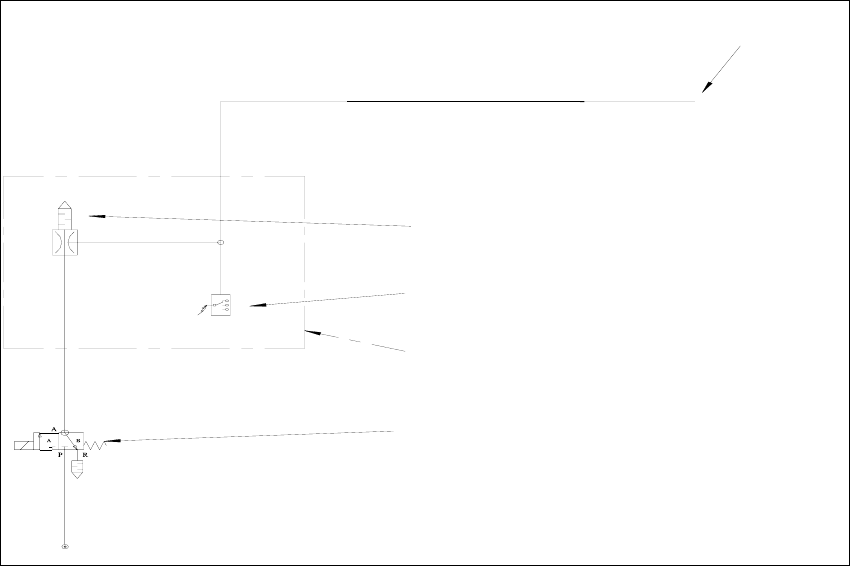
2.5.1 Pneumatic diagram for the vacuum support
2
2.5.2 Programming the KEYENCE air pressure sensor AP-31P (PNP)
The "lifting table up" signal is not enabled until the value set on the Keyence vacuum sensor is
reached. This threshold should be approx. -200 mbar below the closed vacuum (values of –820
mbar are possible with a good vacuum). 2
Setting instructions as per enclosure. 2
Program default setting 2
: Hold down the SET key for 3 seconds.
: Use the
ÇÈ keys to set the display unit to bAr (unit: BAR). Press the SET key.
: Use the
ÇÈ keys to set the operating mode to F3 (F3: mode for two independent outputs).
Press the SET key.
: Set N.O./N.C. to N.O. (normally-open contact) as above. Press the SET key.
: Set vibration avoidance to 100 (100 ms). Press the SET key.
: Set the display color to 2-C (2 color: red/green LED). Press the SET key. The device then re-
turns to measuring mode.
Included in item number for
Keyence compressed air sensor
00366201-01
Vacuum filter
00373428-01
(00375531-01)
fitted on the lifting table
Base with magnets
vacuum generating unit
00323173-01
(003327746)
the cable, vacuum tooling solenoid valve
3/2-way valve
To vacu
um
Functional description - Special design for the hybrid clamping unit with vacuum check
02/2006 Edition
40
Setting the zero point (calibration) 2
: Hold down key A in measuring mode for approx. 2 seconds. First "----" appears, then "0". The
measurement is now complete.
Entering the setpoint value 2
: Press the SET key. "A" and the current setpoint value flash alternately.
: Use the
ÇÈ keys to set the setpoint value. It should be 200 mbar less than the closed vac-
uum.
: Press the "A" key to save the setpoint value.
Setpoint value B is not needed and may be left set to -0.300 bar.
: Press the SET key to finish entering the setpoint value.
General 2
Measured values shown in red on the display indicate "closed vacuum OK".
N.O. contact closed. 2
Values shown in green: The measured values are lower than the threshold.
Closed vacuum too low or vacuum open (no PCB present). N.O. contact open. 2
Closed vacuum (PCB present) should be approx. > -700 mbar. 2
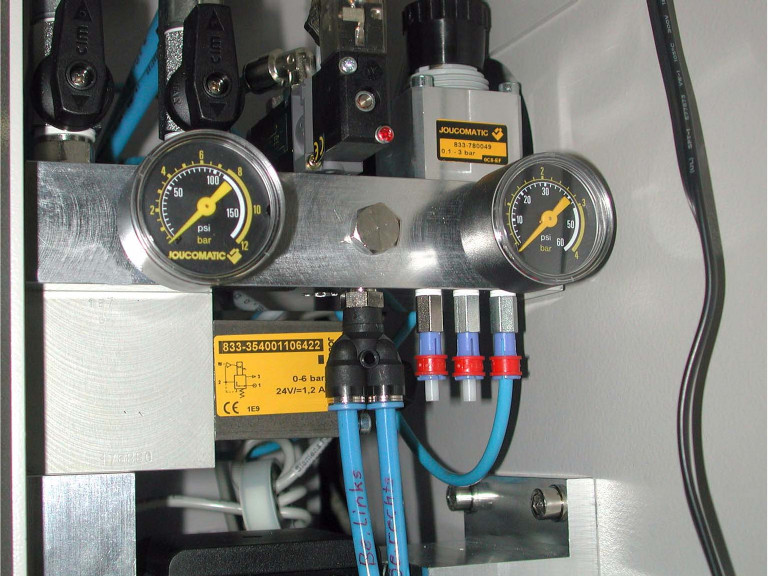
2.5.3 Connection on the machine compressed air supply
2
Functional description - Special design for the hybrid clamping unit with vacuum check
02/2006 Edition
41
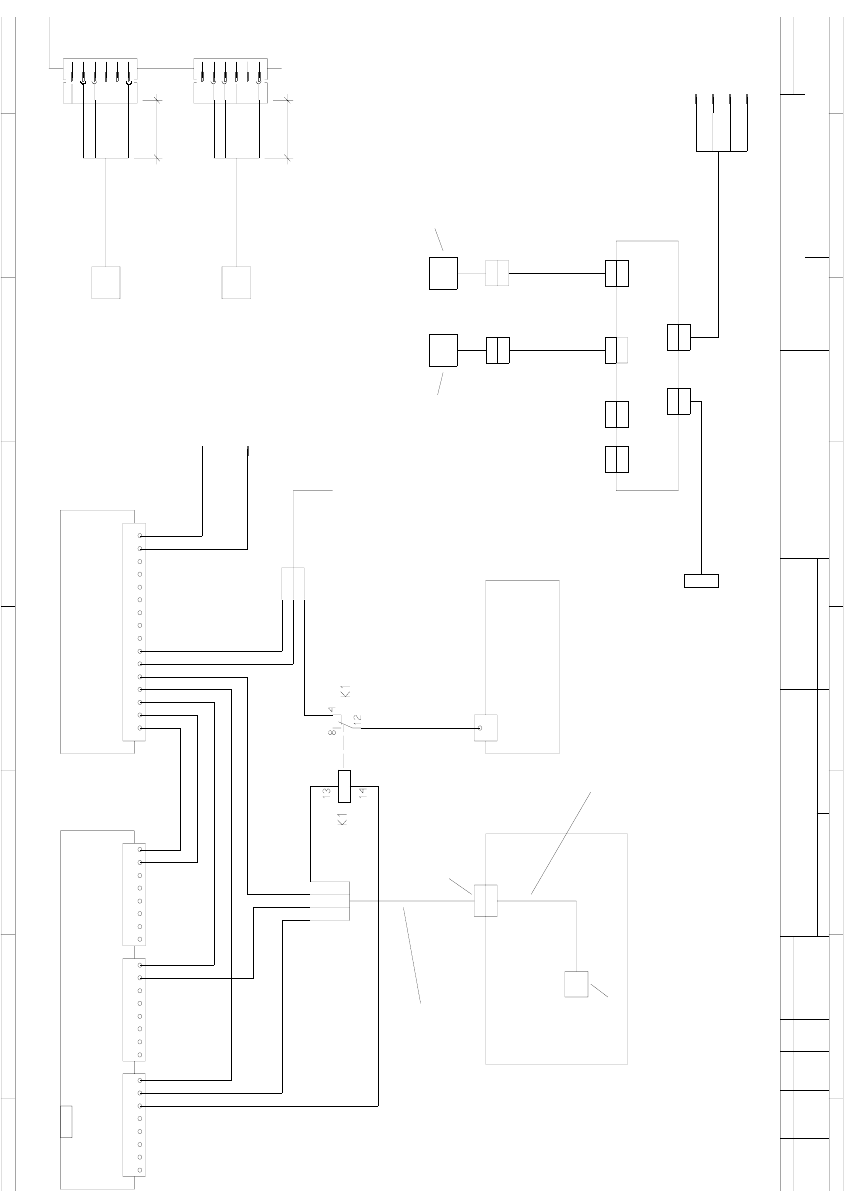
2.6 Electrical connections
2.6.1 Circuit diagrams
=
Date
Check.
Stand.
Author
Orig. Repl. f. Repl. by
NameDat e
d
ifie
d
SIEMENS AG
+
X1
X1
X1
1
To A4 X6kg 5
Convers io
n
bk
X2
X* s a
--
KEY
bn
bu
30mm
Light barrier, input conveyor
00345332
I
/
To
conversion board
00364931
X1
gy+pk
gn+ye
wh+bn
on X2kc : 7
78
gy
321
87654
X5kg 6
6
Width adjustment1
bn
gn
wh
bu + rd
bn
00326068
I
/
(
on X2kc : 4
123
Cable: PCB barcode distributor - MC
00345333
cable: PCB barcode power supply
on X212 / 3
15141312++++++
solenoid valve
OPTI CON
45
11
ye
00332745
Vacuum tooling - connection cable
Input belt
(
Solenoid valve
Please note!
Install the vacuum tooling control top left of the I/O terminal panel
Install the K1 relay on the right close to the X210 terminal.
X5
X5
X1
X1
X2
X2
X3
on X212 / 4
terminal panel ( left
-
Vacuum tooling control
I/O terminal card combination A1
00327250
00331378
(ka)
41
ye
1
X3
X4
56 8916
Stopper
PCB conveyor control 1/2
X1ke
3----
M X2ka
8
To
conv. control (in control unit)
To
00343635
Distribution board, PCB barcode
X6
27
X1
X1
Cable: vacuum tooling -
00332746
Wir e vi
from 00326069
Please note !
Remove jumper JP1 at X1.
lifting table, X13
X34
6
00359664
connection cable
++
P
-- 2
close to the I/O terminal card combinations.
X4
X6
10
X5ty (barcode)
Barcode reader
7654
3
"will be activated", when PCB output
of upstream machine is covered
o Extends, when PCB output conveyor of
t
o Retracts, when trigger signal of barcode
s
Conne
c
identic
a
sonar
s
Input
b
Replaces input conveyor sonar sensor; stops input conveyor with time delay when cover
e
"is deactivated", when barcode scanner
detects or approx. max. 6sec
A4
When solenoid valve (Vacuum tooling installed)
connected
--> K1 is released and width adjustment
is deactivated
( OMRON E3X-A41 + E32-DC200E )
bk
bn
bu
30mm
Light barrier, center conveyor
( OMRON E3X-A41 + E32-DC200E )
KEY
4
X36
cable: Stopper valve
003
2
To
conversion board
PCB conveyor control 1/2
Lifting table, X12
Tek
e
w 25.07.01
27.04.2001
Wo l l g a r t e n
#
Bosch-Ansbach 2 project
00364115-010101L
D
Terminal panel, control unit
Connector, pneumatic system
(deactivates width adjustment)
to conveyor control
! with S25-HM
6
5
6
2
3
4
5
6
4
1
3
3
2
3
2
6
1
PL EA1 E6
2
upstream machine is covered