TSR2000-Series-Hardware-User-Guide-V1.pdf - 第8页
8 2.4 Instructions about the Keypad - the k eypad, on the robot f ace , can be used when the t eaching pend ant is disconnect ed. Caution: when connect ing the teaching pend ant wi th the main unit (robot), the butt ons …
7
2.3 Unpacking and Inspection
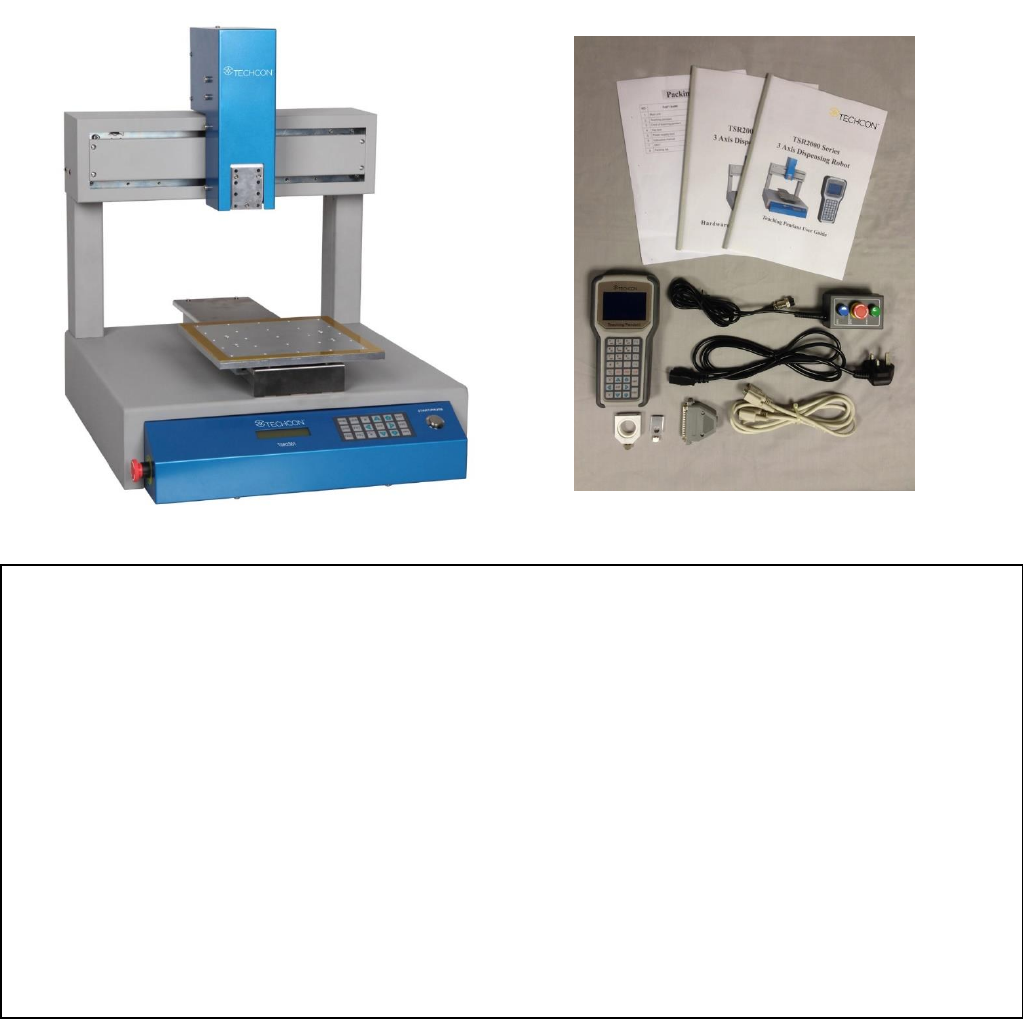
Carefully unpack the valve and examine the items contained in the carton. These will include:
• Robot
• Teaching Pendant
• Teaching Pendant Cable
• Keybox
• Power Lead
• Hardware User Guide
• Teach Pendant User Guide
• Syringe Barrel Mounting Kit
• DB37 Connector
• TSR-VCABLE (not shown) connects robot to TS250, TS350 or TS500R
Inspect the unit for any damaged which may have occurred in transit. If such damage has occurred, notify the
carrier at once. Claim for damage must be made by the consignee to the carrier, and should be reported to the
manufacturer.
8
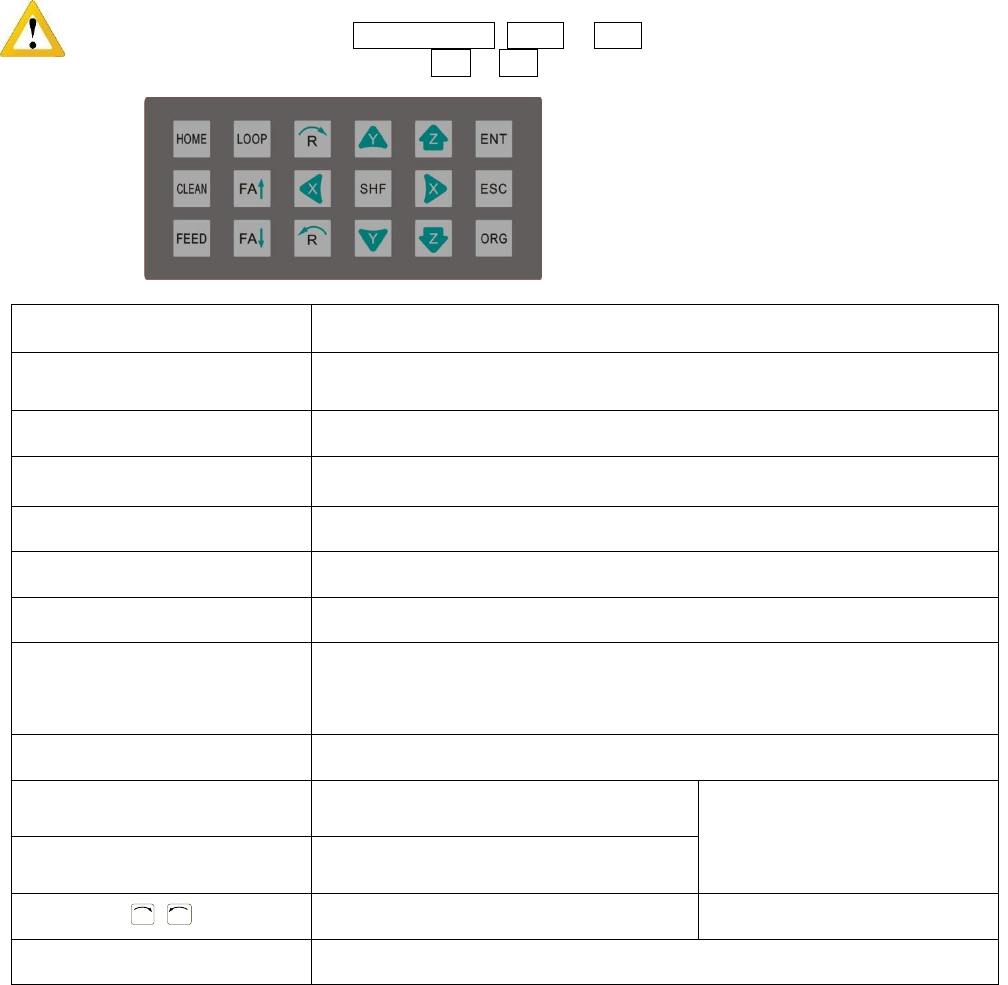
2.4 Instructions about the Keypad - the keypad, on the robot face, can be used when the teaching pendant is
disconnected.
Caution: when connecting the teaching pendant with the main unit (robot), the buttons on the front panel
of the unit are invalid except START/PAUSE, FEED & ORG. If fitting with throttling valve to control
the movement of glue tube, the button FA↑ & FA↓ can be used.
Button
Function Description
X / X / Y / Y / Z / Z
Control the axis’ coordinate
【HOME】
Move the tip to the origin of the processing file, this can be set.
【SHF】
Switch point processing speed, 3 level: low, middle, high
【ENT】
Save the set parameters
【ORG】
Reset, move the tip to the zero point (0,0,0)
【LOOP】
Set the loop operating parameters
【ESC】
1. Return to file processing interface but not save the set parameters.
2. Enter into the testing interface, test the axis’s function
【FEED】
Control dispensing
【FA】
N/A
N/A
【FA】
N/A
R
/
R
Control the R axis’ coordinate
* With R axis type
【START/PAUSE】
Start or pause the processing file.
For Further functions and detailed use of the
buttons refer to the chapter 4 “off-line
operation instruction”.
9
2.5 Course of the File Processing
To complete a process file there needs to be three steps: program-adjust-process. For detailed operation refer to
the “operation manual of the teaching pendant”.
Program: The method of teaching a program.
Adjust: Adjusting the programming file, such as origin calibration, slant array, height adjusts, file
parameters adjust (including speed, acceleration, delay time, distance etc.)
Process: Download the program file to the system, from the teaching pendant.
The program is now complete and can be initiated.
3. SETUP AND CONNECTION
3.1 Setup
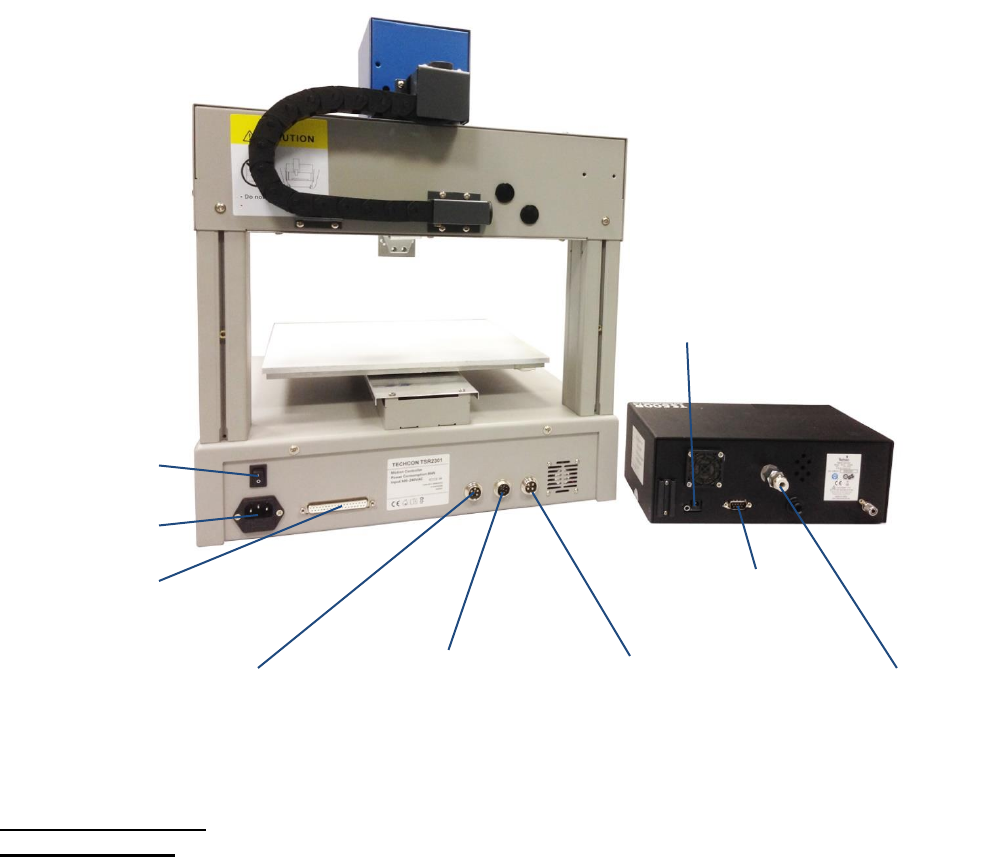
Connecting air tubing: directly insert the air tube into the air connector, on the back of the controller.
Removing air tube: press down the connector head and then pull out the air tube, from the controller.
DB9 – connect with
7-pin socket
Power switch
Power socket
INPUT 2
4-pin socket.
Connect to keybox
OUPUT
7-pin socket. Connect
with controller (DB9)
Air inlet
Power socket
DB37 - Additional Outputs
INPUT 1
5-pin socket. Connect to
safety cover, photoelectric
switch or low fluid switch.